1. บทนำ
This manual provides detailed instructions for the safe and efficient operation of your SUPVAN G15M Mini Label Maker. Please read this manual thoroughly before using the device to ensure proper functionality and to maximize its lifespan. The SUPVAN G15M Mini is a portable, rechargeable industrial label maker designed for various labeling needs, featuring thermal transfer printing for durable, long-lasting labels.

Image: The SUPVAN G15M Mini Label Maker shown in an outdoor environment, highlighting its design for both indoor and outdoor use and key features like rechargeable battery, QWERTY keyboard, minimal margin, no ink required, 10-year durability, and portability.
2. สินค้าหมดview และบรรจุภัณฑ์
The SUPVAN G15M Mini Label Maker package includes the following items:
- SUPVAN G15M Mini Portable Label Maker x1
- White Continuous Label Tape (12 mm x 7.5 m) x1
- สายชาร์จ USB Type-C x1
- คู่มือการใช้งาน x1

Image: A visual representation of the SUPVAN G15M Mini Label Maker, a white label roll, a USB Type-C cable, and the user manual, illustrating all items included in the product package.
3. การตั้งค่า
3.1 การชาร์จอุปกรณ์
Before first use, fully charge the label maker using the provided USB Type-C cable. Connect the cable to the device's charging port and a compatible USB power source. The charging indicator will show the charging status.
3.2 การติดตั้งเทปฉลาก
- เปิดฝาช่องใส่ฉลากบนอุปกรณ์
- Insert the label tape cassette, ensuring it clicks into place correctly.
- ปิดฝาช่องใส่ป้ายชื่อให้สนิท
3.3 การเปิด/ปิดเครื่อง
กดปุ่มเปิด/ปิดค้างไว้ (โดยปกติจะมีสัญลักษณ์รูปพลังงานอยู่) เพื่อเปิดหรือปิดอุปกรณ์

Image: The SUPVAN G15M Mini Label Maker, displaying its QWERTY keyboard and screen, alongside a roll of white label tape, ready for use.
4. คู่มือการใช้งาน
4.1 Basic Text Entry
ใช้แป้นพิมพ์ QWERTY พิมพ์ข้อความที่คุณต้องการ ข้อความจะปรากฏบนหน้าจอ LCD
4.2 Adjusting Text Properties
The G15M Mini supports various text customization options:
- ขนาดตัวอักษร: เลือกขนาดตัวอักษรได้ 9 ขนาด
- รูปแบบตัวอักษร: Select from 6 available font styles.
- ขอบเขต: Apply one of 5 border styles to your label.
- สัญลักษณ์ : Access over 400 built-in symbols to enhance your labels.
- ภาษา: The device supports 17 languages, including French.
4.3 Multi-Line Printing
The label maker supports up to 4 lines of text. For 4-line printing, labels must be at least 12mm wide.
4.4 Barcodes and QR Codes
Generate and print various types of barcodes and QR codes directly from the device.
4.5 การพิมพ์และการตัด
After composing your label, press the print button. The device will print the label. Use the integrated cutter to cleanly separate the printed label from the tape roll.

Image: A graphic illustrating the SUPVAN G15M Mini's extensive features, including support for 17 languages, over 400 symbols, 9 barcode and QR code types, and up to 4 lines of text printing.
5. ประเภทและคุณลักษณะของฉลาก
5.1 Thermal Transfer Printing
The G15M Mini utilizes thermal transfer printing technology, which ensures labels are resistant to UV, water, and wear. This technology prevents fading, making labels suitable for long-term outdoor use (up to 10 years).
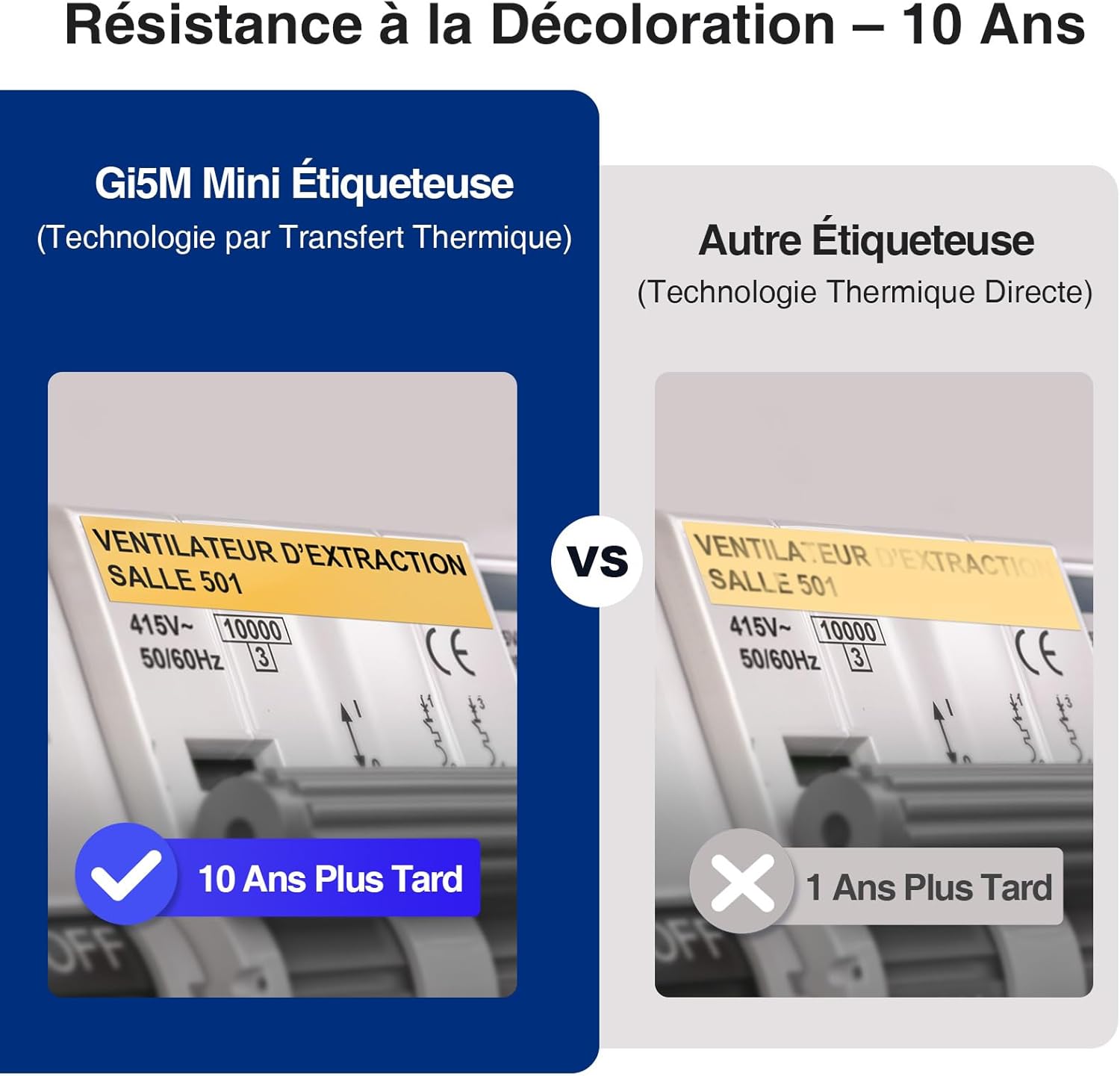
Image: A visual comparison demonstrating the superior fade resistance of thermal transfer labels produced by the SUPVAN G15M Mini, which can last up to 10 years, versus direct thermal labels that degrade much faster.
5.2 Supported Label Media
The device is compatible with various label types and sizes:
- ป้ายกำกับต่อเนื่อง: 6 mm to 15 mm width.
- Heat Shrink Tubes: 3.5 mm to 9 mm width, ideal for cable identification.
- Cable Labels: Specifically designed labels for wrapping around cables.
- Fixed Size Labels: Pre-cut labels for specific applications.
- Wrap-Around Labels: Labels designed to wrap around objects.
- Identification Labels: Labels for general identification purposes.

Image: A display of various label applications, including heat shrink tubes for wires, cable labels, continuous labels for storage, wrap-around labels, identification labels, and fixed-size labels for electrical panels.
5.3 อายุการใช้งานแบตเตอรี่
The integrated 1200mAh lithium battery provides approximately three months of standby time on a full charge, reducing the need for frequent recharging.

Image: A comparison highlighting the SUPVAN G15M Mini's 1200mAh rechargeable battery capacity, emphasizing its environmental benefits and cost-effectiveness over devices powered by disposable AAA batteries.
หน้าจอ LCD ขนาด 5.4 นิ้ว พร้อมไฟแบ็คไลท์
The 300 nits backlit LCD screen ensures clear readability in various lighting conditions, from bright daylight to low-light environments.

Image: Two images demonstrating the SUPVAN G15M Mini's backlit LCD screen, showing its clear visibility in both a brightly lit outdoor setting during the day and a dimly lit indoor environment at night.
5.5 Minimal Margin Printing
The G15M Mini is designed to print with minimal margins (5mm), significantly reducing label tape waste compared to other label makers (10mm margins).

Image: A visual comparison showing the SUPVAN G15M Mini's ability to print with a minimal 5mm margin, effectively reducing label waste, contrasted with other label makers that typically use a larger 10mm margin.
5.6 แอปพลิเคชันอเนกประสงค์
The G15M Mini is suitable for a wide range of applications, including electrical cabling, industrial equipment identification, outdoor labeling, and organizing items at home or in the office.
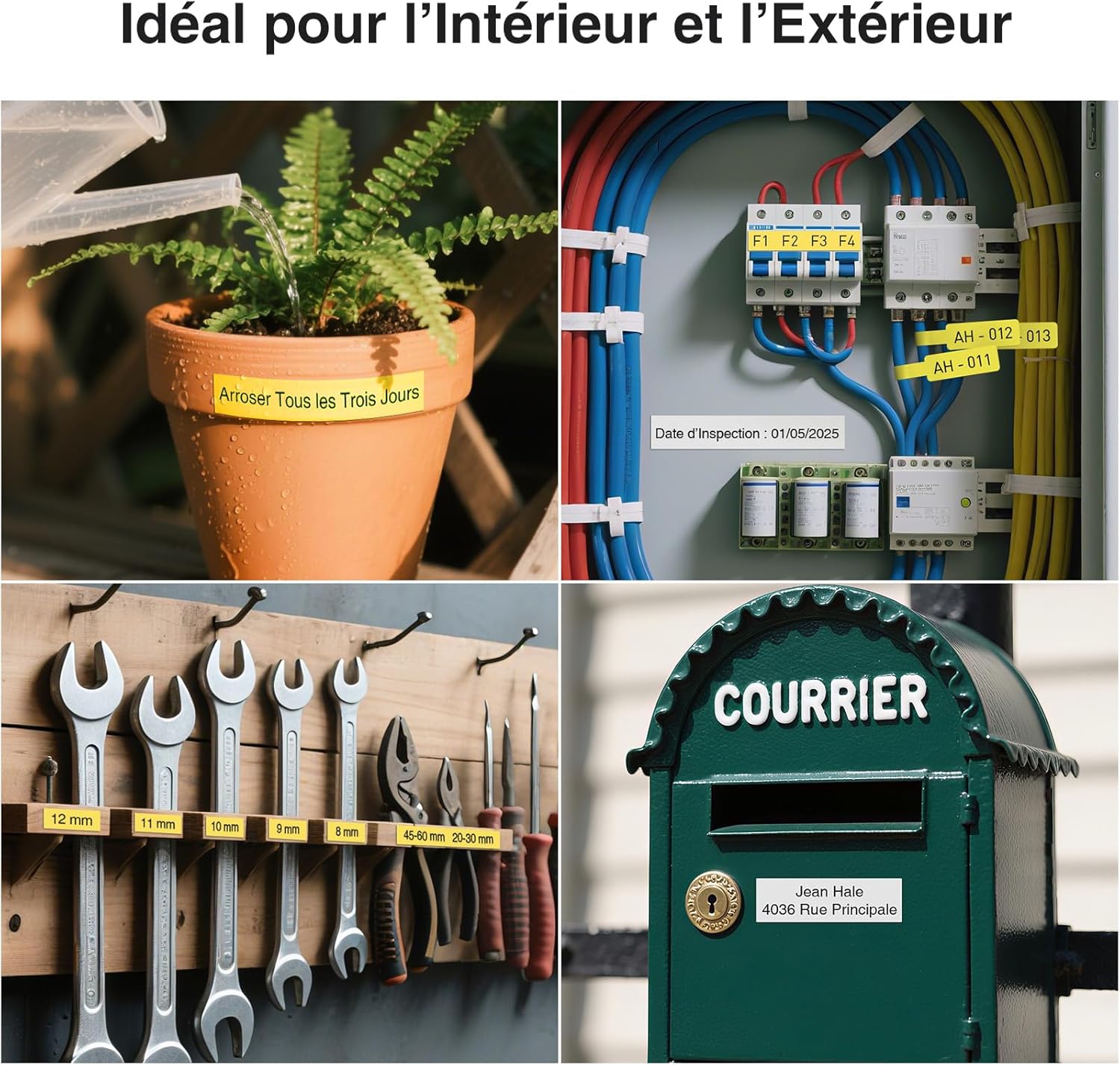
ภาพ: ภาพตัดปะแสดงasing the versatility of the G15M Mini label maker, with examples of labels used for a plant pot, electrical wiring, tool organization, and a mailbox, demonstrating its suitability for both indoor and outdoor environments.

Image: A series of images demonstrating the durability of SUPVAN labels, highlighting their resistance to water, oil, UV light, scratches, and heat, as well as their ability to be removed without leaving residue.
6. การบำรุงรักษา
6.1 การทำความสะอาดหัวพิมพ์
Regularly clean the print head with a soft, lint-free cloth or a specialized cleaning pen to ensure optimal print quality. Refer to the detailed cleaning instructions in the full manual for best practices.
6.2 การดูแลแบตเตอรี่
To prolong battery life, avoid fully discharging the device frequently. Store the label maker in a cool, dry place when not in use for extended periods.
7 การแก้ไขปัญหา
If you encounter any issues with your SUPVAN G15M Mini Label Maker, please refer to the following general troubleshooting tips:
- ไม่มีไฟฟ้า: Ensure the device is charged. Connect it to a power source using the USB Type-C cable.
- คุณภาพการพิมพ์ไม่ดี: Check if the label tape is installed correctly. Clean the print head. Ensure the label tape is not damaged or expired.
- เทปติด: Open the label compartment and carefully remove any jammed tape. Reinstall the tape cassette.
- อุปกรณ์ไม่ตอบสนอง: ลองรีเซ็ตอุปกรณ์โดยการปิดแล้วเปิดใหม่อีกครั้ง หากปัญหายังคงอยู่ โปรดติดต่อฝ่ายบริการลูกค้า
For more detailed troubleshooting steps, consult the comprehensive user manual included with your product.
8. ข้อมูลจำเพาะ
| คุณสมบัติ | ข้อมูลจำเพาะ |
|---|---|
| หมายเลขรุ่น | G15M มินิ |
| ยี่ห้อ | ศุภวรรณ |
| เทคโนโลยีการพิมพ์ | ถ่ายโอนความร้อน |
| ขนาดสื่อสูงสุด | 15 มม. |
| ความละเอียดการพิมพ์สูงสุด (ขาวดำ) | 203 จุดต่อนิ้ว |
| Max Print Speed (Black & White) | 20 หน้าต่อนาที |
| การเชื่อมต่อ | พอร์ต USB Type-C, บลูทูธ |
| แบตเตอรี่ | แบตเตอรี่ลิเธียม 1200 mAh (ชาร์จไฟได้) |
| ขนาด (กว้าง x ยาว x สูง) | 17 x 8.5 x 4.3 ซม. |
| การใช้พลังงาน | 5W |
| ความลึกของสี | 1 บิตต่อพิกเซล (bpp) |
| อุปกรณ์ที่รองรับ | พีซี สมาร์ทโฟน |
9. การรับประกันและการสนับสนุน
9.1 ข้อมูลการรับประกัน
The SUPVAN G15M Mini Label Maker comes with a 2-year limited manufacturer's warranty. Please retain your proof of purchase for warranty claims. The warranty covers defects in materials and workmanship under normal use.
9.2 การสนับสนุนลูกค้า
For technical assistance, troubleshooting, or warranty inquiries, please visit the official SUPVAN website or contact their customer service department. Refer to the contact information provided in your product packaging or on the official SUPVAN webเว็บไซต์สำหรับรายละเอียดการสนับสนุนล่าสุด


