1. บทนำ
This manual provides essential information and instructions for operating your Sony ZV-E10 II Mirrorless Vlogging Camera Kit with the 16-50mm OSS Lens. Designed for content creators and vloggers, this camera combines a 26 MP APS-C sensor with advanced features for high-quality video and stills. Please read this manual thoroughly before using the camera to ensure proper and safe operation.
2. อะไรอยู่ในกล่อง
Your Sony ZV-E10 II kit includes the following items:
- Sony Alpha ZV-E10 II Mirrorless Camera (Black)
- Sony E PZ 16-50mm f/3.5-5.6 OSS II Lens
- แบตเตอรี่ลิเธียมไอออนแบบชาร์จได้ Sony NP-FZ100 (2280mAh)
- ฝาปิดตัวกล้อง Sony ALC-B1EM สำหรับกล้อง E-Mount
- สายสะพายไหล่
- ม่านบังลม
- การ์ดหน่วยความจำ 64GB
- กระเป๋า Soft
- เครื่องอ่านการ์ดหน่วยความจำ
- สายไมโคร HDMI
- ขาตั้งกล้องแบบยืดหยุ่นขนาด 12 นิ้ว
- สายคล้องมือ
- กระเป๋าใส่การ์ดหน่วยความจำ
- ชุดทำความสะอาด
3. สินค้าหมดview
The Sony ZV-E10 II is a compact and lightweight mirrorless camera designed for ease of use and high-quality content creation. It features a 26 MP APS-C Exmor R CMOS sensor and a BIONZ XR processor for stunning image and video performance.

รูปที่ 3.1 : ด้านหน้า view of the Sony ZV-E10 II camera with the 16-50mm lens and an external microphone attached.
ส่วนประกอบหลัก:
- เมาท์เลนส์: E-mount for interchangeable lenses.
- Vari-angle LCD Screen: A 3-inch touchscreen that can be articulated for flexible framing, especially useful for vlogging.
- ไมโครโฟนในตัว: Features a 3-capsule microphone with an included windscreen for clear audio.
- รองเท้าอเนกประสงค์: Allows attachment of external accessories like microphones and lights.
- Control Buttons and Dials: Ergonomically placed for intuitive operation.

รูปที่ 3.2: ด้านหลัง view of the Sony ZV-E10 II camera, showing the fully articulating LCD touchscreen and control buttons.

รูปที่ 3.3: ด้านบน view of the Sony ZV-E10 II camera, highlighting the power switch, shutter button, and mode dial.
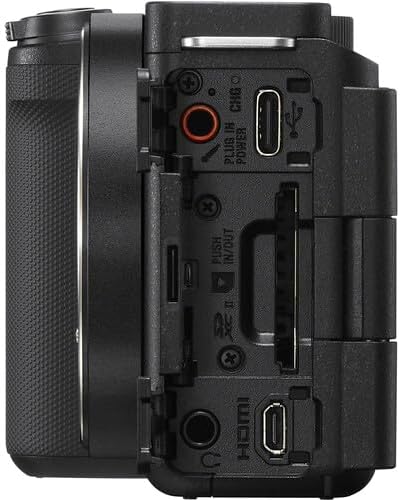
รูปที่ 3.4: ด้านข้าง view of the Sony ZV-E10 II camera, displaying the various ports including USB-C, HDMI, and microphone/headphone jacks.
4. การตั้งค่า
4.1. การใส่แบตเตอรี่และการ์ดหน่วยความจำ
- เปิดฝาปิดแบตเตอรี่/การ์ดหน่วยความจำที่อยู่บริเวณด้านล่างของกล้อง
- Insert the NP-FZ100 battery with the arrow pointing into the camera until it locks into place.
- Insert the memory card (SD card) into the slot with the contacts facing the correct direction until it clicks.
- ปิดฝาให้แน่น

รูปที่ 4.1: ด้านล่าง view of the camera with the battery and memory card compartment open.
4.2. การติดเลนส์
- ถอดฝาครอบตัวกล้องออกจากกล้อง และถอดฝาครอบเลนส์ด้านหลังออกจากเลนส์
- จัดตำแหน่งเครื่องหมายดัชนีสีขาวบนเลนส์ให้ตรงกับเครื่องหมายดัชนีสีขาวบนตัวกล้อง
- ติดตั้งเลนส์โดยหมุนตามเข็มนาฬิกาจนกระทั่งได้ยินเสียงคลิกเข้าที่

รูปที่ 4.2 : ด้านหน้า view of the camera body with the lens removed, showing the E-mount sensor.
5. การใช้งานกล้อง
5.1. เปิด/ปิดเครื่อง
ในการเปิดหรือปิดกล้อง ให้เลื่อน เปิด/ปิด switch located on the top plate.
5.2 โหมดการถ่ายภาพพื้นฐาน
The camera offers various shooting modes accessible via the mode dial or menu. Common modes include:
- อัตโนมัติอัจฉริยะ: Automatically detects the scene and adjusts settings.
- โปรแกรมอัตโนมัติ (P): กล้องจะตั้งค่ารูรับแสงและความเร็วชัตเตอร์โดยอัตโนมัติ ในขณะที่คุณควบคุมการตั้งค่าอื่นๆ
- โหมดปรับรูรับแสงอัตโนมัติ (A): คุณตั้งค่ารูรับแสง กล้องจะตั้งค่าความเร็วชัตเตอร์เอง
- โหมดความเร็วชัตเตอร์ (S): คุณตั้งค่าความเร็วชัตเตอร์ กล้องจะตั้งค่ารูรับแสงเอง
- คู่มือ (ม): ควบคุมรูรับแสงและความเร็วชัตเตอร์ได้อย่างเต็มที่
- โหมดภาพยนตร์: โหมดเฉพาะสำหรับการบันทึกวิดีโอ
5.3. ระบบโฟกัสอัตโนมัติ
The ZV-E10 II features an advanced autofocus system with 759 phase-detection points and Real-Time Eye AF for both humans and animals, ensuring sharp focus on your subjects during photos and videos.
- การติดตามแบบเรียลไทม์: เลือกวัตถุบนหน้าจอ แล้วกล้องจะติดตามการเคลื่อนไหวของวัตถุนั้นอย่างต่อเนื่อง
- โฟกัสสัมผัส: Tap on the LCD screen to set the focus point.
6. คุณสมบัติขั้นสูง
6.1. Product Showcase Setting
This mode is ideal for product reviews. When activated, the camera automatically shifts focus from your face to a product held up to the lens, then back to your face when the product is removed.
6.2. Background Defocus
Achieve a professional-looking blurred background (bokeh) with a single button press. This feature is perfect for isolating your subject and adding a cinematic touch to your content.
6.3. Cinematic Vlog Setting
This setting optimizes video capture for a cinematic look by automatically adjusting frame rate to 24fps and adding black letterbox bars. You can also choose from various "Looks" (e.g., Clean, Chic, Fresh) and "Moods" (e.g., Auto, Gold, Ocean, Forest) to customize the aesthetic.
Video 6.1: This video demonstrates the Cinematic Vlog Setting, showcasing how it locks the frame rate to 24fps, adds letterbox bars, and allows selection of various "Looks" and "Moods" for a cinematic video aesthetic (from 8:57 to 9:30 in the comparison video).
6.4. Creative Looks and S-Cinetone
The camera offers 10 Creative Look presets (e.g., FL, IN, SH, VV2) that allow you to fine-tune saturation, contrast, sharpness, and clarity directly in-camera. Additionally, the S-Cinetone picture profile (PP11) provides a cinematic look optimized for skin tones without extensive post-production grading.
6.5. In-Camera Time-lapse
Create stunning time-lapse videos directly within the camera without needing external intervalometers or complex software. You can set the frame rate and interval time to capture dynamic scenes like moving clouds or changing light conditions.
Video 6.2: This video demonstrates the in-camera time-lapse feature, showing how to access settings for frame rate and interval time to create time-lapse sequences (from 5:16 to 5:34 in the comparison video).
7. คุณสมบัติด้านเสียง
7.1. Internal Microphone and Directivity
The ZV-E10 II features an improved internal 3-capsule microphone with adjustable directivity. You can select between ด้านหน้า, หลัง, หรือ ทิศทางทั้งหมด to optimize audio pickup based on your shooting scenario, effectively isolating your voice from ambient noise.
7.2. Multi-Interface Shoe for External Microphones
For enhanced audio quality, the camera's Multi-Interface (MI) Shoe allows for direct digital audio input from compatible Sony microphones (e.g., Sony ECM-M1) without the need for additional cables. This provides a clean, high-quality audio signal.
Video 7.1: This video illustrates the audio capabilities of the Sony ZV-E10 II, including the internal microphone's directivity settings (Front, Rear, All Directions) and the use of the Multi-Interface Shoe for external microphones like the Sony ECM-M1 (from 11:41 to 14:17 in the comparison video).
8. ระบบป้องกันภาพสั่นไหว
The ZV-E10 II incorporates Optical SteadyShot image stabilization, particularly effective with the bundled 16-50mm OSS lens. This feature helps to reduce camera shake, resulting in smoother and more stable footage, especially during handheld shooting.
Video 8.1: This video compares the image stabilization performance between the original Sony ZV-E10 and the ZV-E10 II, demonstrating the improved stability of the newer model's Active SteadyShot (from 14:18 to 15:10 in the comparison video).
9. การบำรุงรักษา
9.1. การทำความสะอาดกล้องและเลนส์
- ใช้ผ้านุ่มที่ไม่เป็นขุยในการทำความสะอาดตัวกล้อง
- For the lens, use a lens brush to remove dust, then a lens cleaning solution and a microfiber cloth. Avoid touching the lens surface with your fingers.
- Never use organic solvents such as alcohol, benzene, or thinner to clean the camera.
9.2. การดูแลแบตเตอรี่
- ชาร์จแบตเตอรี่ให้เต็มก่อนใช้งานครั้งแรก
- เก็บแบตเตอรี่ไว้ในที่เย็นและแห้งเมื่อไม่ได้ใช้งาน
- หลีกเลี่ยงการให้แบตเตอรี่สัมผัสกับอุณหภูมิที่สูงเกินไป
10 การแก้ไขปัญหา
หากคุณพบปัญหาเกี่ยวกับกล้องของคุณ โปรดดูวิธีแก้ไขทั่วไปต่อไปนี้:
- กล้องไม่เปิด: ตรวจสอบให้แน่ใจว่าแบตเตอรี่ชาร์จเต็มและใส่เข้าไปอย่างถูกต้อง
- ไม่ชาร์จแบตเตอรี่: Check the charging cable and adapter. If the charging indicator light is yellow, it may indicate a fault with the battery or charging system. Try a different charging cable or contact support.
- ภาพเบลอ: Check focus settings (autofocus mode, focus area). Ensure the lens is clean and properly attached.
- การบันทึกวิดีโอหยุดโดยไม่คาดคิด: Ensure the memory card has sufficient space and is of a high-speed class suitable for 4K recording. Check battery level.
- Menu navigation issues: The ZV-E10 II features an updated, fully touchscreen-enabled menu. Ensure touch operation is enabled in settings if you prefer it.
For more detailed troubleshooting, please visit the Sony support webเว็บไซต์หรือติดต่อฝ่ายบริการลูกค้า
11. ข้อมูลจำเพาะ
| คุณสมบัติ | รายละเอียด |
|---|---|
| ขนาดสินค้า | 1.8 x 4.5 x 2.5 นิ้ว |
| น้ำหนักสินค้า | 4.4 ปอนด์ |
| ASIN | B0DFJTWDK6 |
| หมายเลขรุ่นสินค้า | ZVE10M2KB |
| แบตเตอรี่ | แบตเตอรี่ที่ไม่ได้มาตรฐาน 1 ก้อน (รวมอยู่ด้วย) |
| วันที่พร้อมใช้งานครั้งแรก | วันที่ 28 สิงหาคม 2024 |
| ผู้ผลิต | โซนี่ |
| การติดตั้งที่เข้ากันได้ | โซนี่ อี |
| อัตราส่วนภาพ | 4:3 น. |
| เทคโนโลยีโฟโต้เซนเซอร์ | บีเอสไอ ซีมอส |
| รองรับ File รูปแบบ | เจเพ็ก, MP4 |
| ระบบป้องกันภาพสั่นไหว | ลูกผสม |
| ความยาวโฟกัสสูงสุด | 50 มิลลิเมตร |
| ยี่ห้อ | โซนี่ |
| ชื่อรุ่น | ZVE10M2KB |
| สูงสุด Webความละเอียดของภาพลูกเบี้ยว | 26 MP |
| ขนาดเซนเซอร์ภาพ | 23.6 x 15.6 มม. |
12. การรับประกันและการสนับสนุน
Your Sony ZV-E10 II camera is covered by a manufacturer's warranty. For specific warranty terms and conditions, please refer to the documentation included with your product or visit the official Sony support webเว็บไซต์.
For technical support, product registration, or service inquiries, please contact Sony Customer Support through their official channels.


