1. บทนำ
ขอบคุณสำหรับการซื้อasing the AFK Portable Bluetooth Wireless Speaker. This manual provides detailed instructions on how to set up, operate, and maintain your speaker to ensure optimal performance and longevity. Please read this manual thoroughly before using the product.

Image: The AFK Portable Bluetooth Wireless Speaker, showcasing its sleek black cylindrical design and top-mounted control panel.
2. สินค้าหมดview
2.1 เนื้อหาบรรจุภัณฑ์
กรุณาตรวจสอบเนื้อหาแพ็คเกจเมื่อแกะกล่อง:
- AFK Portable Bluetooth Wireless Speaker (Model: BT528) with built-in microphone
- สายชาร์จ USB-C
- คู่มือการใช้งาน (เอกสารนี้)
2.2 คุณสมบัติหลัก
- เสียงอันทรงพลัง: Dual speaker drivers and a powerful amplifier module deliver up to 15W room-filling sound with punchy bass, strong midranges, and crisp highs.
- การเชื่อมต่อบลูทูธ 5.3: Offers fast and stable wireless connections up to 100 feet (30 meters).
- แสงไดนามิก: Features 5 colorful light colors and 6 light modes, including mixed color flashes that sync with the beat, creating an immersive audio-visual experience.
- เวลาเล่นที่ขยาย: Enjoy up to 18 hours of non-stop playback at 50% volume, or up to 4 hours at 100% volume. Lights can be turned off to conserve battery.
- ตัวเลือกการเล่นหลายแบบ: Supports wireless playback via Bluetooth, TF card, or USB.
- ไมโครโฟนในตัว: Allows for clear hands-free calls within the Bluetooth range.
- การออกแบบพกพา: Lightweight and easy to carry for indoor and outdoor use.
- การชาร์จ USB-C: Convenient and modern USB-C port for charging.
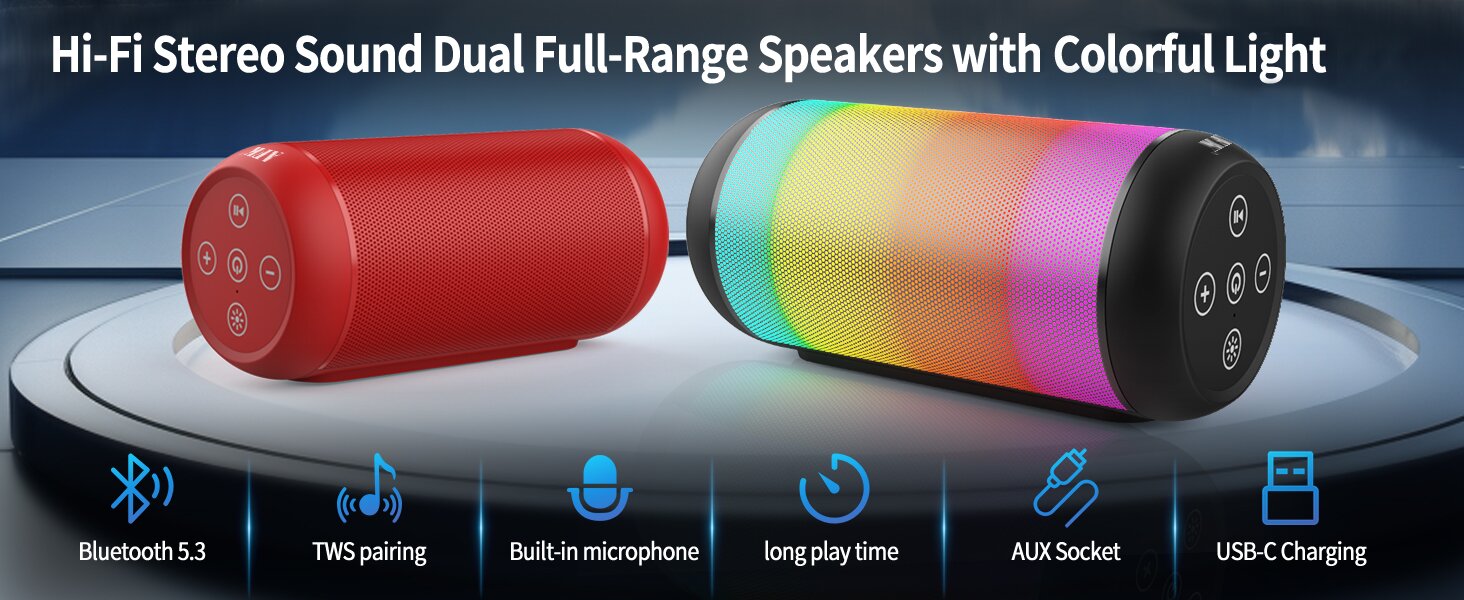
Image: An illustration highlighting key features such as Bluetooth 5.3, TWS pairing, built-in microphone, long playtime, AUX socket, and USB-C charging.

ภาพ: ภาพตัดขวาง view illustrating the dual speaker drivers responsible for deep bass stereo sound.

Image: The speaker positioned on a table, demonstrating its 360-degree stereo surround sound capability.
3. การตั้งค่า
3.1 การชาร์จลำโพง
Before first use, fully charge the speaker. Connect the provided USB-C charging cable to the speaker's USB-C port and the other end to a compatible USB power adapter (not included) or a computer's USB port. The charging indicator light will show the charging status and turn off when fully charged.
3.2 การเปิด/ปิดเครื่อง
- วิธีเปิดเครื่อง: กดปุ่มเปิด/ปิดค้างไว้ (⏻) for a few seconds until you hear an audible prompt and the indicator lights turn on.
- วิธีปิดเครื่อง: กดปุ่มเปิด/ปิดค้างไว้ (⏻) again for a few seconds until you hear an audible prompt and the indicator lights turn off.
4. คู่มือการใช้งาน
4.1 การจับคู่บลูทูธ
วิธีเชื่อมต่อลำโพงของคุณกับอุปกรณ์ที่รองรับบลูทูธ:
- Ensure the speaker is powered on and in Bluetooth pairing mode (indicated by a flashing blue light, or similar).
- บนอุปกรณ์ของคุณ (สมาร์ทโฟน แท็บเล็ต คอมพิวเตอร์) เปิดใช้งาน Bluetooth และค้นหาอุปกรณ์ที่มีอยู่
- Select "AFK Speaker" (or similar name) from the list of found devices.
- เมื่อจับคู่สำเร็จแล้ว ลำโพงจะแสดงสัญญาณว่าเชื่อมต่อสำเร็จ (เช่น ไฟสีน้ำเงินติดสว่าง หรือมีเสียงแจ้งเตือน)
The speaker will automatically attempt to reconnect to the last paired device when powered on, if the device is within range and Bluetooth is enabled.

Image: The speaker in an outdoor setting, demonstrating its stable Bluetooth connection range of up to 100 feet.
4.2 การเล่นเพลง
- โหมดบลูทู ธ : Once paired, play music from your connected device. Use the speaker's control buttons or your device to control playback (play/pause, next/previous track, volume).
- โหมดการ์ด TF/USB: เสียบการ์ด TF หรือไดรฟ์ USB ที่มีไฟล์เสียง files into the respective port on the speaker. The speaker will automatically switch to the corresponding mode and begin playback. Use the speaker's control buttons for navigation.
4.3 Controlling Lights
The speaker features dynamic lighting modes. Press the Light button (💡) to cycle through the available light modes:
- Tarry Sky Light
- การหายใจ
- การไหล
- กระโดดอย่างรวดเร็ว
- Rhythm Jump
- ไฟดับ

ภาพ: โอเวอร์view of the six dynamic light modes available on the speaker, including options to turn the lights off.
4.4 การจัดการการโทร
With the built-in microphone, you can manage calls when connected via Bluetooth:
- รับ/วางสาย: กดปุ่มเล่น / หยุดชั่วคราว (⏸) ครั้งหนึ่ง.
- ปฏิเสธสาย: กดปุ่มเล่น/หยุดชั่วคราวค้างไว้ (⏸) เป็นเวลา 2 วินาที

Image: The speaker being used for a hands-free call, demonstrating the functionality of its built-in microphone.
5. การบำรุงรักษา
5.1 การทำความสะอาด
To clean your speaker, use a soft, dry, lint-free cloth. Do not use abrasive cleaners, alcohol, or chemical solvents, as these may damage the surface or internal components. Avoid getting moisture into any openings.
5.2 พื้นที่จัดเก็บ
Store the speaker in a cool, dry place away from direct sunlight, extreme temperatures, and humidity. If storing for an extended period, charge the battery periodically (e.g., every 3 months) to maintain battery health.
6 การแก้ไขปัญหา
If you encounter issues with your AFK Portable Bluetooth Wireless Speaker, please refer to the following common problems and solutions:
| ปัญหา | สาเหตุที่เป็นไปได้ | สารละลาย |
|---|---|---|
| ลำโพงไม่เปิดเครื่อง | แบตเตอรี่อ่อน; กดปุ่มเปิด/ปิดไม่ถูกต้อง | ชาร์จลำโพงให้เต็ม กดปุ่มเปิด/ปิดค้างไว้สักสองสามวินาที |
| ไม่มีเสียง. | ระดับเสียงต่ำเกินไป; อุปกรณ์ไม่ได้เชื่อมต่อ; โหมดป้อนข้อมูลไม่ถูกต้อง | Increase speaker and device volume. Ensure Bluetooth is connected or TF/USB is inserted correctly. |
| ไม่สามารถจับคู่ผ่านบลูทูธได้ | ลำโพงไม่ได้อยู่ในโหมดจับคู่ อุปกรณ์ Bluetooth ปิดอยู่ อยู่ไกลจากลำโพงเกินไป มีสัญญาณรบกวน | Ensure speaker is in pairing mode. Turn device Bluetooth off/on. Move device closer to speaker. Avoid strong electromagnetic interference. |
| แบตเตอรี่มีอายุสั้น | High volume usage; Lights constantly on; Battery degradation. | Reduce volume. Turn off lights when not needed. Battery life naturally decreases over time. |
7. ข้อมูลจำเพาะ
| คุณสมบัติ | รายละเอียด |
|---|---|
| ชื่อรุ่น | BT528-BLK-US |
| ประเภทลำโพง | ลำโพงคู่ |
| เทคโนโลยีการเชื่อมต่อ | บลูทูธ 5.3 |
| เทคโนโลยีการสื่อสารไร้สาย | บลูทูธ |
| ระยะสูงสุด | 30 เมตร (100 ฟุต) |
| กำลังขับสูงสุดของลำโพง | 11 Watts (RMS) / 15 Watts (Peak) |
| การตอบสนองความถี่ | 20 KHz (หมายเหตุ: นี่อาจเป็นขีดจำกัดสูงสุด โดยทั่วไปช่วงอยู่ที่ 20Hz-20kHz) |
| โหมดเอาต์พุตเสียง | สเตอริโอ |
| การกำหนดค่าช่องเสียงรอบทิศทาง | 2.0 |
| คุณสมบัติพิเศษ | Built-in Microphone, Dynamic LED Lights |
| การใช้ที่แนะนำ | Indoor/Outdoor, Sport, Outdoor Events, Parties, Campไอเอ็นจี, เดินป่า |
| อุปกรณ์ที่รองรับ | Desktop, Smartphone, Tablet, Television |
| แหล่งพลังงาน | ใช้พลังงานจากแบตเตอรี่ (รวมแบตเตอรี่ลิเธียมไอออน 1 ก้อน) |
| วิธีการควบคุม | ปุ่มสัมผัส |
| สี | สีดำ |
| ขนาดสินค้า | ลึก 2.6 นิ้ว x กว้าง 6.1 นิ้ว x สูง 2.6 นิ้ว (ลึก 6.6 ซม. x กว้าง 15.5 ซม. x สูง 6.6 ซม.) |
| น้ำหนักสินค้า | 1.26 ปอนด์ (0.57 กิโลกรัม) |
| กันน้ำได้ | เท็จ |
8. การรับประกันและการสนับสนุน
8.1 การรับประกันแบบจำกัด
This AFK Portable Bluetooth Wireless Speaker comes with a limited warranty. Please refer to the warranty card included in your package or contact AFK customer support for specific terms and conditions. The warranty typically covers manufacturing defects and malfunctions under normal use.
8.2 การสนับสนุนลูกค้า
For further assistance, technical support, or warranty claims, please contact AFK customer service. Contact information can usually be found on the product packaging, the official AFK webเว็บไซต์ หรือผ่านช่องทางการสนับสนุนของร้านค้าปลีกของคุณ


