การแนะนำ
The GearLight S1000 LED Tactical Flashlight is a powerful and versatile illumination tool designed for a wide range of applications, from everyday tasks to outdoor adventures and emergency situations. Its robust construction and advanced features ensure reliable performance when you need it most.
This manual provides detailed instructions on how to set up, operate, maintain, and troubleshoot your S1000 flashlight to ensure optimal performance and longevity.
เนื้อหาแพ็คเกจ
Upon opening your GearLight S1000 package, please verify that all the following items are included:
- (2) GearLight S1000 LED Tactical Flashlights
- (2) Built-in Lithium-Ion Batteries (pre-installed)
- (2) 19-inch USB-C Charging Cables
- (2) Hand Straps
- (1) Holster
- (1) Operation Guide (this manual)
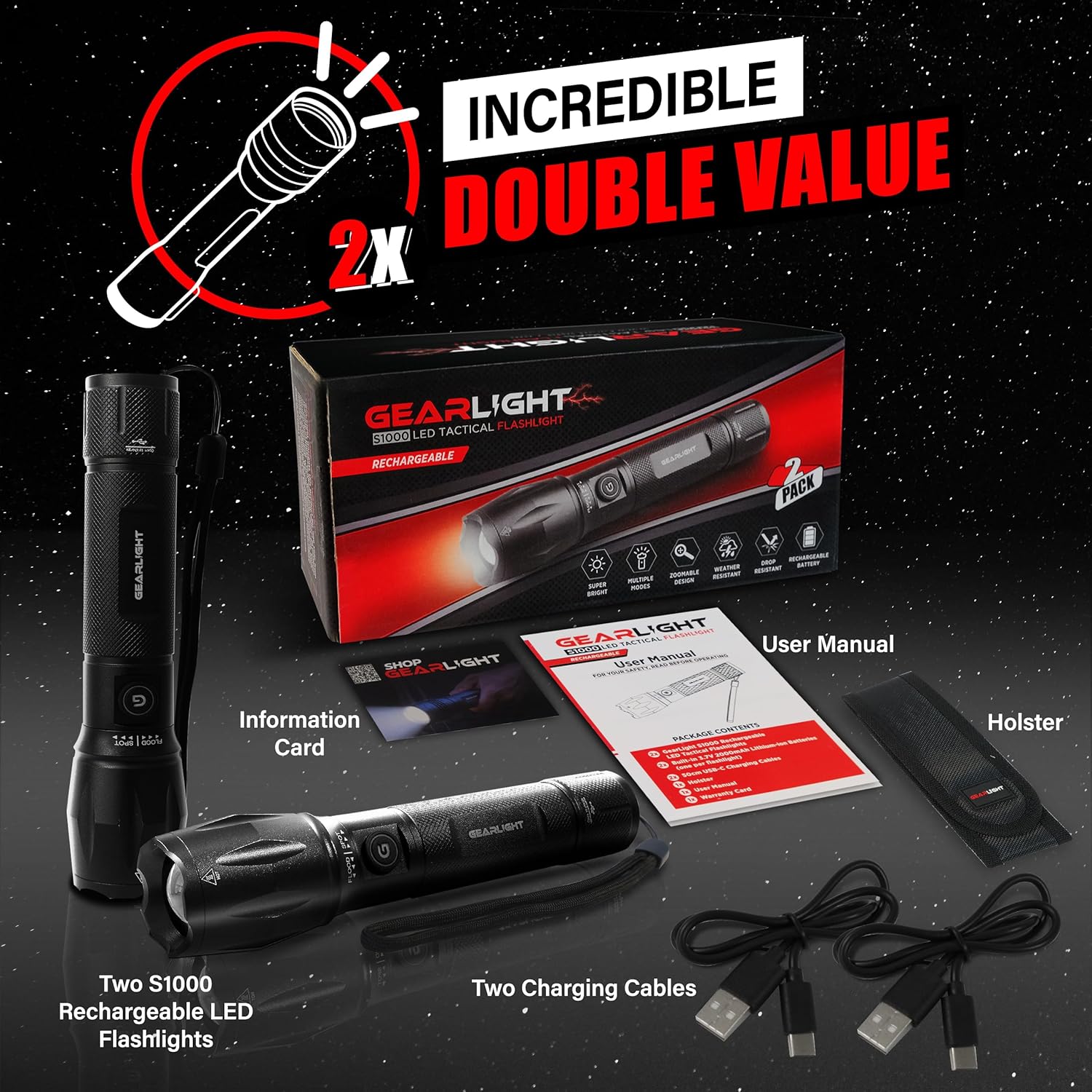
Figure 1: Included items in the GearLight S1000 2-Pack Rechargeable package.
คุณสมบัติหลัก
- Bright & Rechargeable: The S1000 provides powerful illumination with multiple modes and a zoomable beam, powered by a CREE LED. It features a built-in rechargeable lithium-ion battery for long-lasting performance.
- Dual-Button Design: Equipped with two power buttons—one on the side and one on the tail—for convenient operation and quick access in various situations.
- การชาร์จเร็วด้วย USB-C: Features a built-in 3.7V 2000mAh lithium-ion battery that charges quickly via USB-C, ensuring your flashlight is always ready.
- น้ำหนักเบาและขนาดพกพา: Compact and easy to carry, fitting comfortably in a pocket, backpack, or glove compartment, making it ideal for travel and emergency kits.
- ทนทานและทนต่อสภาพอากาศ: Constructed from military-grade aluminum with an anti-roll body design. It is IPX4 water-resistant and can withstand drops up to 10 feet.

Figure 2: The S1000 flashlight providing powerful illumination in a dark environment.

รูปที่ 3: รายละเอียด view of the S1000's durable construction and key design elements.

Figure 4: The S1000's resilience against water and impact.
การตั้งค่าและการชาร์จ
The GearLight S1000 comes with a built-in rechargeable lithium-ion battery. Before first use, it is recommended to fully charge the flashlight.
- ค้นหาพอร์ตการชาร์จ: Twist the tail end of the flashlight to reveal the USB-C charging port.
- เชื่อมต่อสายเคเบิล: Insert one end of the provided USB-C charging cable into the flashlight's port and the other end into a compatible USB power source (e.g., wall adapter, computer USB port, power bank).
- ไฟแสดงสถานะการชาร์จ: The charging indicator light (usually near the charging port or power button) will illuminate to show charging status. Refer to the flashlight's specific indicator behavior (e.g., red for charging, green for fully charged).
- ชาร์จเต็ม: Allow the flashlight to charge until the indicator shows a full charge. Charging time may vary depending on the power source.
- Secure the Port: Once charging is complete, remove the USB-C cable and twist the tail end back to cover and protect the charging port from dust and water.
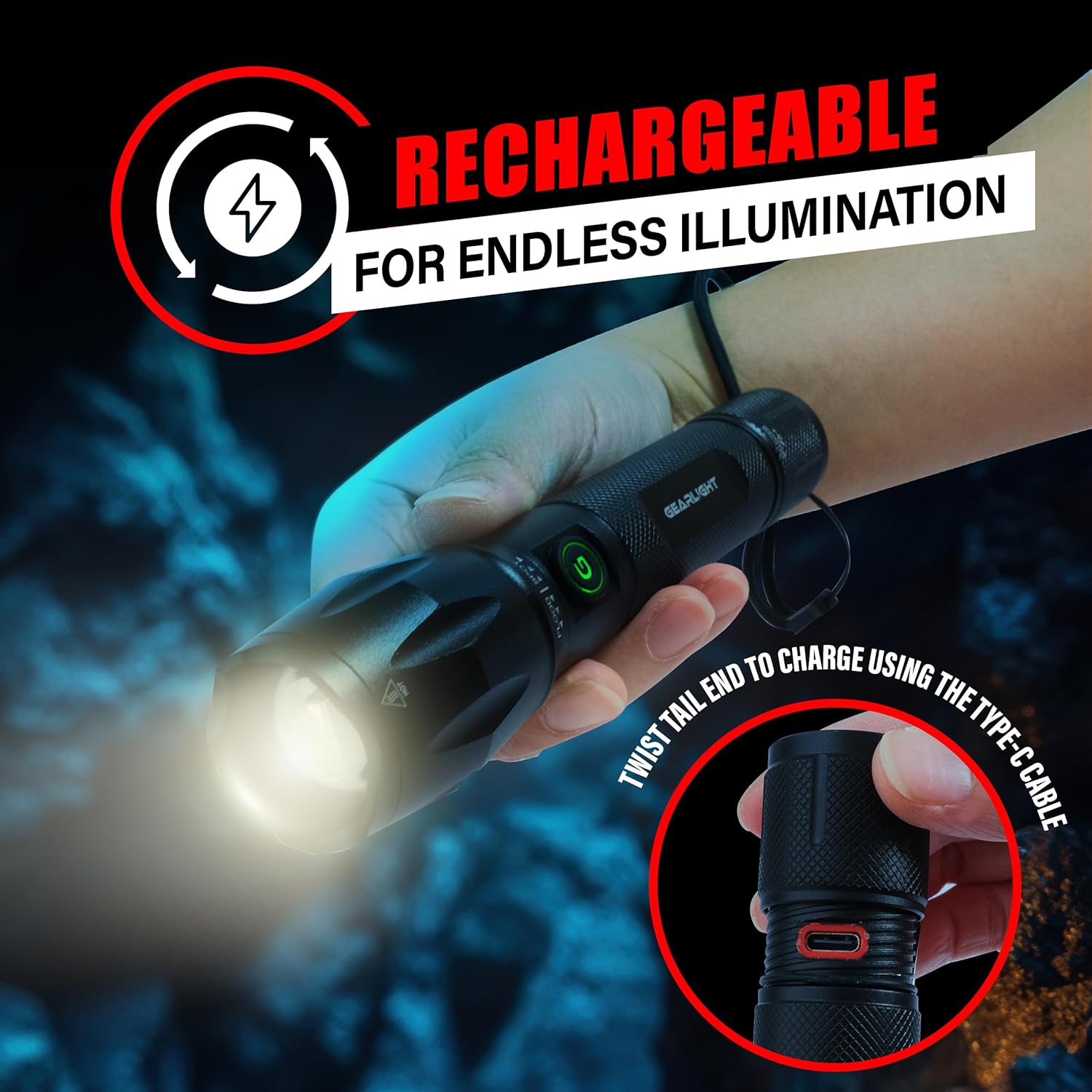
Figure 5: Accessing the USB-C charging port by twisting the tail end.
คำแนะนำการใช้งาน
The S1000 flashlight features a dual-button design and multiple lighting modes for various needs.
เปิด/ปิดเครื่อง
- ปุ่มด้านข้าง: Press the side power button to turn the flashlight ON or OFF.
- Tail Button: Press the tail cap button to turn the flashlight ON or OFF. This button often provides momentary on/off functionality with a half-press.
การเปลี่ยนโหมดแสง
The S1000 offers 5 lighting modes: High, Medium, Low, Strobe, and SOS.
- With the flashlight ON, quickly press the side power button repeatedly to cycle through the modes: High → Medium → Low → Strobe → SOS → High.
- Alternatively, with the flashlight ON, lightly tap the tail cap button (without fully clicking) to cycle through the modes. A full click will turn the flashlight off.
ฟังก์ชั่นซูม
The S1000 features a zoomable beam to adjust between a wide floodlight and a focused spotlight.
- To adjust the beam, simply push or pull the head of the flashlight forward or backward.
- Pulling the head forward will narrow the beam for a focused spotlight.
- Pushing the head backward will widen the beam for a broad floodlight.
การซ่อมบำรุง
Proper maintenance ensures the longevity and optimal performance of your GearLight S1000 flashlight.
- การทำความสะอาด: เช็ดตัวไฟฉายด้วยผ้านุ่มๆamp ผ้า ห้ามใช้น้ำยาทำความสะอาดหรือสารละลายที่มีฤทธิ์กัดกร่อน รักษาเลนส์ให้สะอาดเพื่อให้ได้แสงที่ส่องออกมาได้สูงสุด
- การหล่อลื่น: Periodically apply a thin layer of silicone grease to the O-rings and screw threads (e.g., tail cap threads) to maintain water resistance and smooth operation.
- พื้นที่จัดเก็บ: Store the flashlight in a cool, dry place away from direct sunlight and extreme temperatures. If storing for extended periods, ensure the battery is partially charged (around 50%) to preserve battery health. Recharge every 3-6 months if not in use.
- หลีกเลี่ยงการถอดชิ้นส่วน: Do not attempt to disassemble the sealed head or other components beyond what is necessary for charging or basic cleaning, as this may void the warranty and damage the flashlight.
การแก้ไขปัญหา
If you encounter issues with your GearLight S1000 flashlight, try the following solutions:
| ปัญหา | สาเหตุที่เป็นไปได้ | สารละลาย |
|---|---|---|
| ไฟฉายไม่ติด | แบตเตอรี่หมด ฝาท้ายหลวม ชิ้นส่วนภายในเสียหาย | ชาร์จแบตเตอรี่ให้เต็ม ขันฝาท้ายให้แน่น ติดต่อฝ่ายสนับสนุนลูกค้าหากปัญหายังคงมีอยู่ |
| แสงสลัวหรือกระพริบ | แบตเตอรี่อ่อน Dirty lens or contacts. | ชาร์จแบตเตอรี่ Clean the lens and ensure contacts are free of debris. |
| Cannot change modes. | กดปุ่มผิด ซอฟต์แวร์มีปัญหา | Ensure quick, successive presses of the side button or light taps of the tail button. Try turning off and on again. |
| ไฟแสดงสถานะการชาร์จไม่ทำงาน | สายไฟหรือแหล่งจ่ายไฟชำรุด สิ่งกีดขวางพอร์ตชาร์จ | ลองใช้สาย USB-C และแหล่งจ่ายไฟอื่นดู Check charging port for debris. |
ข้อมูลจำเพาะ
| คุณสมบัติ | รายละเอียด |
|---|---|
| แบบอย่าง | S1000 |
| ประเภทแหล่งกำเนิดแสง | LED (CREE) |
| แหล่งพลังงาน | ใช้พลังงานจากแบตเตอรี่ (ชาร์จใหม่ได้) |
| ประเภทแบตเตอรี่ | Built-in 3.7V 2000mAh Lithium-Ion |
| พอร์ตชาร์จ | ยูเอสบี-ซี |
| วัสดุ | Military-Grade Aluminum |
| ระดับความต้านทานต่อน้ำ | ทนน้ำระดับ IPX4 |
| ความต้านทานการตก | สูงถึง 10 ฟุต |
| ขนาดสินค้า | ลึก 6.1 นิ้ว x กว้าง 1.57 นิ้ว x สูง 1.57 นิ้ว |
| น้ำหนักสินค้า | 1.1 ปอนด์ (สำหรับแพ็ค 2 ชิ้น) |
| ยูพีซี | 850021168520 |
การรับประกันและการสนับสนุน
For warranty information, technical support, or any inquiries regarding your GearLight S1000 flashlight, please visit the official GearLight webหรือติดต่อฝ่ายบริการลูกค้าโดยตรง
คุณยังสามารถเยี่ยมชม GearLight Store on Amazon สำหรับข้อมูลผลิตภัณฑ์และทรัพยากรสนับสนุนเพิ่มเติม


