1. บทนำและผลิตภัณฑ์view
The DIHOOL Electric Lift Table, Model US-DHLCE-S395A, is a three-section electric lifting column designed for adjustable height applications. It is driven by a DC motor and constructed with aluminum oxide material for durability and efficient heat dissipation. This lifting platform is suitable for various uses, including medical appliances, home elevator systems, children's photography chairs, Japanese tatami tables, hidden lifting tables, children's toy tables, and laser printers.
Key features include a maximum load capacity of 80KG (180LB) and an adjustable height range. The system incorporates a current limit protection system that automatically disconnects the circuit if the load exceeds 80KG or an obstacle is detected, protecting the motor from damage. The controller supports multiple control methods, including remote, button, wire, and WiFi.
ภาพที่ 1.1: จบแล้วview of the DIHOOL Electric Lift Table's 3-section sleeve lifting structure, built-in limit switch, and quiet operation. The structure allows for simultaneous lifting and lowering of double-layer aluminum tubes, enhancing aesthetics. A built-in limit switch prevents damage from the internal telescopic push rod extending too far. The unit operates at a quiet 30dB.

Image 1.2: Illustration of the lift table's high load capacity. It has a no-load speed of 10mm/s (0.4inch/s) and a maximum load capacity of 200kg (450lbs). For optimal performance and longevity, it is recommended to operate at 80% of the maximum load capacity (160kg/352lbs) and avoid continuous long-term operation, with a maximum continuous runtime of 20 minutes.
2. ข้อมูลด้านความปลอดภัย
Read all instructions carefully before installation and operation. Failure to follow these instructions may result in injury or damage to the product.
- ความจุในการรับน้ำหนัก: Do not exceed the maximum load capacity of 80KG (180LB). The static load capacity is 120KG (260LB). Overloading can cause damage to the motor and lifting mechanism.
- การตรวจจับสิ่งกีดขวาง: The controller features a current limit protection system. If the load exceeds the maximum or an obstacle is encountered, the system will automatically disconnect to prevent motor damage. However, always ensure the path of movement is clear.
- การทำงานต่อเนื่อง: The motor requires heat dissipation. Avoid continuous operation for extended periods. The operating frequency is a 10% working system, with a maximum continuous run time of 20 minutes. After 20 minutes of continuous operation, allow the unit to cool down.
- แหล่งจ่ายไฟ: ตรวจสอบแหล่งจ่ายไฟ voltage matches the product specifications (AC100V-220V for power supply, DC24-30V for DC Motor).
- การติดตั้ง: Follow installation guidelines carefully. For ceiling installations, ensure the load capacity is less than 140KG and use specialized expansion screws. Lateral installation is prohibited and will void the warranty for any resulting damage.
- เด็กและสัตว์เลี้ยง: Keep children and pets away from the lift table during operation to prevent accidents.
- สภาพแวดล้อม : Operate the lift table within the specified temperature range of -15°C to +65°C.
3. ข้อมูลจำเพาะผลิตภัณฑ์
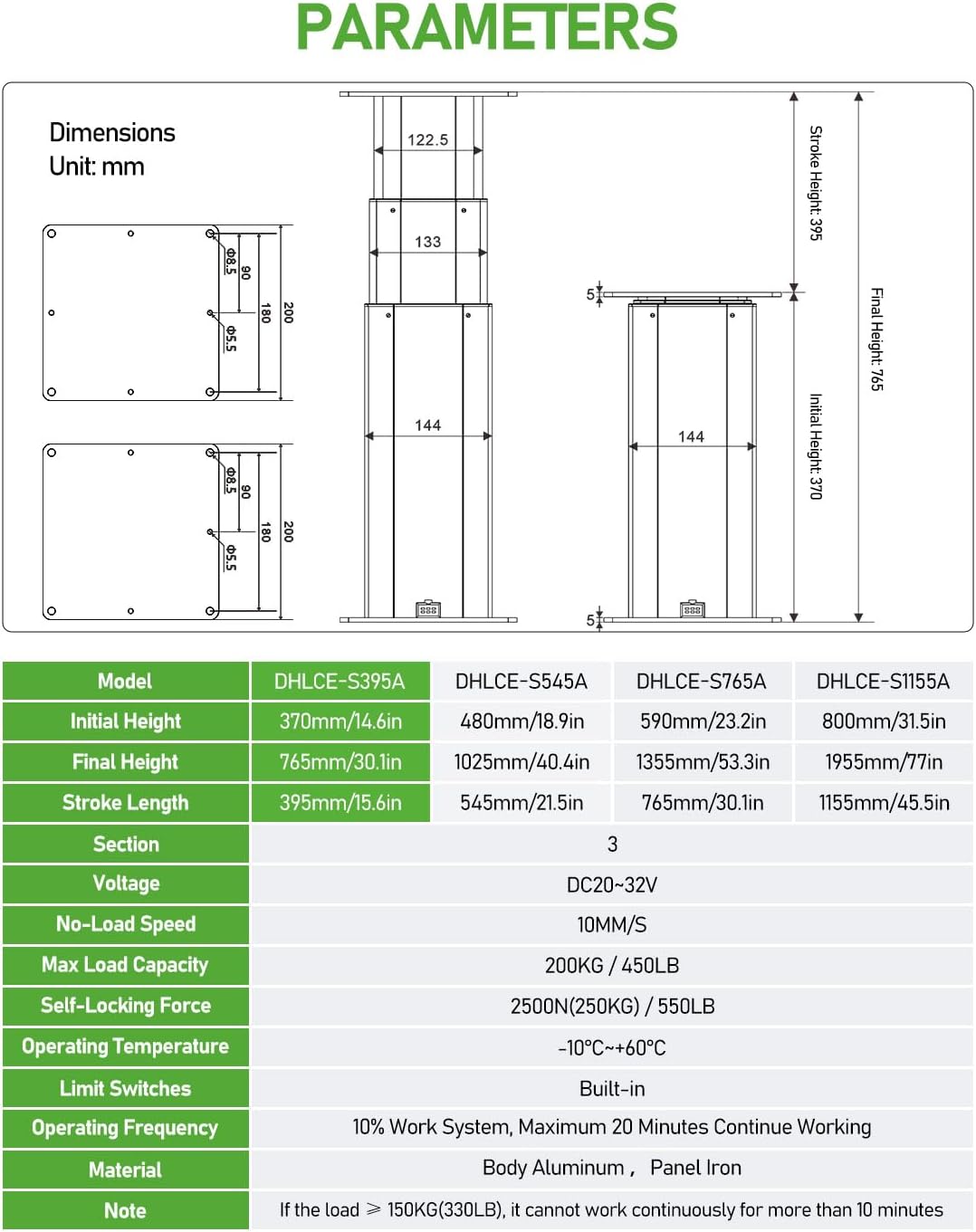
The following table details the technical specifications for the DIHOOL Electric Lift Table, Model US-DHLCE-S395A.

Image 3.1: Detailed parameters and dimensions for various DIHOOL electric lift table models, including DHLCE-S395A. This model features an initial height of 370mm (14.6in), a final height of 765mm (30.1in), and a stroke length of 395mm (15.6in). It is a 3-section unit with a voltage range of DC20-32V, a no-load speed of 10mm/s, and a max load capacity of 200KG (450LB). It includes built-in limit switches and operates at a 10% work system, with a maximum of 20 minutes continuous working time. The material is body aluminum with an iron panel.
| ข้อมูลจำเพาะ | ค่า |
|---|---|
| แบบอย่าง | US-DHLCE-S395A |
| ความจุในการรับน้ำหนักสูงสุด | 80กก. / 180ปอนด์ |
| ความสามารถในการรับน้ำหนักคงที่ | 120กก. / 260ปอนด์ |
| ความสูงขั้นต่ำ | 360MM (14.17") |
| ความสูงสูงสุด | 790MM (31.10") |
| ความยาวช่วงชัก | 430มม. |
| ความเร็ว | 10มม./วินาที |
| Column Width | 144*144มม. |
| Dimensions (L.W.H) | 200*200*360มม. |
| เล่มที่tage (Power Supply) | AC100V-220V |
| เล่มที่tage (DC Motor) | กระแสตรง24-30โวลต์ |
| Ampกำลังการผลิตไฟฟ้า | 3 Amps |
| การบำบัดพื้นผิว | Electrophoretic black |
| เกรด IP | IP43 |
| อุณหภูมิในการทำงาน | -15°C ~ +65°C |
| ความถี่ในการใช้งาน | 10% working system, maximum 1 hour work continue (Note: Image 3.1 states max 20 min continuous working) |
| วัสดุ | อะลูมิเนียมออกไซด์ |
| ระดับเสียง | 40 เดซิเบล |
| ส่วนประกอบที่รวมอยู่ | ผู้ควบคุม |
| จำเป็นต้องประกอบ | ใช่ |
| น้ำหนักสินค้า | 9 กิโลกรัม |
4. การตั้งค่าและการติดตั้ง
This section provides guidance on installing your DIHOOL Electric Lift Table. Ensure all components are present before beginning installation.
4.1 อุปกรณ์เสริมที่มีให้
แพ็คเกจนี้ประกอบด้วยฮาร์ดแวร์ที่จำเป็นสำหรับการติดตั้ง:
- M8*20 Bolts (8pcs)
- M8 Nuts (8pcs)
- M5*25 Screws (16pcs)

Image 4.1: Description of included accessories (M8*20 Bolts, M8 Nuts, M5*25 Screws) and examples of installation methods. For wooden board installation, use M5*25 screws. For steel plate installation, use M8*20 bolts and M8 nuts. The image also highlights customizable options for enclosure color, upper/lower panels, and power interface.
4.2 สภาพแวดล้อมการติดตั้ง
The lift table can be installed in various configurations. Always ensure the desktop size does not exceed 80*80cm. If the length and width of the desktop exceed 80cm, it is recommended to use 2 or more columns.

Image 4.2: Illustrations of different installation methods. Forward Installation: The desktop size should not exceed 80*80cm. Avoid placing excessive weight on the edge of the desktop; ensure the load's center of gravity is positioned at the center. การติดตั้งแบบย้อนกลับ: Similar desktop size and weight distribution guidelines apply. การติดตั้งฝ้าเพดาน: Use specialized expansion screws. If the lift is suspended from the ceiling, modify parameters for up and down current. Load capacity must be less than 140KG. การติดตั้งด้านข้าง: Side mounting is prohibited. Any resulting damage will not be covered under warranty.
- Forward Installation: Mount the lift table with the motor facing downwards. Ensure the load is centered to prevent tipping.
- การติดตั้งแบบย้อนกลับ: Mount the lift table with the motor facing upwards. Ensure the load is centered.
- การติดตั้งฝ้าเพดาน: This method requires specialized expansion screws. If suspending the lift from the ceiling, it is crucial to adjust the parameters for the up and down current in the controller. The load capacity for ceiling installation must be less than 140KG.
- การติดตั้งด้านข้าง: Side mounting is strictly prohibited. Any damage resulting from lateral installation will not be covered under warranty.
วิธีการจ่ายไฟ 4.3 วิธี
The lift table can be powered by various methods, including 12V, 20V-30V, 110V, or 220V.
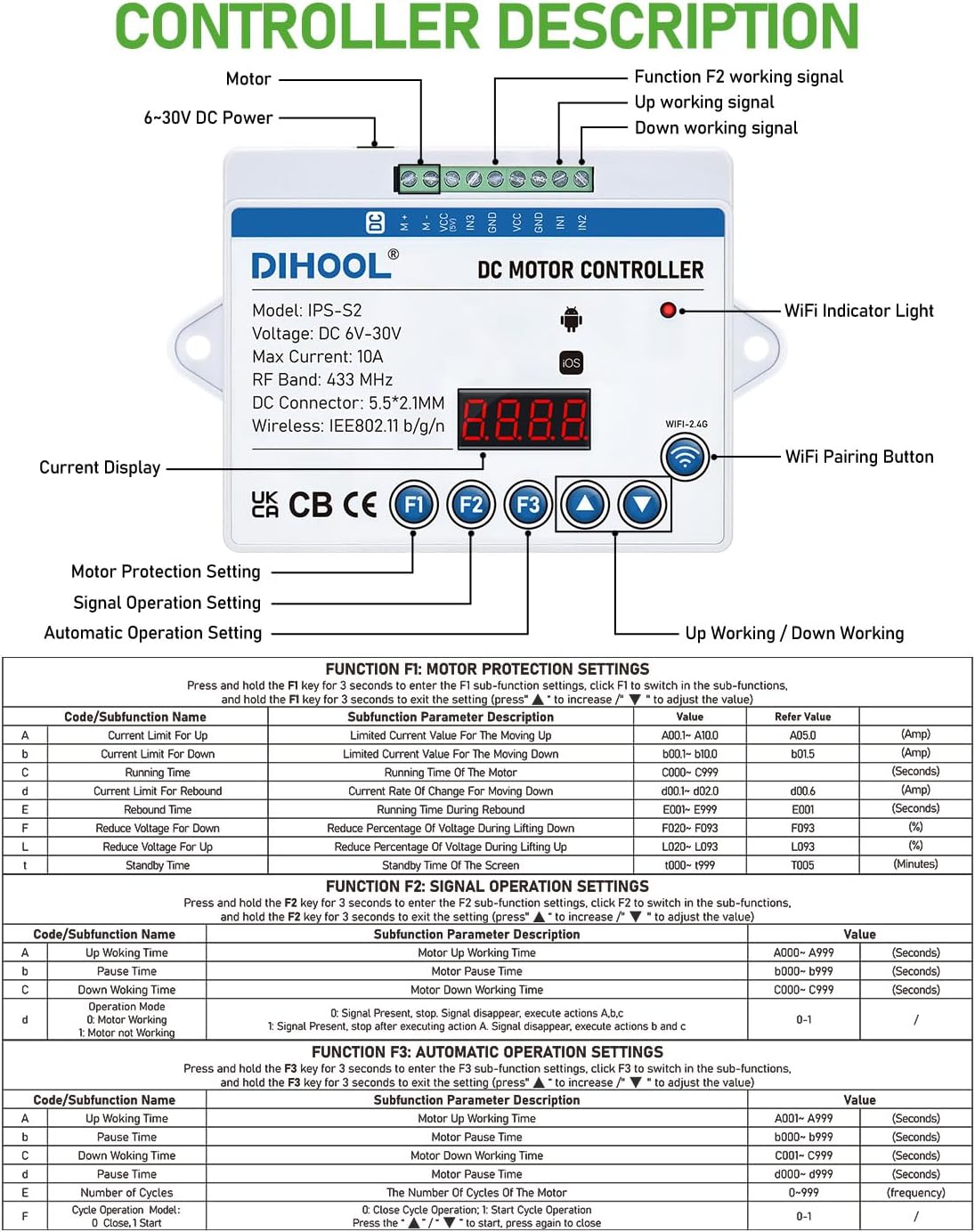
Image 4.3: Demonstrates multiple power supply methods. The actuator can operate directly on 12V power, achieving 5mm/s speed with a maximum load capacity of 100kg. A boost converter (12V to 24V) can be used to enable full-power operation. Examples include AC adapter (AC120V/AC240V), automotive power receptacle (DC12V input with boost converter), storage battery (DC24V), and power bank (100W PD3.0/PD3.1). Common applications shown are elevating photography platforms, laser marking machines, tatami beds, and elevating tables for RVs.
5. คู่มือการใช้งาน
The DIHOOL Electric Lift Table features a pre-wired controller with seven available control modes for convenient operation.
5.1 Controller Description

Image 5.1: Detailed diagram of the DIHOOL DC Motor Controller (Model: IPS-S2). It shows various components including the motor connection (6-30V DC Power), WiFi indicator light, WiFi pairing button, current display, and control buttons (F1, F2, F3, Up, Down, Set). The image also outlines the functions of F1 (Motor Protection Setting), F2 (Signal Operation Setting), and F3 (Automatic Operation Setting) with their respective sub-functions and parameter descriptions.
5.2 วิธีการควบคุม
The lifting column is pre-wired, simplifying setup. Seven control modes are available:
- รีโมทคอนโทรล
- ตัวควบคุมด้ามจับ
- IPS-S2 Controller (Main unit)
- ควบคุม WiFi
- Function F3 programmable automatic lifting
- IN2 IN3 I/O Signal Control Button (Purchase separately)
- Function F2 Photoelectric switch control (Purchase separately)
5.3 ฟังก์ชันของตัวควบคุม
The controller features three main function buttons (F1, F2, F3) for advanced settings:
- F1: Motor Protection Settings
Press F1 to enter sub-function settings. Use the up/down arrows to select and adjust parameters such as Current Limit Up/Down, Running Time Up/Down, Rebound Time, Reduce Voltage for Up/Down, and Standby Time. - F2: Signal Operation Settings
Press F2 to enter sub-function settings. Adjust parameters like Up/Down Working Time, Motor Running Time, Operation Mode (Signal present, stop; Signal disappear, execute actions A,b,c; Signal present, execute actions A,b,c; Signal disappear, execute actions b and c), and Motor Not Working. - F3: Automatic Operation Settings
Press F3 to enter sub-function settings. Adjust parameters such as Up/Down Working Time, Pause Time, Down Working Time, Number of Cycles, and Cycle Delay Mode.
การควบคุมเวลา: If a specific height is desired (e.g., 200MM), calculate the time required to reach that height and then set parameter C (time) within the F3 Automatic Operation Settings.
Downward Current Setting: The controller allows setting a downward current 0.2~0.3A higher than the indicated current. This feature helps prevent objects from being caught during downward movement.
6. การบำรุงรักษา
Regular maintenance ensures the longevity and optimal performance of your DIHOOL Electric Lift Table.
- การทำความสะอาด: Periodically clean the exterior of the lift column with a soft, dry cloth. Avoid using abrasive cleaners or solvents that could damage the aluminum oxide finish.
- การตรวจสอบ: Regularly inspect all cables and connections for any signs of wear, fraying, or damage. Ensure all mounting bolts and screws are securely tightened.
- การหล่อลื่น: The internal mechanism is generally maintenance-free. Do not attempt to lubricate internal components unless specifically instructed by DIHOOL support.
- การป้องกันการโอเวอร์โหลด: Always adhere to the maximum load capacity of 80KG (180LB). Operating the unit beyond its rated capacity can lead to premature wear and motor failure.
- ระยะเวลาการทำความเย็น: Respect the operating frequency of 10% working system, with a maximum continuous run time of 20 minutes. Allow the motor to cool down after extended use to prevent overheating.
- การปกป้องสิ่งแวดล้อม: Keep the lift table in an environment within the specified operating temperature range and protect it from excessive moisture or dust, which can affect electrical components.
7 การแก้ไขปัญหา
This section addresses common issues you might encounter with your electric lift table. If the problem persists, contact customer support.
| ปัญหา | สาเหตุที่เป็นไปได้ | สารละลาย |
|---|---|---|
| Lift table does not move | ไม่มีแหล่งจ่ายไฟ การเชื่อมต่อสายเคเบิลหลวม เปิดใช้งานการป้องกันโอเวอร์โหลด คอนโทรลเลอร์ทำงานผิดปกติ | Check power outlet and cable connections. ตรวจสอบให้แน่ใจว่าเสียบสายเคเบิลทั้งหมดอย่างแน่นหนา Reduce load; check for obstacles. Allow motor to cool if recently overloaded. Refer to controller manual or contact support. |
| Lift table moves slowly or intermittently | พลังงานไม่เพียงพอ Partial overload มอเตอร์ร้อนเกินไป | Ensure stable power supply. Check voltage. Reduce load to below maximum capacity. Allow the unit to cool down. Avoid continuous operation. |
| เสียงรบกวนที่ผิดปกติระหว่างการทำงาน | Obstruction in lifting mechanism ส่วนประกอบหลวม ปัญหามอเตอร์ | Inspect the lifting column for any foreign objects. ตรวจสอบฮาร์ดแวร์สำหรับติดตั้งทั้งหมดว่าแน่นหนาดีหรือไม่ หากยังมีเสียงรบกวนอยู่ ให้หยุดใช้งานและติดต่อฝ่ายสนับสนุน |
| หน้าจอแสดงผลของคอนโทรลเลอร์ไม่ทำงาน | ไม่มีอำนาจควบคุม Controller cable issue | Check main power and controller connection. Ensure controller cable is not damaged or loose. |
| WiFi control not connecting | Incorrect WiFi settings Router issues | Refer to the controller manual for WiFi setup instructions. Ensure correct network and password. รีสตาร์ทเราเตอร์ WiFi ของคุณ |
8. การรับประกันและการสนับสนุน
For specific warranty terms and conditions, please refer to the documentation provided with your purchase or contact DIHOOL customer service directly. Warranty coverage typically includes defects in materials and workmanship under normal use.
การสนับสนุนลูกค้า:
If you encounter any issues not covered in this manual or require further assistance, please contact DIHOOL customer support. Have your product model number (US-DHLCE-S395A) and purchase information ready when contacting support.
Contact information can typically be found on the DIHOOL official webไซต์หรือบนบรรจุภัณฑ์ผลิตภัณฑ์ของคุณ
