1. สินค้าหมดview
The ULTRAK 495 Professional 100-Lap Digital Stopwatch is designed for precise timekeeping in various sports and training activities. It features a large, easy-to-read display and multiple functions to support athletes, coaches, and referees.
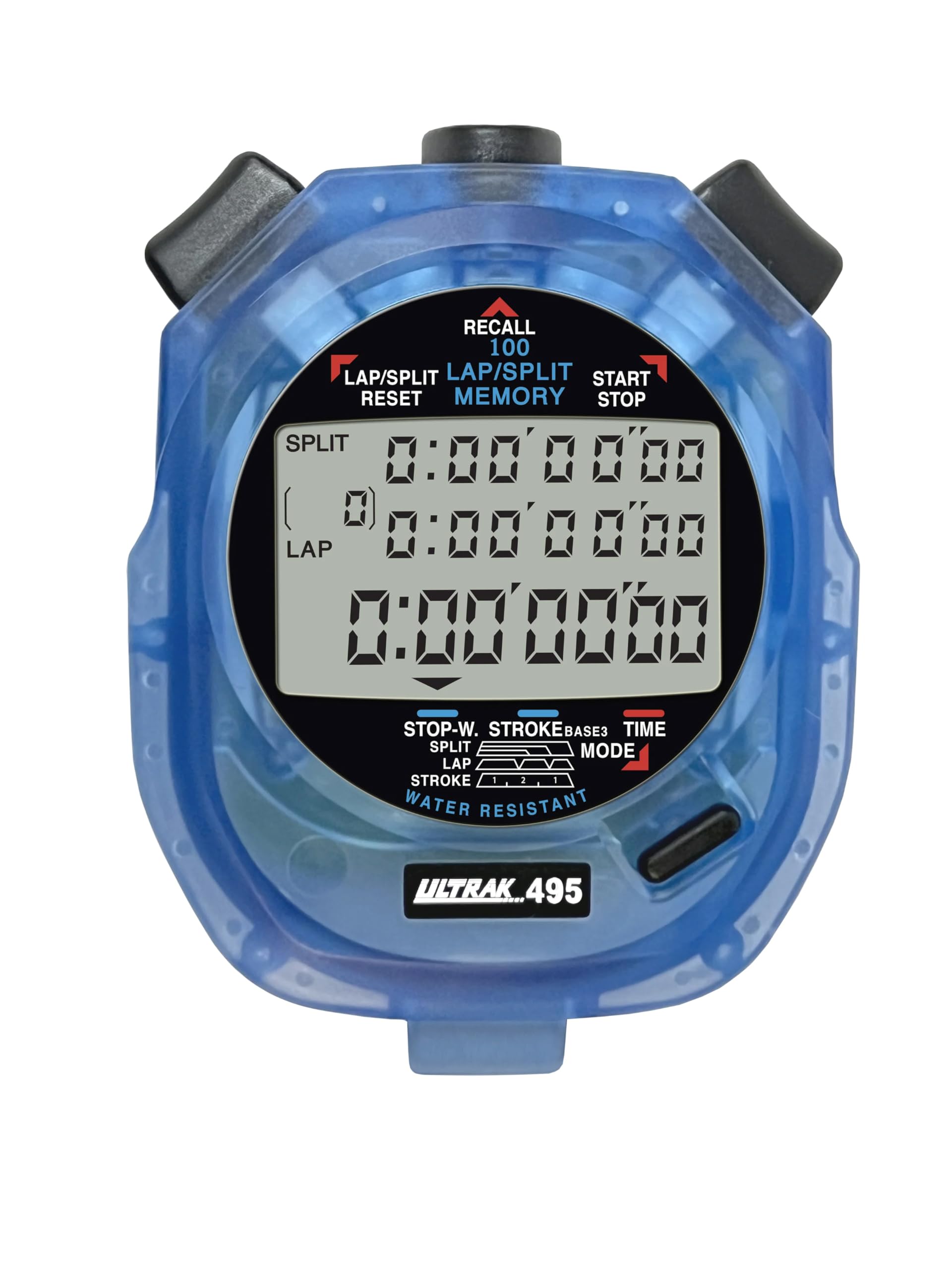
Figure 1: ULTRAK 495 Stopwatch in blue.
คุณสมบัติหลัก:
- 100 Dual Split Recallable Memory: Enhances accuracy for track and field events, ideal for athletes and coaches requiring precise timekeeping.
- ฟังก์ชั่นอเนกประสงค์: Includes stroke/frequency, time, and calendar functions, suitable for diverse sports activities.
- ดีไซน์กันน้ำ: Allows for outdoor use in various weather conditions.
- จอแสดงผลขนาดใหญ่ 3 แถว: ช่วยให้ใช้งานง่าย viewing of multiple lap times simultaneously.
- Durable Lithium Battery: Ensures reliability for extended use.
2. การตั้งค่า
2.1. การติดตั้งแบตเตอรี่
The ULTRAK 495 Stopwatch comes with one Lithium Metal battery pre-installed. If battery replacement is needed, refer to the Maintenance section.
2.2. การตั้งเวลาและวันที่เริ่มต้น
ในการตั้งเวลาและวันที่:
- กดปุ่ม โหมด button repeatedly until the time/calendar display mode is active.
- กดปุ่มค้างไว้ ชุด button (usually located on the top right) until the digits begin to flash.
- ใช้ รอบ/แยก/รีเซ็ต button (top left) to adjust the flashing digit.
- กดปุ่ม ชุด กดปุ่มเพื่อเลื่อนไปยังตัวเลขหรือการตั้งค่าถัดไป (เช่น ชั่วโมง นาที วินาที เดือน วัน ปี)
- เมื่อการตั้งค่าทั้งหมดถูกต้องแล้ว ให้กดปุ่ม โหมด ปุ่มเพื่อออกจากโหมดการตั้งค่า

Figure 2: Stopwatch displaying various modes, including Time/Calendar.
3. การดำเนินการ
3.1. Stopwatch Mode (Standard Timing)
This mode is used for basic timing of events.
- Ensure the stopwatch is in the standard stopwatch mode (usually indicated by "STOPWATCH" on the display). If not, press โหมด จนกว่าจะปรากฏ
- กด เริ่ม/หยุด (top right button) to begin timing.
- กด เริ่ม/หยุด กดอีกครั้งเพื่อหยุดตัวจับเวลา
- กด เริ่ม/หยุด เพื่อเริ่มจับเวลาอีกครั้ง
- To reset the timer to zero, ensure it is stopped, then press รอบ/แยก/รีเซ็ต (top left button).
3.2. Lap/Split Timing with Memory Recall
The ULTRAK 495 can record up to 100 lap and split times.
- In stopwatch mode, press เริ่ม/หยุด เพื่อเริ่มจับเวลา
- กด รอบ/แยก/รีเซ็ต to record a split time. The display will momentarily show the split time while the main timer continues running in the background. The bottom row displays the running event or lap time.
- Repeat step 2 for each lap or split you wish to record.
- กด เริ่ม/หยุด to end the timing session.
- To recall recorded times, press the เรียกคืน button (top center). Use the รอบ/แยก/รีเซ็ต และ เริ่ม/หยุด buttons to navigate through the stored lap and split times.
- To exit recall mode, press โหมด. To clear memory, ensure the stopwatch is stopped and not in recall mode, then press and hold รอบ/แยก/รีเซ็ต.

Figure 3: Display showing simultaneous split, lap, and total times.
3.3. โหมดจับเวลาถอยหลัง
The stopwatch includes a countdown timer function.
- กด โหมด จนกระทั่งหน้าจอแสดงตัวนับเวลาถอยหลังปรากฏขึ้น
- กดค้างไว้ ชุด เพื่อเข้าสู่โหมดการตั้งค่า
- ใช้ รอบ/แยก/รีเซ็ต เพื่อปรับเวลาและ ชุด การเคลื่อนตัวระหว่างชั่วโมง นาที และวินาที
- เมื่อตั้งเวลาถอยหลังที่ต้องการแล้ว ให้กดปุ่ม โหมด เพื่อออกจากโหมดการตั้งค่า
- กด เริ่ม/หยุด เพื่อเริ่มการนับถอยหลัง สัญญาณเตือนจะดังขึ้นเมื่อตัวจับเวลาถึงศูนย์
3.4. Stroke/Frequency Measuring Mode
This mode is useful for measuring stroke rates in swimming or other repetitive actions.
- กด โหมด until the stroke/frequency mode is displayed.
- กด เริ่ม/หยุด to begin measuring.
- กด รอบ/แยก/รีเซ็ต at the start of each stroke or cycle. The stopwatch will calculate and display the frequency.
- กด เริ่ม/หยุด เพื่อหยุดการวัด
4. การบำรุงรักษา
4.1. การทำความสะอาด
Wipe the stopwatch with a soft, dry cloth. For stubborn dirt, use a slightly damp เช็ดด้วยผ้าและสบู่อ่อนๆ แล้วเช็ดให้แห้งสนิท หลีกเลี่ยงสารเคมีรุนแรงหรือน้ำยาทำความสะอาดที่มีฤทธิ์กัดกร่อน
4.2. ความทนทานต่อน้ำ
The ULTRAK 495 is water-resistant, making it suitable for use in various weather conditions. However, it is not designed for submersion. Avoid pressing buttons while the stopwatch is wet to prevent water ingress.
4.3. การเปลี่ยนแบตเตอรี่
The stopwatch uses one Lithium Metal battery. When the display becomes dim or functions become erratic, it's time to replace the battery. Carefully open the battery compartment (usually on the back, secured by small screws) and replace with a new battery of the same type. Ensure proper polarity and securely close the compartment.
5 การแก้ไขปัญหา
- จอแสดงผลว่างเปล่าหรือมืดลง: ตรวจสอบแบตเตอรี่ เปลี่ยนใหม่หากจำเป็น
- Stopwatch resets unexpectedly during timing: This can sometimes occur due to low battery or a temporary electrical glitch. Try replacing the battery. If the issue persists, ensure buttons are not being pressed inadvertently.
- ปุ่มไม่มีการตอบสนอง: Ensure the stopwatch is not in a locked mode (if applicable, check manual for specific lock features). If wet, ensure it is completely dry. If still unresponsive, try replacing the battery.
- เวลาหรือวันที่ไม่ถูกต้อง: Refer to section 2.2 to re-set the time and date.
6. ข้อมูลจำเพาะ
| คุณสมบัติ | รายละเอียด |
|---|---|
| หมายเลขรุ่น | 495 |
| หน่วยความจำ | 100 Dual Split Recallable Laps |
| แสดง | Large 3-Row Display |
| ฟังก์ชั่น | Stopwatch, Lap/Split, Countdown Timer, Stroke/Frequency, Time, Calendar |
| ความต้านทานต่อน้ำ | ใช่ (กันน้ำได้) |
| ประเภทแบตเตอรี่ | แบตเตอรี่ลิเธียมโลหะ 1 ก้อน (รวมอยู่ด้วย) |
| วัสดุ | พลาสติก |
| ขนาดสินค้า | ลึก 0.2 นิ้ว x กว้าง 2.5 นิ้ว x สูง 3.5 นิ้ว |
| น้ำหนักสินค้า | 3.2 ออนซ์ |
7. การรับประกันและการสนับสนุน
For specific warranty information and customer support, please refer to the documentation included with your product or visit the official Ultrak webไซต์ โปรดเก็บใบเสร็จรับเงินของคุณไว้เป็นหลักฐานการซื้อสำหรับการเรียกร้องการรับประกันใดๆ


