การแนะนำ
Thank you for choosing the Tracer M45 Portable Bluetooth Speaker. This manual provides essential information for the safe and efficient use of your device. Please read it thoroughly before operating the speaker and keep it for future reference.
The Tracer M45 is a versatile 45W portable Bluetooth speaker designed for high-quality audio playback from various sources, including Bluetooth-enabled devices, FM radio, and other audio inputs. It features a robust design and intuitive controls for an enhanced listening experience.
ข้อมูลด้านความปลอดภัย
- อย่าให้ลำโพงโดนน้ำ ความชื้น หรืออุณหภูมิที่สูงหรือต่ำเกินไป
- หลีกเลี่ยงการทำตกหรือให้ลำโพงได้รับแรงกระแทกรุนแรง
- ห้ามถอดประกอบ ซ่อมแซม หรือดัดแปลงลำโพงด้วยตนเอง โปรดติดต่อช่างผู้ชำนาญเพื่อขอรับบริการ
- ควรวางลำโพงให้ห่างจากแหล่งความร้อนและแสงแดดโดยตรง
- ใช้เฉพาะสายชาร์จและอะแดปเตอร์ไฟที่ระบุเท่านั้น
- ทำความสะอาดลำโพงด้วยผ้านุ่มและแห้ง ห้ามใช้น้ำยาทำความสะอาดหรือสารละลายที่มีฤทธิ์กัดกร่อน
- ตรวจสอบให้แน่ใจว่ามีการระบายอากาศที่เหมาะสมเมื่อใช้งานลำโพง
เนื้อหาแพ็คเกจ
กรุณาตรวจสอบว่าสินค้าทั้งหมดมีอยู่ในแพ็คเกจ:
- Tracer M45 Portable Bluetooth Speaker
- สายชาร์จ
- รีโมทคอนโทรล
- คู่มือการใช้งาน (เอกสารนี้)
สินค้าเกินview
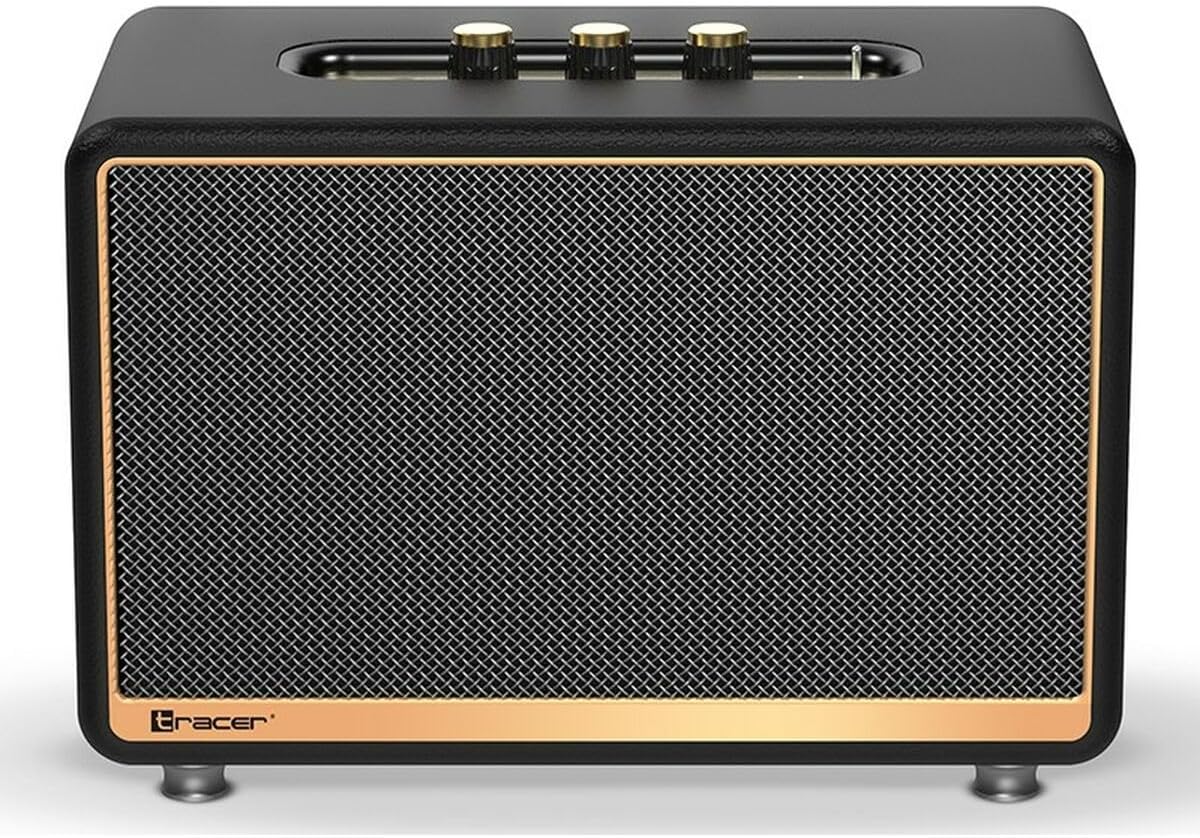
รูปที่ 1 : ด้านหน้า view of the Tracer M45 Portable Bluetooth Speaker. The speaker features a black mesh grille with a gold-colored trim, and three gold-colored control knobs are visible on the top panel. The Tracer logo is located at the bottom left of the grille.
การควบคุมและพอร์ต
Familiarize yourself with the various controls and ports on your Tracer M45 speaker:
- ปุ่มเปิด/ปิด: Located on the rear or top panel, used to turn the speaker ON/OFF.
- ปุ่มปรับระดับเสียง: Three gold-colored knobs on the top panel for adjusting volume, bass, and treble.
- ปุ่มโหมด: To switch between Bluetooth, FM Radio, and other input modes.
- ปุ่มเล่น/หยุดชั่วคราว: For controlling audio playback.
- ปุ่มแทร็กก่อนหน้า/ถัดไป: For navigating through tracks or FM radio stations.
- พอร์ตชาร์จ: สำหรับเชื่อมต่อสายชาร์จ
- พอร์ต Aux-in: สำหรับเชื่อมต่ออุปกรณ์เสียงภายนอกผ่านสายสัญญาณเสียงขนาด 3.5 มม.
- พอร์ต USB: (If present) For playing music from a USB drive.
- ไฟแสดงสถานะ LED: แสดงสถานะพลังงาน สถานะการชาร์จ และสถานะการจับคู่บลูทูธ
การตั้งค่า
1. ชาร์จลำโพง
Before first use, fully charge the speaker. Connect the charging cable to the speaker's charging port and the other end to a suitable USB power adapter (not included) or a computer's USB port. The LED indicator will show the charging status and turn off or change color when fully charged.
2. การเปิด/ปิดเครื่อง
To turn the speaker ON, locate the power switch/button and slide it to the "ON" position or press and hold it for a few seconds. The LED indicator will light up. To turn OFF, repeat the process.
3. การจับคู่บลูทู ธ
- Ensure the speaker is ON and in Bluetooth mode. If not, press the Mode button until you hear a Bluetooth pairing prompt or see the LED indicator flashing rapidly.
- On your smartphone, tablet, or other Bluetooth device, enable Bluetooth.
- ค้นหา available devices. You should see "Tracer M45" or a similar name in the list.
- Select "Tracer M45" to connect. Once paired, the speaker will indicate a successful connection (e.g., a sound prompt or steady LED light).
- The speaker will automatically reconnect to the last paired device when in range and Bluetooth is enabled.
4. Connecting via Aux-in
For devices without Bluetooth, connect a 3.5mm audio cable (not included) from your device's headphone jack to the speaker's Aux-in port. The speaker should automatically switch to Aux mode, or you may need to press the Mode button.
5. การตั้งค่าวิทยุ FM
To use the FM Radio function, switch the speaker to FM mode using the Mode button. For best reception, ensure the speaker is in an open area. Press and hold the Play/Pause button to auto-scan and save available FM stations. Use the Previous/Next Track buttons to navigate between saved stations.
การดำเนินงาน
การเล่นขั้นพื้นฐาน
- เล่น/หยุดชั่วคราว: กดปุ่มเล่น/หยุดชั่วคราวหนึ่งครั้งเพื่อเล่นหรือหยุดเสียงชั่วคราว
- การควบคุมระดับเสียง: Rotate the main volume knob on the top panel to increase or decrease the volume. Use the bass and treble knobs to adjust sound equalization.
- เพลงถัดไป / ก่อนหน้า: Press the Next or Previous track buttons to skip to the next or previous song/station.
การใช้รีโมทคอนโทรล
The Tracer M45 comes with a remote control for convenient operation. Ensure the remote has working batteries. The remote allows you to control power, mode, volume, track navigation, and FM radio functions from a distance.
การซ่อมบำรุง
- การทำความสะอาด: Wipe the speaker's surface with a soft, dry, lint-free cloth. Do not use liquid cleaners, sprays, or solvents.
- พื้นที่จัดเก็บ: เมื่อไม่ได้ใช้งานเป็นเวลานาน ควรเก็บลำโพงไว้ในที่แห้งและเย็น หลีกเลี่ยงแสงแดดโดยตรงและอุณหภูมิที่สูงหรือต่ำเกินไป
- การดูแลแบตเตอรี่ เพื่อยืดอายุการใช้งานแบตเตอรี่ ควรหลีกเลี่ยงการใช้แบตเตอรี่จนหมดบ่อยๆ ควรชาร์จลำโพงเป็นประจำ แม้จะไม่ได้ใช้งานก็ตาม
การแก้ไขปัญหา
| ปัญหา | สาเหตุที่เป็นไปได้ | สารละลาย |
|---|---|---|
| ลําโพงไม่เปิดขึ้น | แบตเตอรี่เหลือน้อยหรือหมด | ชาร์จลำโพงให้เต็ม |
| ไม่สามารถจับคู่ผ่านบลูทูธได้ | ลำโพงไม่ได้อยู่ในโหมดจับคู่ บลูทูธปิดอยู่ในอุปกรณ์ และอุปกรณ์อยู่ไกลเกินไป | Ensure speaker is in Bluetooth pairing mode. Turn on Bluetooth on your device. Move device closer to speaker (within 10 meters). |
| ไม่มีเสียง. | ระดับเสียงเบาเกินไป; โหมดอินพุตไม่ถูกต้อง; อุปกรณ์ไม่เล่น | Increase speaker and device volume. Check if the correct input mode (Bluetooth, Aux) is selected. Ensure audio is playing on the connected device. |
| การรับสัญญาณวิทยุ FM ไม่ดี | สัญญาณอ่อน; มีสัญญาณรบกวน | Relocate the speaker to an area with better signal. Perform auto-scan again. |
ข้อมูลจำเพาะ
| คุณสมบัติ | รายละเอียด |
|---|---|
| หมายเลขรุ่น | S9174238 |
| ยี่ห้อ | ผู้ติดตาม |
| เทคโนโลยีการเชื่อมต่อ | บลูทูธ 5.0 |
| กำลังขับสูงสุด | 45 วัตต์ |
| ประเภทลำโพง | Portable Bluetooth Speaker (with Subwoofer component) |
| โหมดเอาต์พุตเสียง | พื้นฐาน |
| ประเภทการติดตั้ง | โต๊ะยืน |
| คุณสมบัติพิเศษ | Wireless, LED Indicator, ON/OFF Switch, FM Radio |
| การใช้ที่แนะนำ | For computer, For smartphone or tablet |
| ประเภทตัวควบคุม | รีโมทคอนโทรล |
| สี | สีดำ |
| ขนาดสินค้า (กว้าง x ยาว x สูง) | 22 x 20 x 32 ซม. (8.66 x 7.87 x 12.6 นิ้ว) |
| น้ำหนัก | 4.04 กก. (8.9 ปอนด์) |
การรับประกันและการสนับสนุน
Tracer products are designed and manufactured to the highest quality standards. For information regarding warranty coverage, please refer to the warranty card included with your product or visit the official Tracer webไซต์ โปรดเก็บใบเสร็จรับเงินไว้เป็นหลักฐานการซื้อ
For technical support, troubleshooting assistance, or service inquiries, please contact Tracer customer support through their official channels. Contact information can typically be found on the product packaging or the manufacturer's webเว็บไซต์.
หมายเหตุ: เงื่อนไขการรับประกันอาจแตกต่างกันไปในแต่ละภูมิภาค


