1. บทนำ
Welcome to the user manual for your Jooeniok L81 Smart Watch. This guide provides detailed instructions on how to set up, operate, and maintain your device, ensuring you get the most out of its features. The Jooeniok L81 is designed to enhance your daily life with its communication, fitness tracking, and health monitoring capabilities.
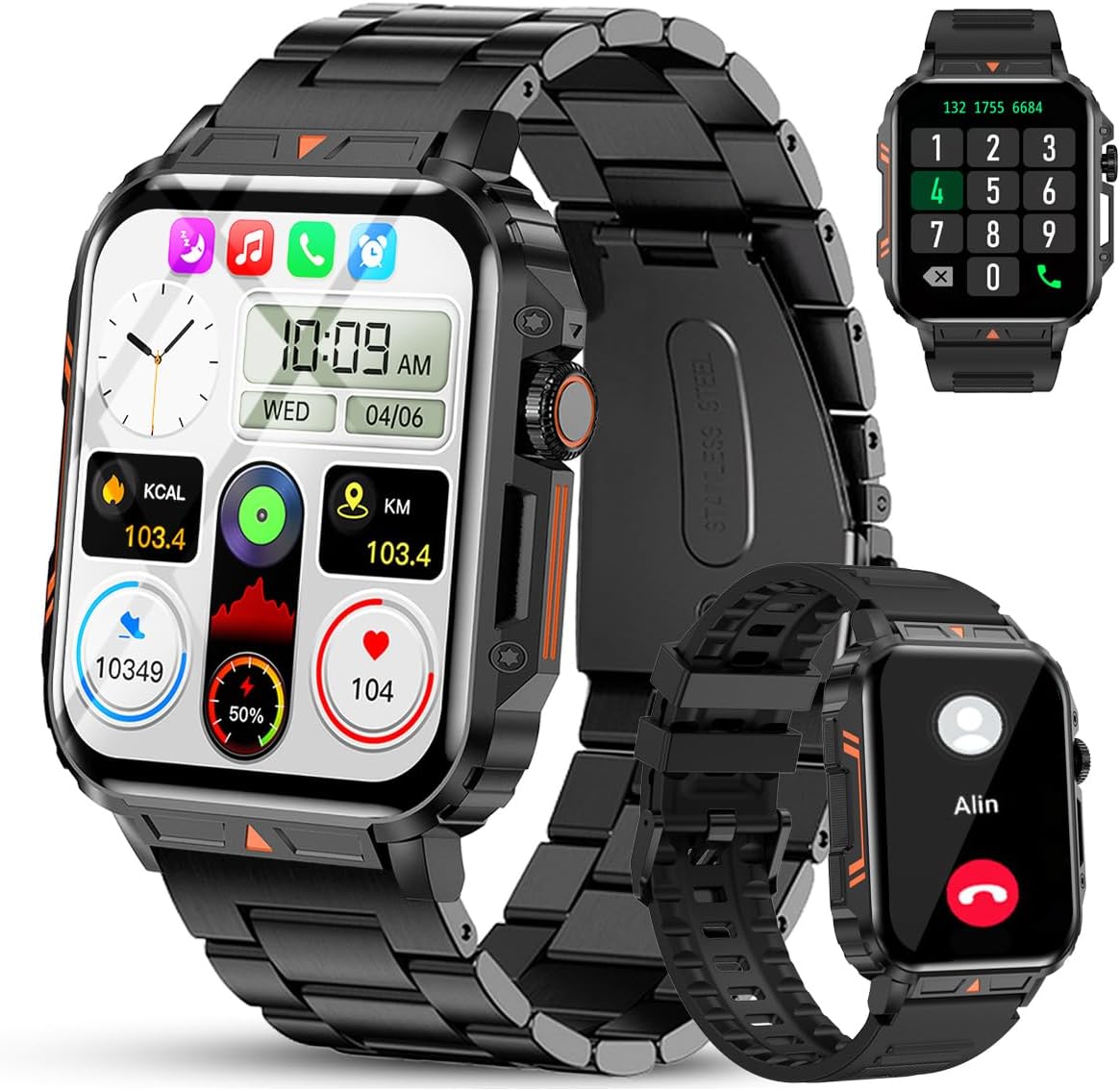
Image 1.1: The Jooeniok L81 Smart Watch, showcasing its main display and interchangeable straps.
2. คุณสมบัติหลัก
- Bluetooth Calling & Message Alerts: Make and receive calls, read messages, and receive notifications from various apps directly on your watch.
- 1.95'' HD Touch Screen & DIY Dial: Enjoy a clear display and personalize your watch face.
- โหมดกีฬามากกว่า 112 แบบ: Track a wide range of activities including running, cycling, badminton, and hiking.
- กันน้ำ IP68: Suitable for daily use, hand washing, and outdoor activities in rain. (Note: Not recommended for diving, showering, or sauna.)
- การติดตามสุขภาพ: Monitor heart rate, blood oxygen (SpO2), blood pressure, and sleep patterns.
- แบตเตอรี่ใช้งานได้ยาวนาน: มาพร้อมแบตเตอรี่ความจุ 340mAh เพื่อการใช้งานที่ยาวนาน
- มัลติฟังก์ชั่น: Includes features like timer, alarm, stopwatch, weather, calendar, water reminder, sedentary reminder, and remote photo control.
3. คู่มือการติดตั้ง
3.1. การชาร์จสมาร์ทวอทช์
Before initial use, fully charge your Jooeniok L81 Smart Watch. Connect the magnetic charging cable to the charging contacts on the back of the watch and plug the USB end into a standard USB power adapter (not included) or a computer's USB port. The watch display will indicate charging status.

Image 3.1: Illustration of the watch dimensions and the location of the charging contacts.
3.2. การติดตั้งและการจับคู่แอป
- ดาวน์โหลดแอป: Scan the QR code provided in the watch's quick start guide or search for the official companion app (e.g., "FitCloudPro" or similar, check packaging for exact name) in the Apple App Store (for iOS) or Google Play Store (for Android).
- เปิดใช้งานบลูทูธ: ตรวจสอบให้แน่ใจว่าได้เปิดใช้งาน Bluetooth บนสมาร์ทโฟนของคุณแล้ว
- เปิดแอป: เปิดแอปพลิเคชันที่ติดตั้งไว้ แล้วทำตามคำแนะนำบนหน้าจอเพื่อสร้างบัญชีหรือเข้าสู่ระบบ
- เพิ่มอุปกรณ์: Within the app, navigate to the "Device" or "Add Device" section. The app will search for available Bluetooth devices. Select "L81" or the corresponding device name when it appears.
- ยืนยันการจับคู่: อาจมีคำขอจับคู่ปรากฏขึ้นบนนาฬิกาและโทรศัพท์ของคุณ โปรดยืนยันการจับคู่บนอุปกรณ์ทั้งสอง
- การอนุญาติ: อนุญาตสิทธิ์ที่จำเป็น (เช่น การแจ้งเตือน ตำแหน่งที่ตั้ง รายชื่อติดต่อ) เพื่อให้แอปทำงานได้อย่างถูกต้อง
The watch is compatible with Android 5.1 and above, and iOS 10.0 and above.
3.3. Initial Settings and Language
After successful pairing, the watch should automatically synchronize time and language settings with your phone. If the watch displays an incorrect language, navigate to the watch's settings menu (usually by swiping down from the main screen or pressing the side button to access the app list, then finding the 'Settings' icon). Look for 'Language' or 'System' settings to change it to English or your preferred language.
4. คู่มือการใช้งาน
4.1. การนำทางพื้นฐาน
- หน้าจอสัมผัส: ปัดไปทางซ้าย/ขวา และขึ้น/ลง เพื่อเลื่อนดูเมนูและฟีเจอร์ต่างๆ แตะเพื่อเลือก
- ปุ่มด้านข้าง: Press to return to the main screen or access the app list. Long press for power options.
- Crown Button (if present): Rotate to scroll through lists or adjust settings, press to select.
4.2. การโทรและการแจ้งเตือนผ่านบลูทูธ
Once paired, your watch can handle calls and display notifications. Ensure Bluetooth is connected and the companion app has the necessary permissions.
- โทรออก: Access the dial pad or contact list on your watch to initiate calls.
- การรับสาย: เมื่อมีสายเรียกเข้า คุณสามารถรับสายหรือปฏิเสธสายได้โดยตรงจากนาฬิกา
- การแจ้งเตือน: Swipe down from the main screen or access the notification center to view incoming messages from SMS, WhatsApp, Facebook, and other apps.
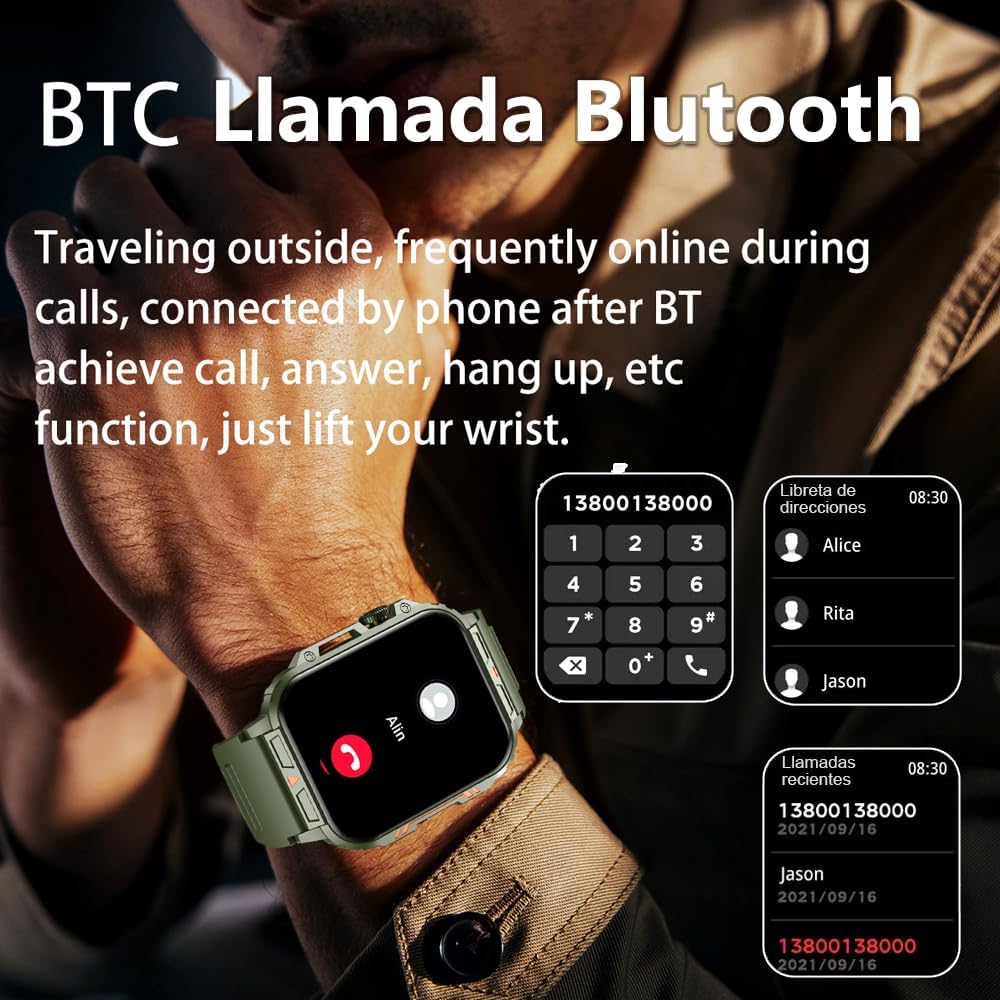
Image 4.1: The watch screen showing an incoming call and the dial pad for making calls.

Image 4.2: The watch displaying notifications from various social media and messaging applications.
4.3. โหมดกีฬา
The watch supports over 112 sports modes. To access them, navigate to the 'Sports' or 'Workout' section on your watch. Select your desired activity to start tracking. The watch will record steps, distance, and calories.

Image 4.3: Icons representing various sports modes available on the watch.
4.4. การติดตามสุขภาพ
The Jooeniok L81 provides continuous monitoring of several health metrics. Access these features through the watch's menu or the companion app.
- อัตราการเต้นของหัวใจ: The watch uses an optical sensor to monitor your heart rate. View ข้อมูลแบบเรียลไทม์บนนาฬิกาหรือแนวโน้มโดยละเอียดในแอป
- ระดับออกซิเจนในเลือด (SpO2) และความดันโลหิต: Initiate a measurement from the watch. Results are displayed on the screen and recorded in the app for historical analysis.
- การติดตามการนอนหลับ: Wear the watch to bed for automatic sleep tracking. It analyzes deep sleep, light sleep, and awake times, providing a comprehensive sleep quality report in the app.
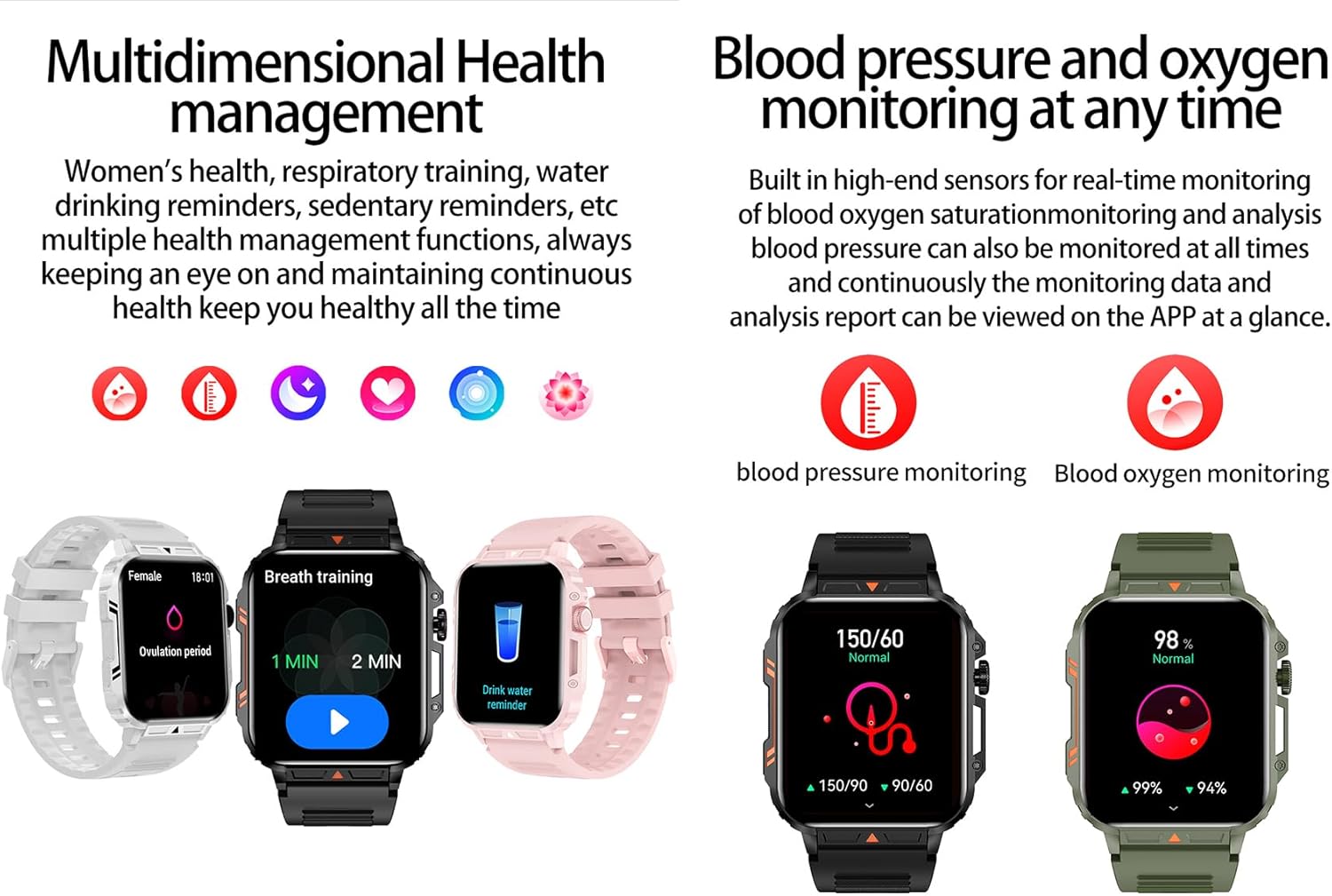
Image 4.4: Watch screens showing blood pressure and blood oxygen monitoring results.

Image 4.5: Watch screens showing real-time heart rate and a summary of sleep data.
4.5. AI Intelligent Voice Function
After connecting the watch to your phone via Bluetooth, activate the voice function on the watch. This allows you to use voice commands to open applications, check weather, make calls, or navigate, offering a hands-free experience.
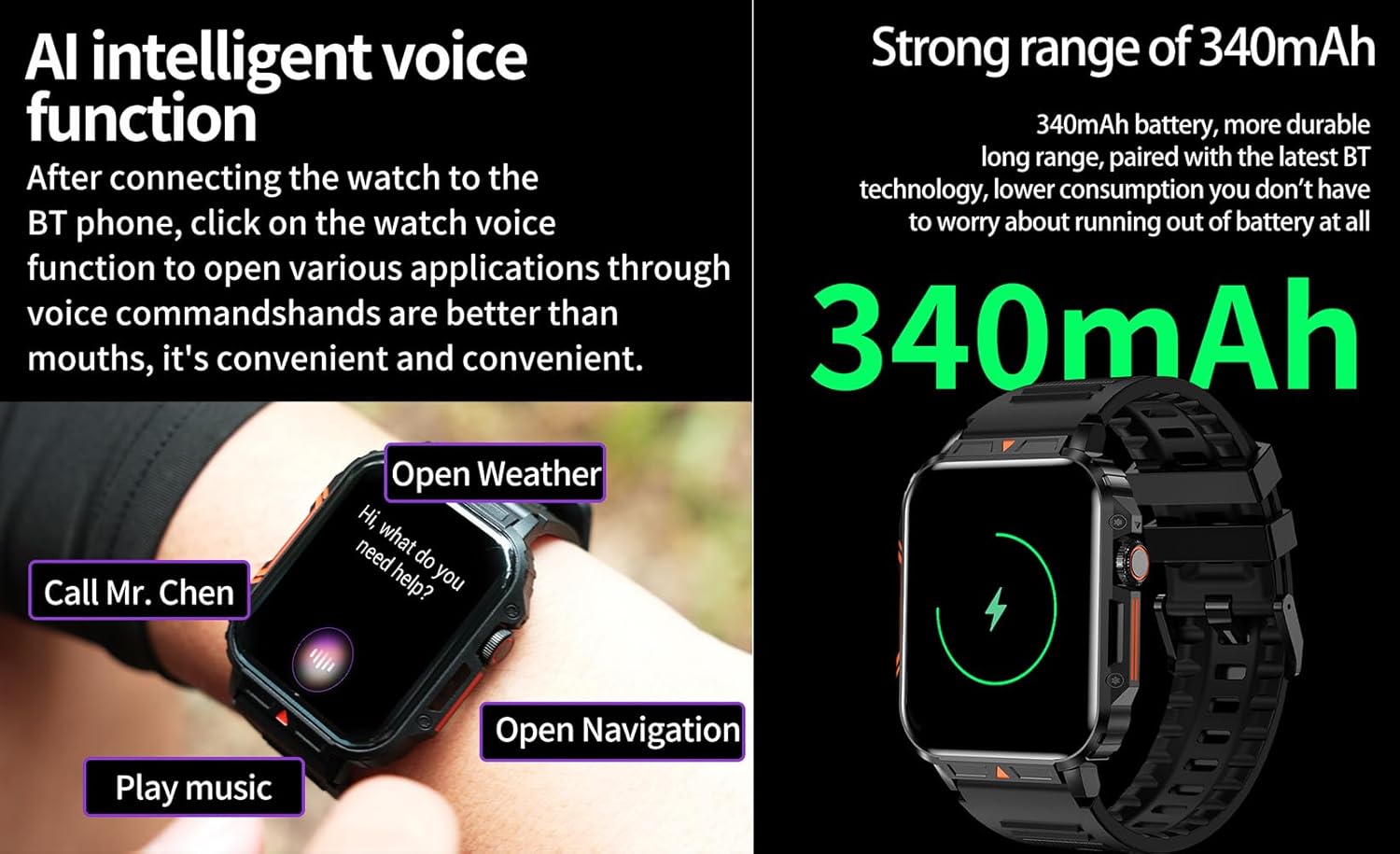
Image 4.6: The watch screen illustrating the AI voice assistant interface with exampคำสั่ง
4.6. หน้าปัดนาฬิกาแบบทำเอง
Personalize your watch face by using the DIY dial feature within the companion app. You can often upload custom images or choose from a variety of pre-designed watch faces.
5. การบำรุงรักษา
5.1. ความทนทานต่อน้ำ
The Jooeniok L81 Smart Watch is IP68 waterproof and dustproof. This means it is resistant to dust and can withstand immersion in water up to 1.5 meters for up to 30 minutes. It is suitable for daily use, hand washing, and light rain.
สำคัญ: นาฬิกานั้นเป็น ไม่ recommended for diving, hot showers, or saunas, as steam and high water pressure can compromise the seals and cause damage.

Image 5.1: The watch shown with water splashes, indicating its water resistance.
5.2. การทำความสะอาด
ทำความสะอาดนาฬิกาและสายนาฬิกาเป็นประจำเพื่อป้องกันการระคายเคืองผิวหนังและรักษาการใช้งาน ใช้ผ้านุ่มๆamp cloth to wipe the screen and body. For the strap, follow the manufacturer's recommendations for the specific material (e.g., silicone, metal).
- หลีกเลี่ยงการใช้สารเคมีรุนแรงหรือวัสดุที่มีฤทธิ์กัดกร่อน
- โปรดตรวจสอบให้แน่ใจว่านาฬิกาแห้งสนิทก่อนชาร์จหรือใช้งานเป็นเวลานาน
5.3. การดูแลแบตเตอรี่
เพื่อยืดอายุแบตเตอรี่:
- หลีกเลี่ยงอุณหภูมิที่สูงหรือต่ำเกินไป
- Do not let the battery fully drain frequently.
- ชาร์จนาฬิกาโดยใช้สายเคเบิลที่ให้มา
Image 5.2: The watch screen highlighting its 340mAh battery capacity.
6 การแก้ไขปัญหา
| ปัญหา | วิธีแก้ปัญหาที่เป็นไปได้ |
|---|---|
| นาฬิกาไม่เปิด | ตรวจสอบให้แน่ใจว่านาฬิกาชาร์จเต็มแล้ว เสียบนาฬิกาเข้ากับเครื่องชาร์จอย่างน้อย 30 นาที |
| ไม่สามารถจับคู่กับสมาร์ทโฟนได้ |
|
| แสดงภาษาไม่ถูกต้อง | Navigate to the watch's settings menu, find 'Language' or 'System' settings, and select your preferred language. If paired, the app might also have a language setting. |
| Touch screen unresponsive or intermittent. |
|
| ไม่ได้รับการแจ้งเตือน |
|
| Health monitoring data seems inaccurate. |
|
7. ข้อมูลจำเพาะ
| คุณสมบัติ | รายละเอียด |
|---|---|
| ชื่อรุ่น | L81 |
| ยี่ห้อ | จูโอนิอค |
| ขนาดหน้าจอ | 1.95 นิ้ว |
| เทคโนโลยีการเชื่อมต่อ | บลูทูธ |
| มาตรฐานการสื่อสารไร้สาย | บลูทูธ |
| ระบบปฏิบัติการ | แอนดรอยด์ (ใช้งานได้กับ Android 5.1 ขึ้นไป และ iOS 10.0 ขึ้นไป) |
| ความจุของหน่วยความจำ | 128MB |
| แบตเตอรี่ | แบตเตอรี่ลิเธียมโพลิเมอร์ 1 ก้อน (340 mAh, มีมาให้ในชุด) |
| ความต้านทานต่อน้ำ | IP68 |
| คุณสมบัติพิเศษ | Activity Tracker, Notifications, Phone Call, Time Display, Heart Rate Monitor, Blood Oxygen Monitor, Sleep Monitor, 112+ Sports Modes, AI Voice Function |
| ขนาด (โดยประมาณ) | Watch face: 44mm (width) x 52mm (height); Thickness: 12mm; Strap length: 260mm |
8. การรับประกันและการสนับสนุน
The Jooeniok L81 Smart Watch is backed by a รับประกัน 365 วัน นับจากวันที่ซื้อ การรับประกันนี้ครอบคลุมถึงข้อบกพร่องจากการผลิตและการทำงานผิดปกติภายใต้การใช้งานปกติ
For technical support, warranty claims, or any questions regarding your product, please contact Jooeniok customer service through the retailer's platform or the contact information provided on the product packaging or official webเว็บไซต์.
โปรดเก็บหลักฐานการซื้อไว้เพื่อใช้ยืนยันการรับประกัน


