การแนะนำ
Welcome to the user manual for your new Infinix Smart 8 smartphone. This guide provides essential information on setting up, operating, maintaining, and troubleshooting your device. The Infinix Smart 8 is designed for efficient performance, featuring a G36 processor, 4GB RAM, 64GB internal storage, a 50MP main camera, and a long-lasting 5000 mAh battery. Please read this manual thoroughly to ensure optimal use of your device.
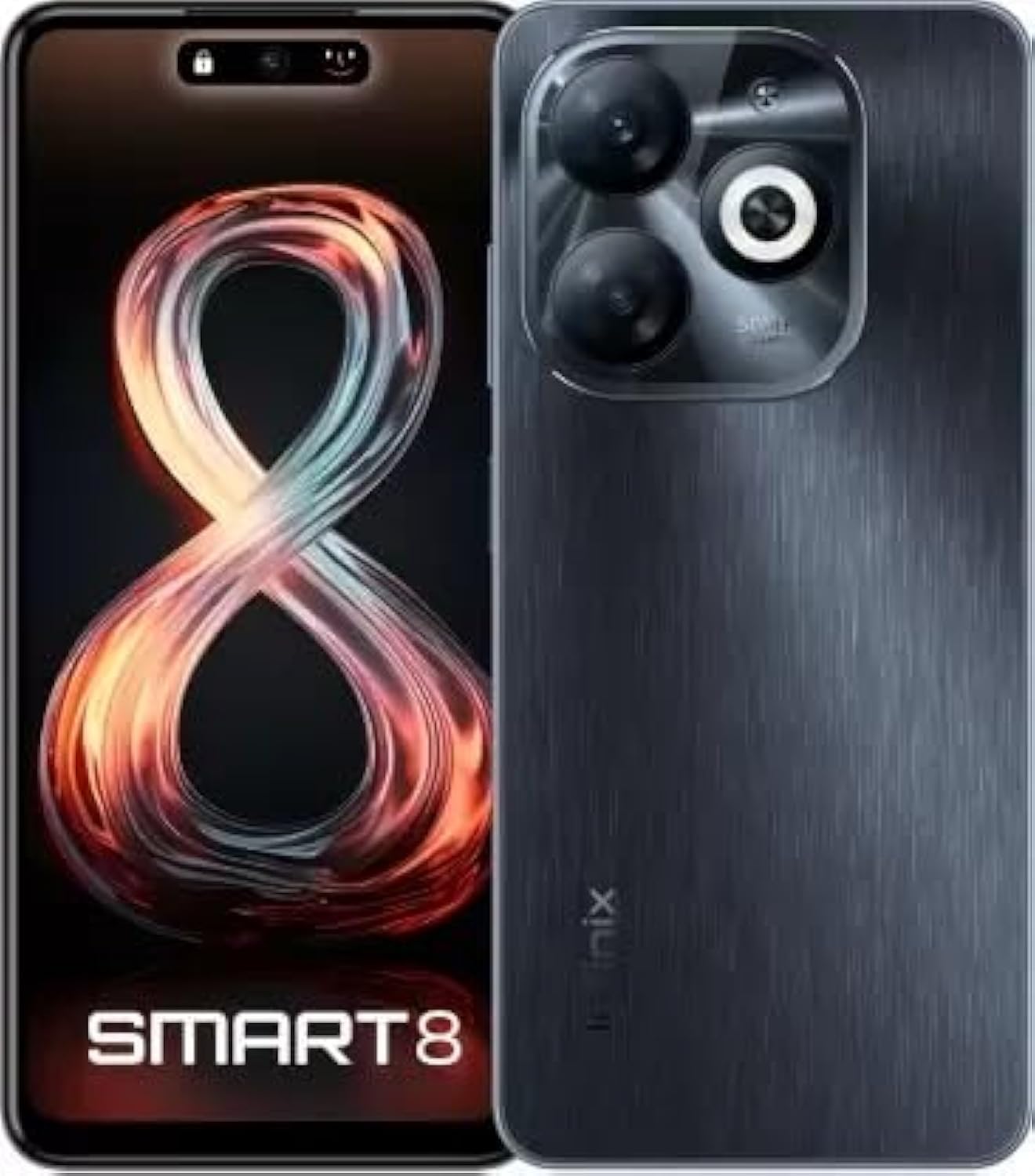
Image: Infinix Smart 8 smartphone in Timber Black, showcasinด้วยการออกแบบที่เพรียวบางและโมดูลกล้อง
มีอะไรอยู่ในกล่อง
Upon unboxing your Infinix Smart 8, please verify that all the following items are included:
- โทรศัพท์มือถือ
- อะแดปเตอร์
- สายเคเบิล USB Type-C
- เคส TPU
- หมุดถอดซิม
- คู่มือเริ่มต้นอย่างรวดเร็ว
- บัตรรับประกัน
- บัตร Xclub
คู่มือการติดตั้ง
1 การใส่ซิมการ์ดและเมมโมรี่การ์ด
Locate the SIM card tray on the side of your device. Use the provided SIM ejector pin to open the tray. Insert your Nano-SIM card(s) and/or a microSD card (for expandable storage up to 1 TB) into the designated slots. Ensure the cards are correctly oriented as shown in the diagram in the Quick Start Guide. Gently push the tray back into the device until it clicks into place.
2. การเปิด/ปิดเครื่อง
- การเปิดเครื่อง: กดปุ่มเปิด/ปิดค้างไว้ (ปกติจะอยู่ทางด้านขวา) จนกว่าโลโก้ Infinix จะปรากฏขึ้น
- วิธีปิดเครื่อง: กดปุ่มเปิด/ปิดค้างไว้ จากนั้นเลือก "ปิดเครื่อง" จากตัวเลือกที่ปรากฏบนหน้าจอ
- ในการรีสตาร์ท: กดปุ่มเปิด/ปิดค้างไว้ จากนั้นเลือก "รีสตาร์ท" จากตัวเลือก
3. การตั้งค่าเริ่มต้น
The first time you power on your device, you will be guided through an initial setup process. This includes selecting your language, connecting to a Wi-Fi network, setting up your Google account, and configuring security features like fingerprint unlock. Follow the on-screen prompts to complete the setup.
คำแนะนำการใช้งาน
การนำทางพื้นฐาน
- สัมผัส: แตะไอคอนเพื่อเปิดแอปหรือเลือกรายการ
- ปัด: ลากนิ้วของคุณไปบนหน้าจอเพื่อเลื่อนหรือนำทางระหว่างหน้าจอ
- หยิก: ใช้สองนิ้วเพื่อซูมเข้าหรือออกจากรูปภาพและ web หน้า
- กดแบบยาว: กดและค้างรายการเพื่อดูตัวเลือกเพิ่มเติมหรือเพื่อย้ายรายการ
การโทรและการส่งข้อความ
To make a call, open the Phone app, enter the number, and tap the call icon. To send a message, open the Messages app, tap the new message icon, enter the recipient's number or select from contacts, type your message, and tap send.
การเชื่อมต่อกับเครือข่าย
- ไวไฟ : ไปที่ การตั้งค่า > เครือข่ายและอินเทอร์เน็ต > Wi-Fi เปิด Wi-Fi เลือกเครือข่ายที่ต้องการ และป้อนรหัสผ่านหากจำเป็น
- บลูทูธ: Go to Settings > Connected devices > Bluetooth. Turn Bluetooth on, then pair with available devices.
- ข้อมูลมือถือ: Ensure your SIM card is active. Go to Settings > Network & internet > Mobile network to manage data usage and settings.
คุณสมบัติหลัก
The Infinix Smart 8 offers a range of features designed to enhance your mobile experience:
- หน่วยความจำและการจัดเก็บ: Equipped with 4 GB RAM and 64 GB internal storage, expandable up to 1 TB via microSD card.
- แสดง: Features a 16.76 cm (6.6 inch) HD+ Display with a 90 Hz refresh rate and 5000 Nits brightness for clear and vibrant visuals.
- ระบบกล้อง: A powerful 50MP main camera with AI Lens and a 5MP front camera for high-quality photos and selfies.
- แบตเตอรี่: A large 5000 mAh battery ensures extended usage on a single charge.
- โปรเซสเซอร์: Powered by a G36 Processor for smooth performance and multitasking.
- การเชื่อมต่อ: Supports 4G cellular networks, Bluetooth, USB, and Wi-Fi.
- ความปลอดภัย: Includes a fingerprint sensor for secure and convenient unlocking.
การใช้กล้อง
Your Infinix Smart 8 comes with an advanced camera system to capture your moments.
กล้องหลัง
The main rear camera is 50 Megapixels, complemented by an AI Lens for enhanced image processing. It features a Quad-LED Flashlight for improved low-light photography.
กล้องหน้า
The front camera is 5 Megapixels, perfect for clear selfies and video calls.

ภาพ: รายละเอียด view of the Infinix Smart 8's rear camera setup, highlighting the 50MP dual camera and Quad-LED flashlight.
To access the camera, tap the Camera app icon. You can switch between photo, video, and other modes. Tap the shutter button to take a picture or start/stop recording a video.
แสดงข้อมูล
The Infinix Smart 8 features a vibrant 6.6-inch HD+ display.
- ขนาด: 16.76 ซม. (6.6 นิ้ว)
- ปณิธาน: 1600 x 720 พิกเซล
- อัตราการรีเฟรช: 90 Hz for smoother scrolling and gaming.
- ความสว่าง: Up to 5000 Nits, ensuring visibility even in bright sunlight.
- พิมพ์: Punch-Hole Display design.

Image: The Infinix Smart 8's 6.6-inch HD+ display, illustrating its punch-hole design and high brightness.
ข้อมูลจำเพาะทางเทคนิค
Below are the detailed technical specifications for the Infinix Smart 8:
| คุณสมบัติ | ข้อมูลจำเพาะ |
|---|---|
| ระบบปฏิบัติการ | แอนดรอยด์ |
| แรม | 4GB |
| การจัดเก็บข้อมูลภายใน | 64GB |
| พื้นที่เก็บข้อมูลแบบขยายได้ | สูงสุด 1TB |
| โปรเซสเซอร์ | โปรเซสเซอร์ G36 |
| ขนาดจอแสดงผล | 16.76 ซม. (6.6 นิ้ว) HD+ |
| ความละเอียดการแสดงผล | 1600 x 720 พิกเซล |
| กล้องหลัง | 50MP + เลนส์ AI |
| กล้องหน้า | 5MP |
| ความจุของแบตเตอรี่ | 5000 มิลลิแอมป์ |
| เวลาสนทนาทางโทรศัพท์ | 25 ชั่วโมง |
| การสื่อสารแบบไร้สาย | Cellular (4G Ready) |
| เทคโนโลยีการเชื่อมต่อ | บลูทูธ, ยูเอสบี, ไวไฟ |
| จีพีเอส | โกลนาส |
| แจ็คเสียง | ใช่ |
| น้ำหนักสินค้า | 350 กรัม |
| หมายเลขรุ่นสินค้า | smart 8 |

Image: A visual summary of the Infinix Smart 8's technical specifications, including RAM, storage, battery, and processor details.
ข้อมูลแบตเตอรี่
The Infinix Smart 8 is equipped with a 5000 mAh battery, providing ampขุมพลังสำหรับการใช้งานประจำวัน
- ความจุ: 5000 มิลลิวินาทีamp ชั่วโมง
- เวลาสนทนา: ใช้งานได้นานสูงสุด 25 ชั่วโมงเมื่อชาร์จเต็ม
- การชาร์จ: Use the provided Adaptor and USB Type-C Cable for optimal charging.
For best battery life, avoid fully discharging the battery frequently and use the original charger.
การแก้ไขปัญหา
If you encounter issues with your Infinix Smart 8, refer to the following common solutions:
- อุปกรณ์ไม่เปิด: Ensure the battery is charged. Connect the charger and wait a few minutes before attempting to power on again. If unresponsive, try a forced restart by holding the power button for 10-15 seconds.
- แอปขัดข้อง/หยุดทำงาน: Close the problematic app and reopen it. If the issue persists, clear the app's cache (Settings > Apps > [App Name] > Storage & cache > Clear cache). Consider updating the app or the phone's software.
- สัญญาณเครือข่ายไม่ดี: ตรวจสอบว่าใส่ซิมการ์ดถูกต้องหรือไม่ ลองรีสตาร์ทอุปกรณ์ และตรวจสอบให้แน่ใจว่าคุณอยู่ในพื้นที่ที่มีสัญญาณเครือข่ายครอบคลุม
- แบตเตอรี่หมดเร็ว: Reduce screen brightness, close unused apps running in the background, disable unnecessary notifications, and turn off Wi-Fi/Bluetooth when not in use.
- หน้าจอสัมผัสไม่ตอบสนอง: รีสตาร์ทอุปกรณ์ หากปัญหายังคงอยู่ โปรดตรวจสอบให้แน่ใจว่าหน้าจอสะอาดและปราศจากความชื้น
For more complex issues, refer to the official Infinix support webเว็บไซต์หรือติดต่อฝ่ายบริการลูกค้า
การบำรุงรักษาและการดูแล
To ensure the longevity and optimal performance of your Infinix Smart 8, follow these maintenance guidelines:
- การทำความสะอาด: ใช้ผ้านุ่มไม่เป็นขุยทำความสะอาดหน้าจอและตัวเครื่อง หลีกเลี่ยงสารเคมีรุนแรงหรือวัสดุที่มีฤทธิ์กัดกร่อน
- อุณหภูมิ: ห้ามให้เครื่องสัมผัสกับอุณหภูมิที่สูงหรือต่ำเกินไป (ร้อนหรือเย็นเกินไป) หรือโดนแสงแดดโดยตรงเป็นเวลานาน
- การสัมผัสน้ำ: The device is not waterproof. Avoid contact with water or other liquids.
- การอัปเดตซอฟต์แวร์: Regularly check for and install software updates to benefit from performance improvements and security patches.
- พื้นที่จัดเก็บ: Avoid overfilling your device's storage. Regularly clear unnecessary files and app caches.
การรับประกันและการสนับสนุน
Your Infinix Smart 8 is covered by a 7-day service center replacement/repair policy from the date of purchase. Please retain your purchase receipt and the warranty card for service claims.
- ผู้ผลิต: Infinix (G mobile devices private ltd)
- การสนับสนุนทางโทรศัพท์ฟรี: 18004190525
- การสนับสนุนทางออนไลน์: เยี่ยมชมเว็บไซต์อย่างเป็นทางการของ Infinix webเว็บไซต์นี้รวบรวมคำถามที่พบบ่อย แหล่งข้อมูลสนับสนุน และข้อมูลการติดต่อ
For any issues or queries, please contact the manufacturer's support team.
ข้อมูลด้านความปลอดภัยที่สำคัญ
Please read the following safety information carefully to prevent injury or damage to your device:
- Do not attempt to disassemble, repair, or modify the device yourself. This can cause damage, fire, or electric shock.
- Use only original or certified compatible chargers and accessories.
- Avoid exposing the device to open flames or extreme heat.
- ห้ามทิ้งอุปกรณ์ลงในไฟหรือน้ำ
- เก็บอุปกรณ์และอุปกรณ์เสริมให้พ้นมือเด็กและสัตว์เลี้ยง
- ปฏิบัติตามกฎหมายและข้อบังคับท้องถิ่นทั้งหมดเกี่ยวกับการใช้โทรศัพท์มือถือ โดยเฉพาะในขณะขับรถ
สินค้าเกินview วีดีโอ
ชมวิดีโอผลิตภัณฑ์อย่างเป็นทางการนี้เพื่อดูภาพรวมview of the Infinix Smart 8's features and capabilities.
วิดีโอ: เจ้าหน้าที่ผ่านview of the Infinix Smart 8 smartphone, detailing its technical specifications, key features, camera, and display.


