การแนะนำ
Thank you for choosing the Smof Open Ear Headphones with Micphone, Model LK02. These wireless air conduction Bluetooth headphones are designed to provide a comfortable and hygienic listening experience while keeping you aware of your surroundings. Featuring Bluetooth 5.1, aptX-HD, and a convenient mute function, they are ideal for online meetings, teaching, office work, home business, and driving. This manual provides detailed instructions on how to set up, operate, and maintain your headphones.

Figure 1: Smof Open Ear Headphones (Model LK02) and included carrying case.
สินค้าเกินview
The Smof LK02 headphones feature an open-ear design that rests outside your ear canal, allowing you to hear ambient sounds while enjoying your audio. This design promotes safety and hygiene. The headset is lightweight, weighing only 41g, and is constructed with skin-friendly soft silicone ear pads and a durable aluminum alloy back-hanging design for extended comfort.

Figure 2: The lightweight design of the Smof LK02 headphones, weighing approximately 41 grams, ensures comfort during prolonged use.
คุณสมบัติหลัก:
- การออกแบบแบบเปิดหู: Allows awareness of surroundings and maintains ear hygiene.
- Bluetooth 5.1: Provides stable, fast, and low-power consumption connectivity with aptX-HD for high-quality audio.
- Noise Reduction Boom Microphone: Captures voice clearly and blocks ambient noise, enhancing communication efficiency.
- อายุการใช้งานแบตเตอรี่ยาวนาน: Up to 8 hours of talk time or 10 hours of listening time on a single charge.
- ควบคุมง่าย: Multifunction button for power, pairing, playback, calls, and voice assistant. Dedicated volume buttons.
- ฟังก์ชั่นปิดเสียง: Dedicated button for quick microphone muting.
- ความเข้ากันได้: Widely compatible with mobile phones, PCs, computers, laptops, tablets, and smartwatches.

Figure 3: The adjustable noise-canceling boom microphone effectively reduces background noise for clear communication.
การตั้งค่า
การชาร์จหูฟัง:
- ค้นหาพอร์ตชาร์จ Type-C บนหูฟัง
- Connect the provided Type-C USB charging cable to the headphones and the other end to a compatible USB power source (e.g., computer USB port, wall adapter).
- ไฟ LED จะแสดงสถานะการชาร์จ โดยทั่วไปการชาร์จเต็มจะใช้เวลาประมาณ 2 ชั่วโมง
- Once fully charged, the LED indicator will change (refer to the LED indicator section for specific light patterns).
A full charge provides up to 8 hours of talk time or 10 hours of listening time.

Figure 4: The Type-C charging port for quick and convenient charging.
การจับคู่บลูทู ธ :
- ตรวจสอบให้แน่ใจว่าหูฟังปิดอยู่
- Press and hold the Multifunction Button for 3-5 seconds until the LED indicator flashes red and blue alternately, indicating pairing mode.
- On your device (smartphone, computer, tablet), enable Bluetooth and search for available devices.
- Select "Smof LK02" (or similar name) from the list of found devices.
- เมื่อเชื่อมต่อแล้ว ไฟ LED จะแสดงไฟสีน้ำเงินคงที่หรือกะพริบช้าๆ
- หูฟังจะพยายามเชื่อมต่อกับอุปกรณ์ที่จับคู่ไว้ครั้งสุดท้ายโดยอัตโนมัติเมื่อเปิดเครื่อง
คำแนะนำการใช้งาน
ปุ่มฟังก์ชั่น:

รูปที่ 5: เกินview of the headphone controls and their functions.
| ปุ่ม/การดำเนินการ | การทำงาน |
|---|---|
| ปุ่มมัลติฟังก์ชัน (Long Press 3-5s) | Power ON/OFF, Enter Pairing Mode |
| ปุ่มมัลติฟังก์ชัน (Click Once) | เล่น/หยุดเพลง, รับ/วางสาย |
| ปุ่มมัลติฟังก์ชัน (ดับเบิ้ลคลิก) | เปิดใช้งานผู้ช่วยเสียง |
| ปุ่ม Volume + (Click Once) | เพิ่มปริมาณ |
| ปุ่ม Volume + (ดับเบิ้ลคลิก) | เพลงต่อไป |
| ระดับเสียง - ปุ่ม (Click Once) | ลดระดับเสียง |
| ระดับเสียง - ปุ่ม (ดับเบิ้ลคลิก) | เพลงก่อนหน้า |
| สวิตช์ปิดเสียง | Mute/Unmute Microphone during calls |
สถานการณ์การใช้งาน:
The open-ear design and noise-canceling microphone make these headphones versatile for various activities:
- การประชุม/สัมมนาออนไลน์: Clear audio and microphone for professional communication.
- Online Teaching/Learning: Facilitates clear interaction for educators and students.
- Office/Home Business: Ideal for calls and multitasking while staying aware of your environment.
- การขับขี่: Allows you to hear traffic and surroundings for safety while taking calls or listening to navigation.

Figure 6: The Smof LK02 headphones are suitable for diverse environments and activities.
การซ่อมบำรุง
To ensure the longevity and optimal performance of your Smof Open Ear Headphones, please follow these maintenance guidelines:
- การทำความสะอาด: Use a soft, dry cloth to wipe the headphones. Do not use abrasive cleaners or immerse the headphones in water.
- พื้นที่จัดเก็บ: Store the headphones in the provided pressure-resistant mini storage bag when not in use to protect them from dust and physical damage. Avoid storing in extreme temperatures.
- การชาร์จ: Only use the provided charging cable or a certified Type-C cable. Avoid overcharging the battery.
- การจัดการ: Do not bend or twist the headset excessively, as this may damage the internal components or the aluminum alloy frame.
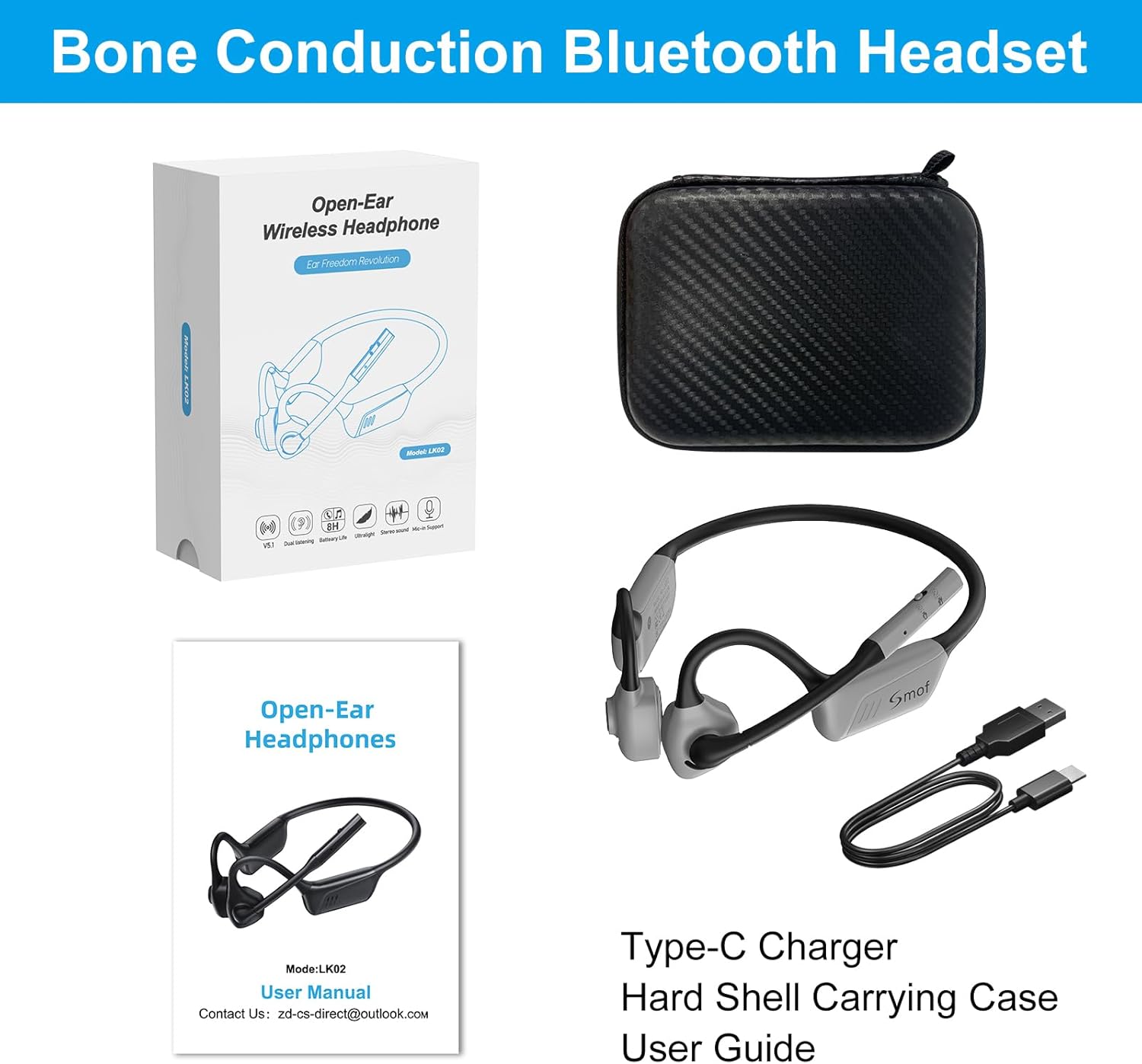
Figure 7: The included pressure-resistant mini storage bag helps protect your headphones during storage and travel.
การแก้ไขปัญหา
If you encounter issues with your Smof Open Ear Headphones, please refer to the following common solutions:
| ปัญหา | สาเหตุที่เป็นไปได้ | สารละลาย |
|---|---|---|
| หูฟังไม่สามารถเปิดเครื่องได้ | แบตเตอรี่อ่อน | ชาร์จหูฟังอย่างน้อย 30 นาที |
| ไม่สามารถจับคู่กับอุปกรณ์ได้ | หูฟังไม่ได้อยู่ในโหมดจับคู่, Bluetooth ปิดอยู่ในอุปกรณ์, อุปกรณ์อยู่ไกลเกินไป | Ensure headphones are in pairing mode (flashing red/blue). Turn Bluetooth on your device. Move device closer to headphones (within 10 meters). |
| ไม่มีเสียงหรือคุณภาพเสียงไม่ดี | ระดับเสียงเบาเกินไป; ไม่ได้เชื่อมต่อหูฟัง; มีสัญญาณรบกวน | Increase volume on headphones and device. Reconnect Bluetooth. Move away from other wireless devices. |
| ไมโครโฟนไม่ทำงาน | ไมโครโฟนปิดเสียง เลือกอุปกรณ์อินพุตไม่ถูกต้อง | Check the mute switch on the microphone boom. Ensure Smof LK02 is selected as the input device in your computer/app settings. |
| การเชื่อมต่อไม่ต่อเนื่อง | Distance from device; obstacles; low battery. | Reduce distance to device. Remove obstacles. Charge headphones. |
ข้อมูลจำเพาะ
| คุณสมบัติ | รายละเอียด |
|---|---|
| ชื่อรุ่น | LK02 |
| เทคโนโลยีการเชื่อมต่อ | ไร้สาย (บลูทูธ 5.1) |
| โปรโตคอลการสื่อสารไร้สาย | บลูทูธ |
| รองรับโปรfiles | HSP, HFP, AVRCP, A2DP, SBC, APTX, APTX_LL, APTX_HD |
| การวางตำแหน่งหู | หูเปิด |
| ฟอร์มแฟกเตอร์ | การนำอากาศ |
| วัสดุ | พลาสติก |
| น้ำหนักสินค้า | 40 กรัม |
| อายุการใช้งานแบตเตอรี่ (เวลาสนทนา) | นานถึง 8 ชั่วโมง |
| อายุการใช้งานแบตเตอรี่ (เวลาฟังเพลง) | นานถึง 10 ชั่วโมง |
| เวลาในการชาร์จ | ประมาณ 2 ชั่วโมง |
| เวลาสแตนด์บาย | นานถึง 40 ชั่วโมง |
| ช่วงความถี่ | 20เฮิรตซ์-20กิโลเฮิรตซ์ |
| ระดับความต้านทานต่อน้ำ | ไม่ทนน้ำ |
| วิธีการควบคุม | สัมผัส, ควบคุมด้วยเสียง |
| คุณสมบัติพิเศษ | Foldable, Noise Reduction Boom Microphone, Mute Function |
| ส่วนประกอบที่รวมอยู่ | User Manual, Type-C Charging Cable, Hard Shell Carrying Case |
การรับประกันและการสนับสนุน
Smof products are manufactured with high-quality standards. For any product-related inquiries, technical support, or warranty claims, please contact Smof customer service. Please refer to the contact information provided in your product packaging or on the official Smof webเว็บไซต์.
While specific warranty details are not provided in this manual, most electronic products come with a standard manufacturer's warranty covering defects in materials and workmanship for a limited period from the date of purchase. Please retain your proof of purchase for warranty service.
For further assistance, you may also refer to the contact information on the product's packaging or the included user manual. The manufacturer's contact email is often found there.


