1. คำแนะนำด้านความปลอดภัยที่สำคัญ
Please read and understand all safety instructions before installation and operation. Failure to follow these instructions may result in injury or product damage.
- ความจุน้ำหนัก: ห้ามเกินขีดความสามารถในการรับน้ำหนักสูงสุด 110 ปอนด์ (50 กก.)
- การติดตั้ง: The TV lift mechanism must be securely mounted against a wall or within a sturdy cabinet structure using appropriate fasteners. Ensure the mounting surface can support the combined weight of the lift and the TV.
- ความปลอดภัยทางไฟฟ้า: Ensure all electrical connections are secure and comply with local electrical codes. Do not operate the lift with damaged cords or plugs. Keep liquids away from electrical components.
- เคลียร์สต๊อก : Maintain clear space around the lift and TV during operation to prevent obstructions and potential damage.
- เด็กและสัตว์เลี้ยง: Keep children and pets away from the lift during operation.
- วัตถุประสงค์การใช้: This product is designed for lifting and lowering televisions within its specified size and weight range. Do not use for any other purpose.
2. เนื้อหาบรรจุภัณฑ์
ตรวจสอบว่าส่วนประกอบทั้งหมดอยู่ครบและไม่ได้รับความเสียหายก่อนดำเนินการติดตั้ง
- Motorized TV Lift Unit
- ขาตั้งทีวี (2 ชิ้น)
- รีโมทคอนโทรล
- Wired Hand Controller
- รับสัญญาณ
- อะแดปเตอร์แปลงไฟ
- สายไฟ
- อุปกรณ์สำหรับติดตั้ง (สกรู แหวนรอง น็อต)

3. การตั้งค่าและการติดตั้ง
Follow these steps carefully for proper installation of your VEVOR Motorized TV Lift.
3.1. Assemble the TV Bracket
- Attach the two vertical TV mounting brackets to the horizontal crossbars using the provided screws and a drill. Ensure they are securely fastened.

3.2. Connect the Control System
- Connect the wired hand controller to the signal receiver.
- Connect the linear actuator cable from the TV lift unit to the power adapter.
- เสียบอะแดปเตอร์แปลงไฟเข้ากับเต้ารับที่เหมาะสม


3.3. Extend the Lift and Attach TV Bracket
- Use the wired hand controller or remote control to extend the linear actuator of the lift.
- Fix the assembled TV bracket onto the extended lift mechanism using the provided screws. Ensure a secure fit.

3.4. ติดตั้งทีวี
- Attach the connector racks to the back of your TV using the appropriate VESA mounting screws.
- Carefully lift your TV and hook the connector racks onto the TV mounting brackets on the lift. Ensure the TV is level and securely seated.

4. คู่มือการใช้งาน
The VEVOR Motorized TV Lift can be operated using either the wireless remote control or the wired hand controller.
4.1. การทำงานของรีโมทคอนโทรล
- ปุ่มขึ้น: กดเพื่อยกทีวีขึ้น
- ปุ่มลง: กดเพื่อลดทีวี
- ปุ่มหยุด: กดเพื่อหยุดทีวีที่ความสูงที่ต้องการ
4.2. Wired Hand Controller Operation
- The wired hand controller features similar Up, Down, and Stop buttons for direct control.

4.3. Automatic Lift Functionality
The lift is designed to automatically raise or lower the TV. The TV can be hidden within a cabinet when not in use, providing a clean aesthetic.
4.1 วิดีโอ: VEVOR Motorized TV Lift in action. This video demonstrates the automatic lifting and lowering functionality of the VEVOR Motorized TV Lift, showing how a TV can be discreetly hidden within a cabinet.
5. การบำรุงรักษา
Regular maintenance ensures optimal performance and longevity of your TV lift.
- การทำความสะอาด: Wipe the lift and TV mounting brackets with a soft, dry cloth. Avoid abrasive cleaners or solvents.
- การตรวจสอบ: Periodically check all screws and connections to ensure they are tight. Inspect the power cord for any signs of damage.
- การหล่อลื่น: The linear actuator is generally maintenance-free. Do not attempt to lubricate internal components unless specifically instructed by VEVOR support.
6 การแก้ไขปัญหา
If you encounter issues with your VEVOR Motorized TV Lift, refer to the following table for common problems and solutions.
| ปัญหา | สาเหตุที่เป็นไปได้ | สารละลาย |
|---|---|---|
| ลิฟต์ไม่เคลื่อนที่ | ไม่มีไฟเข้า การเชื่อมต่อหลวม แบตเตอรี่รีโมทหมด | Check power cord connection, ensure outlet is active. Verify all control cables are securely connected. Replace remote control batteries. |
| Lift moves erratically or stops. | Obstruction, overloaded, motor issue. | Check for any obstructions in the lift's path. Ensure TV weight does not exceed 110 lbs. Contact VEVOR support if the issue persists. |
| รีโมทคอนโทรลไม่ตอบสนอง | Remote battery dead, signal interference. | Replace remote control batteries. Ensure no strong signal interference sources are nearby. Try using the wired hand controller. |
7. ข้อมูลจำเพาะ
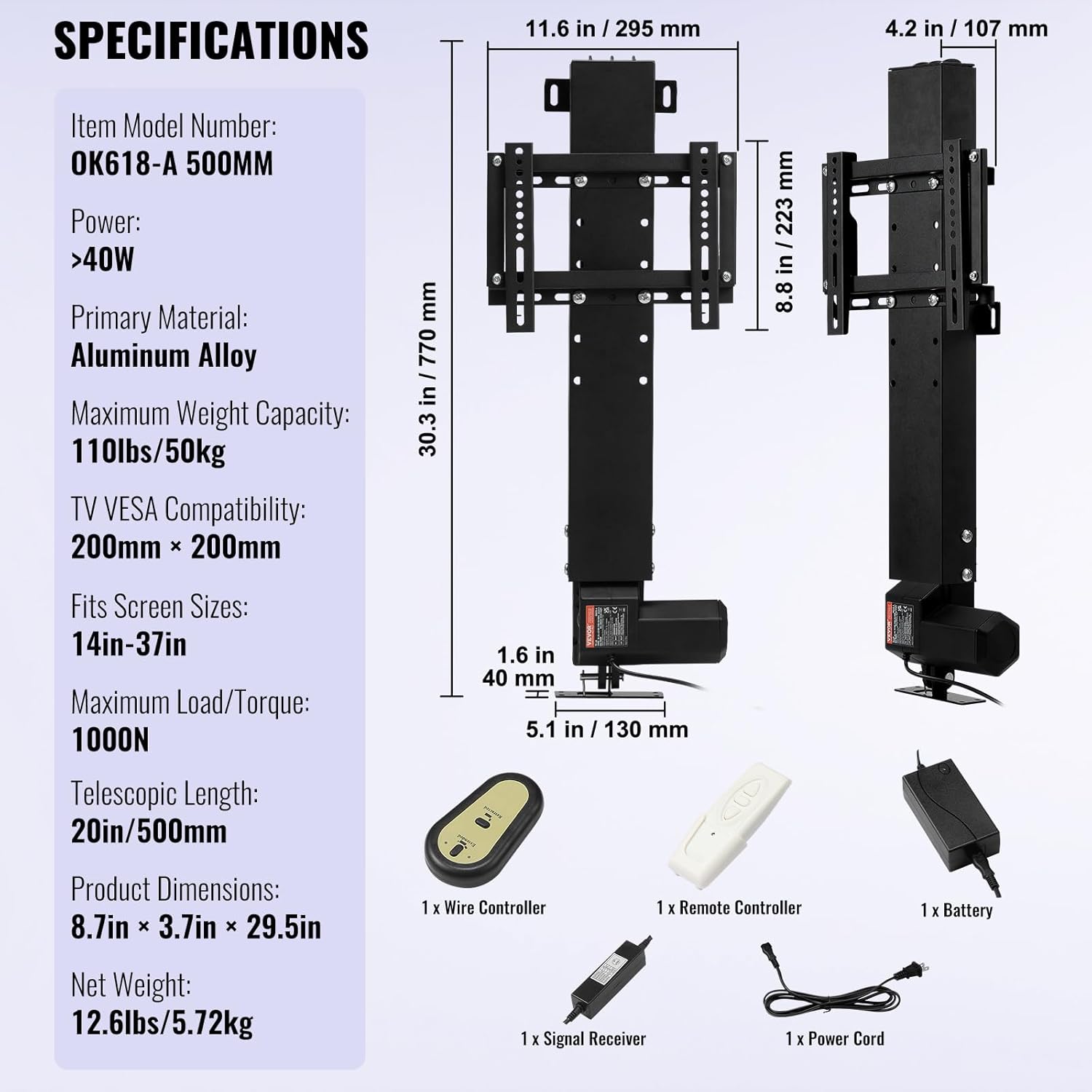
Detailed technical specifications for the VEVOR Motorized TV Lift.
- หมายเลขรุ่นสินค้า: 28CDSTSZJ0000035456
- วัสดุหลัก: โลหะผสมอลูมิเนียม
- สี: สีดำ
- ขนาดสินค้า : 30.3 x 10.6 x 5.1 นิ้ว (770 x 269 x 130 มม.)
- น้ำหนักสินค้า: 13.7 ปอนด์ (5.72 กก.)
- ความยาวช่วงชัก: 19.6 นิ้ว (500 มม.)
- ช่วงปรับความสูง: 30.4 inches - 50 inches (770 mm - 1270 mm)
- ความจุน้ำหนักสูงสุด: 110 ปอนด์ (50 กก.)
- TV VESA Compatibility: Max 200 x 200 mm
- Fits Screen Sizes: 14-37 นิ้ว
- ประเภทการเคลื่อนไหว: การแสดงออก
- พลัง: >40 วัตต์
- Maximum Load/Torque: 1000น.
8. การรับประกันและการสนับสนุน
สำหรับข้อมูลการรับประกัน การสนับสนุนด้านเทคนิค หรือการสอบถามบริการ โปรดติดต่อฝ่ายบริการลูกค้าของ VEVOR ผ่านทาง VEVOR อย่างเป็นทางการ website or your purchase platform. Please have your model number (28CDSTSZJ0000035456) and purchase details ready when contacting support.


