การแนะนำ
This manual provides essential instructions for the installation, operation, and maintenance of your Fermax Sup Milo Digital Intercom System. Please read this manual thoroughly before installation and use to ensure proper function and safety. Keep this manual for future reference.
The Fermax Sup Milo Digital Intercom System is designed to provide clear communication and enhanced security for residential and commercial premises. It integrates advanced technology with a robust design to offer reliable access control and communication solutions.
ข้อมูลด้านความปลอดภัย
Always follow basic safety precautions to reduce the risk of fire, electric shock, and injury to persons. This product should only be installed and serviced by qualified personnel.
- ถอดสายไฟก่อนติดตั้งหรือซ่อมบำรุง
- อย่าให้เครื่องโดนฝนหรือความชื้น
- ตรวจสอบให้แน่ใจว่าการเชื่อมต่อสายไฟทั้งหมดมีความปลอดภัยและเป็นไปตามกฎหมายไฟฟ้าในท้องถิ่น
- อย่าพยายามซ่อมแซมเครื่องด้วยตนเอง แนะนำให้ส่งช่างผู้ชำนาญเข้ารับบริการทุกครั้ง
เนื้อหาแพ็คเกจ
ตรวจสอบว่าส่วนประกอบทั้งหมดครบถ้วนก่อนเริ่มการติดตั้ง โดยทั่วไปแล้ว แพ็คเกจจะประกอบด้วย:
- Fermax Sup Milo Digital Intercom Unit (Aluminum Plate)
- ฮาร์ดแวร์สำหรับติดตั้ง
- Connection cables (may vary by kit)
- คู่มือการใช้งาน (เอกสารนี้)
Note: Specific components may vary based on the purchased kit.
การติดตั้งและการตั้งค่า
This section outlines the general steps for installing the Fermax Sup Milo Digital Intercom System. Professional installation is recommended.
1. การเตรียมสถานที่
- Choose a suitable mounting location, typically near an entrance, at an accessible height.
- ตรวจสอบให้แน่ใจว่าพื้นผิวเรียบและมั่นคง
- Verify access to necessary power and communication wiring.
2. การติดตั้งตัวเครื่อง
- Carefully remove the front panel of the intercom unit to access mounting holes.
- Position the unit and mark the drilling points on the wall.
- เจาะรูและติดตั้งพุกยึดผนังที่เหมาะสมหากจำเป็น
- Secure the intercom unit to the wall using the provided mounting screws.
3. การเชื่อมต่อสายไฟ
Refer to the wiring diagram specific to your system configuration. General connections include:
- แหล่งจ่ายไฟ: Connect to a stable 100V power source. Ensure correct polarity.
- Communication Bus: Connect the digital bus lines to the indoor units and central control unit.
- การเปิดประตู: Connect the door release mechanism (e.g., electric strike) to the designated terminals.
- ช่องรับ/ส่งสัญญาณเสริม: Connect any additional devices such as external cameras or sensors as required.
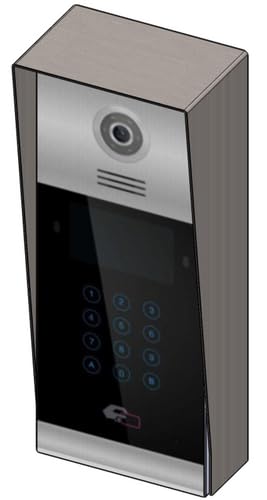 ภาพที่ 1: ด้านหน้า view of the Fermax Sup Milo Digital Intercom System, showing the aluminum plate and digital keypad. This image illustrates the exterior design of the main unit.
4. การเปิดเครื่องและการตั้งค่าเริ่มต้น
- Once all wiring is complete and secure, restore power to the system.
- The unit will perform a self-test. Observe any indicator lights or sounds.
- Follow the system's programming guide (usually provided separately or accessible via a master unit) to configure apartment numbers, access codes, and other settings.
คำแนะนำการใช้งาน
Making a Call from the Outdoor Panel
- To call an apartment: Enter the apartment number using the digital keypad.
- กดปุ่ม "โทรออก" (มักแสดงด้วยไอคอนรูปกระดิ่งหรือไอคอนที่คล้ายกัน)
- The indoor unit will ring. Once answered, communication can begin.
Receiving a Call and Opening the Door (Indoor Unit)
- When the indoor unit rings, press the "Answer" button to establish communication with the visitor.
- To open the door, press the "Door Release" button on your indoor unit.
- The door will unlock for a short period.
Using Access Codes
If configured, authorized users can enter a pre-programmed access code on the outdoor digital keypad to unlock the door without needing to call an indoor unit.
- Enter your personal access code using the digital keypad.
- Press the "Enter" or "Door Release" button.
- ประตูจะปลดล็อค
การซ่อมบำรุง
Regular maintenance ensures the longevity and optimal performance of your Fermax intercom system.
การทำความสะอาด
- ทำความสะอาดด้านนอกของตัวเครื่องด้วยน้ำยานุ่มdamp ผ้า.
- ห้ามใช้น้ำยาทำความสะอาดที่มีฤทธิ์กัดกร่อน ตัวทำละลาย หรือสเปรย์เคมี เนื่องจากอาจทำให้พื้นผิวและชิ้นส่วนอิเล็กทรอนิกส์เสียหายได้
- ตรวจสอบให้แน่ใจว่าไม่มีของเหลวเข้าไปในช่องเปิดของอุปกรณ์
การตรวจสอบ
- Periodically check for any visible damage to the unit or wiring.
- ตรวจสอบให้แน่ใจว่าสกรูยึดทั้งหมดแน่นดีแล้ว
- Test the communication and door release functions regularly.
การอัพเดตซอฟต์แวร์
If applicable, consult your installer or Fermax support for information on firmware updates that may improve performance or add new features.
การแก้ไขปัญหา
ส่วนนี้จะกล่าวถึงปัญหาทั่วไปที่คุณอาจพบ สำหรับปัญหาที่ซับซ้อนมากขึ้น โปรดติดต่อฝ่ายสนับสนุนด้านเทคนิค
| ปัญหา | สาเหตุที่เป็นไปได้ | สารละลาย |
|---|---|---|
| No communication with indoor unit. |
|
|
| ตัวเปิดประตูไม่ทำงาน |
|
|
| แป้นพิมพ์ไม่ตอบสนอง |
|
|
ข้อมูลจำเพาะ
Technical specifications for the Fermax Sup Milo Digital Intercom System (Model: 8424299951713).
- แบบอย่าง: Fermax Sup Milo Digital Intercom System
- หมายเลขชิ้นส่วน: 8424299951713
- ผู้ผลิต: เฟอร์แม็กซ์
- ขนาด (แพ็คเกจ): ขนาดประมาณ 0.1 x 0.1 x 0.1 ซม
- น้ำหนัก (หน่วย): 108 กรัม
- วัสดุ: Metal, Plastic, Polycarbonate (Aluminum Plate)
- แหล่งพลังงาน: External Power Supply (100V)
- เล่มที่tage: 100โวลต์
- วัดtage: 100วัตต์
- แบตเตอรี่ที่ต้องการ: เลขที่
- สี: Multicolored (referring to internal components or subtle design elements, main plate is aluminum)
ข้อมูลการรับประกัน
Fermax products are manufactured to high-quality standards. For specific warranty terms and conditions, please refer to the warranty card included with your product or visit the official Fermax webไซต์นี้ โปรดเก็บหลักฐานการซื้อไว้เพื่อใช้ยืนยันการรับประกัน
Typically, warranty covers manufacturing defects for a specified period from the date of purchase. Damage due to improper installation, misuse, or unauthorized repairs is generally not covered.
การสนับสนุนลูกค้า
If you require technical assistance, have questions about your product, or need to report a problem, please contact your local Fermax distributor or visit the official Fermax webเว็บไซต์สำหรับทรัพยากรสนับสนุน
Webเว็บไซต์: www.fermax.com
โปรดเตรียมหมายเลขรุ่น (8424299951713) และรายละเอียดการซื้อให้พร้อมเมื่อติดต่อฝ่ายสนับสนุน


