การแนะนำ
This manual provides essential information for the safe and efficient use of your Strex 3-in-1 Wireless Charging Station. This device allows you to simultaneously charge a smartphone, an Apple Watch, and AirPods wirelessly. Please read this manual thoroughly before using the product and retain it for future reference.

Image: The Strex 3-in-1 Wireless Charger in use, showing a smartphone, Apple Watch, and AirPods being charged simultaneously.
ข้อมูลด้านความปลอดภัย
- ห้ามถอดประกอบ ดัดแปลง หรือซ่อมแซมอุปกรณ์ด้วยตนเอง
- ควรเก็บเครื่องชาร์จให้ห่างจากน้ำ ความชื้น และอุณหภูมิสูง
- หลีกเลี่ยงการทำที่ชาร์จตกหรือได้รับแรงกระแทกรุนแรง
- Use only a compatible power adapter (Quick Charge 3.0, at least 18W) to ensure optimal performance and safety.
- Do not place metal objects or magnetic cards on the charging surface, as this may interfere with charging or damage the device.
- ตรวจสอบให้แน่ใจว่ามีการระบายอากาศที่เหมาะสมรอบๆ อุปกรณ์ชาร์จระหว่างการใช้งาน
เนื้อหาแพ็คเกจ
กรุณาตรวจสอบแพ็คเกจสำหรับรายการต่อไปนี้:
- Strex 3-in-1 Wireless Charging Station (Model SP288)
- สาย USB-C
- คู่มือการใช้งาน
Note: A Quick Charge 3.0 (18W or higher) power adapter is required for fast charging all devices simultaneously and is ไม่รวมอยู่.
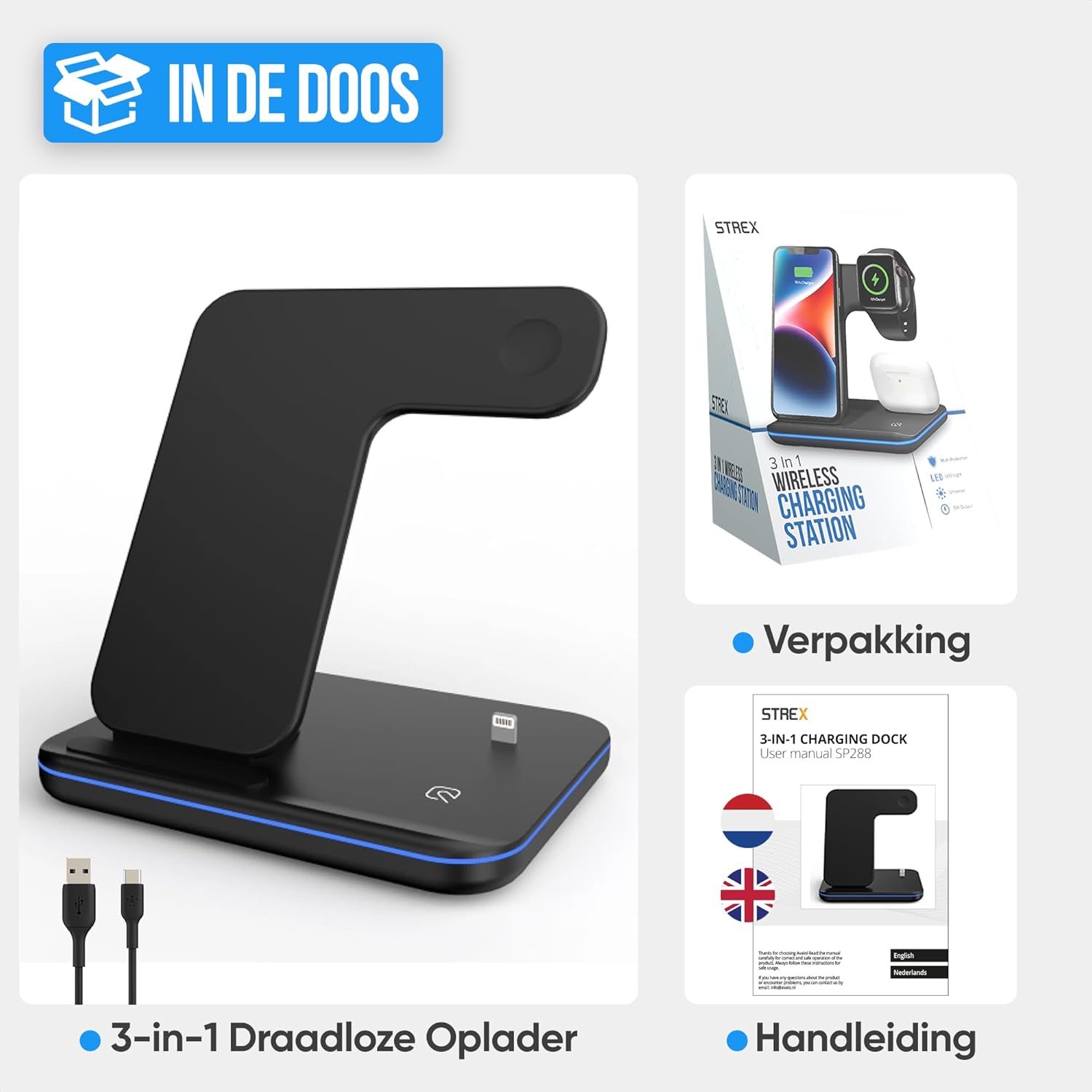
Image: The Strex 3-in-1 Wireless Charger, a USB-C cable, and the user manual, as typically found in the product packaging.
สินค้าเกินview
Familiarize yourself with the components of your Strex 3-in-1 Wireless Charger:
- Smartphone Charging Pad: Vertical stand for wireless smartphone charging.
- โมดูลชาร์จ Apple Watch: Magnetic charging area for Apple Watch.
- AirPods Charging Area: Flat pad for wireless AirPods charging.
- ไฟแสดงสถานะ LED: แสดงสถานะการชาร์จ
- พอร์ตอินพุต USB-C: สำหรับเชื่อมต่อสายไฟ
- แผ่นกันลื่น: ติดตั้งบนฐานเพื่อความมั่นคง
- ตะแกรงระบายอากาศ: เพื่อระบายความร้อน

ภาพ: รายละเอียด view of the Strex 3-in-1 Wireless Charger, highlighting its various components such as the phone charging area, watch charging area, AirPods charging area, LED indicator, USB port, ventilation grille, and anti-slip feet.
คำแนะนำการตั้งค่า
- เชื่อมต่อพลังงาน: Insert the provided USB-C cable into the USB-C input port on the back of the charging station.
- เชื่อมต่อกับอะแดปเตอร์: Connect the other end of the USB-C cable to a Quick Charge 3.0 (18W or higher) power adapter (not included).
- เสียบปลั๊ก: Plug the power adapter into a wall outlet. The LED indicator light will briefly illuminate, indicating the charger is ready for use.
- การจัดวาง: วางแท่นชาร์จบนพื้นผิวเรียบและมั่นคง

Image: A visual comparison demonstrating how the Strex 3-in-1 Wireless Charger helps reduce cable clutter, showing a tidy setup on the right compared to a disorganized one on the left.
คำแนะนำการใช้งาน
การชาร์จอุปกรณ์ของคุณ
- สมาร์ทโฟน: Place your wireless charging-compatible smartphone on the vertical charging stand. It can be placed horizontally or vertically. Ensure the phone is centered on the charging area for optimal connection.
- นาฬิกาแอปเปิ้ล: Attach your Apple Watch to the magnetic charging module. The watch will snap into place and begin charging.
- AirPods: Place your wireless charging-compatible AirPods case on the flat charging pad at the base of the station.
The charger supports fast wireless charging up to 15W for compatible smartphones. All three devices can be charged simultaneously.
ไฟแสดงสถานะ LED
The LED indicator light provides visual feedback on the charging status:
- ไฟเขียว: The charging station is in standby mode or no device is currently charging.
- แสงสีฟ้า: Devices are actively charging.
- Flashing Green and/or Blue Light: Indicates an improper placement of a device or detection of a foreign object. Re-position the device or remove any obstructions.
To turn the LED light on or off, gently tap the touch-sensitive area on the base of the charger.
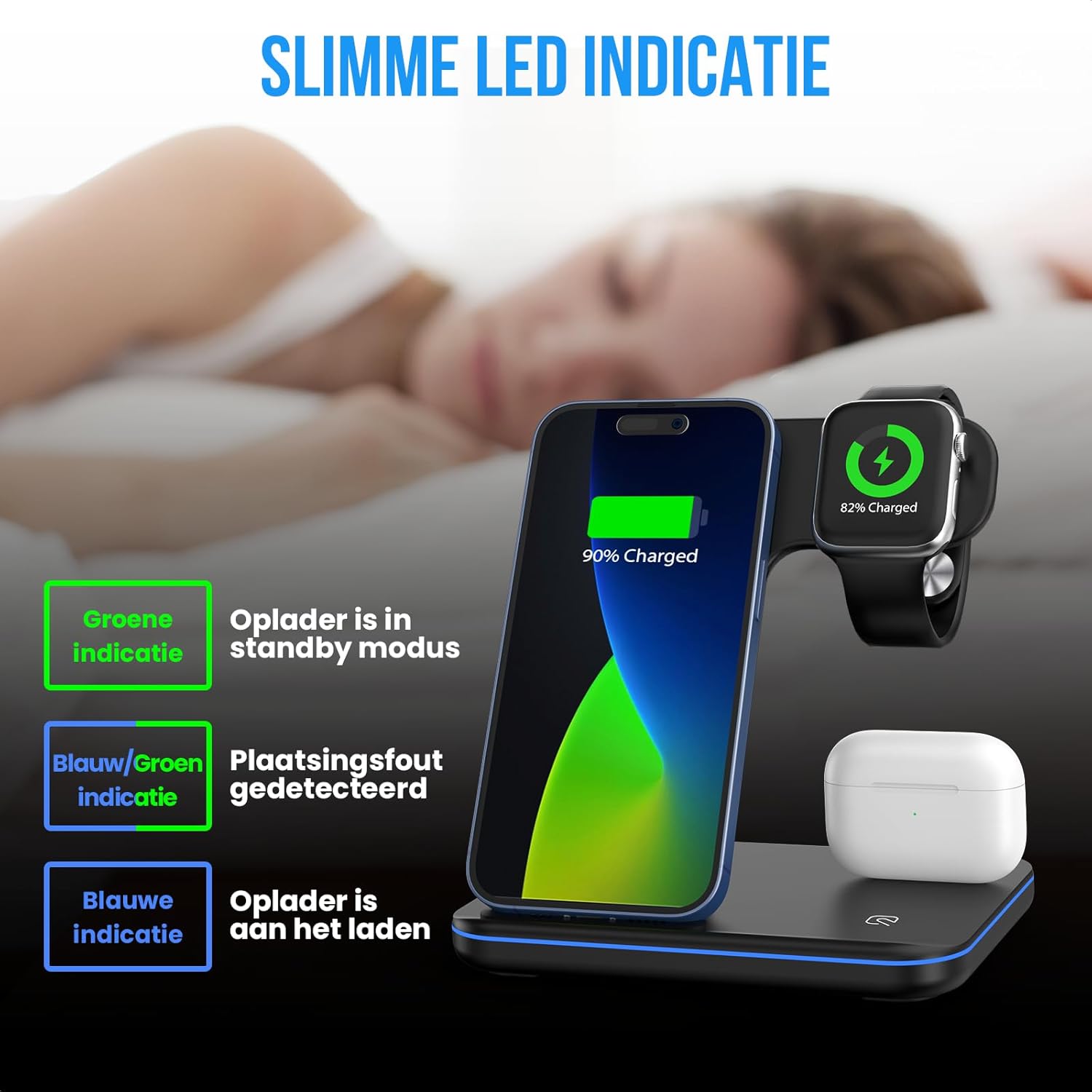
Image: An illustration detailing the meaning of the LED indicator lights: green for standby, blue for active charging, and flashing green/blue for incorrect device placement.
ความเข้ากันได้
The Strex 3-in-1 Wireless Charger is compatible with most wireless charging-enabled devices, including:
- Apple iPhone (iPhone 8 series and newer)
- Apple Watch (Series 2 and newer, excluding Series 1 and original)
- Apple AirPods (with wireless charging case, e.g., AirPods 2, AirPods Pro, AirPods 3)
- Android smartphones with wireless charging functionality (e.g., Samsung Galaxy S series, Huawei, Google Pixel, etc.)

Image: A comprehensive compatibility chart illustrating which models of Apple Watch, AirPods, iPhones, and other Android smartphones are supported by the Strex 3-in-1 Wireless Charger.

Image: The Strex 3-in-1 Wireless Charger demonstrating flexible charging orientations, with a phone charging vertically for communication and horizontally for media consumption.
การซ่อมบำรุง
- การทำความสะอาด: ถอดปลั๊กเครื่องชาร์จออกจากแหล่งจ่ายไฟก่อนทำความสะอาด ใช้ผ้าแห้งนุ่มๆ เช็ดทำความสะอาดพื้นผิว ห้ามใช้สารทำความสะอาดที่มีฤทธิ์กัดกร่อนหรือตัวทำละลาย
- พื้นที่จัดเก็บ: เมื่อไม่ได้ใช้งานเป็นเวลานาน ควรเก็บเครื่องชาร์จไว้ในที่แห้งและเย็น หลีกเลี่ยงแสงแดดโดยตรง
- การดูแลสายเคเบิล: ควรหลีกเลี่ยงการงอหรือบิดสาย USB-C มากเกินไปเพื่อป้องกันความเสียหาย
การแก้ไขปัญหา
| ปัญหา | สาเหตุที่เป็นไปได้ | สารละลาย |
|---|---|---|
| อุปกรณ์ไม่ชาร์จ |
|
|
| LED light flashing green/blue. |
|
|
| ชาร์จช้า |
|
|
ข้อมูลจำเพาะ
| หมายเลขรุ่น | SP288 |
| ยี่ห้อ | สเตรกซ์ |
| ประเภทสินค้า | 3-in-1 สถานีชาร์จไร้สาย |
| อินพุต Voltage | กระแสตรง 12 โวลต์ |
| กำลังขับ (สูงสุด) | 15W (Smartphone), 5W (Apple Watch), 5W (AirPods) |
| Required Power Adapter | Quick Charge 3.0 (18W or higher) - ไม่รวม |
| ประเภทขั้วต่อ | ยูเอสบี ไทป์ ซี |
| วัสดุ | Heat-resistant ABS and PC |
| สี | Black (Note: Product specification listed "vert une" but product images show black) |
| น้ำหนักสินค้า | 296 กรัม |
| ขนาดสินค้า | 13.6 x 10.1 x 13.6 ซม. |
การรับประกันและการสนับสนุน
For warranty information or technical support, please refer to the contact details provided with your purchase or visit the official Strex webไซต์ เก็บหลักฐานการซื้อของคุณไว้เพื่อใช้ในกรณีเรียกร้องการรับประกัน
For further assistance, please contact Strex customer service.


