การแนะนำ
The Phrozen Cure Mega S is an advanced resin curing station designed for post-processing 3D printed models. It features both drying and UV curing functions, a 360-degree transparent turntable, and dual high-speed fans to ensure efficient and uniform curing of large and small models. This manual provides essential information for the safe and effective operation, setup, and maintenance of your Phrozen Cure Mega S.
ข้อมูลด้านความปลอดภัย
โปรดอ่านคำแนะนำด้านความปลอดภัยทั้งหมดอย่างละเอียดก่อนใช้งานอุปกรณ์ เพื่อป้องกันการบาดเจ็บหรือความเสียหาย
- Always wear appropriate personal protective equipment (PPE), such as gloves and eye protection, when handling uncured resin or models that have not been fully cured.
- Ensure the device is placed on a stable, level surface away from direct sunlight and flammable materials.
- Do not look directly at the UV light source during operation.
- ควรเก็บอุปกรณ์ให้ห่างจากน้ำหรือของเหลวอื่นๆ เพื่อป้องกันไฟฟ้าช็อต
- ถอดปลั๊กอุปกรณ์ออกจากเต้าเสียบไฟก่อนทำความสะอาดหรือบำรุงรักษาใดๆ
- เก็บให้พ้นจากมือเด็กและสัตว์เลี้ยง
สินค้าเกินview
The Phrozen Cure Mega S is a robust curing station designed for large-scale and high-volume post-processing. Its intuitive design allows for easy access and efficient operation.

ภาพ: ด้านหน้า view of the Phrozen Cure Mega S curing station, showcasing its compact, black enclosure with a transparent orange-tinted door.
ส่วนประกอบหลัก
- Main Curing Chamber: The enclosed space where models are dried and cured.
- Transparent Turntable: Rotates models 360 degrees for even curing.
- แหล่งกำเนิดแสงยูวี: Emits 405nm UV light for resin solidification.
- High-Speed Fans: Two fans for efficient drying of models.
- แผงสัมผัส: User interface for controlling drying and curing settings.
- Removable Rack: Allows for flexible curing of various model sizes.
- Side-Swing Door: Provides easy access to the curing chamber.
- Built-In Interior Light: Illuminates the chamber for monitoring progress.

Image: Visual representation of the Phrozen Cure Mega S's smart design, highlighting the side-swing door, interior lighting, and the touch panel interface.
การตั้งค่า
Follow these steps for the initial setup of your Phrozen Cure Mega S.
- แกะอุปกรณ์ออกจากกล่อง: Carefully remove the Phrozen Cure Mega S from its packaging. Retain all packaging materials for future transport or storage.
- เลือกตำแหน่ง: Place the curing station on a flat, stable, and heat-resistant surface in a well-ventilated area. Ensure there is sufficient space around the unit for air circulation.
- เชื่อมต่อพลังงาน: Plug the power cord into the power input port on the back of the unit, then plug the other end into a grounded electrical outlet.
- Install Turntable: Place the transparent turntable securely onto the rotating mechanism inside the curing chamber.
- Optional Rack Installation: If curing smaller or multiple models, install the removable rack at the desired height within the chamber.
- เปิดเครื่อง: Press the power button on the touch panel to turn on the device.
การดำเนินการ
The Phrozen Cure Mega S offers versatile drying and curing options for your 3D printed models.
Drying and Curing Functions
The device allows you to select between drying, curing, or a combined dry and cure cycle.
- โหมดการอบแห้ง: Utilizes dual high-speed fans (1700 RPM) to quickly dry models, removing residual alcohol or moisture after washing.
- Curing Mode: Activates the 405nm UV light source to solidify resin models, enhancing their hardness and durability. The 360-degree light source and rotating turntable ensure uniform exposure.
- Dry & Cure Mode: Performs a drying cycle followed by a curing cycle automatically, streamlining the post-processing workflow.

Image: Depicts the Phrozen Cure Mega S in operation, highlighting its dual-action drying (1700 RPM) and 360-degree curing capabilities.
การใช้แผงสัมผัส
The touch panel provides intuitive control over the device's functions.
- เลือกโหมด: On the main screen, tap the desired mode: Fan + Cure (Dry & Cure), UV Cure, หรือ พัดลม (Drying).
- ตั้งเวลา: Use the '+' and '-' buttons to adjust the duration for the selected mode. Recommended curing times vary based on resin type and model size.
- เริ่มรอบ: Press the 'Start' button to begin the process. The interior light will activate, and the turntable will begin to rotate.
- ติดตามความคืบหน้า: Use the built-in interior light to observe the drying or curing state of your models through the transparent door.
- สิ้นสุดรอบ: The device will automatically stop once the set time has elapsed. You can also manually stop the cycle by pressing the 'Stop' button.
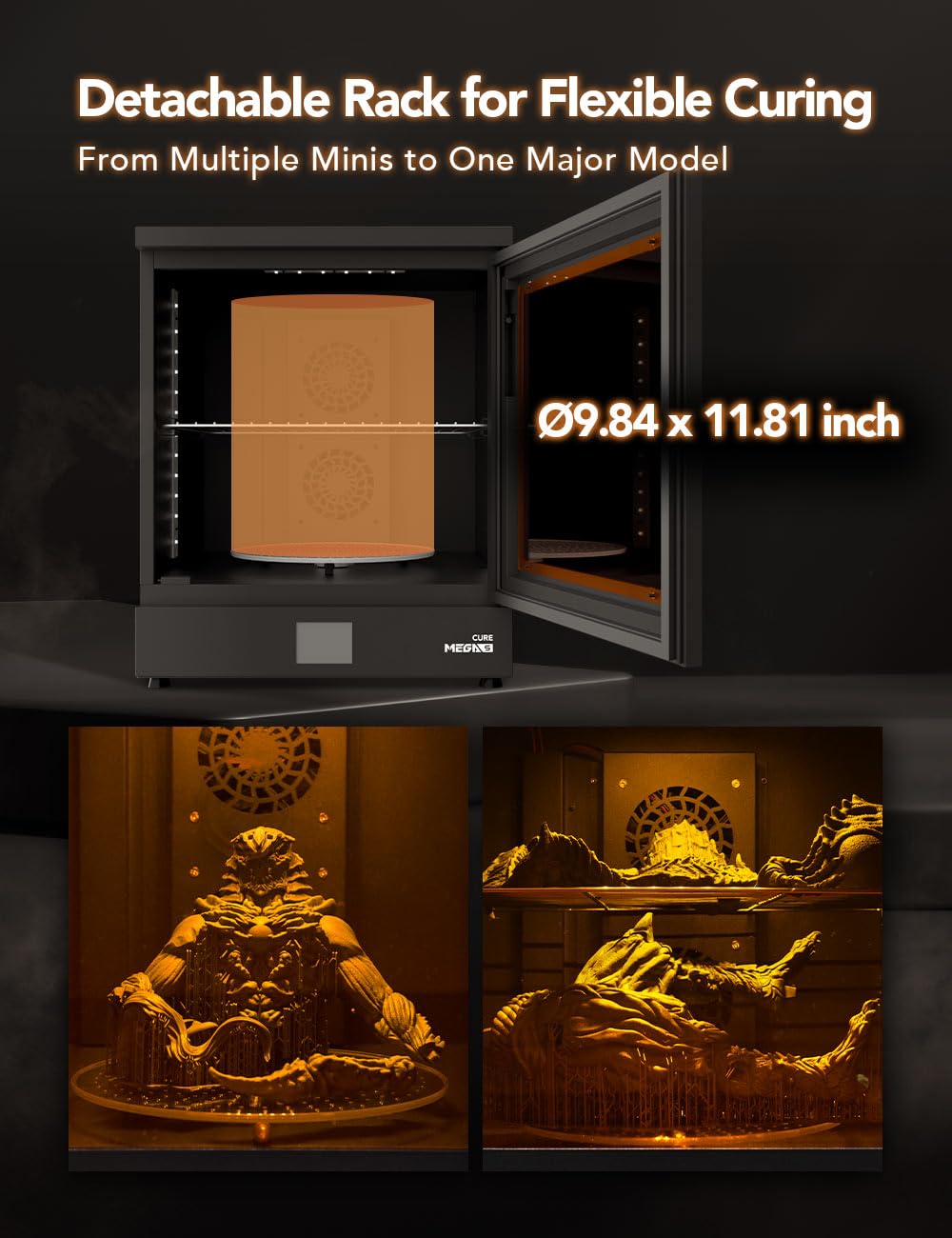
Image: Illustrates the detachable rack feature, showing how it accommodates both large single models and multiple smaller models for flexible curing.
การซ่อมบำรุง
Regular maintenance ensures optimal performance and longevity of your Phrozen Cure Mega S.
- การทำความสะอาดห้อง: After each use, especially if resin spills occur, wipe down the interior of the curing chamber with a soft cloth dampened with isopropyl alcohol (IPA). Ensure the device is unplugged.
- การทำความสะอาดเครื่องเล่นแผ่นเสียง: Remove the turntable and clean it with IPA. Ensure it is completely dry before placing it back into the unit.
- การทำความสะอาดภายนอก: เช็ดพื้นผิวภายนอกด้วยผ้าแห้งนุ่มๆ หลีกเลี่ยงการใช้สารทำความสะอาดที่มีฤทธิ์กัดกร่อนหรือตัวทำละลาย
- แหล่งกำเนิดแสงยูวี: Periodically check the UV LEDs for any dust or residue and gently clean them with a soft, dry cloth if necessary.
- พื้นที่จัดเก็บ: เมื่อไม่ได้ใช้งานเป็นเวลานาน ควรเก็บอุปกรณ์ไว้ในที่แห้งและเย็น หลีกเลี่ยงแสงแดดโดยตรง
การแก้ไขปัญหา
This section addresses common issues you might encounter with your Phrozen Cure Mega S.
| ปัญหา | สาเหตุที่เป็นไปได้ | สารละลาย |
|---|---|---|
| อุปกรณ์ไม่เปิดเครื่อง | สายไฟไม่ได้เสียบอย่างถูกต้อง ไม่มีไฟออกจากเต้ารับ | ตรวจสอบการเชื่อมต่อสายไฟ ทดสอบเต้ารับกับอุปกรณ์อื่น |
| UV light not activating. | Curing mode not selected; door not fully closed. | Ensure 'UV Cure' or 'Fan + Cure' mode is selected. Close the door securely. |
| จานเสียงไม่หมุน | Turntable not properly seated; obstruction. | Re-seat the turntable. Check for any debris obstructing rotation. |
| Models not curing evenly. | Insufficient curing time; models too close together. | Increase curing time. Ensure models are spaced adequately on the turntable. |
| Models not drying effectively. | Drying mode not selected; fans obstructed. | Ensure 'Fan' or 'Fan + Cure' mode is selected. Check for obstructions near fan vents. |
ข้อมูลจำเพาะ
Technical specifications for the Phrozen Cure Mega S.
| คุณสมบัติ | รายละเอียด |
|---|---|
| หมายเลขรุ่น | CUREMEGAS00US |
| ขนาดสินค้า | ลึก 15.6 นิ้ว x กว้าง 18.7 นิ้ว x สูง 19.1 นิ้ว (กว้าง 39.5 ซม. x ลึก 47.5 ซม. x สูง 48.6 ซม.) |
| น้ำหนักสินค้า | 15 กิโลกรัม (33.07 ปอนด์) |
| วัสดุ | โลหะ |
| Curing Wavelength | 405nm UV Light |
| ความเร็วพัดลม | 1700 RPM (Dual Fans) |
| Turntable Rotation | 360 องศา |
| ผู้ผลิต | PHROZEN TECH CO., LTD. |
| วันที่พร้อมใช้งานครั้งแรก | วันที่ 9 สิงหาคม 2023 |

Image: Diagram showing the physical dimensions of the Phrozen Cure Mega S: 47.5cm depth, 39.5cm width, and 48.6cm height.
การรับประกันและการสนับสนุน
For warranty information, technical support, or service inquiries, please contact Phrozen customer support through their official webไซต์หรือผู้ค้าปลีกที่ซื้อผลิตภัณฑ์
แหล่งข้อมูลออนไลน์: Visit the official Phrozen webเว็บไซต์นี้รวบรวมคำถามที่พบบ่อย (FAQ) ไดรเวอร์เวอร์ชั่นล่าสุด และเอกสารสนับสนุนเพิ่มเติม
ข้อมูลติดต่อ: Refer to your purchase documentation or the Phrozen webไซต์สำหรับรายละเอียดการติดต่อที่เฉพาะเจาะจง


