การแนะนำ
The Turtle Beach REACT-R Wired Game Controller is officially licensed for Xbox Series X, Xbox Series S, Xbox One, and Windows 10|11 PCs. This controller is designed to enhance your gaming experience with quick-access audio controls, mappable buttons, and immersive vibration feedback. Its ergonomic design ensures comfort during extended gaming sessions.

รูปที่ 1 : ด้านหน้า view of the Turtle Beach REACT-R Wired Game Controller.
เนื้อหาแพ็คเกจ
ตรวจสอบให้แน่ใจว่ามีสินค้าทั้งหมดอยู่ในแพ็คเกจของคุณ:
- ตัวควบคุม REACT-R
- 8’ / 2.5m USB Cable
- คู่มือเริ่มต้นอย่างรวดเร็ว
- สติ๊กเกอร์เต่าทะเล

Figure 2: Illustration of the items included in the REACT-R Controller package.
สินค้าเกินview
The REACT-R controller integrates several features to enhance your gaming performance and comfort:
- Game-Enhancing Audio Controls: Quick-access audio controls including Superhuman Hearing, game and chat volume balance, and mic mute.
- Superhuman Hearing Sound Setting: Hear every detail, from quiet footsteps to enemy weapon reloads, for a competitive advantage.
- Two Mappable Quick-Action Buttons: Speed up your response with two customizable buttons on the backside of the controller.
- 3.5mm Headset Connection: Utilize Turtle Beach audio functions by plugging in any 3.5mm connected headset.
- ข้อเสนอแนะการสั่นสะเทือน: Dual rumble motors in the handles and triggers provide immersive, realistic gameplay.
- การควบคุมที่ตอบสนองได้ดี: Textured triggers and bumpers, an accurate 8-way D-pad, and smooth thumbstick movement ensure faster reactions.
- Ergonomic Textured Grips: Comfortable, fatigue-free shape with textured handle surfaces for a firm grip during long gaming sessions.
- Officially Licensed for Xbox: Ensures reliable performance and compatibility with Xbox Series X|S, Xbox One, and Windows 10|11 PCs.

Figure 3: Detail of the integrated audio controls on the REACT-R controller.
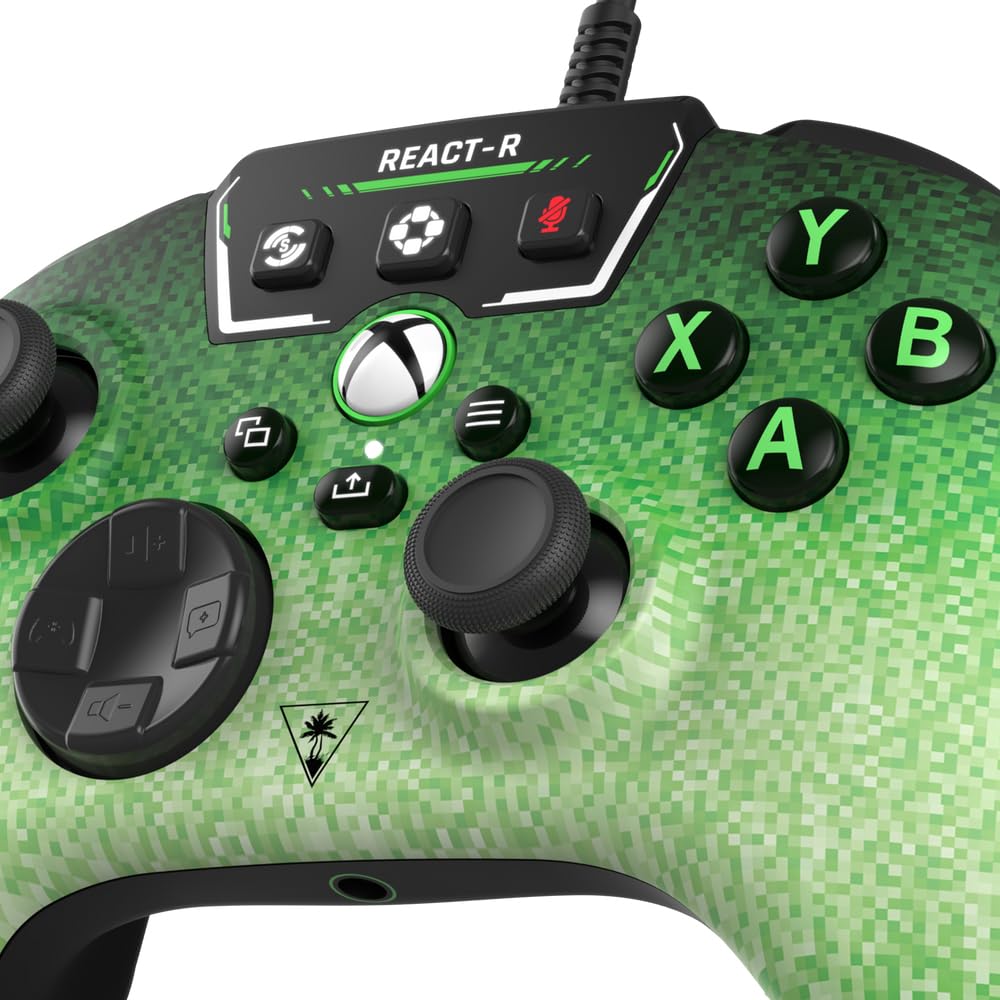
Figure 4: The two mappable quick-action buttons located on the back of the controller.
การตั้งค่า
การเชื่อมต่อคอนโทรลเลอร์
- Locate the 8’ / 2.5m USB-C cable included in the package.
- Connect the USB-C end of the cable to the port on the top of the REACT-R controller.
- Connect the standard USB-A end of the cable to an available USB port on your Xbox console (Series X|S or Xbox One) or Windows 10|11 PC.
- The controller will automatically power on and connect to your device.
การเชื่อมต่อชุดหูฟัง
- Plug any 3.5mm wired gaming headset into the 3.5mm headset jack located at the bottom of the controller.
- Once connected, you can use the integrated audio controls on the controller to manage your headset settings.
คำแนะนำการใช้งาน
การควบคุมเสียง
The top panel of the controller features dedicated audio controls:
- ระดับเสียง +/-: Adjust the overall game audio volume.
- Chat +/-: Adjust the chat volume relative to the game volume.
- ปิดเสียงไมค์: Toggle your microphone on or off.
- การได้ยินที่เหนือมนุษย์: Activate this mode to enhance critical in-game sounds like footsteps and reloads.
Mappable Quick-Action Buttons
The two buttons on the back of the controller (P1, P2) can be programmed to replicate any other controller button for quicker reactions. Refer to the Quick Start Guide for detailed mapping instructions.
การตอบรับการสั่นสะเทือน
The dual rumble motors provide tactile feedback for in-game events, enhancing immersion. This feature is active by default.
การซ่อมบำรุง
- รักษาตัวควบคุมให้สะอาดด้วยการเช็ดด้วยผ้าแห้งและนุ่ม
- หลีกเลี่ยงการให้ตัวควบคุมสัมผัสกับอุณหภูมิที่สูงหรือความชื้นสูงหรือแสงแดดโดยตรง
- อย่าพยายามถอดประกอบหรือดัดแปลงตัวควบคุม เนื่องจากจะทำให้การรับประกันเป็นโมฆะ
การแก้ไขปัญหา
If you encounter any issues with your REACT-R controller, please try the following:
- Ensure the USB-C cable is securely connected to both the controller and your gaming device.
- Test the controller on a different USB port or a different compatible device to rule out port or device issues.
- If using a headset, ensure it is fully plugged into the 3.5mm jack and that audio settings are correctly configured on your device.
- For further assistance, please refer to the official Turtle Beach support webเว็บไซต์หรือติดต่อฝ่ายบริการลูกค้า
ข้อมูลจำเพาะ
| หมายเลขรุ่น | ทีบีเอส-0740-05 |
| ความเข้ากันได้ | Xbox Series X|S, Xbox One, Windows 10|11 PCs |
| การเชื่อมต่อ | Wired (8’ / 2.5m USB-C to USB-A cable) |
| เอาท์พุตเสียง | แจ็คหูฟัง 3.5 มม |
| ขนาด | 6.12 x 2.57 x 4.25 นิ้ว |
| น้ำหนัก | 13.3 ออนซ์ |
| ผู้ผลิต | หาดเต่าทะเล |
การรับประกันและการสนับสนุน
This product is covered by a limited warranty. For detailed warranty information, product registration, and technical support, please visit the official Turtle Beach webไซต์นี้ โปรดเก็บหลักฐานการซื้อไว้เพื่อใช้ยืนยันการรับประกัน
Copyright © 2023 Voyetra Turtle Beach, Inc. All rights reserved. Turtle Beach, the palm tree logo, Superhuman Hearing, and Voyetra are registered trademarks and/or trademarks of VTB, Inc. Microsoft, Xbox, Xbox “Sphere” Design, Xbox Series X|S, Xbox One, and Windows are trademarks of the Microsoft group of companies. All other trademarks are the properties of their respective owners.


