การแนะนำ
This user manual provides detailed instructions for the operation and maintenance of your MOBI Connect Smart 4 in 1 Wi-Fi Air Purifier & Humidifier. This device is designed to improve indoor air quality by purifying and humidifying the air, offering a healthier and more comfortable living environment. Please read this manual thoroughly before use to ensure proper function and safety.

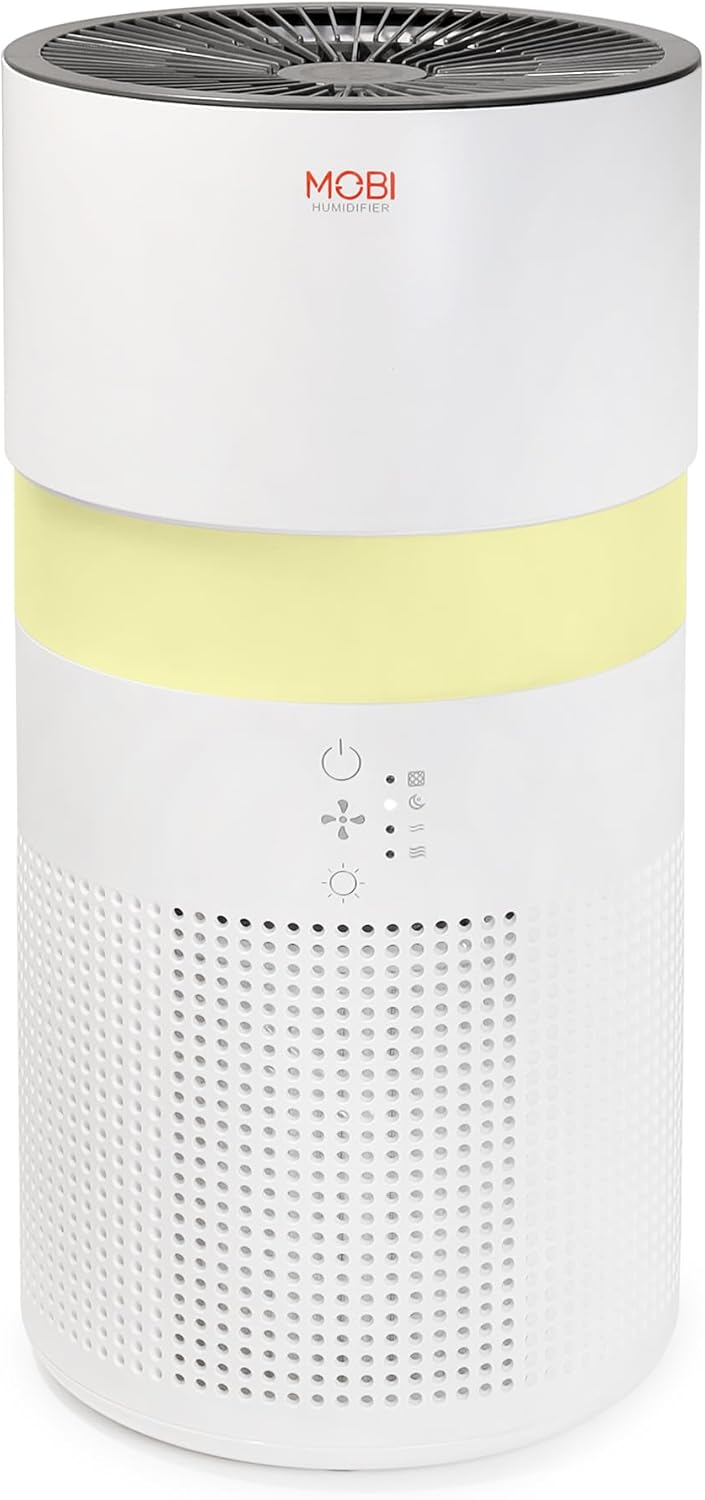
Image: The MOBI Connect Smart 4 in 1 Wi-Fi Air Purifier & Humidifier, a compact white cylindrical device with a light band and control panel.
ข้อมูลด้านความปลอดภัยที่สำคัญ
เพื่อลดความเสี่ยงจากไฟไหม้ ไฟฟ้าช็อต หรือการบาดเจ็บ โปรดปฏิบัติตามข้อควรระวังด้านความปลอดภัยขั้นพื้นฐานทุกครั้งเมื่อใช้งานเครื่องใช้ไฟฟ้านี้
- ควรวางอุปกรณ์บนพื้นผิวที่มั่นคงและเรียบเสมอ
- ห้ามปิดกั้นช่องรับหรือช่องระบายอากาศ
- เก็บอุปกรณ์ให้ห่างจากน้ำและความชื้น
- ถอดปลั๊กอุปกรณ์ก่อนทำความสะอาดหรือบำรุงรักษา
- อย่าใช้อุปกรณ์หากสายไฟหรือปลั๊กเสียหาย
- เก็บให้พ้นจากมือเด็กและสัตว์เลี้ยง
- Only use original MOBI replacement filters.
สินค้าเกินview
Familiarize yourself with the components and controls of your air purifier and humidifier.
ภาพ: ภาพระยะใกล้ view of the control panel on the MOBI Air Purifier, showing power, fan speed, light, and humidifier icons.
คุณสมบัติของแผงควบคุม:
- ปุ่มเปิด/ปิด: Turns the unit on/off and activates pairing mode.
- ตัวบ่งชี้ความเร็วพัดลม: Displays current fan speed (Sleep, Medium, High).
- Humidifier Indicator: Shows humidifier status.
- ปุ่มโหมดแสง: Cycles through light modes (Off, Gradient, Fixation).
- ตัวบ่งชี้การเปลี่ยนตัวกรอง: ไฟแสดงสถานะจะสว่างขึ้นเมื่อถึงเวลาต้องเปลี่ยนไส้กรอง
คู่มือการติดตั้ง
Follow these steps to set up your MOBI Connect Smart 4 in 1 Wi-Fi Air Purifier & Humidifier and connect it to the MOBI Smart App.
ตั้งค่าเริ่มต้น:
- แกะอุปกรณ์และนำวัสดุบรรจุภัณฑ์ทั้งหมดออก
- Ensure the filter is correctly installed inside the unit. Refer to the 'Maintenance' section for filter installation.
- วางอุปกรณ์บนพื้นผิวเรียบและมั่นคง
- Plug the power adapter into the device and then into a wall outlet. The device will enter pairing mode, indicated by a red blinking LED.
การเชื่อมต่อแอพ:
- ดาวน์โหลด MOBI Smart App จากร้านแอปของอุปกรณ์ของคุณ
- Open the app and sign up for an account if you don't have one.
- Accept all requested permissions (Bluetooth, Location, Notifications) for full functionality.
- On the app's home screen, tap 'Add Device' or the '+' icon in the top right corner.
- The app will search for nearby devices. If your device is blinking red, it should appear in the 'Discovering devices' area. Tap 'Add'.
- If not automatically discovered, select 'Mobi Air Purifier' from the 'Add Manually' list.
- Enter your 2.4GHz Wi-Fi network username and password. (Note: 5GHz networks are not supported).
- Follow the on-screen instructions to activate the device for pairing. If the red LED is not blinking, press and hold the power button until it starts blinking.
- Once the device is blinking red, tap 'Finish network configuration' and then 'Next' in the app.
- The app will connect to the device. Once connected, tap the blue button with the white plus sign next to 'MOBI Smart Air Care 4 IN 1' and then 'Done' in the top right corner.
Video: A detailed guide on how to connect and set up the MOBI Smart 4-in-1 Air Purifier & Humidifier using the MOBI Smart App, including app permissions, device discovery, Wi-Fi setup, and pairing instructions.
คำแนะนำการใช้งาน
Control your MOBI Connect Smart 4 in 1 Wi-Fi Air Purifier & Humidifier using the physical buttons on the device or through the MOBI Smart App.
Using the Device Buttons:
- เปิด/ปิดเครื่อง: Press the power button once to turn the unit on or off.
- ปรับความเร็วพัดลม: Press the fan speed button to cycle through Sleep, Medium, and High settings.
- Control Night Light: Press the light button to cycle through Off, Gradient (color flow), and Fixation (single color) modes.
- ฟังก์ชั่นเครื่องเพิ่มความชื้น: Press the humidifier button to activate or deactivate the humidification feature.
Using the MOBI Smart App:
The app provides comprehensive control and additional features.
- สวิตช์: Power the device on or off remotely.
- ความเร็วลม: Select Sleep, Medium, or High wind speed options.
- นาฬิกาจับเวลาถอยหลัง: Set a timer for 2, 4, or 6 hours for automatic shut-off.
- การตั้งค่า: Access advanced options:
- การฆ่าเชื้อด้วยรังสียูวี: Enable or disable the UV disinfection feature.
- รีเซ็ตตัวกรอง: Reset the filter life indicator after replacing the filter.
- โหมดแสง: Choose between Off, Gradient (cycling colors), or Fixation (select a single color).
- กำหนดการ: Create custom schedules for when the device should turn on or off.
- การรวมระบบบ้านอัจฉริยะ: Monitor your home's air quality and integrate with other MOBI Smart devices.
- Aromatherapy Pad: Add essential oils to the designated pad to diffuse scents into the air.

Image: The MOBI Air Purifier showcasing its 7 color-changing LED night light feature, adding ambiance to any room.

Image: The MOBI Air Purifier next to a smartphone displaying the MOBI Smart App interface, highlighting smart home control features.
การซ่อมบำรุง
การบำรุงรักษาอย่างสม่ำเสมอจะช่วยให้เครื่องทำงานได้อย่างมีประสิทธิภาพสูงสุดและยืดอายุการใช้งานของเครื่องได้
การเปลี่ยนตัวกรอง:
The MOBI Connect Smart 4 in 1 Wi-Fi Air Purifier & Humidifier uses a 3-stage filtration system (Pre-Filter, Carbon, and HEPA filter). The filter replacement alert will notify you when it's time to change the filter.

ภาพ: ภาพแสดงโครงสร้างของ 3-stage HEPA filtration system, showing the layers of the filter.
- ถอดปลั๊กอุปกรณ์ออกจากเต้ารับไฟฟ้า
- ถอดฝาครอบด้านล่างของเครื่องออก
- ถอดแผ่นกรองเก่าออกอย่างระมัดระวัง
- Insert the new MOBI replacement filter, ensuring it is seated correctly.
- เปลี่ยนฝาครอบด้านล่าง
- เสียบอุปกรณ์กลับเข้าไปใหม่
- In the MOBI Smart App, go to 'Settings' and select 'Reset Filter' to reset the filter life indicator.

Image: The MOBI Air Purifier with a new filter, illustrating the filter replacement alert system.
การทำความสะอาดอุปกรณ์:
- เช็ดด้านนอกของอุปกรณ์ด้วยผ้านุ่มdamp ผ้า ห้ามใช้น้ำยาทำความสะอาดที่มีฤทธิ์กัดกร่อน
- Clean the water tank regularly to prevent mineral buildup and mold growth. Use a mild detergent and rinse thoroughly.
- Ensure all parts are completely dry before reassembling and using the device.
การแก้ไขปัญหา
หากคุณพบปัญหาเกี่ยวกับอุปกรณ์ โปรดดูปัญหาและวิธีแก้ไขที่พบบ่อยต่อไปนี้
| ปัญหา | สาเหตุที่เป็นไปได้ | สารละลาย |
|---|---|---|
| อุปกรณ์ไม่เปิด | ไม่ได้เสียบปลั๊ก; มีปัญหาที่เต้ารับไฟฟ้า; สายไฟชำรุด | Ensure power cord is securely plugged in. Test outlet with another device. Check for cord damage. |
| อุปกรณ์ไม่สามารถเชื่อมต่อ Wi-Fi ได้ | Incorrect Wi-Fi password; 5GHz network; device not in pairing mode. | Verify Wi-Fi password. Ensure you are connecting to a 2.4GHz network. Press and hold power button to enter pairing mode (red blinking LED). |
| คุณภาพอากาศยังไม่ดีขึ้น | Dirty filter; incorrect fan speed; room size too large. | Check filter indicator and replace if necessary. Increase fan speed. Ensure device is suitable for your room size. |
| Humidifier not producing mist. | Water tank empty; humidifier function off; mineral buildup. | Refill water tank. Activate humidifier function via app or button. Clean water tank and humidifier components. |
ข้อมูลจำเพาะ
| คุณสมบัติ | รายละเอียด |
|---|---|
| ขนาดสินค้า | ลึก 6.5 นิ้ว x กว้าง 6.5 นิ้ว x สูง 13 นิ้ว (6.5 x 6.5 x 13 นิ้ว) |
| หมายเลขรุ่นสินค้า | 70692 |
| น้ำหนัก | 3 ปอนด์ |
| สี | สีขาว |
| การครอบคลุมพื้นที่ | สูงถึง 350 ตารางฟุต |
| ระบบการกรองน้ำ | 3-สtage (Pre-Filter, Activated Carbon, HEPA) |
| ประเภทเครื่องทำความชื้น | Forced-air water tank method |
| ไฟกลางคืน | 7 Unique LED Colors, Adjustable Modes (Off, Gradient, Fixation) |
| ระดับเสียง | 24dB (โหมดพักเครื่อง) |
| อัตราการไหลเวียนของอากาศ | 5x per hour |
| การเชื่อมต่อ | Wi-Fi (2.4GHz required) |
| การรับรอง | UL Certified, RoHS Certified |
| วัดtage | 680 วัตต์ |
การรับประกันและการสนับสนุน
MOBI products are designed with quality and reliability in mind. For warranty information and customer support, please refer to the official MOBI webหรือติดต่อฝ่ายบริการลูกค้าโดยตรง
For frequently asked questions (FAQ) and feedback, you can also access these sections within the MOBI Smart App under the device settings.


