การแนะนำ
Welcome to the user manual for your new FERMAX Duox Plus Veo 4.3" Monitor. This manual provides essential information for the proper installation, operation, and maintenance of your device. Please read this manual thoroughly before using the product to ensure safe and efficient operation.
ข้อมูลด้านความปลอดภัยที่สำคัญ
- ความปลอดภัยทางไฟฟ้า: Ensure all electrical connections are made by a qualified professional and comply with local electrical codes. Disconnect power before installation or maintenance.
- สภาพแวดล้อม : Do not expose the monitor to extreme temperatures, humidity, or direct sunlight. Install in a dry, well-ventilated area.
- การจัดการ: Handle the monitor with care to avoid damage to the screen or internal components.
- การทำความสะอาด: ใช้ผ้าแห้งนุ่มๆ เช็ดทำความสะอาด ห้ามใช้สารทำความสะอาดที่มีฤทธิ์กัดกร่อนหรือตัวทำละลาย
- การกำจัด: Dispose of the product and its components according to local electronic waste regulations.
เนื้อหาแพ็คเกจ
โปรดตรวจสอบว่ารายการทั้งหมดที่ระบุไว้ด้านล่างมีอยู่ในแพ็คเกจของคุณหรือไม่:
- FERMAX Duox Plus Veo 4.3" Monitor Unit
- ตัวยึด
- สายเชื่อมต่อ (ถ้ามี)
- สกรูและปลั๊กติดผนัง
- คู่มือการใช้งาน (เอกสารนี้)
คุณสมบัติผลิตภัณฑ์
The FERMAX Duox Plus Veo 4.3" Monitor offers advanced features for your intercom system:
- 4.3-inch color display for clear video communication.
- Hands-free audio communication.
- Intuitive button interface for call answer, door release, and additional functions.
- Sleek, compact design suitable for modern interiors.
- Compatible with Duox Plus digital systems.
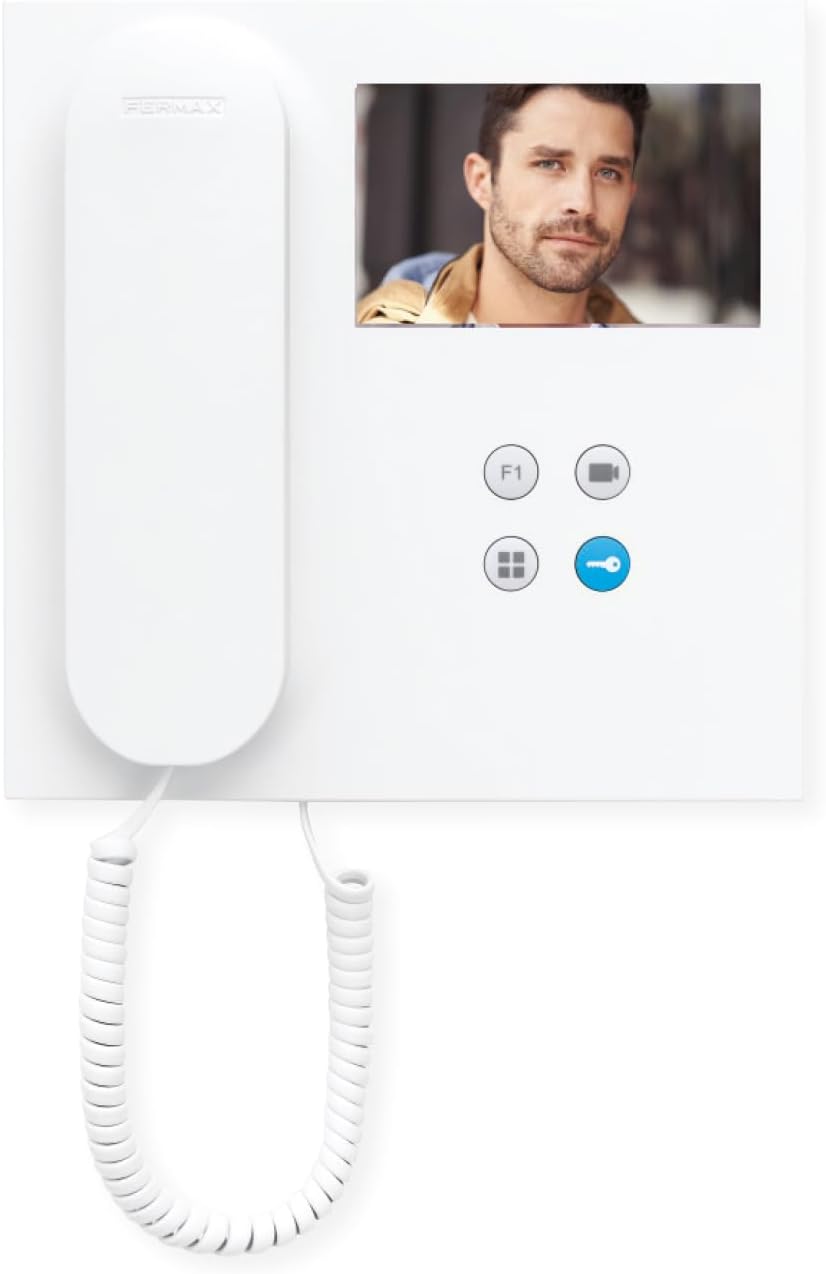
ภาพ: ด้านหน้า view of the FERMAX Duox Plus Veo 4.3" Monitor, showing the display, handset, and control buttons.
การติดตั้งและการตั้งค่า
1. การติดตั้งจอภาพ
- เลือกสถานที่: Select a suitable indoor location, away from direct heat sources or moisture.
- ทำเครื่องหมายจุดเจาะ: ใช้ตัวยึดเป็นแบบในการทำเครื่องหมายจุดเจาะบนผนัง
- เจาะรู: Drill holes at the marked points and insert wall plugs.
- วงเล็บยึดที่ปลอดภัย: ติดตั้งขายึดเข้ากับผนังโดยใช้สกรูที่ให้มา
2. การเชื่อมต่อสายไฟ
คำเตือน: Ensure power is disconnected before making any electrical connections. Refer to your system's wiring diagram for specific connections.
- Connect the Duox Plus bus wires (data and power) to the designated terminals on the monitor.
- Connect any additional wires for auxiliary functions (e.g., second door release, panic button) as per your system's requirements.
- ตรวจสอบให้แน่ใจว่าการเชื่อมต่อทั้งหมดมีความปลอดภัยและมีฉนวนป้องกันอย่างเหมาะสม
3. การติดตั้งจอภาพ
- Carefully align the monitor with the mounting bracket.
- Slide the monitor onto the bracket until it clicks securely into place.
- คืนพลังงานให้กับระบบ
คำแนะนำการใช้งาน
การรับสายโทรศัพท์
- When a visitor calls from the outdoor panel, the monitor will ring and display the visitor's image.
- หากต้องการรับสาย ให้กดปุ่ม ปุ่มคำตอบ (typically indicated by a phone icon).
- หากต้องการวางสาย ให้กดปุ่ม ปุ่มวางสาย (often the same button or a distinct hang-up icon).
การเปิดประตู
- During a call, or when monitoring the outdoor panel, press the ปุ่มปลดล็อกประตู (typically indicated by a key icon) to open the main entrance door.
Monitoring the Outdoor Panel
- ถึง view the outdoor panel camera without an incoming call, press the ปุ่มมอนิเตอร์ (often indicated by a camera icon). The display will show the live feed.
การปรับแต่งการตั้งค่า
- ปริมาณ: Use the volume controls (if present, or via menu) to adjust the ringtone and conversation volume.
- ความสว่าง/คอนทราสต์: Access the monitor's menu (refer to specific button layout) to adjust display settings.
การซ่อมบำรุง
- การทำความสะอาด: ใช้ผ้าเนื้อนุ่มที่ไม่เป็นขุยเช็ดหน้าจอเบาๆ แล้วเช็ดทำความสะอาดasing. Do not use liquid cleaners, aerosols, or abrasive materials.
- การตรวจสอบ: ตรวจสอบสายเคเบิลและจุดเชื่อมต่อทั้งหมดเป็นระยะ เพื่อดูว่ามีร่องรอยการสึกหรอหรือความเสียหายหรือไม่
- การอัปเดตซอฟต์แวร์: If applicable, check the manufacturer's website for any firmware updates for your Duox Plus system.
การแก้ไขปัญหา
| ปัญหา | สาเหตุที่เป็นไปได้ | สารละลาย |
|---|---|---|
| ไม่มีภาพปรากฏบนหน้าจอ | No power; loose connection; camera issue. | Check power supply. Ensure all cables are securely connected. Verify outdoor panel camera is functioning. |
| ไม่มีเสียงระหว่างการโทร | Volume too low; faulty connection; microphone/speaker issue. | Increase volume. Check audio cable connections. Contact support if issue persists. |
| ตัวเปิดประตูไม่ทำงาน | Incorrect wiring; faulty lock mechanism; system error. | Verify wiring to the door strike. Test the lock mechanism independently. Consult system installer. |
| Monitor not ringing. | Ringtone volume off; system not registered; faulty outdoor panel button. | Check ringtone volume. Ensure monitor is properly registered to the system. Test outdoor panel button. |
If the problem persists after attempting these solutions, please contact FERMAX technical support or your installer.
ข้อมูลจำเพาะทางเทคนิค
| คุณสมบัติ | รายละเอียด |
|---|---|
| แบบอย่าง | 90b61eff-c290-484c-aba5-73e26c52e3da |
| ขนาดหน้าจอ | 4.3 นิ้ว |
| ปณิธาน | 800 x 600 |
| อัตราส่วนภาพ | 4:3 น. |
| อัตราส่วนความคมชัดของภาพ | 2000:1 น. |
| พื้นผิวหน้าจอ | มันเงา |
| ผู้ผลิต | เฟอร์แม็กซ์ |
| ขนาดแพ็คเกจ | 8.74 x 8.15 x 2.01 นิ้ว |
การรับประกันและการสนับสนุน
FERMAX products are designed for durability and reliability. For information regarding warranty terms and conditions, please refer to the warranty card included with your product or visit the official FERMAX webเว็บไซต์.
For technical support, installation assistance, or service inquiries, please contact your local FERMAX distributor or visit the support section of the FERMAX webเว็บไซต์:

Image: FERMAX brand logo with the slogan "Connectivity for All".


