1. บทนำ
Thank you for choosing the AVATTO WT400-16A-B Smart WiFi Thermostat. This device is designed to provide intelligent temperature control for your water heater and gas boiler systems, offering convenience through programmable schedules, app control, and voice commands. Please read this manual carefully before installation and operation to ensure proper use and optimal performance.
2. ข้อมูลด้านความปลอดภัย
- Always disconnect power to the heating system before installing or servicing the thermostat.
- ควรให้ช่างไฟฟ้าหรือช่างเทคนิคระบบทำความร้อนที่มีคุณสมบัติเหมาะสมเป็นผู้ติดตั้ง
- อย่าให้เทอร์โมสตัทโดนน้ำหรือความชื้นมากเกินไป
- ตรวจสอบให้แน่ใจว่าการเชื่อมต่อสายไฟทั้งหมดมีความปลอดภัยและเป็นไปตามกฎหมายไฟฟ้าในท้องถิ่น
- เก็บแบตเตอรี่ให้พ้นมือเด็ก และทิ้งแบตเตอรี่ที่ใช้แล้วอย่างถูกวิธี
3. เนื้อหาบรรจุภัณฑ์
ตรวจสอบว่ามีรายการทั้งหมดอยู่ในแพ็คเกจของคุณ:
- AVATTO WT400-16A-B Thermostat Unit
- คู่มือการใช้งาน
- สกรูยึด (2 ชิ้น)
- NTC Sensor Cable (3 meters)
4. สินค้าหมดview
4.1 คุณสมบัติหลัก
- การควบคุม WiFi อัจฉริยะ: Connects directly to 2.4 GHz Wi-Fi for remote control via smartphone app.
- การควบคุมด้วยเสียง: เข้ากันได้กับ Amazon Alexa และ Google Assistant เพื่อการใช้งานแบบแฮนด์ฟรี
- กำหนดการที่ตั้งโปรแกรมได้: Offers 6 distinct heating programs for weekdays and 2 for weekends, optimizing energy use.
- Heating and Cooling Functionality: Supports both heating and cooling modes for year-round comfort.
- จอ LCD ขนาดใหญ่: A 4.6-inch screen clearly shows room temperature, set temperature, operating status, battery level, day, and time.
- ติดตั้งง่าย: Designed for surface mounting with potential-free output (NO, NC, COM).
- ตัวเลือกพลังงานคู่: Operates on AAA batteries with an optional Type-C power input.
4.2 การแสดงผลและการควบคุม
The thermostat features a clear LCD screen and an intuitive rotary knob for adjustments.
4.3 ความเข้ากันได้
This thermostat is designed for use with water heaters and gas boilers that have dry contact connections. มันคือ not compatible with electric underfloor heating systems or instantaneous electric water heaters.

Image: This diagram illustrates the thermostat's compatibility. It is compatible with gas boilers featuring dry contact connections (indicated by a checkmark) and is not compatible with electric heating systems or actuator valves (indicated by cross marks).
5. การตั้งค่า
5.1 การติดตั้ง
The thermostat is designed for surface mounting. Choose a suitable location on an interior wall, away from direct sunlight, drafts, or heat sources that could affect temperature readings.
- ตัดการเชื่อมต่อไฟฟ้า: ปิดสวิตช์ตัดไฟหลักของระบบทำความร้อนที่ตัวตัดวงจร
- ติดตั้งแผ่นด้านหลัง: Detach the front panel of the thermostat from its backplate. Secure the backplate to the wall using the provided screws.
- การเดินสายไฟ: Connect the heating system wires to the NO (Normally Open), NC (Normally Closed), and COM (Common) terminals on the backplate. Refer to your heating system's manual for specific wiring diagrams. The thermostat provides a potential-free output.
- ติดตั้งแผงด้านหน้า: Once wiring is complete and secure, reattach the front panel to the backplate.
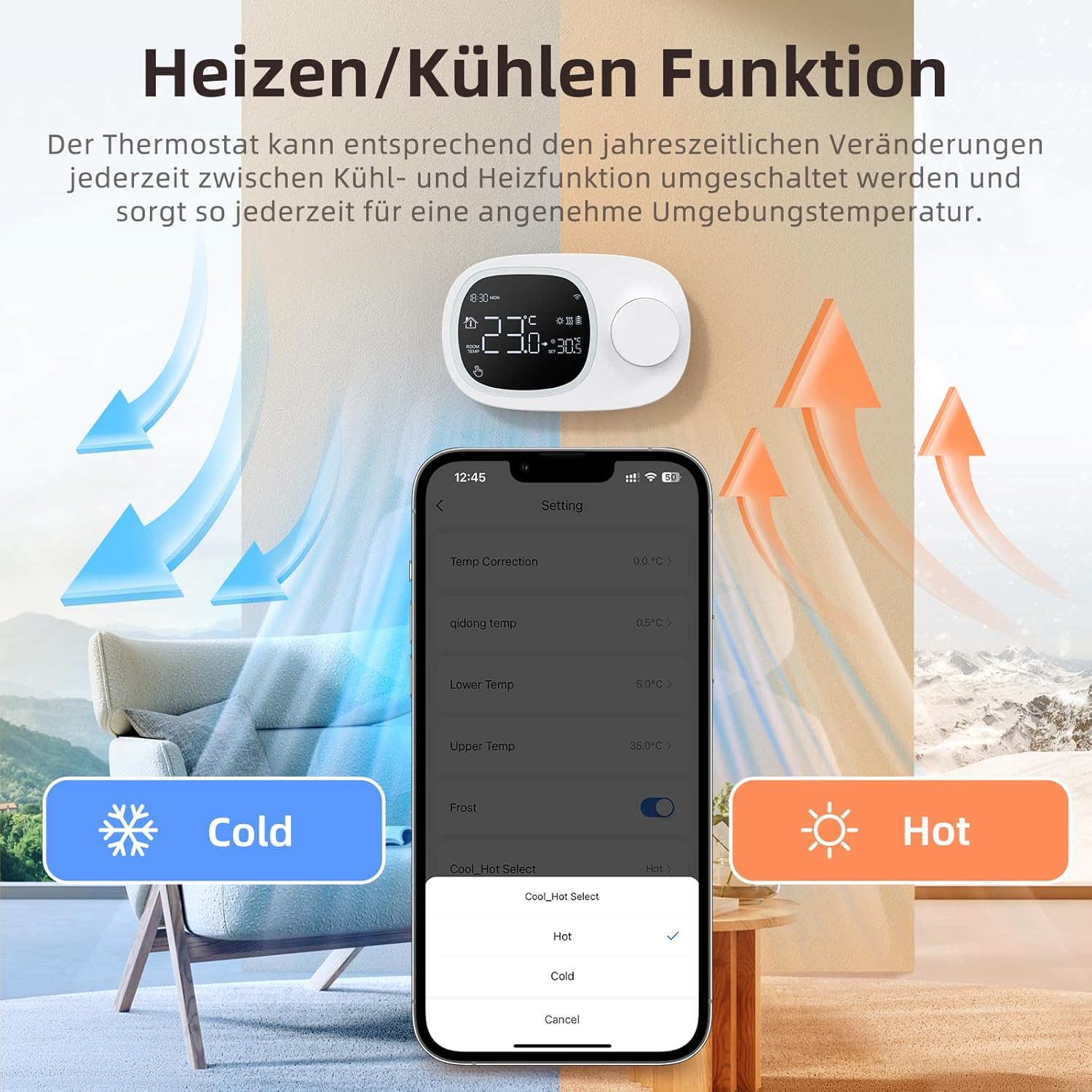
Image: This image shows the thermostat's backplate with wiring terminals and its physical dimensions (13.3 cm width, 8.6 cm height, 2.5 cm depth).
5.2 แหล่งจ่ายไฟ
The thermostat can be powered by three AAA batteries or via a Type-C USB connection.
- การติดตั้งแบตเตอรี่: Open the battery compartment on the back of the thermostat and insert three AAA batteries, observing the correct polarity. The screen will display the battery level. Under normal operation, batteries typically last about 6 months.
- Type-C Power (Optional): For continuous power, you can connect a Type-C USB cable to the designated port.

Image: This image illustrates the battery compartment for AAA batteries and the Type-C port for alternative power input.
5.3 การเชื่อมต่อ WiFi
To enable smart features, connect your thermostat to your home's 2.4 GHz Wi-Fi network.
- ดาวน์โหลดแอพ: Download and install the 'Smart Life' or 'AVATTO' app from your smartphone's app store.
- ลงทะเบียน/เข้าสู่ระบบ: สร้างบัญชีหรือเข้าสู่ระบบแอพ
- เพิ่มอุปกรณ์: In the app, select 'Add Device' or the '+' icon. Choose 'Thermostat' or 'Heating Control'.
- โหมดจับคู่: Follow the in-app instructions to put the thermostat into pairing mode (usually involves pressing and holding a button on the thermostat until a Wi-Fi icon flashes).
- เชื่อมต่อกับ Wi-Fi: Ensure your mobile phone is connected to your home's 2.4 GHz Wi-Fi network. Enter your Wi-Fi password in the app.
- ตั้งค่าให้เสร็จสมบูรณ์: The app will guide you through the final steps to connect the thermostat.
6. คู่มือการใช้งาน
6.1 การทำงานพื้นฐาน
- เปิด/ปิดเครื่อง: กดปุ่มเปิด/ปิดเพื่อเปิดหรือปิดเทอร์โมสตัท
- ปรับอุณหภูมิ: Rotate the knob to set your desired room temperature. The display will show both the current room temperature and the set temperature.
6.2 โหมดที่ตั้งโปรแกรมได้
The thermostat allows you to set a weekly schedule to automatically adjust the temperature.
- Weekday Programs: Set up to 6 different heating periods for Monday to Friday.
- Weekend Programs: Set up to 2 heating periods per day for Saturday and Sunday.
- Setting Schedule: Access the programming menu via the thermostat's interface or the Smart Life/AVATTO app to configure your desired times and temperatures for each period.

Image: This image displays the app interface for setting a weekly programmable schedule, showing different time slots and temperatures for each day.
การควบคุมแอพ 6.3 ตัว
Control your thermostat remotely using the Smart Life or AVATTO app.
- การปรับอุณหภูมิจากระยะไกล: สามารถเปลี่ยนอุณหภูมิที่ตั้งไว้ได้จากทุกที่
- การจัดการตารางเวลา: Easily create, modify, or disable heating schedules.
- การสลับโหมด: Switch between heating and cooling modes.
- การแชร์อุปกรณ์: แบ่งปันการควบคุมอุณหภูมิเครื่องปรับอากาศกับสมาชิกในครอบครัว
6.4 การควบคุมด้วยเสียง
Integrate your thermostat with Amazon Alexa or Google Assistant for convenient voice commands.
- การเชื่อมโยงบัญชี: Follow the instructions in the Smart Life/AVATTO app to link your account with Alexa or Google Assistant.
- คำสั่งเสียง: ใช้คำสั่งเช่น:
- "Alexa ตั้งค่า [ชื่อเทอร์โมสตัท] เป็น 22 องศา"
- "Hey Google, what is the temperature in [Room Name]?"

Image: This image demonstrates remote control via the Smart Life app and voice control using an Alexa device, showing a command to set the room temperature.
6.5 ฟังก์ชันการทำความร้อนและการทำความเย็น
The thermostat supports both heating and cooling modes. You can switch between these functions as needed to maintain a comfortable ambient temperature throughout the year.
- การเลือกโหมด: The mode can typically be changed through the thermostat's menu settings or directly within the Smart Life/AVATTO app.
- ปรากฏการณ์ฮิสเทอรีซิสของอุณหภูมิ: The thermostat features precise temperature control with adjustable hysteresis (0.5-10°C) to prevent rapid cycling of your heating/cooling system.
- ขีดจำกัดอุณหภูมิ: Set minimum and maximum temperature limits (e.g., 5-35°C) to ensure safe and efficient operation.

Image: This image illustrates the heating and cooling functions, showing temperature arrows and the app interface for selecting 'Hot' or 'Cold' modes.
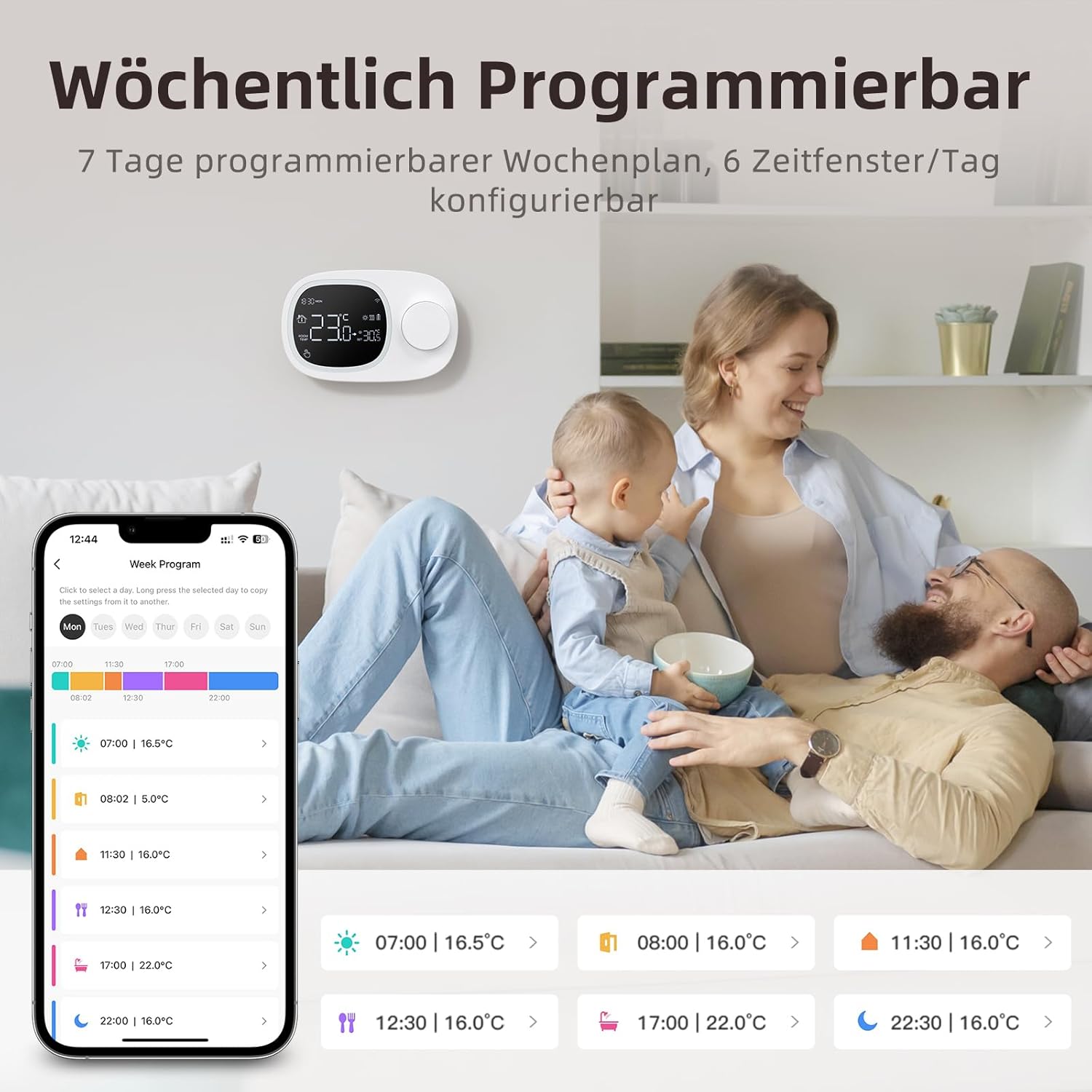
Image: This image highlights the precise temperature control features, including temperature hysteresis (0.5-10°C), minimum temperature setting (0.5°C), and upper/lower temperature limits (5-35°C).
7. การบำรุงรักษา
7.1 การเปลี่ยนแบตเตอรี่
When the battery level indicator on the screen shows low power, replace the three AAA batteries promptly to ensure continuous operation. Refer to section 5.2 for battery installation instructions.
8 การแก้ไขปัญหา
หากคุณพบปัญหาเกี่ยวกับเทอร์โมสตัท โปรดดูปัญหาทั่วไปและวิธีแก้ไขต่อไปนี้:
| ปัญหา | สาเหตุที่เป็นไปได้ / วิธีแก้ไข |
|---|---|
| Thermostat does not power on. | Check if the AAA batteries are correctly inserted and charged. Ensure the power button is functioning. If using Type-C power, verify the cable connection. |
| Confused characters appear on the screen. | This may indicate an installation issue. Reinstall the device, ensuring all connections are secure. |
| Displayed temperature is inaccurate. | Access the advanced menu mode on the thermostat or the calibration menu in the Smart Life/Tuya app to adjust temperature settings. |
| Device starts normally, but screen does not show output temperature. | Check the connection between the main control board and the power board. Verify that all wiring is correct according to the markings on the device connector. |
| ไม่สามารถเชื่อมต่อ Wi-Fi ได้ | Ensure your router is broadcasting a 2.4 GHz Wi-Fi signal. Confirm your mobile phone is connected to the 2.4 GHz network during pairing. Check Wi-Fi password. |
9. ข้อมูลจำเพาะ
- ยี่ห้อ: อาวัตโต้
- หมายเลขรุ่น: WT400-16A-B (also referred to as WT580)
- สี: สีดำ
- ขนาด (เทอร์โมสตัท): ขนาดประมาณ 13.3 x 8.6 x 2.5 ซม
- น้ำหนักสินค้า: 270 กรัม
- Power Output (Heating System): สูงสุด 3800 วัตต์
- เล่มที่tage: 240 โวลต์ (AC)
- วัสดุ: พลาสติก
- แหล่งจ่ายไฟ (เทอร์โมสตัท): 3 x AAA Batteries (sold separately), optional Type-C USB
- การเชื่อมต่อ: Wi-Fi (2.4 GHz), บลูทูธ
- ประเภทตัวควบคุม: Amazon Alexa, Google Assistant
- คุณสมบัติพิเศษ: Voice control, LCD display (temperature, weather, time, date, room temp, heating icon), 0.5°C temperature increments, Silent operation, Smart Life/Tuya Smart remote control.
- การใช้งานผลิตภัณฑ์เฉพาะ: Water heaters and gas boilers with dry contact.
10. การรับประกันและการสนับสนุน
Information regarding specific warranty details is not available in this document. For technical assistance, troubleshooting, or any questions not covered in this manual, please contact AVATTO customer support. You may also find additional support resources through the Smart Life or AVATTO application.


