การแนะนำ
This manual provides detailed instructions for the setup, operation, maintenance, and troubleshooting of your Makeid L1 Portable Wireless Sticker Label Maker Machine. Please read this manual thoroughly before using the device to ensure proper function and longevity.
มีอะไรอยู่ในกล่อง
ตรวจสอบว่ามีส่วนประกอบทั้งหมดอยู่ในแพ็คเกจ:
- Makeid L1 Label Maker Machine
- 4-meter roll of label tape
- สายชาร์จ USB
- คู่มือการใช้งาน (เอกสารนี้)
สินค้าเกินview
Familiarize yourself with the key components of your Makeid L1 Label Maker.

ภาพ: เกินview of the Makeid L1 Label Maker, highlighting the power button, the lid for tape replacement, and the integrated cutter for crisp labels.
- ปุ่มเปิด/ปิด: Located on the side, used to turn the device on/off.
- ฝา: Opens to access the tape compartment for loading and replacing label rolls.
- เครื่องตัดในตัว: Ensures clean and precise cuts of printed labels.
- ช่องเสียบฉลากออก: จุดที่ฉลากพิมพ์ปรากฏขึ้น
- พอร์ตชาร์จ: USB port for recharging the device.
การตั้งค่า
1. การชาร์จอุปกรณ์
Before first use, ensure the label maker is fully charged. Connect the provided USB charging cable to the device's charging port and a compatible USB power source (e.g., computer USB port, USB wall adapter). The indicator light will show charging status (refer to device specific light indicators for full/charging status).
2. การติดเทปฉลาก
The Makeid L1 supports various label tape widths (9mm, 12mm, 16mm) and types (continuous, die-cut, transparent, white, colored, pattern). Ensure the tape is correctly oriented.
- Open the lid of the label maker.
- Insert the label roll into the compartment, ensuring the tape feeds out from the bottom and through the output slot.
- ปิดฝาให้แน่น
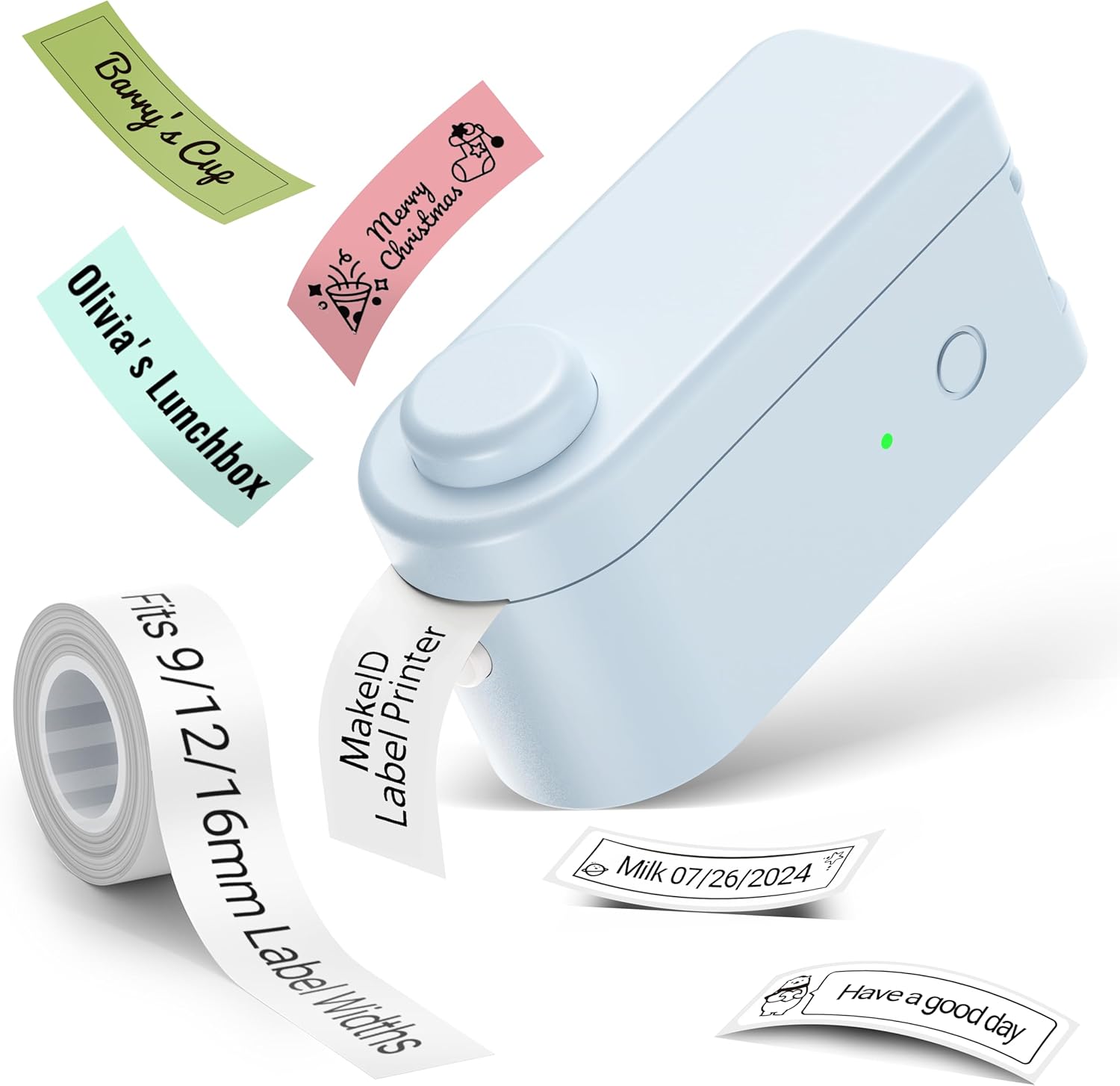
ภาพ: The Makeid L1 Label Maker demonstrating the label tape roll and examples of printed labels, including continuous and die-cut types.
3. การดาวน์โหลดและติดตั้งแอป
The Makeid L1 operates via a dedicated mobile application. ค้นหา "MakeID-Life" on your device's app store.

ภาพ: Screenshots showing the "Get it on Google Play" and "Download on the App Store" buttons, indicating where to find the MakeID-Life application.
4. การจับคู่บลูทู ธ
The label maker connects to your smartphone via Bluetooth.
- ตรวจสอบให้แน่ใจว่าได้เปิดใช้งาน Bluetooth บนสมาร์ทโฟนของคุณแล้ว
- Turn on the Makeid L1 Label Maker by pressing the power button. The indicator light will flash, indicating it's ready for pairing.
- Open the "MakeID-Life" app. The app will automatically search for nearby devices.
- Select "L1" from the list of available devices to connect. Once connected, the indicator light on the label maker will become solid.

ภาพ: A visual guide demonstrating the three steps for Bluetooth connection: turning on Bluetooth, selecting the L1 model within the app, and confirming the device connection.
คำแนะนำการใช้งาน
1. Designing Your Label
The "MakeID-Life" app offers extensive customization options:
- การป้อนข้อความ: Type your desired text.
- แบบอักษร: Choose from 88 different font styles.
- ไอคอนและสัญลักษณ์: Access over 600 icons and various symbols.
- เทมเพลต: Utilize over 400 pre-designed templates for various purposes (e.g., kitchen, office, school).
- Borders & Frames: Add decorative borders.
- ฟังก์ชั่นอื่นๆ: Create barcodes, QR codes, tables, dates, and patterns.
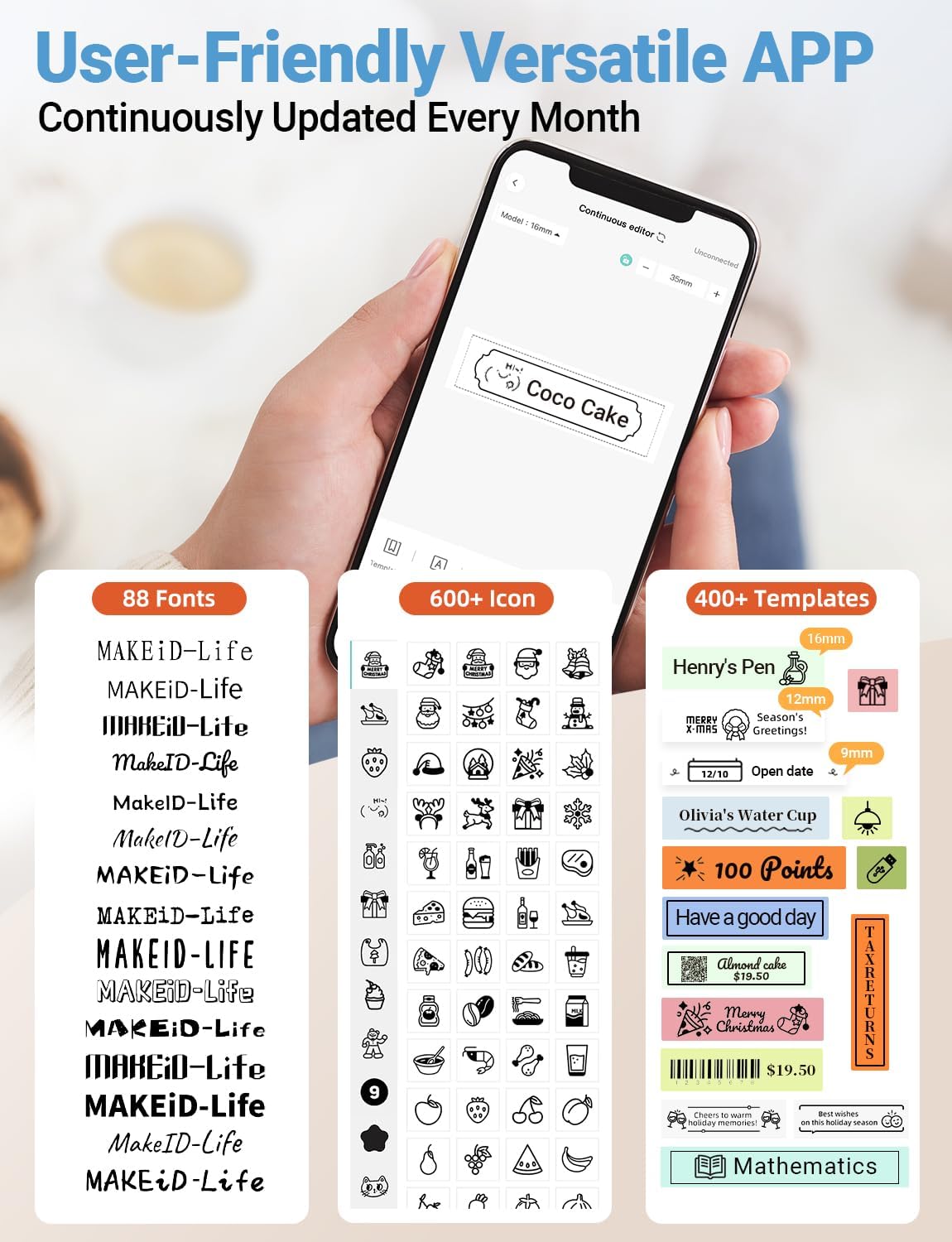
ภาพ: รายละเอียด view of the MakeID-Life app interface, showcasing the wide selection of 88 fonts, over 600 icons, and more than 400 templates available for label customization.
2. การพิมพ์ฉลาก
Once your design is complete in the app:
- Review your label design on the app screen.
- Tap the "Print" button within the app.
- The label will be thermally printed and emerge from the output slot.
3. Cutting Labels
The Makeid L1 features a built-in cutter for clean edges.
- After printing, gently pull the label forward slightly.
- Press the cutting button (refer to the Product Overview image for location) to cleanly cut the label.

ภาพ: Illustration of the Makeid L1's built-in cutter, demonstrating how it provides professional and safe cutting of labels, eliminating messy torn edges.
4. Types of Label Printing
The L1 supports two primary types of label printing:
- ป้ายกำกับต่อเนื่อง: Ideal for custom lengths, allowing you to print text of any length and cut it precisely.
- Die-Cut Labels: Pre-sized labels with specific shapes, perfect for consistent labeling of items like jars or files.

ภาพ: Visual representation of continuous labels, which can be cut to any length, and die-cut labels, which are pre-shaped for specific applications.
การซ่อมบำรุง
การทำความสะอาดหัวพิมพ์
To ensure optimal print quality, periodically clean the thermal print head.
- Turn off the label maker and disconnect it from the power source.
- Open the lid and remove the label tape.
- Gently wipe the print head with a soft, lint-free cloth dampล้างด้วยไอโซโพรพิลแอลกอฮอล์ ห้ามใช้น้ำหรือน้ำยาทำความสะอาดที่มีฤทธิ์กัดกร่อน
- Allow the print head to dry completely before reinserting the tape and closing the lid.
พื้นที่จัดเก็บ
Store the label maker in a cool, dry place away from direct sunlight and extreme temperatures. Remove the label tape if storing for extended periods.
การแก้ไขปัญหา
โปรดดูตารางด้านล่างเพื่อดูปัญหาทั่วไปและวิธีแก้ไข
| ปัญหา | สาเหตุที่เป็นไปได้ | สารละลาย |
|---|---|---|
| อุปกรณ์ไม่เปิด | แบตเตอรี่อ่อน | ชาร์จอุปกรณ์โดยใช้สาย USB ที่ให้มา |
| ไม่สามารถเชื่อมต่อผ่านบลูทูธได้ | บลูทูธในโทรศัพท์ปิดอยู่ อุปกรณ์ไม่ได้อยู่ในโหมดจับคู่ หรืออาจเป็นปัญหาที่แอป | Ensure Bluetooth is enabled on your phone. Turn the label maker off and on again to re-enter pairing mode. Restart the "MakeID-Life" app. |
| Poor print quality / Faded prints. | Print head dirty; incorrect label tape; low battery. | Clean the print head. Ensure you are using Makeid compatible thermal label tape. Charge the device. |
| Label tape not feeding. | Tape incorrectly loaded; tape jammed. | Open the lid and re-insert the label tape correctly, ensuring it's not jammed. |
| Labels are not cutting cleanly. | Cutter blade dull or obstructed. | Ensure no debris is obstructing the cutter. If issues persist, contact customer support. |
ข้อมูลจำเพาะ
Detailed technical specifications for the Makeid L1 Label Maker Machine:
| คุณสมบัติ | รายละเอียด |
|---|---|
| ยี่ห้อ | เมคอิด |
| ชื่อรุ่น | L1 |
| เทคโนโลยีการเชื่อมต่อ | บลูทูธ |
| เทคโนโลยีการพิมพ์ | เทอร์มอล |
| เอาท์พุตเครื่องพิมพ์ | เอกรงค์ |
| ปณิธาน | 203 x 203 DPI (also 300 x 300 DPI for other variants) |
| ขนาดสื่อสูงสุด | 0.63 นิ้ว (16 มม.) |
| อุปกรณ์ที่รองรับ | Smartphones (Android & iOS) |
| วิธีการควบคุม | แอป |
| ฮาร์ดแวร์อินเตอร์เฟซ | ยูเอสบี |
| แหล่งพลังงาน | แบตเตอรี่ลิเธียมไอออน 1 ก้อน (รวมอยู่ด้วย) |
| ขนาดสินค้า | ลึก 3.93 นิ้ว x กว้าง 1.6 นิ้ว x สูง 1.96 นิ้ว (10 x 4.06 x 4.98 ซม.) |
| น้ำหนักสินค้า | 4.4 ออนซ์ (126 กรัม) |
| คุณสมบัติพิเศษ | Continuous & Pre-cut Label Tapes, Waterproof, Oil-proof, Friction Resistant, Light Resistant, No Fading, Rich Font Icon Pattern, Portable, Inkless, Wireless, Rechargeable, Creative Print Functions (Barcode, Text, Picture, QR 2D Code, Table, Date, Border, Icon, Shape, Pattern, Template) |
การรับประกันและการสนับสนุน
The Makeid L1 Label Maker comes with a รับประกันตลอดอายุการใช้งาน. For technical support, warranty claims, or further assistance, please contact Makeid customer service through the official Makeid webไซต์หรือข้อมูลการติดต่อที่ให้ไว้ในบรรจุภัณฑ์ผลิตภัณฑ์ของคุณ
สำหรับแหล่งข้อมูลเพิ่มเติมและคำถามที่พบบ่อย โปรดไปที่ Makeid Store on Amazon.
ข้อมูลด้านความปลอดภัย
- อย่าถอดแยกชิ้นส่วนหรือพยายามซ่อมแซมอุปกรณ์ด้วยตนเอง
- เก็บอุปกรณ์ให้ห่างจากน้ำและความชื้นสูง
- Use only original or certified compatible label tapes and charging cables.
- เก็บให้พ้นจากมือเด็ก
- หลีกเลี่ยงการให้อุปกรณ์สัมผัสกับอุณหภูมิที่ร้อนจัดหรือโดนแสงแดดโดยตรง


