1. บทนำ
The MOBI CONNECT Smart DualScan Bluetooth Thermometer (Model 700026) is designed for accurate and versatile temperature measurement. It offers multiple reading methods including ear, forehead, room, and object temperature. This device features a backlit screen, LED fever indicators, and memory recall for up to 20 previous readings. It supports both Fahrenheit and Celsius modes and can connect via Bluetooth to the MOBI Smart App for enhanced tracking and management capabilities.

Image: The MOBI CONNECT Smart DualScan Bluetooth Thermometer, its packaging, and a smartphone displaying the companion app.
2. เนื้อหาบรรจุภัณฑ์
ตรวจสอบว่ามีรายการทั้งหมดอยู่ในแพ็คเกจ:
- 1 x MOBI CONNECT Smart DualScan Bluetooth Thermometer
- 1 x Protective Cap (for forehead mode)
- 1 x ที่เก็บกระเป๋า
- 1 x คู่มือผู้ใช้
- คู่มือเริ่มต้นอย่างรวดเร็ว 1 ชุด
- แบตเตอรี่ AAA 2 ก้อน

ภาพ: รายละเอียด view of the thermometer with its components labeled for easy identification.
3. การตั้งค่า
3.1. การติดตั้งแบตเตอรี่
- Open the battery compartment cover located on the back of the thermometer.
- ใส่แบตเตอรี่ AAA สองก้อน โดยตรวจสอบให้แน่ใจว่าขั้วถูกต้อง (+/-)
- ปิดฝาช่องใส่แบตเตอรี่ให้แน่น
3.2. การเปิด/ปิดเครื่อง
- ในการเปิดเครื่อง ให้กด SCAN/Power button. The device will perform a self-test and display the last reading.
- เครื่องวัดอุณหภูมิจะปิดตัวเองโดยอัตโนมัติหลังจากไม่มีการใช้งานประมาณ 30 วินาที เพื่อประหยัดพลังงานแบตเตอรี่
3.3. การเปลี่ยนหน่วยอุณหภูมิ (ฟาเรนไฮต์/เซลเซียส)
เมื่อเปิดเครื่องแล้ว ให้กดปุ่มค้างไว้ โหมด button for 3 seconds to switch between Fahrenheit (°F) and Celsius (°C).
4. โหมดการทำงาน
4.1. Forehead Measurement
- Ensure the protective cap is on the probe.
- กดปุ่ม SCAN/Power ปุ่มเพื่อเปิดเครื่องวัดอุณหภูมิ
- Position the thermometer approximately 0.5 to 1 inch (1-2.5 cm) from the center of the forehead.
- กดปุ่มค้างไว้ สแกน button. A beep will sound, and the temperature will be displayed on the LCD screen.

Image: Demonstrating forehead temperature measurement.
4.2. Ear Measurement
- Gently remove the protective cap from the probe.
- กดปุ่ม SCAN/Power ปุ่มเพื่อเปิดเครื่องวัดอุณหภูมิ
- Carefully insert the probe into the ear canal. For children under 1 year, gently pull the ear straight back. For children over 1 year and adults, gently pull the ear up and back.
- กดปุ่มค้างไว้ สแกน button. A beep will sound, and the temperature will be displayed on the LCD screen.

Image: Removing the protective cap for ear measurement.

Image: Demonstrating ear temperature measurement.
4.3. Room and Object Temperature Measurement
The thermometer can also measure ambient room temperature and the temperature of objects (e.g., liquids, surfaces). To switch to these modes, press the โหมด button repeatedly until the desired icon (room or object) appears on the display. Then, point the thermometer at the object or area and press สแกน.
4.4. ตัวบ่งชี้ไข้
The LCD display changes color to indicate temperature status:
- ไฟแบ็คไลท์สีเขียว: Indicates a normal body temperature.
- ไฟแบ็คไลท์สีแดง: Indicates a high body temperature (fever warning).
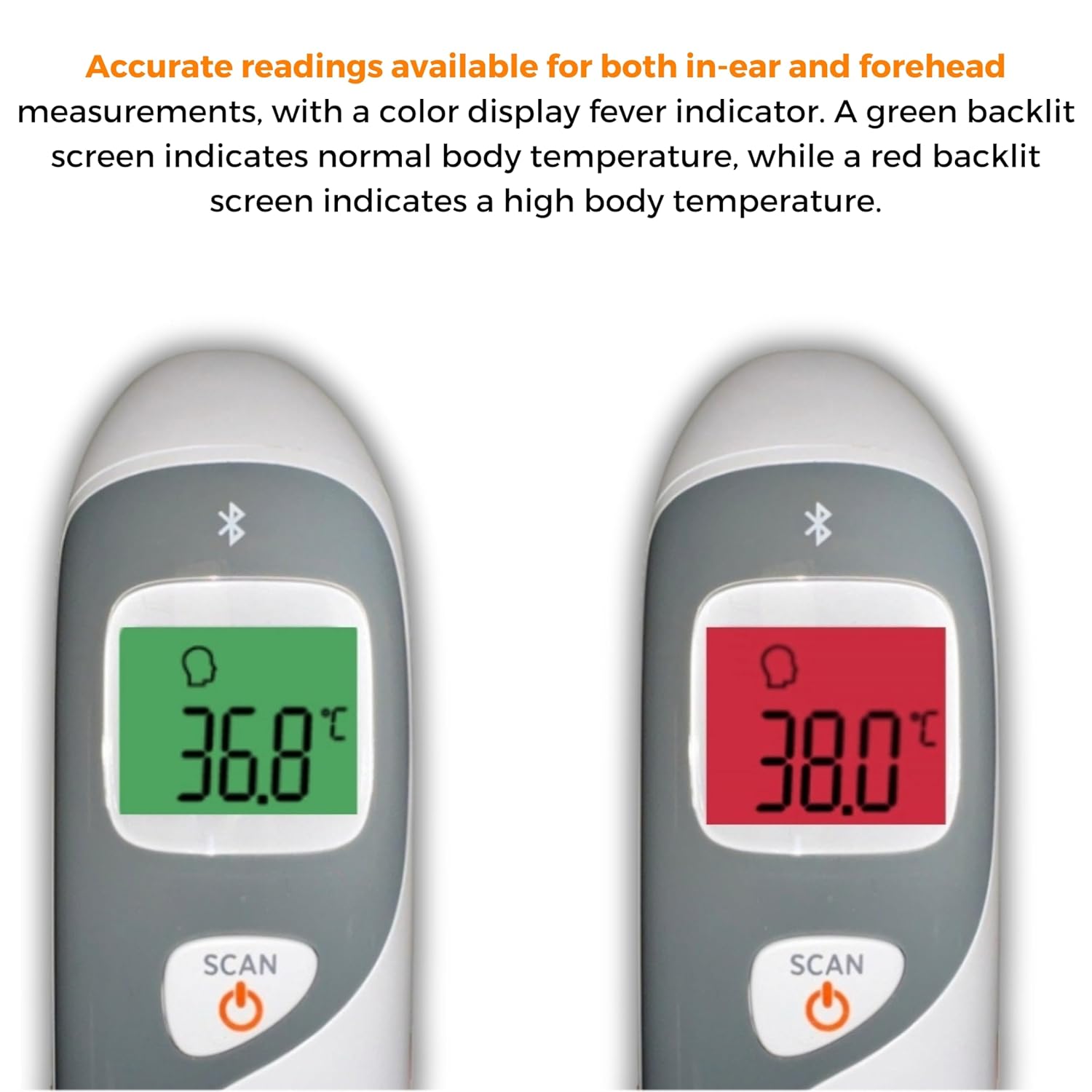
Image: The thermometer's color-changing LCD display indicating normal (green) and high (red) temperatures.
4.5. เรียกคืนหน่วยความจำ
The thermometer stores the last 20 temperature readings. To access these readings, press the MEM/MUTE button while the device is on. Each press will cycle through the stored readings.
5. Bluetooth Connectivity and MOBI Smart App
The MOBI CONNECT Smart DualScan Thermometer can be used independently or paired with your smartphone via Bluetooth for enhanced tracking and features through the MOBI Smart App.
5.1. ดาวน์โหลดแอปและการจับคู่
- Download the "MOBI Smart" app from your device's app store (available on iOS and Android).
- ตรวจสอบให้แน่ใจว่าได้เปิดใช้งาน Bluetooth บนสมาร์ทโฟนของคุณแล้ว
- Open the MOBI Smart App and follow the on-screen instructions to pair your thermometer.
5.2. คุณสมบัติของแอพ
- การติดตามอัตโนมัติ: Automatically records temperature readings from the thermometer.
- ผู้ใช้หลายคน Profiles: สร้างและจัดการโปรfiles for each family member to track their health data independently.
- การบันทึกข้อมูล: Add comments to each reading for context.
- Reporting & Graphs: View powerful reports and graphs for daily, weekly, monthly, or yearly temperature trends.
- ตัวเลือกการส่งออก: Export data for sharing with healthcare professionals.
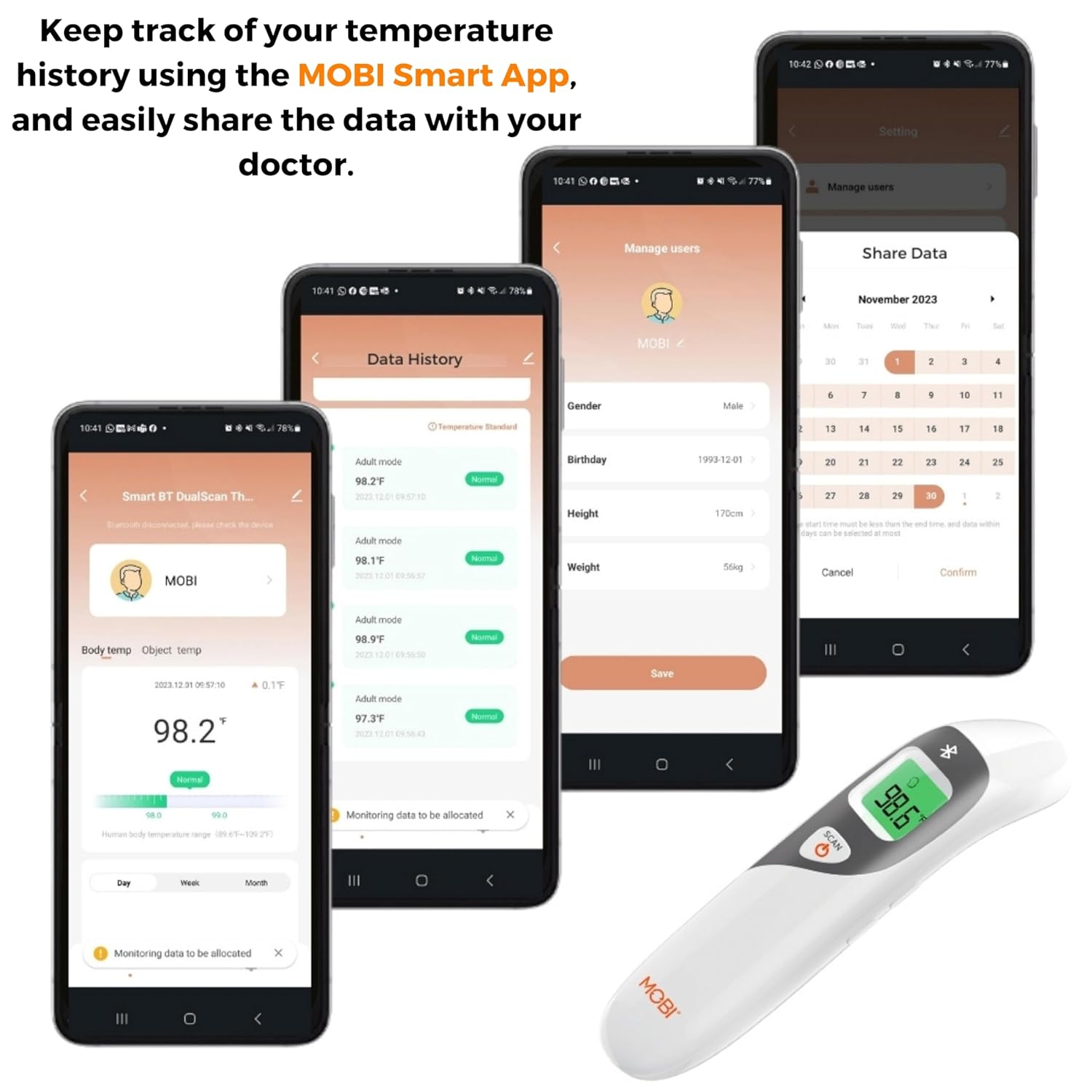
Image: Screenshots of the MOBI Smart App interface, showing data tracking and user management.
5.3. วิดีโอผลิตภัณฑ์อย่างเป็นทางการ
วิดีโอ: เจ้าหน้าที่ผ่านview of the MOBI Smart DualScan Bluetooth Ear & Forehead Thermometer, demonstrating its features and usage.
6. การบำรุงรักษา
6.1. การทำความสะอาด
To clean the thermometer, wipe it with a soft, damp cloth. Do not immerse the device in water or use abrasive cleaners. Ensure the probe is clean before each use, especially for ear measurements.
6.2. การจัดเก็บ
Store the thermometer in its protective pouch in a cool, dry place, away from direct sunlight and extreme temperatures. Remove batteries if the device will not be used for an extended period.
7 การแก้ไขปัญหา
- การอ่านแบบ "โล" หรือ "ไฮ": Indicates a temperature outside the measurable range. Ensure proper placement and try again.
- การอ่านค่าที่ไม่ถูกต้อง:
- Check for proper probe placement (ear or forehead).
- ตรวจสอบให้แน่ใจว่าหัววัดสะอาด
- Verify the correct mode (Adult/Child/Object) is selected if applicable.
- หากเทอร์โมมิเตอร์อยู่ในสภาพแวดล้อมที่แตกต่างจากอุณหภูมิห้องอย่างมาก ควรปล่อยให้เทอร์โมมิเตอร์ปรับอุณหภูมิให้เข้ากับอุณหภูมิห้องเป็นเวลา 30 นาที
- ปัญหาการเชื่อมต่อบลูทูธ:
- ตรวจสอบให้แน่ใจว่าได้เปิดใช้งาน Bluetooth บนสมาร์ทโฟนของคุณแล้ว
- Restart the thermometer and the MOBI Smart App.
- Ensure the thermometer is within range of your smartphone.
- ไม่มีจอแสดงผล: ตรวจสอบการติดตั้งแบตเตอรี่และเปลี่ยนแบตเตอรี่หากจำเป็น
8. ข้อมูลจำเพาะ
| หมายเลขรุ่น | 700026 |
| แหล่งพลังงาน | ใช้พลังงานจากแบตเตอรี่ (AAA 2 ก้อน) |
| ประเภทจอภาพ | LCD พร้อม Backlight |
| การเชื่อมต่อ | บลูทูธ |
| โหมดการวัด | Ear, Forehead, Room, Object |
| หน่วยอุณหภูมิ | ฟาเรนไฮต์ (°F) / เซลเซียส (°C) |
| การเรียกคืนความทรงจำ | การอ่าน 20 ครั้งล่าสุด |
| การดูแลผลิตภัณฑ์ | เช็ดทำความสะอาด |
| วัสดุ | พลาสติก |
| ผู้ผลิต | Mobi Technologies Inc. |
9. การรับประกันและการสนับสนุน
For warranty information or technical support, please contact Mobi Technologies Inc. directly. Refer to the product packaging or the official MOBI webเว็บไซต์สำหรับรายละเอียดการติดต่อล่าสุด


