1. บทนำ
Thank you for choosing the SPLITSKY NZFS Kids Alarm Clock. This device combines an alarm clock, white noise sleep aid, and an 8-mode RGB night light, designed to assist with sleep and wake-up routines for children and adults. Please read this manual thoroughly to understand its features and ensure proper operation.
ข้อมูลด้านความปลอดภัย:
- เก็บอุปกรณ์ให้ห่างจากน้ำและสภาพแวดล้อมที่มีความชื้นสูง
- อย่าพยายามถอดประกอบหรือซ่อมแซมอุปกรณ์ด้วยตัวเอง
- Use only the provided USB-C power cable or a certified equivalent.
- ตรวจสอบให้แน่ใจว่ามีการระบายอากาศที่เหมาะสมรอบๆ อุปกรณ์
2. เนื้อหาบรรจุภัณฑ์
ตรวจสอบว่ามีรายการทั้งหมดอยู่ในแพ็คเกจของคุณ:
- SPLITSKY NZFS Kids Alarm Clock
- 1.2M (4.7 inch) USB-C Power Cable
- คู่มือการใช้งาน (เอกสารนี้)
- 1 x CR2032 Lithium Ion Battery (pre-installed for memory backup)
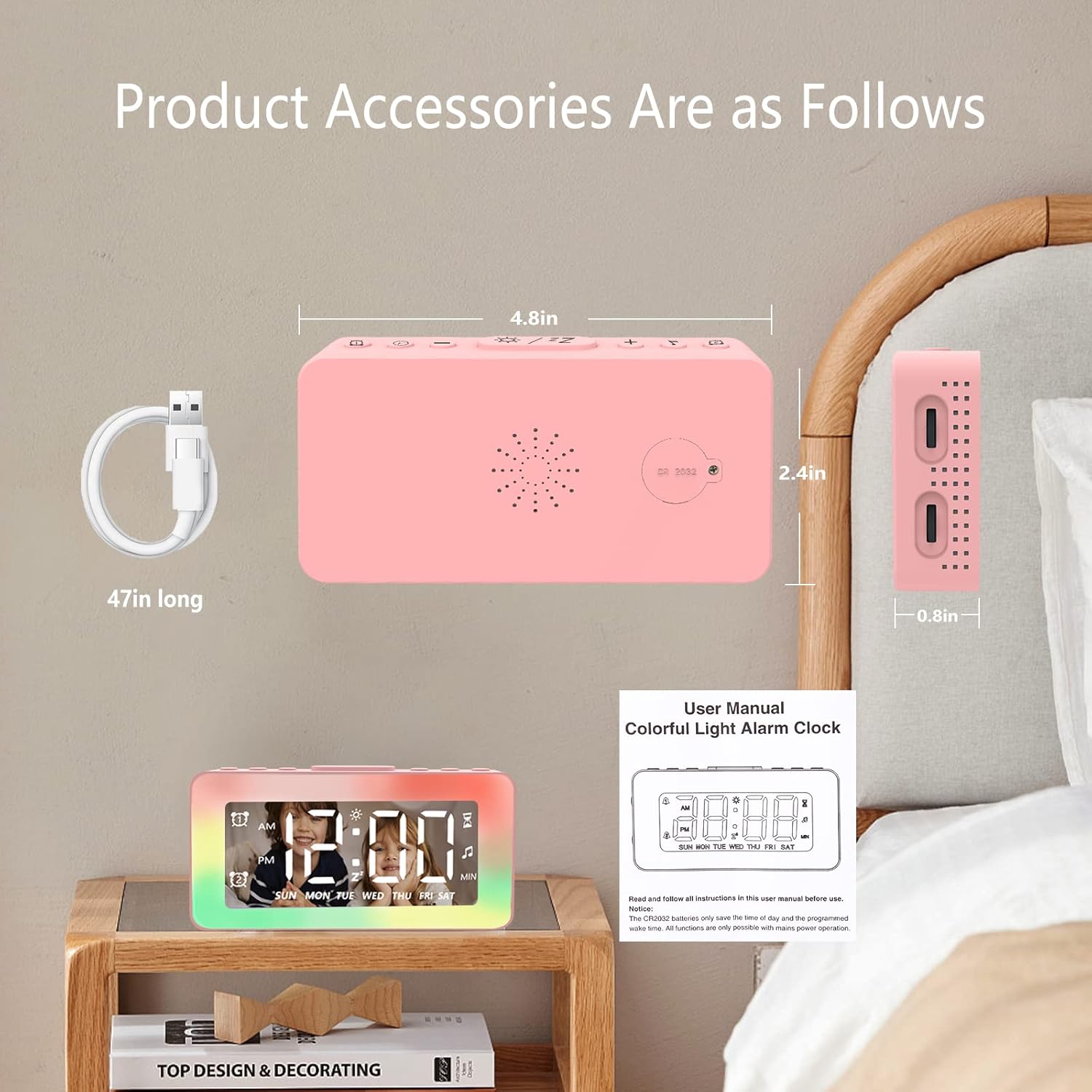
Image: The SPLITSKY NZFS Kids Alarm Clock, a USB-C power cable, and the user manual are included in the package.
3. สินค้าหมดview
ทำความคุ้นเคยกับปุ่มและพอร์ตต่างๆ บนนาฬิกาปลุกของคุณ:

ภาพ: รายละเอียด view of the alarm clock's top buttons and side ports, including Alarm 1, Time Setting, Light Minus/Settings, Snooze/Light Mode Switch, Light Plus/Setup, Music Switch, Alarm 2, Volume Setting, Time Brightness Setting, USB Output Charging Port, and Type-C Input Interface.
- ปุ่มปลุก 1: Set and activate Alarm 1.
- ปุ่มตั้งเวลา: ปรับเวลาปัจจุบัน
- Light Minus / Settings Button: Decrease light brightness or navigate settings.
- Snooze / Light Mode Switch Button: Activate snooze, or cycle through light modes.
- Light Plus / Setup Button: Increase light brightness or confirm settings.
- Music Switch Button: Cycle through white noise sounds.
- ปุ่มปลุก 2: Set and activate Alarm 2.
- Volume Setting Wheel (Side): Adjust alarm and white noise volume.
- Time Brightness Setting Wheel (Side): ปรับความสว่างของการแสดงผล
- USB Output Charging Port (Side): Charge external devices.
- Type-C Input Interface (Side): Connect power cable to the alarm clock.
4. การตั้งค่า
4.1 การเชื่อมต่อสายไฟ
- Connect the provided USB-C power cable to the Type-C Input Interface on the side of the alarm clock.
- เสียบปลายอีกด้านหนึ่งของสาย USB-C เข้ากับอะแดปเตอร์ไฟ USB ที่ใช้งานร่วมกันได้ (ไม่รวมอยู่ด้วย) หรือพอร์ต USB
- The display will illuminate, indicating the clock is powered on.

Image: The SPLITSKY NZFS Kids Alarm Clock is shown powered on and connected via its USB-C port, also demonstrating its capability to charge a smartphone.
4.2 Battery Installation (Memory Backup)
The alarm clock includes a pre-installed CR2032 battery. This battery serves as a memory backup to retain time and alarm settings during a power outage or when the main power is disconnected. It does not power the clock for regular operation.
- If the battery needs replacement, locate the battery compartment on the back of the unit.
- ใช้ไขควงอันเล็กเปิดช่อง
- เปลี่ยนด้วยแบตเตอรี่ CR2032 ใหม่ โดยตรวจสอบให้แน่ใจว่าใส่ขั้วถูกต้อง
- ปิดช่องอย่างแน่นหนา
5. คู่มือการใช้งาน
5.1 Setting the Time (12H/24H Format)
- กดปุ่มค้างไว้ ปุ่มตั้งเวลา until the hour digits begin to flash.
- ใช้ Light Minus / Settings Button (ลง) หรือ Light Plus / Setup Button (up) to adjust the hour.
- กดปุ่ม ปุ่มตั้งเวลา again to move to minute adjustment. Adjust minutes using the Light Minus/Plus buttons.
- กดปุ่ม ปุ่มตั้งเวลา a third time to select 12-hour or 24-hour format. Adjust using the Light Minus/Plus buttons.
- กดปุ่ม ปุ่มตั้งเวลา อีกครั้งเพื่อยืนยันและออกจากโหมดตั้งเวลา
5.2 Setting Alarms (Dual Alarm, Daily/Weekday/Weekend Mode)
นาฬิกาเรือนนี้รองรับการตั้งปลุกอิสระ 2 แบบ (การปลุกที่ 1 และการปลุกที่ 2)
- กดปุ่มค้างไว้ ปุ่มปลุก 1 (สำหรับสัญญาณเตือนที่ 1) หรือ ปุ่มปลุก 2 (for Alarm 2) until the alarm hour digits flash.
- ใช้ Light Minus / Settings Button or Light Plus / Setup Button เพื่อปรับชั่วโมง
- Press the respective Alarm Button again to move to minute adjustment. Adjust minutes using the Light Minus/Plus buttons.
- Press the respective Alarm Button again to select the alarm mode:
- โหมดรายวัน: เสียงนาฬิกาปลุกดังขึ้นทุกวัน
- Weekday Mode: ดังทุกวันจันทร์ถึงวันศุกร์
- โหมดวันหยุดสุดสัปดาห์: เสียงปลุกวันเสาร์และวันอาทิตย์
- Press the respective Alarm Button once more to confirm and exit alarm setting mode.
- To enable/disable an alarm, short press the ปุ่มปลุก 1 or ปุ่มปลุก 2ไอคอนแจ้งเตือนจะปรากฏ/หายไปบนหน้าจอแสดงผล
5.3 ฟังก์ชั่นเลื่อนซ้ำ
เมื่อเสียงเตือนดังขึ้น ให้แตะที่ Snooze / Light Mode Switch Button on top to activate snooze. The alarm will pause for 9 minutes and then sound again. This can be repeated multiple times.
5.4 Night Light (8 Modes RGB, 10-level dimming)
The alarm clock features 6 solid color lights and 2 ambient colorful lights.
- กดสั้น ๆ Snooze / Light Mode Switch Button to turn on the night light and cycle through the 8 color modes.
- To adjust the brightness (10 levels), use the Light Minus / Settings Button or Light Plus / Setup Button while the night light is active.
- To turn off the night light, continue pressing the Snooze / Light Mode Switch Button จนกระทั่งไฟดับลง

Image: Multiple SPLITSKY NZFS Kids Alarm Clocks are shown, each displaying a different color from the 8 available RGB night light modes.
5.5 White Noise Sleep Aid (8 Sounds)
The clock offers 8 soothing sounds to aid sleep.
- กดสั้น ๆ ปุ่มเปลี่ยนเพลง to turn on the white noise and cycle through the available sounds.
- To adjust the volume (16 levels), use the Volume Setting Wheel on the side of the clock.
- To turn off the white noise, continue pressing the ปุ่มเปลี่ยนเพลง until the sound stops.

Image: The SPLITSKY NZFS Kids Alarm Clock is displayed on a bedside table, with icons illustrating the various white noise options such as rain, cicadas, piano, bonfire, waves, birdsong, and church bells.
5.6 Sleep Timer (10-120 minutes)
The sleep timer allows you to set a duration for the white noise and/or night light to play before automatically turning off.
- While white noise or night light is active, press and hold the ปุ่มเปลี่ยนเพลง (for white noise timer) or Snooze / Light Mode Switch Button (for light timer).
- ใช้ Light Minus / Settings Button or Light Plus / Setup Button to select the desired timer duration (10, 20, 30, 60, 90, 120 minutes).
- Press the respective button again to confirm the timer setting. The timer icon will appear on the display.
5.7 การปรับความสว่างของจอแสดงผล
Adjust the brightness of the LED time display using the Time Brightness Setting Wheel on the side of the clock.
พอร์ตชาร์จ USB 5.8 พอร์ต
The USB output charging port on the side of the alarm clock can be used to charge other small electronic devices, such as smartphones. Connect your device's charging cable to this port.
6. การบำรุงรักษา
6.1 การทำความสะอาด
- ตรวจสอบให้แน่ใจว่าได้ถอดปลั๊กอุปกรณ์ออกก่อนทำความสะอาด
- เช็ดพื้นผิวด้วยผ้านุ่มและแห้ง
- ห้ามใช้น้ำยาทำความสะอาดที่มีฤทธิ์กัดกร่อน ตัวทำละลาย หรือสเปรย์เคมี
6.2 พื้นที่จัดเก็บ
When not in use for extended periods, store the alarm clock in a cool, dry place, away from direct sunlight and extreme temperatures.
7 การแก้ไขปัญหา
If you encounter issues with your SPLITSKY NZFS Kids Alarm Clock, refer to the table below for common problems and solutions.
| ปัญหา | สาเหตุที่เป็นไปได้ | สารละลาย |
|---|---|---|
| หน้าจอแสดงผลนาฬิกาปิดอยู่หรือสว่างน้อยเกินไป | Not connected to power; Time brightness set too low. | Ensure USB-C cable is securely connected to a power source. Adjust the Time Brightness Setting Wheel. |
| สัญญาณเตือนภัยไม่ดัง | สัญญาณเตือนไม่ทำงาน; ระดับเสียงสัญญาณเตือนต่ำเกินไป | Check if the alarm icon is displayed. If not, short press the respective Alarm Button to activate. Adjust the Volume Setting Wheel. |
| Time/settings reset after power disconnection. | CR2032 backup battery is depleted or missing. | ใส่แบตเตอรี่ CR2032 ลงในช่องใส่แบตเตอรี่ |
| Night light or white noise not working. | Function not activated; Sleep timer active. | กดสั้น ๆ Snooze / Light Mode Switch Button or ปุ่มเปลี่ยนเพลง to activate. Check if a sleep timer is set. |
8. ข้อมูลจำเพาะ
| คุณสมบัติ | รายละเอียด |
|---|---|
| ยี่ห้อ | สปลิตสกี้ |
| หมายเลขรุ่น | NZFS |
| ประเภทจอภาพ | ดิจิตอล LED |
| ขนาดสินค้า | 3.17"W x 3.17"H (approximately 8.05 cm W x 8.05 cm H) |
| น้ำหนักสินค้า | 8.1 ออนซ์ (ประมาณ 230 กรัม) |
| แหล่งพลังงาน | Corded Electric (USB-C), Battery Powered (CR2032 for memory) |
| โหมดแสงกลางคืน | 8 (6 solid colors, 2 ambient colorful) with 10-level dimming |
| เสียงสีขาว | 8 เสียงที่ผ่อนคลาย |
| เสียงปลุก | 7 wake-up alarm tones with 16-level volume control |
| คุณสมบัติปลุก | Dual Alarm, Daily/Weekday/Weekend modes, 9-minute Snooze |
| ฟังก์ชั่นจับเวลา | 10-120 minute sleep timer for sounds and lights |
| การเชื่อมต่อ | USB-C Input, USB-A Output (for charging external devices) |
| วัสดุ | อะคริโลไนไตรล์บิวทาไดอีนสไตรีน |
9. การรับประกันและการสนับสนุน
9.1 ข้อมูลการรับประกัน
Please refer to the warranty information provided at the time of purchase or contact your retailer for details regarding the product warranty. Keep your proof of purchase for any warranty claims.
9.2 การสนับสนุนลูกค้า
For technical assistance, troubleshooting beyond this manual, or general inquiries, please contact the seller through the platform where you purchased the product. Provide your order number and a detailed description of the issue for prompt support.


