1. บทนำ
ขอบคุณสำหรับการซื้อasing the SOAR XL ShockBox BTH6 Wireless Bluetooth Speaker. This speaker is designed to provide high-quality audio with versatile connectivity options, including Bluetooth 5.0, AM/FM radio, USB, and Aux inputs. Its portable and shockproof design, combined with dynamic multicolor LED lights, makes it suitable for various environments. Please read this manual carefully to ensure proper use and maintenance of your device.
2. สินค้าหมดview
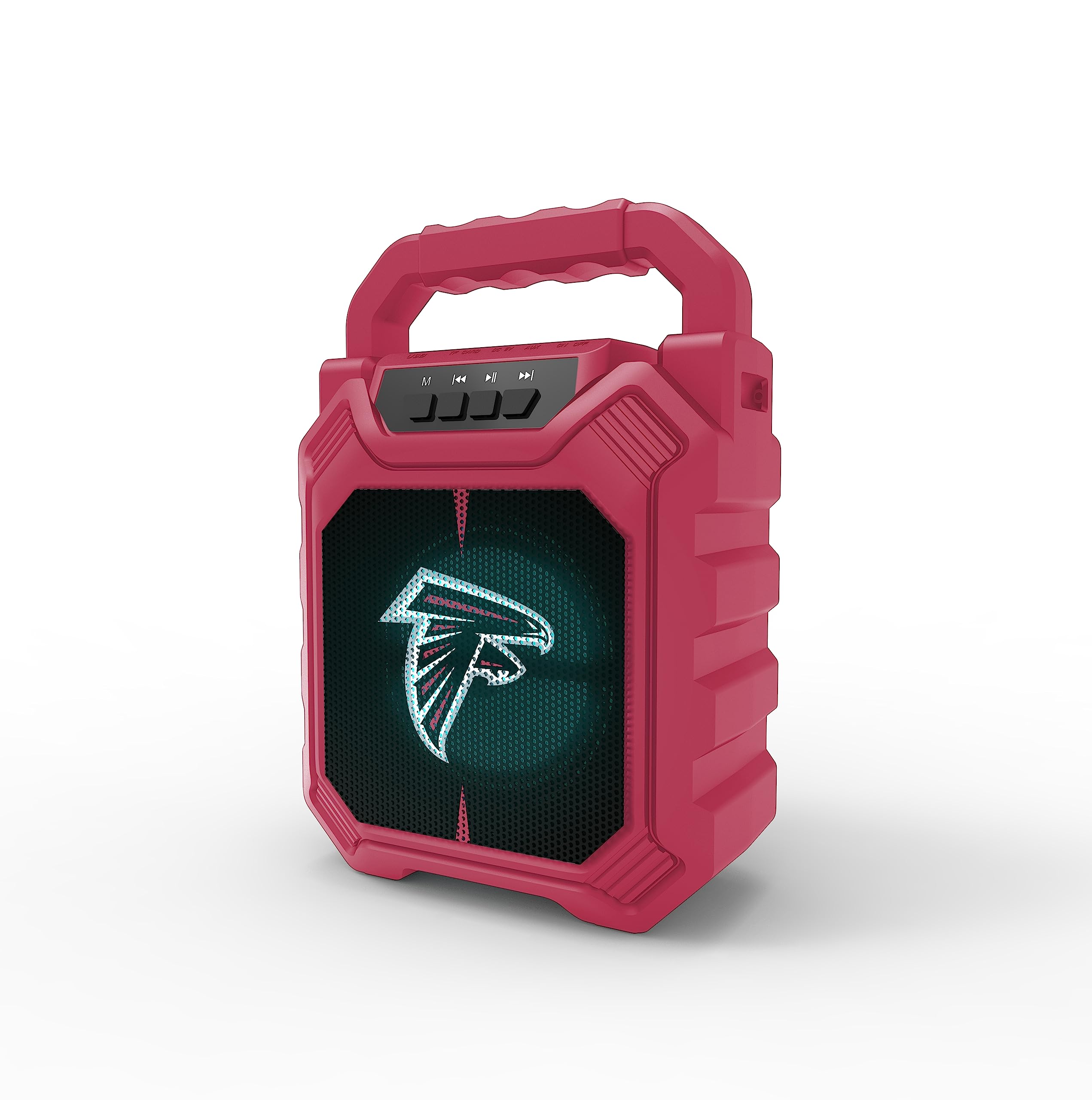
ภาพที่ 1: ด้านหน้า view of the SOAR XL ShockBox BTH6 Wireless Bluetooth Speaker, featuring the Atlanta Falcons logo.
คุณสมบัติหลัก:
- การเชื่อมต่อบลูทูธ 5.0: For seamless wireless audio streaming.
- อินพุตเสียงหลายช่อง: Supports AM/FM radio, USB, and Aux connections.
- การออกแบบพกพา: Features a convenient top handle and shockproof construction.
- อายุการใช้งานแบตเตอรี่ยาวนาน: Provides over 5 hours of playback on a single charge.
- ไฟ LED แบบไดนามิก: Multicolor LED lights pulse with the music.
- สเตอริโอไร้สายจริง (TWS): เชื่อมต่อลำโพงสองตัวเพื่อเสียงสเตอริโอที่ดียิ่งขึ้น
3. การควบคุมและพอร์ต

Image 2: Top panel of the speaker, illustrating the control buttons and various input ports.
ปุ่มฟังก์ชั่น:
- ปุ่มเปิด/ปิด: Press and hold to turn the speaker ON/OFF. Short press to switch modes (Bluetooth, FM, USB, Aux).
- ปุ่ม 'M' (โหมด): Short press to cycle through input modes (Bluetooth, FM Radio, USB, Aux).
- เพลงก่อนหน้า / ลดระดับเสียง: Short press for previous track (in Bluetooth/USB mode). Press and hold to decrease volume.
- ปุ่มเล่น/หยุดชั่วคราว: Short press to play or pause audio. In FM mode, short press to auto-scan and save stations.
- เพลงถัดไป / เพิ่มระดับเสียง: Short press for next track (in Bluetooth/USB mode). Press and hold to increase volume.
พอร์ตอินพุต:
- พอร์ตชาร์จ Micro-USB: สำหรับชาร์จลำโพง
- พอร์ต USB: สำหรับเล่นไฟล์เสียงจากแฟลชไดรฟ์ USB
- พอร์ต Aux-in (3.5 มม.): For connecting external audio devices via an auxiliary cable.
- ช่องเสียบการ์ด MicroSD: สำหรับเล่นไฟล์เสียงจาก MicroSD การ์ด
4. การตั้งค่าและการใช้งาน
4.1 การชาร์จลำโพง
- Connect the provided micro-USB cable to the charging port on the speaker.
- เชื่อมต่อปลายสายอีกด้านหนึ่งเข้ากับอะแดปเตอร์ไฟ USB (ไม่รวมอยู่ด้วย) หรือพอร์ต USB ของคอมพิวเตอร์
- ไฟแสดงสถานะการชาร์จจะสว่างขึ้น เมื่อชาร์จเต็มแล้ว ไฟอาจเปลี่ยนสีหรือดับลง
- A full charge provides over 5 hours of playback time.
4.2 การเปิด/ปิดเครื่อง
- To turn ON, press and hold the Power button until you hear an audible prompt.
- To turn OFF, press and hold the Power button again until the speaker powers down.
4.3 การจับคู่บลูทูธ
- Turn on the speaker. It will automatically enter Bluetooth pairing mode, indicated by a flashing LED light and an audible prompt.
- บนอุปกรณ์ของคุณ (สมาร์ทโฟน แท็บเล็ต ฯลฯ) เปิดใช้งานบลูทูธและค้นหาอุปกรณ์ที่มีอยู่
- Select "SOAR BTH6" from the list of devices.
- เมื่อจับคู่สำเร็จแล้ว ลำโพงจะส่งเสียงยืนยัน และไฟ LED จะหยุดกะพริบ
- ลำโพงจะเชื่อมต่อกับอุปกรณ์ที่จับคู่ไว้ล่าสุดโดยอัตโนมัติเมื่อเปิดเครื่อง หากอุปกรณ์อยู่ในระยะและเปิดใช้งาน Bluetooth ไว้
การใช้งานวิทยุ FM 4.4
- Turn on the speaker and press the 'M' (Mode) button until you enter FM Radio mode.
- To auto-scan and save available FM stations, short press the Play/Pause button. The speaker will scan and store stations automatically.
- ใช้ปุ่ม "เพลงก่อนหน้า" และ "เพลงถัดไป" เพื่อเลื่อนดูสถานีที่บันทึกไว้
4.5 USB and Aux Input
- ช่องต่อ USB: เสียบแฟลชไดรฟ์ USB เข้ากับพอร์ต USB ลำโพงจะเปลี่ยนไปใช้โหมด USB โดยอัตโนมัติและเริ่มเล่นเสียง files.
- อินพุต Aux: Connect an external audio device (e.g., MP3 player) to the Aux-in port using a 3.5mm audio cable. Press the 'M' button to switch to Aux mode.
โหมดไฟ LED 4.6 โหมด

Image 3: The speaker displaying its dynamic LED lights in a vibrant setting.
The speaker features dynamic multicolor LED lights that pulse to the rhythm of the music. These lights activate automatically when the speaker is in use. There are no user-adjustable modes for the LED lights; they are designed to enhance the audio experience visually.
การจับคู่ระบบเสียงสเตอริโอไร้สาย 4.7 True Wireless Stereo (TWS)

Image 4: Two SOAR XL ShockBox BTH6 speakers paired together for True Wireless Stereo (TWS) sound.
To achieve a wider soundstage, you can pair two SOAR XL ShockBox BTH6 speakers together using the TWS function:
- Ensure both speakers are turned OFF.
- Turn ON both speakers. They will enter Bluetooth pairing mode.
- On one of the speakers (this will be your primary speaker), double-press the 'M' (Mode) button. The speakers will attempt to connect to each other.
- Once successfully paired, you will hear an audible confirmation. The LED lights on both speakers will synchronize.
- ตอนนี้ ให้เชื่อมต่ออุปกรณ์ของคุณกับลำโพงหลักผ่านบลูทูธตามที่อธิบายไว้ในหัวข้อ 4.3 เสียงจะเล่นผ่านลำโพงทั้งสองตัวในระบบสเตอริโอ
5. การบำรุงรักษา
- การทำความสะอาด: ใช้ผ้าแห้งนุ่มเช็ดทำความสะอาดภายนอกลำโพง ห้ามใช้สารทำความสะอาดที่มีฤทธิ์กัดกร่อนหรือตัวทำละลาย
- พื้นที่จัดเก็บ: เก็บลำโพงไว้ในที่แห้งและเย็น หลีกเลี่ยงแสงแดดโดยตรงและอุณหภูมิที่สูงหรือต่ำเกินไป
- การดูแลแบตเตอรี่ To prolong battery life, charge the speaker regularly, even if not in frequent use. Avoid fully discharging the battery for extended periods.
- ความต้านทานน้ำ: While designed to be durable, avoid submerging the speaker in water.
6 การแก้ไขปัญหา
| ปัญหา | วิธีแก้ปัญหาที่เป็นไปได้ |
|---|---|
| ลําโพงไม่เปิดขึ้น | Ensure the battery is charged. Connect the speaker to a power source using the micro-USB cable. |
| ไม่สามารถจับคู่ผ่านบลูทูธได้ | Make sure the speaker is in Bluetooth mode and within range (approx. 10 meters). Turn off and on your device's Bluetooth. Forget "SOAR BTH6" from your device's Bluetooth list and try pairing again. |
| ไม่มีเสียงหรือเสียงเบา | ตรวจสอบระดับเสียงทั้งบนลำโพงและอุปกรณ์ที่เชื่อมต่อ ตรวจสอบให้แน่ใจว่าได้เลือกโหมดอินพุตที่ถูกต้องแล้ว |
| การรับสัญญาณวิทยุ FM ไม่ดี | Adjust the speaker's position. Ensure you are in an area with good signal strength. |
| การจับคู่ TWS ล้มเหลว | Ensure both speakers are fully charged and not connected to any other Bluetooth devices. Follow the TWS pairing steps carefully. |
7. ข้อมูลจำเพาะ
| คุณสมบัติ | รายละเอียด |
|---|---|
| หมายเลขรุ่น | BTH6 (Variant: NFL-BTH6-DLPH) |
| เวอร์ชันบลูทูธ | 5.0 |
| อินพุตเสียง | Bluetooth, AM/FM Radio, USB, Aux-in, MicroSD |
| เวลาเล่น | Over 5 hours (per charge) |
| พอร์ตชาร์จ | ไมโคร USB |
| ผู้ผลิต | บริษัท ไพรม์ แบรนด์ส กรุ๊ป อิงค์ |
| วันที่พร้อมใช้งานครั้งแรก | วันที่ 6 กันยายน 2023 |
8. วิดีโอผลิตภัณฑ์อย่างเป็นทางการ
วิดีโอ 1: วิดีโอแนะนำผลิตภัณฑ์อย่างเป็นทางการasing the features and dynamic LED lights of the SOAR BTH6 Wireless Bluetooth Speaker.
9. การรับประกันและการสนับสนุน
For warranty information and customer support, please refer to the documentation included with your product or contact the manufacturer, Prime Brands Group Inc., directly. Details regarding specific warranty periods and support procedures are typically provided at the point of purchase or on the manufacturer's official webเว็บไซต์.