1. บทนำและเรื่องอื่นๆview
สีดำview BV5200Pro is a rugged smartphone designed for durability and performance in challenging environments. It features advanced protection against water, dust, and drops, combined with a powerful processor and versatile camera system. This manual provides essential information for setting up, operating, and maintaining your device.

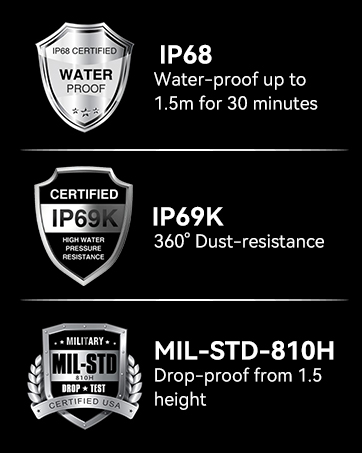
ภาพ: เดอะแบล็กview BV5200Pro is built to withstand harsh conditions, meeting MIL-STD-810H military standards for drop resistance, IP68 for water immersion up to 1.5 meters for 30 minutes, and IP69K for protection against high-pressure, high-temperature water jets and 360° dust ingress.
2. การตั้งค่าอุปกรณ์
2.1 การติดตั้งซิมการ์ดและที่เก็บข้อมูล
The BV5200Pro supports dual 4G LTE SIM cards and a TF (microSD) card for expanded storage. It features three dedicated card slots.
- ค้นหาถาดใส่การ์ด SIM ที่ด้านข้างของโทรศัพท์
- ใช้เครื่องมือถอดซิมที่ให้มาเพื่อเปิดถาด
- Carefully place your Nano-SIM cards and/or TF card into the designated slots. Ensure the gold contacts face downwards.
- ค่อยๆ ดันถาดกลับเข้าไปในโทรศัพท์จนกระทั่งแนบสนิทกับตัวเครื่อง

Image: The phone features three card slots, allowing for two 4G LTE SIM cards and one TF card for memory expansion up to 1TB simultaneously.
2.2 การเปิดเครื่องครั้งแรกและการตั้งค่าพื้นฐาน
To power on your device, press and hold the power button located on the side until the Blackview logo appears. Follow the on-screen prompts to complete the initial setup, including selecting your language, connecting to a Wi-Fi network, and setting up your Google account.
3. การใช้งานอุปกรณ์ของคุณ
3.1 การแสดงผลและอินเทอร์เฟซผู้ใช้
The BV5200Pro features a 6.1-inch HD+ display with a resolution of 720x1560 pixels and 500 nits brightness, ensuring clear visuals even in bright conditions. It runs on Android 12 with Doke OS 3.0, offering an intuitive and customizable user experience.

Image: The 6.1-inch HD+ display provides a wide view and immersive experience with 720x1560 resolution, 83% screen-to-body ratio, and 500 cd/m² brightness.
3.2 ประสิทธิภาพและการจัดเก็บ
Powered by the MediaTek Helio G35 Octa-Core processor, the phone offers smooth performance for daily tasks and entertainment. It comes with 4GB of RAM, expandable to 7GB (with 3GB virtual RAM), and 64GB of internal storage, which can be further expanded up to 1TB using a TF card.

Image: Visual representation of the MediaTek Helio G35 processor, 7GB RAM (4GB physical + 3GB virtual), and 64GB ROM, with 1TB TF card expandability.
3.3 แบตเตอรี่และการชาร์จ
The device is equipped with a 5180mAh battery, providing extended usage times: up to 642 hours standby, 26.5 hours calling, 20 hours music playback, and 8.8 hours video playback. It supports 10W fast charging and OTG reverse charging, allowing you to use your phone as a power bank for other devices.

ภาพ: เหนือview of the 5180mAh battery, showing usage durations for various activities and the OTG reverse charging capability.
3.4 คุณสมบัติกล้อง
The BV5200Pro features a 13MP Sony IMX258 rear camera and an 8MP Samsung5K4H7 front camera. It utilizes ArcSoft technology for enhanced photography, offering various modes:
- 360° Panorama Capture: For wide scenic shots.
- โหมดกลางคืน: ช่วยให้ถ่ายภาพในที่แสงน้อยได้ดีขึ้น
- Improved HDR: Balances exposure in high-contrast scenes.
- โหมดแนวตั้ง: Creates a bokeh effect for professional-looking portraits.
- ไฟส่องหน้า: Enhances selfies in dim lighting.
- โหมดความงาม: Optimizes facial features for flattering photos.
The camera also boasts a 0.1s ultra-fast PDAF for quick and accurate focusing.

Image: Details of the 8MP front camera and 13MP+2MP+2MP rear camera with ArcSoft technology for enhanced photo quality.

ภาพ: อดีตamples of various camera modes available on the BV5200Pro, including Beauty Mode, Night Mode, Portrait Mode, and Pro Mode.
3.5 Security and Convenience Features
The phone includes several features for security and user convenience:
- NFC: For contactless payments and quick data transfer.
- การระบุใบหน้า: Secure and convenient facial recognition for unlocking.
- โหมดถุงมือ: Allows touchscreen operation while wearing gloves.
- Customized Function Button: A programmable button for quick access to 5 essential functions or your favorite apps.
3.6 Navigation and Toolkit
Integrated GPS, GLONASS, Beidou, and Galileo systems provide accurate positioning. The device also comes with a useful toolkit of professional apps, including Compass, Gradienter, Barometer, Protractor, SoundMeter, and FM radio.

ภาพ: ครอบคลุม view of the phone's utility features, including the customizable shortcut button, Face Unlock, 3 card slots, Glove Mode, NFC, advanced GPS, and a suite of toolkit applications.
4. การบำรุงรักษาและความทนทาน
สีดำview BV5200Pro is engineered for extreme durability, making it suitable for rugged use. To ensure its longevity, follow these guidelines:
- กันน้ำ (IP68): The phone can withstand immersion in water up to 1.5 meters deep for 30 minutes. Ensure all port covers are securely closed before exposure to water.
- Dustproof (IP69K): It offers 360° protection against dust and can resist high-pressure, high-temperature water jets.
- Dropproof (MIL-STD-810H): Certified to military standard MIL-STD-810H, the phone is drop-resistant from heights up to 1.5 meters.
- การทำความสะอาด: ใช้แบบนุ่มๆamp ใช้ผ้าเช็ดทำความสะอาดอุปกรณ์ หลีกเลี่ยงสารเคมีรุนแรงหรือวัสดุที่มีฤทธิ์กัดกร่อน
- อุณหภูมิ: Operate the phone within its specified temperature range to prevent damage to the battery and internal components.
ภาพ: เดอะแบล็กview BV5200Pro submerged in water, illustrating its IP68 waterproof rating.
5 การแก้ไขปัญหา
5.1 ความเข้ากันได้ของเครือข่าย
สีดำview BV5200Pro is compatible with GSM network carriers such as T-Mobile, BTC, MetroPCS, H2O, Movistar, Telcel, Tigo, Claro, Vivacom, Ultra Mobile, Lycamobile, Tello Mobile, Bell Wireless, Rogers Wireless, Chatr, Luck Mobile, Virgin Mobile, Telus, Fido, FIZZ, and Shaw Mobile.
สำคัญ: This phone is ไม่ compatible with AT&T and Cricket Wireless SIM cards.

Image: A visual guide to the supported 2G, 3G, and 4G network bands and compatible US carriers for the Blackview บีวี5200โปร
5.2 ปัญหาทั่วไป
- อุปกรณ์ไม่เปิดเครื่อง: ตรวจสอบให้แน่ใจว่าแบตเตอรี่ชาร์จเต็มแล้ว เสียบโทรศัพท์เข้ากับเครื่องชาร์จและรอสักครู่ก่อนลองเปิดเครื่องอีกครั้ง
- การรับสัญญาณไม่ดี: Check your SIM card installation. If the issue persists, contact your network provider.
- แอปขัดข้อง: Clear the cache of the problematic app or reinstall it. Ensure your system software is up to date.
- หน้าจอสัมผัสไม่ตอบสนอง: Restart the device. If using Glove Mode, ensure it is enabled correctly.
6. ข้อมูลจำเพาะ
| คุณสมบัติ | ข้อมูลจำเพาะ |
|---|---|
| ชื่อรุ่น | BV5200โปร |
| ระบบปฏิบัติการ | แอนดรอยด์ 12.0 |
| โปรเซสเซอร์ | MediaTek Helio G35 Octa-Core |
| แรม | หน่วยความจำ 4GB (สามารถเพิ่มได้ถึง 7GB) |
| การจัดเก็บข้อมูลภายใน | 64GB |
| พื้นที่เก็บข้อมูลแบบขยายได้ | รองรับความจุสูงสุด 1TB ผ่านการ์ด TF |
| ขนาดหน้าจอ | หน้าจอ HD+ ขนาด 6.1 นิ้ว |
| ปณิธาน | 720 x 1560 |
| กล้องหลัง | 13MP โซนี่ IMX258 |
| กล้องหน้า | 8MP Samsung5K4H7 |
| ความจุของแบตเตอรี่ | 5180mAh |
| การชาร์จไฟ | ชาร์จเร็ว 10W, ชาร์จย้อนกลับ OTG |
| ระดับความทนทาน | IP68 Waterproof, IP69K Dustproof, MIL-STD-810H Dropproof |
| การเชื่อมต่อ | Dual 4G LTE, Wi-Fi (802.11 a/b/g/n/ac), Bluetooth 5.0, NFC |
| การนำทาง | จีเอสจี, จีโลนัสส์, เป่ยโต้ว, กาลิเลโอ |
| ขนาด | 161.8 x 77.86 x 13.65 มม. |
| น้ำหนัก | 268กรัม |
7. การรับประกันและการสนับสนุน
สีดำview offers a 2-year warranty on all Blackview cell phones purchased from authorized retailers. This includes a 24-month free repair warranty and lifetime technician support. For any issues or inquiries, please contact Blackview การบริการลูกค้า

ภาพ: ข้อมูลเกี่ยวกับคนผิวดำview's two-year warranty support, emphasizing strict quality control and dedicated customer service.
8. วิดีโอผลิตภัณฑ์view
วิดีโอ: เจ้าหน้าที่ผ่านview ของสีดำview BV5200Pro Rugged Cell Phone, highlighting its key features and durability.


