1. บทนำ
The Sony FX3 Full-Frame Cinema Camera (ILME-FX3) is designed for solo shooters and travel applications, serving as a portable cinema camera. It integrates features from both Sony's Cinema Line and Alpha series. The FX3 features a lightweight, handheld form factor with a streamlined profile and a 'cage-free' design, allowing direct attachment of various accessories to the camera body. Its 12.1MP Exmor R BSI CMOS sensor (10.2MP effective in video mode) and BIONZ XR processor enable UHD 4K video capture with internal 10-bit 4:2:2 sampling or 16-bit raw output. The sensor's BSI design enhances clarity and sensitivity, offering an expandable ISO 80-409,600 range and over 15 stops of dynamic range for diverse lighting conditions.
2. ข้อมูลด้านความปลอดภัย
Please read all safety instructions carefully before using the camera. Retain this manual for future reference.
- แหล่งพลังงาน: Use only the specified battery and charger. Do not attempt to disassemble or modify the battery.
- น้ำและความชื้น: This camera is not waterproof. Avoid exposure to rain, moisture, or high humidity to prevent electric shock or malfunction.
- อุณหภูมิ: Do not expose the camera to extreme temperatures (hot or cold). Operating temperature range is typically 0°C to 40°C (32°F to 104°F).
- การจัดการ: โปรดใช้งานกล้องอย่างระมัดระวัง หลีกเลี่ยงการทำตกหรือการกระแทกอย่างแรง
- การทำความสะอาด: Use a soft, dry cloth for cleaning. Do not use organic solvents.
- การกำจัด: กำจัดแบตเตอรี่และชิ้นส่วนอิเล็กทรอนิกส์ตามระเบียบข้อบังคับของท้องถิ่น
3. เนื้อหาบรรจุภัณฑ์
ตรวจสอบว่ารายการทั้งหมดที่ระบุไว้ด้านล่างนี้รวมอยู่ในแพ็คเกจของคุณ:
- Sony FX3 Full-Frame Cinema Camera (ILME-FX3)
- ชุดแฮนด์ XLR
- อุปกรณ์เสริมหมวกรองเท้า
- Accessory Shoe Kit
- เครื่องชาร์จแบตเตอรี่ Sony BC-QZ1
- ฝาครอบตัว
- Handle Shoe Cap
- สายไฟ
- แบตเตอรี่ลิเธียมไอออนแบบชาร์จได้ Sony NP-FZ100 (2280mAh)
- สายเคเบิล USB Type-A ถึง Type-C (USB 3.2)
- Lilliput A7S 7" Full HD Monitor
- 2 x SanDisk SecureDigital 64GB Extreme PRO Memory Card
- กระเป๋า Soft
- 3 x NP-FZ100 Compatible Battery
- ไฟ LED
- เครื่องอ่านการ์ดหน่วยความจำ
- Corel Photo Software (PhotoMirage, AfterShot, Painter Essentials, PaintShop Pro, Video Studio)
- ไมโครโฟนช็อตกัน Rode VideoMicro ขนาดกะทัดรัดพิเศษสำหรับติดตั้งบนกล้อง
- ขาตั้งกล้องแบบยืดหยุ่นขนาด 12 นิ้ว
- สายคล้องมือ
- กระเป๋าใส่การ์ดหน่วยความจำ
- ตัวล็อคฝาปิดเลนส์
- ชุดทำความสะอาด
- สาย HDMI
4. กล้องโอเวอร์view
Familiarize yourself with the physical components and controls of your Sony FX3 camera.

รูปที่ 4.1: ด้านหน้า view of the Sony FX3 camera body, showing the E-mount for interchangeable lenses and the full-frame sensor. The grip is visible on the left side.

รูปที่ 4.2: ด้านหน้า view of the Sony FX3 camera with a Zeiss Sonnar FE 55mm F1.8 ZA lens attached. This illustrates the camera's compact form with a lens.

รูปที่ 4.3: หลัง view of the Sony FX3, displaying the LCD screen, control dial, and various buttons such as MENU, FOCUS MAG, Fn, DISP, ZEBRA, PEAKING, SHUTTER, and playback controls.
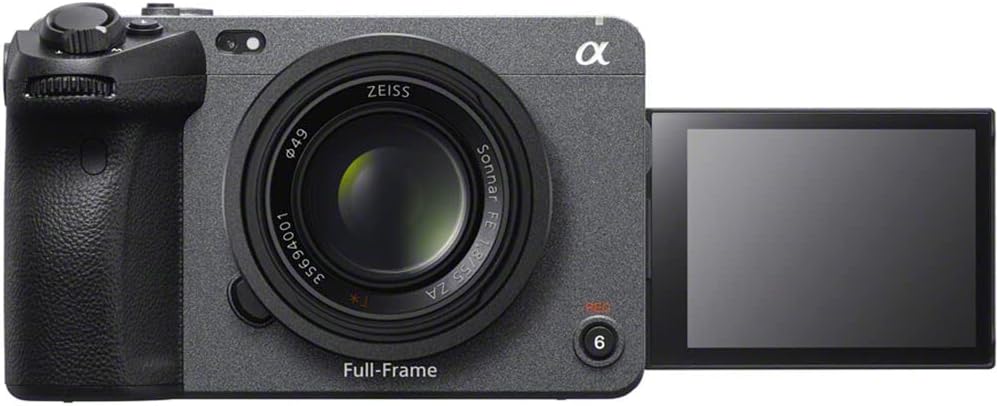
รูปที่ 4.4: ด้านหน้า view of the Sony FX3 with the LCD screen articulated outwards, demonstrating its flexible viewing angles for various shooting scenarios.
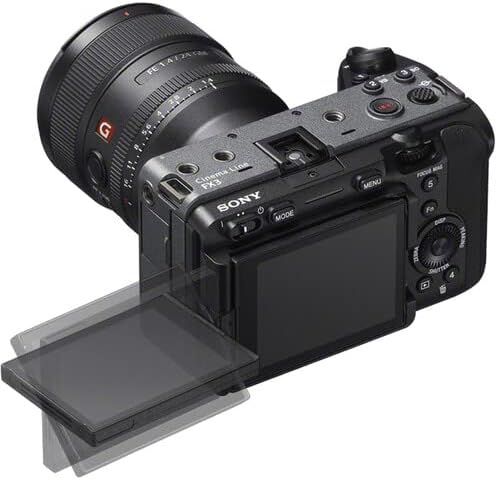
รูปที่ 4.5: Top-rear perspective of the Sony FX3, showing the articulated LCD screen, a mounted lens, and top-panel controls including the record button and mode dial.

รูปที่ 4.6: ด้านซ้าย view of the Sony FX3, revealing the battery compartment and dual CFexpress Type A/SDXC card slots, secured by a lock/open mechanism.

รูปที่ 4.7: ด้านขวา view of the Sony FX3, displaying various input/output ports including HDMI, USB-C (MULTI), USB-A (CHG), headphone jack, and microphone input with plug-in power.
5. การตั้งค่า
5.1. การติดตั้งและการชาร์จแบตเตอรี่
- Open the battery cover on the left side of the camera (refer to Figure 4.6).
- Insert the NP-FZ100 battery with the arrow facing inward until it locks into place.
- ปิดฝาครอบแบตเตอรี่
- To charge, remove the battery and insert it into the supplied BC-QZ1 charger. Connect the charger to a power outlet using the power cord. The charging indicator will illuminate during charging and turn off when complete.
5.2. การติดตั้งการ์ดหน่วยความจำ
- Open the memory card slot cover on the left side of the camera (refer to Figure 4.6).
- Insert a CFexpress Type A or SDXC memory card into the appropriate slot until it clicks. Ensure the card is oriented correctly.
- ปิดฝาปิดช่องเสียบการ์ดหน่วยความจำ
- Format the memory card in the camera before first use to ensure optimal performance.
5.3. การติดตั้งอุปกรณ์เสริม
- XLR Handle Unit: Attach the XLR handle unit to the multi-interface shoe on top of the camera. Secure it using the locking mechanism.
- Lilliput A7S 7" Monitor: Connect the monitor to the camera via an HDMI cable (refer to Figure 4.7 for HDMI port location). Mount the monitor using a suitable mounting solution.
- Rode VideoMicro Microphone: Connect the microphone to the camera's microphone input jack (refer to Figure 4.7).
5.4. การเปิดเครื่องครั้งแรกและการตั้งค่าพื้นฐาน
- กดปุ่ม POWER เพื่อเปิดกล้อง
- ทำตามคำแนะนำบนหน้าจอเพื่อตั้งค่าวันที่ เวลา และภาษา
- Adjust basic settings such as video format (e.g., XAVC S-I 4K), frame rate, and picture profile (e.g., S-Cinetone) as needed for your shooting requirements.
6. การใช้งานกล้อง
6.1. Basic Video Recording
- เปิดเครื่อง: เปิดกล้องโดยใช้ปุ่ม POWER
- เลือกโหมด: Use the MODE button or dial to select your desired shooting mode (e.g., Movie mode).
- ปรับการตั้งค่า: Set ISO, aperture, and shutter speed. The FX3 offers an expandable ISO range of 80-409,600.
- จุดสนใจ: Utilize the Fast Hybrid AF system. The camera supports Face Tracking and Eye AF for precise subject focus.
- เริ่ม/หยุดการบันทึก: Press the REC button (often located on the top or front grip) to start recording. Press again to stop.
6.2. คุณสมบัติวิดีโอขั้นสูง
- การบันทึกวิดีโอ 4K: The camera supports UHD 4K up to 120fps and 1080p up to 240fps.
- การบันทึกภายใน: Record internally with 10-bit 4:2:2 sampling using XAVC S-I.
- Raw Output: Output 16-bit raw video via HDMI to compatible external recorders.
- คัลเลอร์โปรfiles: Use S-Cinetone for cinematic color science, or S-Log3/2 for maximum dynamic range in post-production. 10-bit HLG (Hybrid Log-Gamma) is available for direct HDR productions.
- ช่วงไดนามิค: Benefit from over 15 stops of dynamic range for capturing detail in both highlights and shadows.
6.3. การเล่น
- Press the Playback button (often marked with a triangle icon).
- Use the control dial or directional buttons to navigate through your recorded footage.
- Press the center button to play or pause a video.
วิดีโอผลิตภัณฑ์อย่างเป็นทางการ
6.1 วิดีโอ: โอเวอร์view of the Sony FX3 Full-Frame Cinema Camera, highlighting its key features and design for cinematic production. (Duration: 3:11)
6.2 วิดีโอ: A detailed demonstration of the Sony FX3's advanced functionalities, including autofocus performance and color science. (Duration: 5:23)
7. การบำรุงรักษา
7.1. การทำความสะอาดกล้อง
- ตัวกล้อง: เช็ดตัวกล้องด้วยผ้านุ่มและแห้ง สำหรับคราบสกปรกฝังแน่น ให้เช็ดเบาๆampen the cloth with water and then wipe dry. Avoid using alcohol or other chemical cleaners.
- เลนส์: ใช้แปรงเลนส์ปัดฝุ่นออก จากนั้นเช็ดเบาๆ ด้วยผ้าเช็ดเลนส์และน้ำยาทำความสะอาดเลนส์
- เซ็นเซอร์: Sensor cleaning should be performed with extreme care. If dust spots appear on images, use a blower brush. For persistent dust, consult a professional service center.
- หน้าจอ LCD: เช็ดเบาๆ ด้วยผ้าเนื้อนุ่มที่ไม่เป็นขุย
7.2. การจัดเก็บ
- When not in use for extended periods, remove the battery from the camera.
- เก็บกล้องไว้ในที่แห้งและเย็น หลีกเลี่ยงแสงแดดโดยตรงและอุณหภูมิที่สูงหรือต่ำเกินไป
- ใช้สารดูดความชื้นเพื่อป้องกันเชื้อราและราดำในสภาพแวดล้อมที่มีความชื้น
8 การแก้ไขปัญหา
If you encounter issues with your Sony FX3, refer to the following common problems and solutions:
| ปัญหา | สาเหตุที่เป็นไปได้ / วิธีแก้ไข |
|---|---|
| กล้องไม่สามารถเปิดได้ | Battery may be depleted or incorrectly inserted. Ensure battery is charged and properly seated. |
| ไม่สามารถบันทึกวิดีโอได้ | Memory card may be full, locked, or not formatted. Check card status and format if necessary. Ensure sufficient battery charge. |
| ภาพมีความเบลอ | Check focus settings (AF/MF). Ensure lens is clean. Verify shutter speed is appropriate for lighting conditions to avoid motion blur. |
| ไม่มีการบันทึกเสียง | Check microphone connection. Verify audio recording settings in the camera menu. Ensure microphone is powered if required. |
| Camera overheats. | Prolonged recording in high ambient temperatures can cause overheating. Allow the camera to cool down. Reduce recording resolution or frame rate if possible. |
9. ข้อมูลจำเพาะ
| คุณสมบัติ | รายละเอียด |
|---|---|
| ยี่ห้อ | โซนี่ |
| หมายเลขรุ่น | อิลมี-FX3 |
| ประเภทเซนเซอร์ | 12.1MP Full-Frame CMOS Exmor R Sensor (10.2MP effective in video mode) |
| ความละเอียดในการจับภาพวิดีโอ | UHD 4K (up to 120fps), 1080p (up to 240fps) |
| การบันทึกภายใน | 10-Bit 4:2:2 XAVC S-I |
| เอาท์พุทภายนอก | 16-Bit Raw Output via HDMI |
| ช่วงไดนามิค | 15+ Stops |
| ช่วง ISO | 80 ถึง 409,600 (ขยาย) |
| ระบบออโต้โฟกัส | Phase Detection AF, Face Tracking, Eye AF |
| คัลเลอร์โปรfiles | S-Cinetone, S-Log3/2, HLG |
| ช่องเสียบการ์ดหน่วยความจำ | Dual CFexpress Type A / SDXC Card Slots |
| การเชื่อมต่อ | USB,HDMI |
| ขนาดหน้าจอ | 7 Inches (Lilliput A7S Monitor) |
| น้ำหนักสินค้า | 10.4 pounds (approximate, with accessories) |
| ขนาดสินค้า | 9.6 x 9.1 x 5.8 inches (approximate, with accessories) |
| คุณสมบัติพิเศษ | ระบบป้องกันการสั่นไหว, การถ่ายภาพในที่แสงน้อย, การถ่ายภาพแบบไทม์แลปส์ |
10. การรับประกันและการสนับสนุน
This product is covered by Sony's standard warranty. For specific warranty terms and conditions, please refer to the warranty card included with your product or visit the official Sony support webหากต้องการความช่วยเหลือด้านเทคนิค การแก้ไขปัญหา หรือสอบถามข้อมูลเกี่ยวกับการบริการ โปรดติดต่อฝ่ายบริการลูกค้าของ Sony
แหล่งข้อมูลออนไลน์: For the latest firmware updates, detailed manuals, and support articles, please visit the official Sony support webเว็บไซต์.


