การแนะนำ
The Widex Moment 110 hearing aid ranks as the lowest technology level offered by Widex within the Moment family. The Moment 110 technology level delivers Mid-level performance by FitHearing standards.
Basic hearing aids will provide a few filters and programs, making these devices ideal for those with a mostly quiet lifestyle. If you primarily wish to improve your hearing in small groups, one-on-one conversation, and during routine activity within a home setting, the Widex Moment 110 may be the hearing aid for you.
Moment 110 hearing aids feature traditional Receiver-in-canal (RIC) form factor, whereby the hearing aids sit comfortably and discreetly behind your ear. These hearing aids are made-for-smartphones so you can stream calls, music, and other audio directly through your hearing aids.
สินค้าเกินview
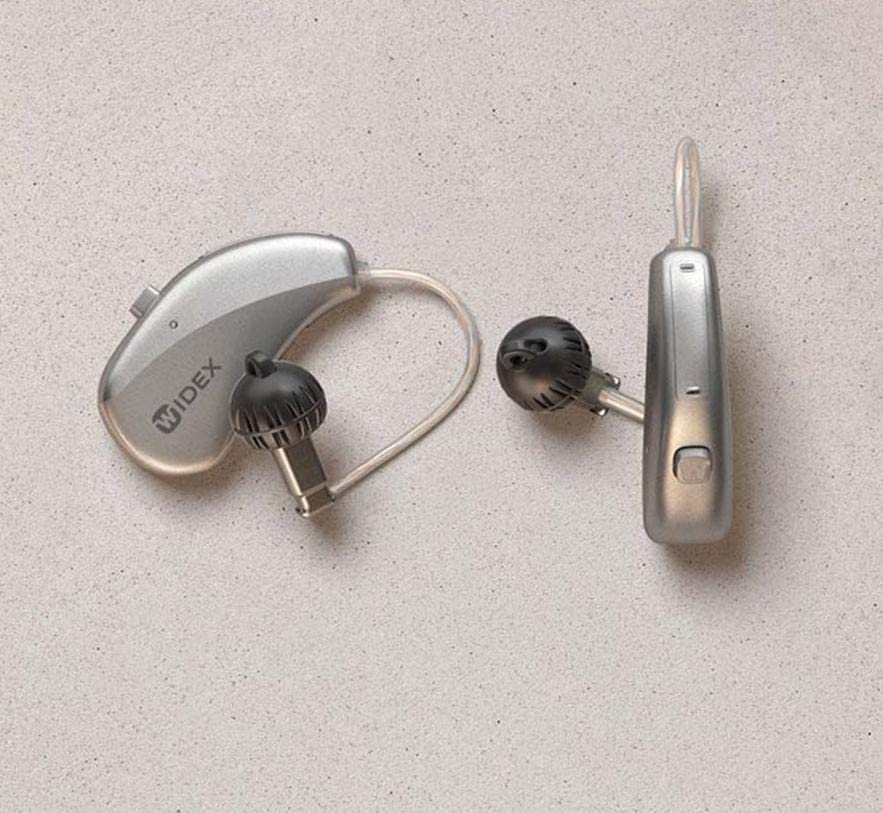
This image displays the Widex Moment Sheer 110 hearing aid, featuring its Receiver-in-canal (RIC) design. The device consists of a small, silver-colored unit that rests behind the ear, connected by a thin tube to an in-ear component with a black dome. The "WIDEX" logo is visible on the main unit. Another similar component is shown separately, indicating a pair of hearing aids.
มีอะไรอยู่ในกล่อง
- Widex Moment Sheer 110 Hearing Aid (Pair)
- เคสชาร์จแบบไร้สาย
คู่มือการติดตั้ง
1. การชาร์จครั้งแรก
Before first use, place your Widex Moment Sheer 110 hearing aids into the provided Wireless Charging Case. Ensure the case is connected to a power source. The indicator lights on the case and hearing aids will show charging status. A full charge typically takes 3-4 hours.
2. การจับคู่กับสมาร์ทโฟน
- ตรวจสอบให้แน่ใจว่าได้เปิดใช้งานบลูทูธของสมาร์ทโฟนของคุณแล้ว
- Open the battery doors of your hearing aids (if applicable) or place them in and out of the charging case to put them in pairing mode.
- On your smartphone, go to Bluetooth settings and select your Widex Moment Sheer 110 from the list of available devices.
- ปฏิบัติตามคำแนะนำบนหน้าจอเพื่อดำเนินการจับคู่ให้เสร็จสมบูรณ์
3. First Fit
Gently place the hearing aid unit behind your ear. Guide the thin tube and the in-ear component into your ear canal. Ensure it sits comfortably and securely. Consult with your audiologist for proper fitting and initial programming.
คำแนะนำการใช้งาน
1. เปิด/ปิดเครื่อง
- การเปิดเครื่อง: Remove the hearing aids from the charging case. They will automatically power on.
- วิธีปิดเครื่อง: Place the hearing aids back into the charging case. They will automatically power off and begin charging.
2. การควบคุมระดับเสียง
Volume adjustments can typically be made via the connected smartphone app or through a small button/rocker switch on the hearing aid itself (refer to specific model details for button functionality).
3. การเลือกโปรแกรม
Your hearing aids may have multiple listening programs for different environments (e.g., quiet, noisy, music). These programs can be switched using the smartphone app or the control button on the hearing aid.
4. Streaming Audio
Once paired, you can stream audio (calls, music, podcasts) directly from your smartphone to your hearing aids. Initiate audio playback on your phone, and it will automatically route to the hearing aids.
การบำรุงรักษาและการดูแล
1. ทำความสะอาดทุกวัน
Wipe your hearing aids daily with a soft, dry cloth to remove earwax and debris. Use the provided cleaning tools (if any) to clear the sound outlet and microphone ports. Do not use water or cleaning solvents.
2. การดูแลรักษาเคสชาร์จ
Keep the charging case clean and dry. Periodically wipe the charging contacts with a dry cotton swab. Ensure no debris obstructs the charging ports.
3. การจัดเก็บ
When not in use, store your hearing aids in their charging case or a dry, cool place away from direct sunlight and extreme temperatures. Keep them out of reach of children and pets.
การแก้ไขปัญหา
| ปัญหา | สาเหตุที่เป็นไปได้ | สารละลาย |
|---|---|---|
| ไม่มีเสียง | Battery depleted; Earwax blockage; Hearing aid off. | Charge the hearing aids; Clean the sound outlet; Ensure hearing aids are powered on. |
| คุณภาพเสียงไม่ดี | Low battery; Earwax buildup; Incorrect program. | Recharge; Clean hearing aid; Switch to appropriate listening program. |
| Connectivity Issues (Smartphone) | Bluetooth off; Hearing aids out of range; Pairing lost. | Ensure Bluetooth is on; Move closer to phone; Re-pair the devices. |
| แบตเตอรี่ไม่ได้ชาร์จ | Charging case not powered; Poor contact with charging pins. | Check power connection to case; Clean charging contacts on both hearing aids and case. |
If problems persist, please contact customer support or your hearing care professional.
ข้อมูลจำเพาะทางเทคนิค
| ชื่อรุ่น | Widex Moment Sheer 110 (Internal Model: signia) |
| เทคโนโลยีการเชื่อมต่อ | ไร้สาย |
| เทคโนโลยีการสื่อสารไร้สาย | ไร้สาย |
| ส่วนประกอบที่รวมอยู่ | เคสชาร์จแบบไร้สาย |
| ช่วงอายุ (คำอธิบาย) | ผู้ใหญ่ |
| การใช้งานเฉพาะของผลิตภัณฑ์ | การใช้ในชีวิตประจำวัน |
| อุปกรณ์ที่รองรับ | Smartphones, Wireless Charging Cases |
| วิธีการควบคุม | Remote (via smartphone app) |
| จำนวนรายการ | 1 (referring to the product unit, typically sold as a pair) |
| ประเภทไดร์เวอร์เสียง | ไดร์เวอร์แบบไดนามิก |
| รูปทรงของหูฟัง | หู |
| ผู้ผลิต | Hearing for life pvt.Ltd. |
| ขนาดสินค้า | 10 x 4 x 8 ซม. |
| แพลตฟอร์มฮาร์ดแวร์ | สมาร์ทโฟน |
| คุณสมบัติพิเศษ | ชาร์จเร็ว |
| วันที่พร้อมใช้งานครั้งแรก | 10 มีนาคม 2023 |
| สี | สีน้ำตาล |
| การวางตำแหน่งหู | ครอบหู |
| ฟอร์มแฟกเตอร์ | ครอบหู |
| แจ็คหูฟัง | 3.5 mm Jack (Note: This specification seems unusual for a modern RIC hearing aid, typically they are wireless. User should rely on wireless connectivity for this model.) |
การรับประกันและการสนับสนุน
สินค้านี้ผลิตโดย Hearing for life pvt.Ltd. For specific warranty details, please refer to the warranty policy provided at the time of purchase or contact the manufacturer directly. General warranty information may be available via the retailer's webเว็บไซต์.
For technical support, troubleshooting assistance beyond this manual, or service inquiries, please contact your authorized Widex dealer or the manufacturer's customer service department.
นโยบายการคืนสินค้า: Please refer to the retailer's returns policy for information on product returns.


