1. บทนำ
Thank you for choosing the Wicked Audio Growl Bluetooth Speaker. This manual provides essential information for the safe and optimal use of your device. The Growl speaker is designed for portability and durability, featuring IP67 waterproof and dustproof ratings, true wireless stereo pairing, and a built-in power bank function.
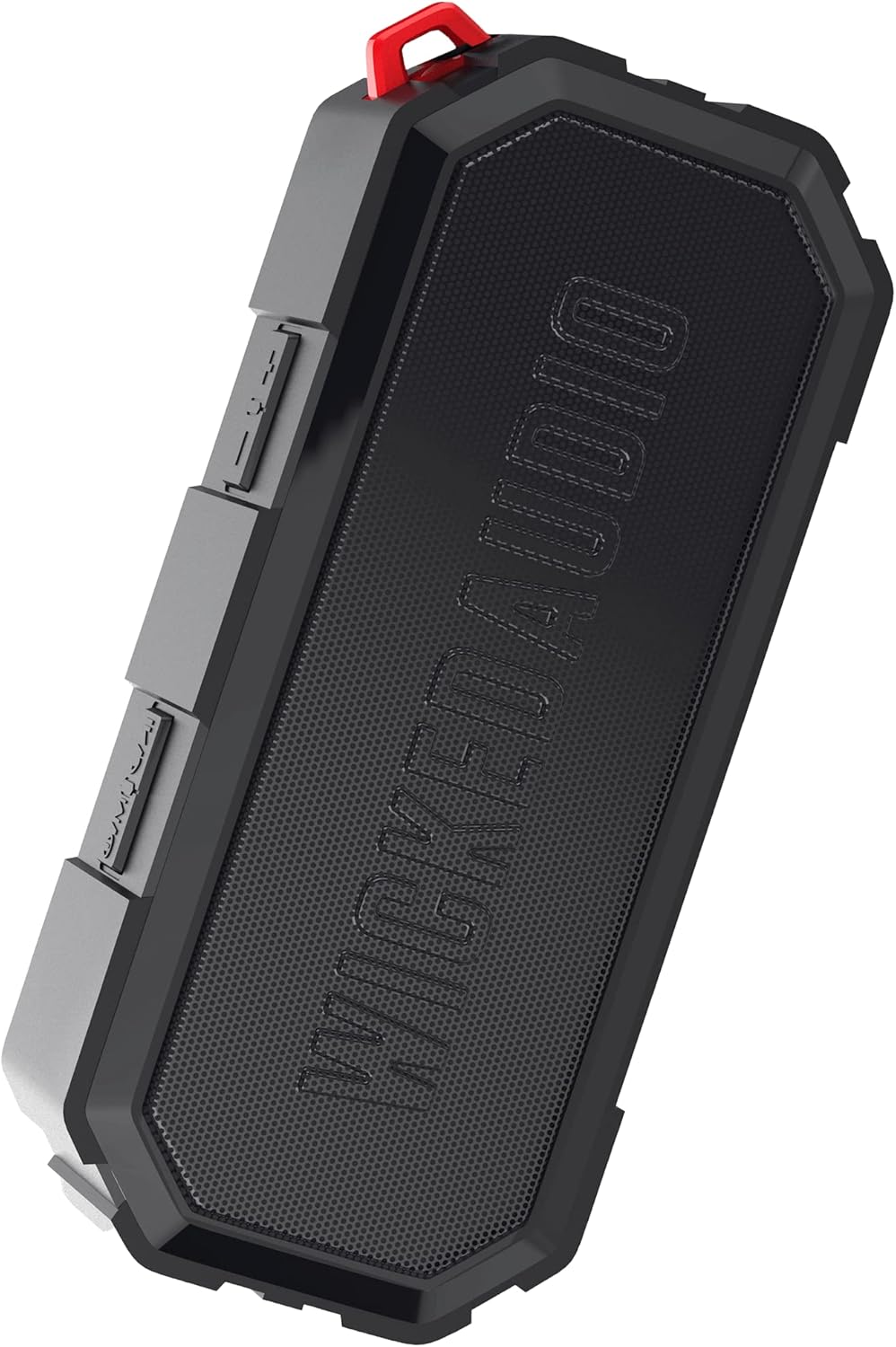
Image 1.1: The Wicked Audio Growl Bluetooth Speaker, showcasinด้วยดีไซน์ที่กะทัดรัดและทนทาน
2. เนื้อหาบรรจุภัณฑ์
กรุณาทำเครื่องหมายในช่องสำหรับรายการต่อไปนี้:
- Wicked Audio Growl Bluetooth Speaker
- คู่มือการใช้งาน (เอกสารนี้)
- สายชาร์จ USB-C
- สายสัญญาณเสียงเสริม (AUX)
3. คุณสมบัติของผลิตภัณฑ์
The Wicked Audio Growl speaker offers a range of features designed for an enhanced audio experience:
- IP67 กันน้ำและกันฝุ่น: Provides protection against water immersion and dust ingress, making it suitable for various environments.
- ดีไซน์แข็งแรงทนทาน: Constructed with a durable silicone case and protective covers for buttons and ports.
- True Wireless Stereo (TWS) Linkable Tech: Connect two Growl speakers wirelessly for a stereo sound experience.
- พาวเวอร์แบงค์ในตัว: Features a 2600mAh battery that can be used to charge other devices via its USB-A output port.
- เวลาเล่นที่ขยาย: ใช้งานได้นานสูงสุด 40 ชั่วโมงต่อการชาร์จหนึ่งครั้ง
- Deep Bass & Dynamic Sound: Equipped with dual 52mm drivers for powerful audio with enhanced bass, rich mids, and clear highs.
- การเชื่อมต่อบลูทูธ 5.0: Offers a stable wireless connection up to 32 feet (10 meters).

Image 3.1: Visual representation of the speaker's waterproof, dustproof, and rugged characteristics.

Image 3.2: The Growl speaker highlighting its IP67 waterproof and dustproof rating.

Image 3.3: Key features of the Growl speaker including extended battery, dual drivers, and linkable tech.

Image 3.4: Close-up emphasizing the enhanced bass and dual 52mm drivers for superior sound.
4. การตั้งค่า
4.1 การชาร์จลำโพง
Before first use, fully charge your Growl speaker. The speaker has a USB-C charging port located under a protective cover.
- เปิดฝาครอบป้องกันด้านข้างของลำโพงเพื่อเข้าถึงพอร์ตต่างๆ
- เชื่อมต่อสายชาร์จ USB-C ที่ให้มากับพอร์ต USB-C ของลำโพง
- เชื่อมต่อปลายสายอีกด้านหนึ่งเข้ากับอะแดปเตอร์ไฟ USB (ไม่รวมอยู่ด้วย) หรือพอร์ต USB ของคอมพิวเตอร์
- ไฟแสดงสถานะการชาร์จจะสว่างขึ้น โดยทั่วไปการชาร์จจนเต็มจะใช้เวลาประมาณ 3 ชั่วโมง
- Once fully charged, disconnect the cable and securely close the protective cover to maintain IP67 rating.

Image 4.1: Illustration of the speaker's 40-hour battery life and 3-hour charging time.
4.2 การเปิด/ปิดเครื่อง
To power on or off the speaker, locate the power button on the control panel.
- เปิดเครื่อง: Press and hold the Power button for a few seconds until you hear an audible indication.
- หมดแรง: Press and hold the Power button again for a few seconds until you hear an audible indication.
4.3 การจับคู่บลูทูธ
Connect your Growl speaker to a Bluetooth-enabled device.
- Ensure the speaker is powered on and within 32 feet (10 meters) of your device.
- ลำโพงจะเข้าสู่โหมดจับคู่โดยอัตโนมัติ ซึ่งจะแสดงโดยไฟ LED กระพริบ
- บนอุปกรณ์ของคุณ (สมาร์ทโฟน แท็บเล็ต ฯลฯ) ไปที่การตั้งค่าบลูทูธ แล้วเปิดใช้งานบลูทูธ
- ค้นหา available devices and select "Wicked Growl" from the list.
- เมื่อเชื่อมต่อเสร็จแล้ว ไฟ LED จะหยุดกะพริบและติดสว่างคงที่ และคุณจะได้ยินเสียงยืนยัน
การจับคู่ระบบเสียงสเตอริโอไร้สาย 4.4 True Wireless Stereo (TWS)
For an immersive stereo experience, you can pair two Growl speakers together.
- Ensure both Growl speakers are powered on and not connected to any other Bluetooth device.
- On one speaker (this will be your primary speaker), press and hold the TWS pairing button (refer to button layout in section 5.1).
- ผู้พูดหลักจะค้นหาผู้พูดรอง
- Once connected, both speakers will emit a confirmation sound, and their LED indicators will synchronize.
- ตอนนี้ ให้เชื่อมต่ออุปกรณ์ของคุณกับลำโพงหลักผ่านบลูทูธตามที่อธิบายไว้ในหัวข้อ 4.3 เสียงจะเล่นผ่านลำโพงทั้งสองตัวในระบบสเตอริโอ

Image 4.2: Diagram illustrating the process of wirelessly pairing two Growl speakers for dual audio.
4.5 อินพุตเสริม (AUX)
You can connect devices without Bluetooth using the 3.5mm AUX input.
- เปิดฝาครอบป้องกันด้านข้างของลำโพง
- Connect one end of the provided 3.5mm AUX cable to the speaker's AUX port.
- ต่อปลายอีกด้านหนึ่งเข้ากับช่องเสียบหูฟังหรือช่องสัญญาณเสียงออกของอุปกรณ์ของคุณ
- ลำโพงจะเปลี่ยนเป็นโหมด AUX โดยอัตโนมัติ
5. คู่มือการใช้งาน
5.1 ฟังก์ชันปุ่ม
The Growl speaker features intuitive controls on its top panel:
| ปุ่ม | ฟังก์ชั่น (กดสั้น) | ฟังก์ชั่น (กดค้าง) |
|---|---|---|
| ปุ่มเปิดปิด | ไม่มีข้อมูล | เปิด/ปิดเครื่อง |
| ปุ่มเล่น/หยุดชั่วคราว | เล่น/หยุดเพลง; รับสาย/วางสาย | ปฏิเสธการรับสาย |
| เพิ่มระดับเสียง (+) | เพิ่มปริมาณ | เพลงถัดไป |
| ลดเสียงลง (-) | ลดระดับเสียง | เพลงก่อนหน้า |
| ปุ่ม TWS | ไม่มีข้อมูล | เริ่มต้นการจับคู่ TWS |
5.2 ใช้เป็นพาวเวอร์แบงค์
The Growl speaker can provide a power boost to your other devices.
- เปิดฝาครอบป้องกันด้านข้างของลำโพง
- Connect your device's charging cable (USB-A end) to the speaker's USB-A output port.
- ต่อปลายอีกด้านของสายชาร์จเข้ากับอุปกรณ์ของคุณ
- The speaker will begin charging your device. Note that using the power bank feature will reduce the speaker's playback time.
- Once charging is complete or you wish to stop, disconnect the cable and securely close the protective cover.

Image 5.1: The speaker functioning as a backup power bank for a smartphone.

Image 5.2: The Growl speaker connected via USB to charge a smartphone, demonstrating its power bank capability.
6. การบำรุงรักษา
Proper care will ensure the longevity of your Wicked Audio Growl speaker.
- การทำความสะอาด: เช็ดลำโพงด้วย d . นุ่มๆamp cloth. Do not use abrasive cleaners or solvents. Ensure all port covers are securely closed before cleaning with water.
- การสัมผัสน้ำ: While IP67 rated, avoid prolonged submersion or exposure to high-pressure water jets. Always ensure port covers are sealed when near water.
- พื้นที่จัดเก็บ: เก็บลำโพงไว้ในที่แห้งและเย็น ห่างจากอุณหภูมิที่สูงและแสงแดดโดยตรง
- การดูแลแบตเตอรี่ เพื่อให้แบตเตอรี่ใช้งานได้นานที่สุด ควรหลีกเลี่ยงการปล่อยให้แบตเตอรี่หมดจนเกลี้ยงบ่อยๆ ชาร์จลำโพงเป็นประจำ แม้ว่าจะไม่ได้ใช้งานเป็นเวลานานก็ตาม
7 การแก้ไขปัญหา
If you encounter issues with your Growl speaker, refer to the following common solutions:
| ปัญหา | วิธีแก้ปัญหาที่เป็นไปได้ |
|---|---|
| ลำโพงไม่เปิด | ตรวจสอบให้แน่ใจว่าแบตเตอรี่ชาร์จเต็มแล้ว เชื่อมต่อกับแหล่งจ่ายไฟโดยใช้สาย USB-C |
| ไม่สามารถจับคู่ผ่านบลูทูธได้ | Ensure the speaker is in pairing mode (flashing LED). Turn off and on Bluetooth on your device. Forget "Wicked Growl" from your device's Bluetooth list and try pairing again. Ensure no other devices are connected to the speaker. |
| ไม่มีเสียง | Check volume levels on both the speaker and your connected device. Ensure the correct input mode (Bluetooth or AUX) is selected. If using AUX, ensure the cable is fully inserted. |
| คุณภาพเสียงไม่ดี | Move the speaker closer to your Bluetooth device to reduce interference. Ensure the speaker is not obstructed. Check the audio source quality. |
| การจับคู่ TWS ล้มเหลว | Ensure both speakers are powered on and not connected to any other Bluetooth device. Try resetting both speakers by powering them off and on, then re-attempt TWS pairing. |
| พาวเวอร์แบงค์ไม่ชาร์จอุปกรณ์ | Ensure the speaker has sufficient charge. Check the USB cable and connection. Some devices may require more power than the speaker can provide. |
8. ข้อมูลจำเพาะ
Detailed technical specifications for the Wicked Audio Growl Bluetooth Speaker:
| คุณสมบัติ | ข้อมูลจำเพาะ |
|---|---|
| ชื่อรุ่น | เสียงคำราม |
| หมายเลขรุ่นสินค้า | WIBTS70 |
| เวอร์ชันบลูทูธ | 5.0 |
| ช่วงสาย | สูงถึง 32 ฟุต (10 เมตร) |
| ขนาดลำโพง | ไดรเวอร์คู่ขนาด 52 มม. |
| กำลังขับสูงสุดของลำโพง | 5 วัตต์ |
| การตอบสนองความถี่ | 20000 เฮิรตซ์ |
| อิมพีแดนซ์ | 16 โอห์ม |
| ประเภทแบตเตอรี่ | แบตเตอรี่ลิเธียมไอออน 1 ก้อน |
| ความจุของแบตเตอรี่ | 2600 มิลลิแอมป์ |
| เวลาเล่น | นานถึง 40 ชั่วโมง |
| เวลาในการชาร์จ | ประมาณ 3 ชั่วโมง |
| พอร์ตชาร์จ | ยูเอสบี-ซี |
| เอาท์พุทของธนาคารพลังงาน | ยูเอสบี-เอ |
| ระดับการกันน้ำ | IP67 |
| ขนาดสินค้า | 20.5D x 5.5W x 15H เซนติเมตร |
| น้ำหนัก | 680 กรัม |
| สี | สีดำ |

Image 8.1: Visual summary of the speaker's sleek design, durability, and key specifications.
9. การรับประกันและการสนับสนุน
Wicked Audio provides a รับประกันจำกัด 12 เดือน for the Growl Bluetooth Speaker from the date of purchase. This warranty covers manufacturing defects and ensures your product performs as expected under normal use.
For warranty claims, technical support, or any inquiries regarding your Wicked Audio Growl speaker, please contact Wicked Audio customer service through their official webไซต์หรือข้อมูลการติดต่อที่ให้มาพร้อมกับเอกสารการซื้อของคุณ
โปรดเก็บหลักฐานการซื้อไว้เพื่อรับบริการตามการรับประกัน


