1. บทนำ
The igloohome SP2E Rugged Outdoor Smart Padlock is designed for secure access management in various outdoor environments. This smart padlock offers keyless entry via PIN codes and Bluetooth keys, managed remotely through a mobile application and web dashboard. It features robust construction, including a boron steel shackle, and is certified for durability and weather resistance.
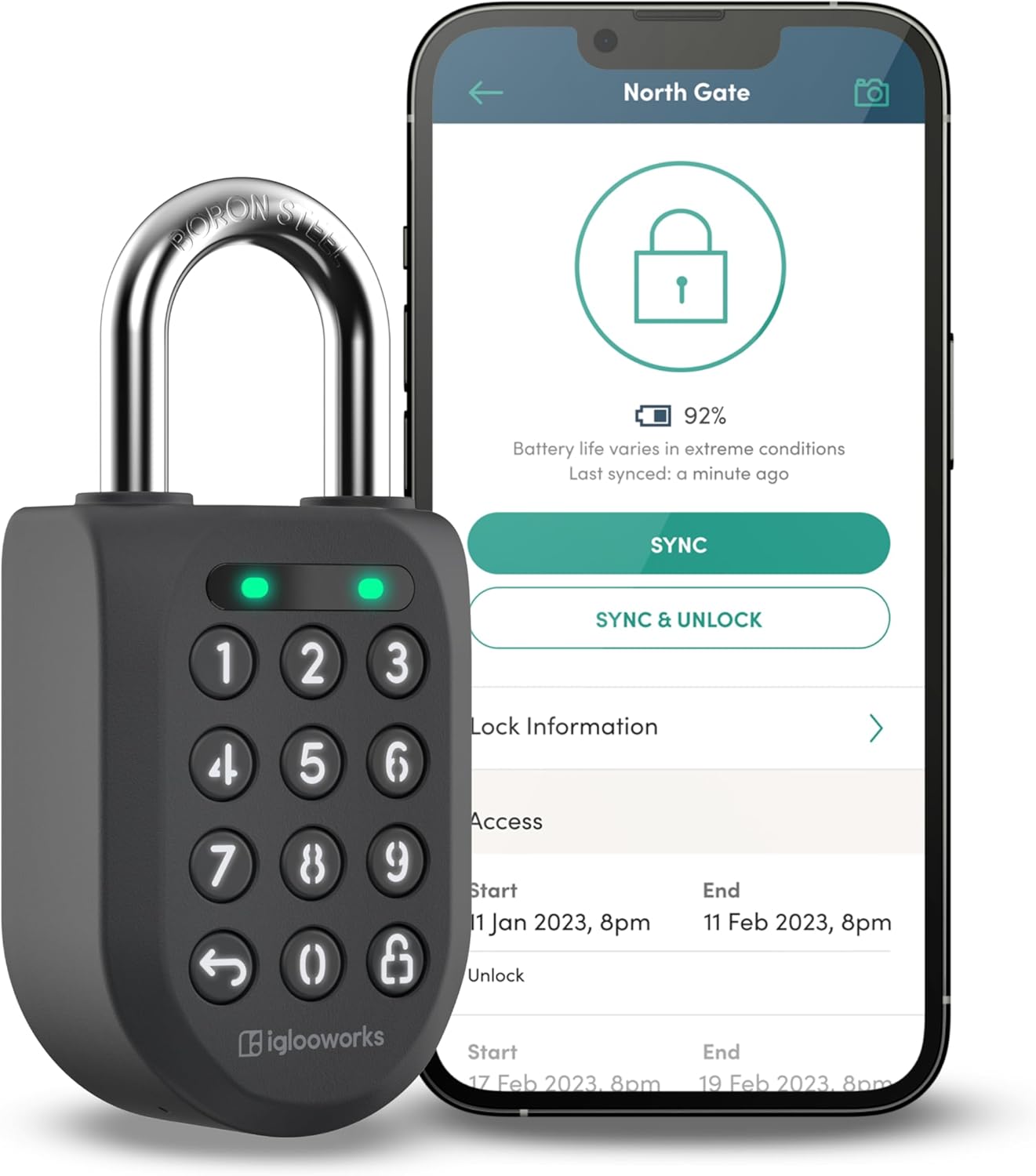
Image 1.1: The igloohome SP2E Smart Padlock shown alongside its mobile application interface, demonstrating remote management capabilities.
คุณสมบัติหลัก:
- การจัดการการเข้าถึงระยะไกล: Generate and send PIN codes and Bluetooth keys from anywhere using the iglooworks mobile app and dashboard.
- การติดตามกิจกรรม: Monitor access logs to see who has unlocked the padlock and when.
- รับรองความปลอดภัย: CEN-3, EN12320, and IK09 certified for resistance against cutting, pulling, twisting, and impact.
- การออกแบบที่ทนฝนและแดด: IP68 rated for dust and water resistance, suitable for extreme temperatures (-20°C to 50°C / -4°F to 122°F).
- แบตเตอรี่แบบชาร์จไฟได้: Long-lasting Li-Ion battery with Type-C charging and emergency jumpstart capability.
2. การตั้งค่า
2.1 การชาร์จเริ่มต้น
Before first use, fully charge the padlock using the provided Type-C charging cable. Connect the cable to the padlock's charging port and a compatible USB power source. A full charge typically takes approximately 1 hour.
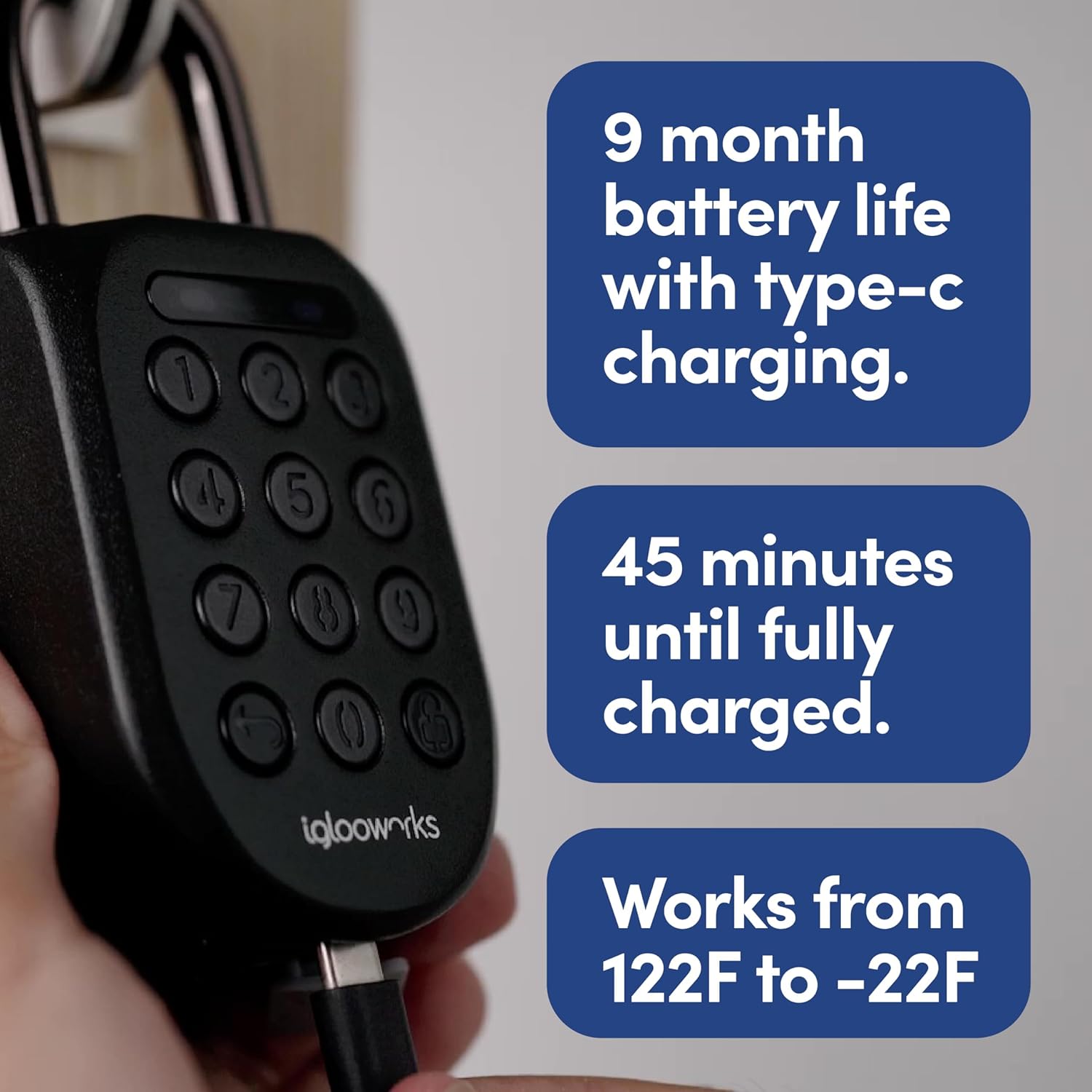
Image 2.1: The igloohome SP2E Smart Padlock connected to a USB-C charging cable, illustrating the charging process.
2.2 Mobile App Download and Account Creation
- Download the 'igloohome' app from the Apple App Store (for iOS devices) or Google Play Store (for Android devices).
- Launch the app and follow the on-screen instructions to create a new account or log in to an existing one.
2.3 Pairing the Padlock
- ตรวจสอบให้แน่ใจว่าได้เปิดใช้งาน Bluetooth บนอุปกรณ์มือถือของคุณ
- In the igloohome app, select 'Add New Lock' or the '+' icon.
- Follow the app's instructions to search for and pair with your SP2E padlock. You may need to press a button on the padlock to activate its Bluetooth pairing mode.
- Once paired, you can name your padlock and configure initial settings.
2.4 Creating Access Credentials
The igloohome app and web dashboard allow you to create and manage various access types:
- รหัส PIN: Generate one-time, duration-based, or permanent PIN codes for keypad entry.
- Bluetooth Keys: Grant mobile access to other users via their igloohome app.
For multi-user management and advanced features, utilize the iglooworks dashboard. This platform provides a centralized interface for managing multiple locks and users.

Image 2.2: A visual representation of the igloohome app's capability to grant mobile keys and PIN codes remotely.
3. คู่มือการใช้งาน
3.1 การปลดล็อกด้วยรหัส PIN
- Wake the padlock by pressing any button on the keypad.
- Enter your valid PIN code followed by the unlock button (🔓).
- If the PIN is correct, the padlock will emit a success tone and the shackle will release.
3.2 Unlocking with Bluetooth Key
- Ensure your mobile device is within Bluetooth range of the padlock.
- Open the igloohome app and select the desired padlock.
- แตะปุ่ม 'ปลดล็อก' ภายในแอป
- The padlock will unlock via Bluetooth.
3.3 คุณสมบัติล็อคอัตโนมัติ
The padlock is equipped with an auto-lock feature. Once the shackle is fastened, the padlock will automatically lock, securing your assets.
3.4 Activity Logs
Access activity logs through the igloohome mobile app or web dashboard to monitor who has accessed the padlock and when. Bluetooth unlocks are updated in real-time, while PIN code unlocks are updated when the lock syncs with the app within Bluetooth range.

Image 3.1: The iglooworks web dashboard displaying audit trails and access logs, providing a comprehensive overview of padlock activity.
4. การบำรุงรักษา
4.1 การจัดการแบตเตอรี่
The SP2E padlock uses a rechargeable Li-Ion battery, offering up to 9 months of battery life or 8000 unlocks on a single charge. An intuitive LED alert will prompt you when the battery level is low. Recharge using the provided Type-C cable.
4.2 Emergency Jumpstart
If the battery is completely drained, the padlock can be jumpstarted using any 5V 0.5A power source (e.g., power bank, smartphone, laptop) via a Type-C cable. Connect the cable to the padlock's charging port to temporarily power it for unlocking.

Image 4.1: The igloohome SP2E Smart Padlock illustrating its emergency jumpstart capability via a USB-C cable.
4.3 การทำความสะอาดและการดูแลรักษาสิ่งแวดล้อม
The padlock is IP68 rated, making it resistant to dust and water. It operates effectively in temperatures ranging from -20°C to 50°C (-4°F to 122°F). To clean, wipe the padlock with a soft, damp cloth. Avoid using harsh chemicals or abrasive materials that could damage the finish or internal components.
5 การแก้ไขปัญหา
5.1 Padlock Not Responding
- ตรวจสอบแบตเตอรี่: The battery may be low or depleted. Use the Type-C cable for an emergency jumpstart or full recharge.
- Wake Padlock: Ensure you press any button on the keypad to wake the padlock before entering a PIN or attempting Bluetooth unlock.
5.2 PIN Code Not Working
- Verify PIN: Double-check that the entered PIN code is correct and has not expired.
- ซิงค์กับแอพ: If the PIN was recently created or modified, ensure the padlock has synced with the app.
- ล็อคความปลอดภัย: After several incorrect access attempts, the padlock may enter a security lockout state. Wait for the lockout period to expire before trying again.
5.3 ปัญหาการเชื่อมต่อบลูทูธ
- เปิดใช้งานบลูทูธ: Confirm Bluetooth is active on your mobile device.
- ความใกล้ชิด: Ensure your device is within close range of the padlock.
- สถานะแอป: Close and reopen the igloohome app, or restart your mobile device.
5.4 Relock Reminder Alert
The padlock will display an LED alert to remind users to fasten the shackle if it remains open after an unlock. Ensure the shackle is properly secured to engage the auto-lock function.
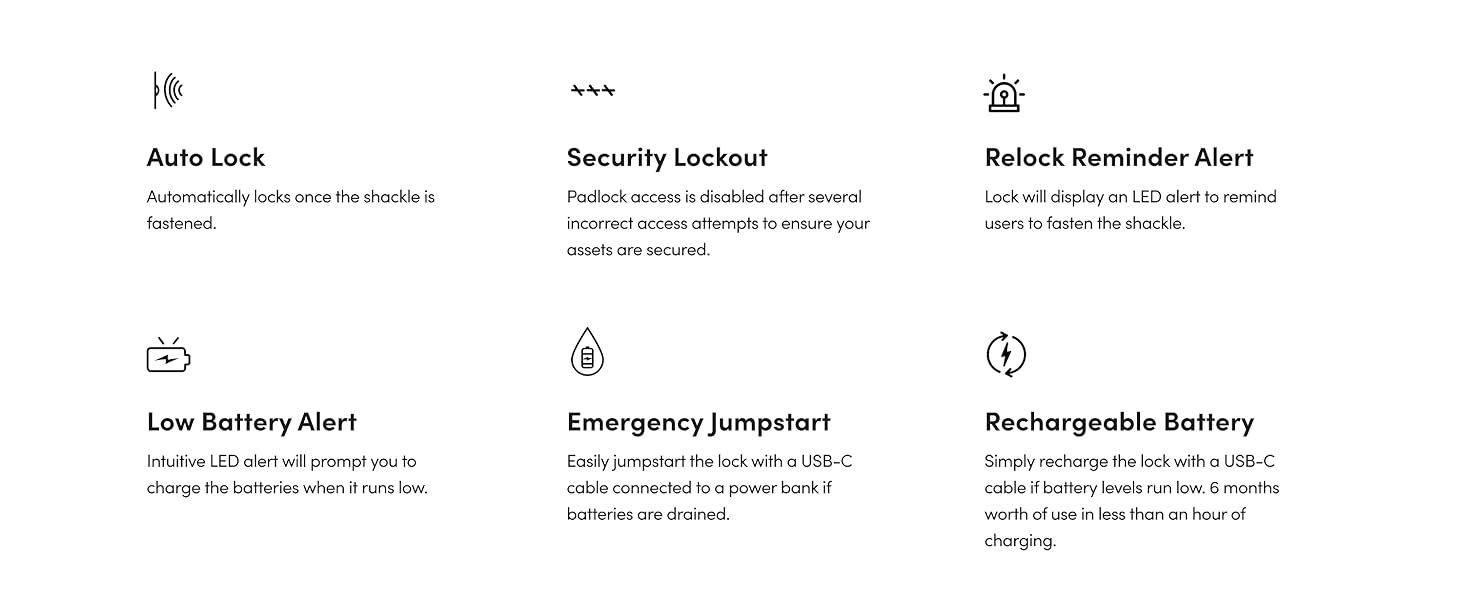
ภาพที่ 5.1: โอเวอร์view of key padlock features including Auto Lock, Security Lockout, Low Battery Alert, Emergency Jumpstart, and Rechargeable Battery.
6. ข้อมูลจำเพาะ
| คุณสมบัติ | รายละเอียด |
|---|---|
| ชื่อรุ่น | SP2E |
| ขนาด (กว้าง x ยาว x สูง) | 4.92 x 2.17 x 1.5 นิ้ว (12.5 x 5.5 x 3.8 ซม.) |
| น้ำหนักสินค้า | 1.1 ปอนด์ (500 กรัม) |
| วัสดุ | Boron Steel (shackle), Zinc (body) |
| ประเภทล็อค | กุญแจบลูทู ธ |
| คุณสมบัติพิเศษ | Auto-Lock, Back-Lit Keypad, Rechargeable, Waterproof |
| โปรโตคอลการเชื่อมต่อ | บลูทูธ |
| ประเภทตัวควบคุม | Android, iOS (Amazon Alexa compatible with Bridge, sold separately) |
| ประเภทแบตเตอรี่ | Rechargeable Li-Ion (1 CR2 battery included) |
| อายุการใช้งานแบตเตอรี่ | Up to 9 months / 8000 unlocks per charge |
| พอร์ตชาร์จ | ประเภทซี |
| อุณหภูมิในการทำงาน | -20°C ถึง 50°C (-4°F ถึง 122°F) |
| การรับรอง | CEN-3, EN12320, IK09, IP68 |
| ยูพีซี | 712198882527 |
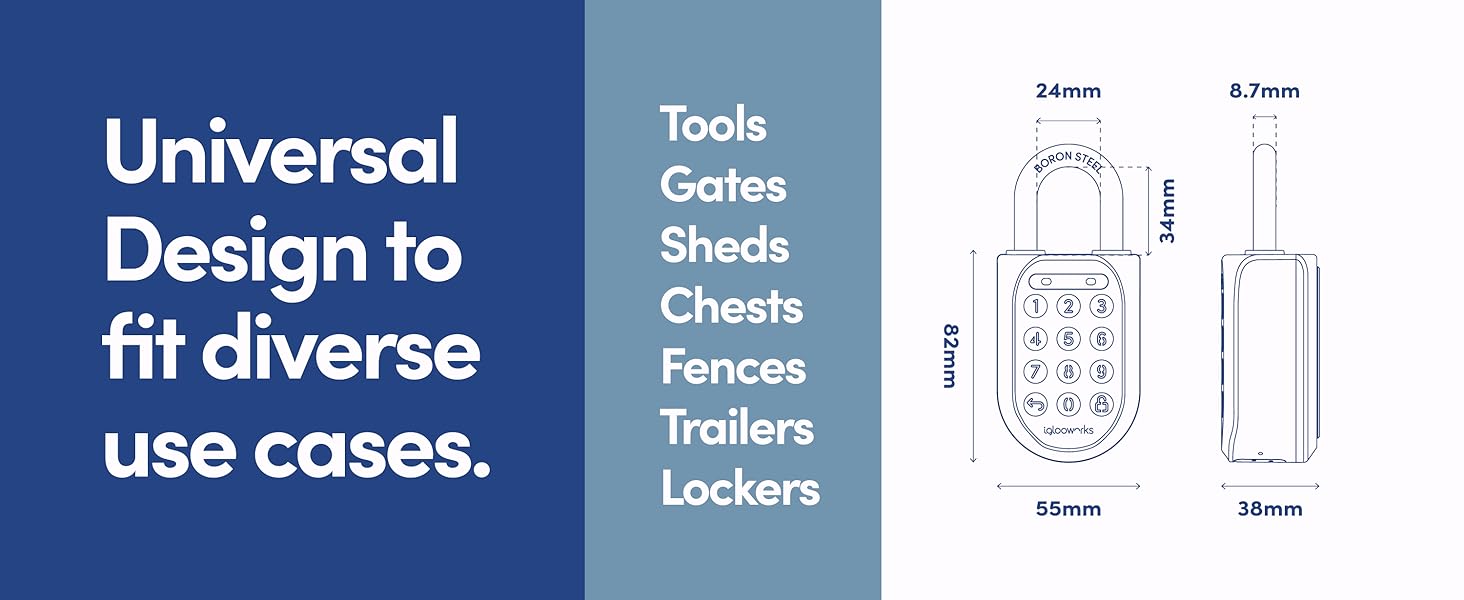
Image 6.1: Technical diagram illustrating the dimensions and universal design applications of the igloohome SP2E padlock.
7. การรับประกันและการสนับสนุน
7.1 การรับประกันสินค้า
The igloohome SP2E Rugged Outdoor Smart Padlock comes with a 2-year limited warranty from the date of purchase. This warranty covers manufacturing defects under normal use. Please retain your proof of purchase for warranty claims.
7.2 การสนับสนุนลูกค้า
For technical assistance, troubleshooting, or warranty inquiries, please visit the official igloohome support website or contact their customer service team. Contact information can typically be found on the igloohome webบนเว็บไซต์หรือภายในแอปพลิเคชันบนมือถือ


