การแนะนำ
This manual provides detailed instructions for the Strex Bluetooth 2-in-1 Transmitter and Receiver, Model SP173. This versatile device allows you to wirelessly transmit or receive audio signals, enhancing your audio experience with various devices.
The Strex Bluetooth adapter supports both ทรานสมิตเตอร์ (TX) และ ตัวรับสัญญาณ (RX) modes, utilizing Bluetooth 5.0 technology for stable, high-quality audio transmission.
เนื้อหาแพ็คเกจ
- Strex Bluetooth 2-in-1 Audio Transmitter/Receiver
- สายไฟไมโคร USB
- สายสัญญาณเสียง AUX 3.5 มม.
- สาย 3.5 มม. ถึง RCA
- คู่มือการใช้งาน (เอกสารนี้)

อุปกรณ์โอเวอร์view
Familiarize yourself with the various components and ports of your Strex Bluetooth adapter.

- สวิตช์เปิด/ปิด: เปิดหรือปิดอุปกรณ์
- Mode Switch (RX/TX): เลือกโหมดระหว่างตัวรับ (RX) และตัวส่ง (TX)
- ไฟ LED แสดงสถานะ: แสดงสถานะพลังงาน การจับคู่ และการเชื่อมต่อ
- พอร์ตชาร์จ Micro USB: สำหรับชาร์จแบตเตอรี่ภายใน
- 3.5mm Audio Input/Output: Connects to audio sources or output devices using the provided cables.
การตั้งค่าและการใช้งาน
การชาร์จอุปกรณ์
Before first use, ensure the device is fully charged. Connect the Micro USB power cable to the charging port on the adapter and the other end to a USB power source (e.g., computer USB port, USB wall adapter).
- การชาร์จเต็มใช้เวลาประมาณ 90 นาที.
- The device provides up to 6-8 ชั่วโมง of continuous playtime on a single charge.

โหมดตัวรับ (RX)
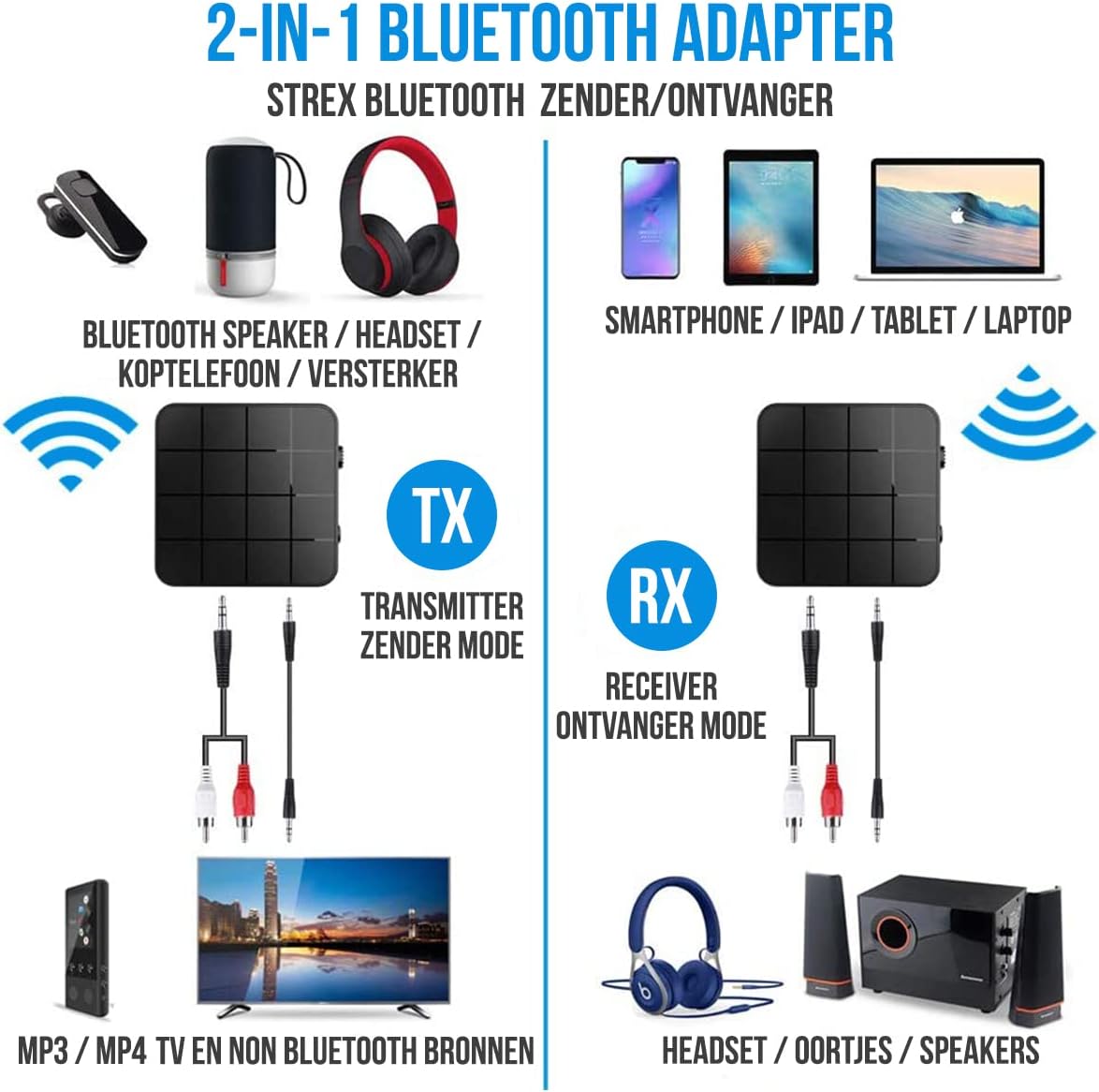
In RX mode, the Strex adapter receives audio wirelessly from a Bluetooth-enabled device (e.g., smartphone, tablet) and outputs it to a non-Bluetooth audio system (e.g., wired speakers, car stereo).
- Switch the device to โหมด RX using the mode selector switch.
- Connect the Strex adapter to your non-Bluetooth audio system using either the สาย AUX 3.5 มม หรือว่า สายเคเบิล 3.5 มม. เป็น RCA.
- Power on the Strex adapter. The Status LED will indicate pairing mode (typically blinking blue).
- On your Bluetooth-enabled device (e.g., smartphone), go to Bluetooth settings and search for available devices. Select "Strex" (or similar name) to pair.
- Once paired, the Status LED will show a solid blue light. You can now stream audio from your device to your audio system.

โหมดเครื่องส่งสัญญาณ (TX)
In TX mode, the Strex adapter transmits audio wirelessly from a non-Bluetooth audio source (e.g., TV, PC, old stereo system) to a Bluetooth-enabled receiving device (e.g., Bluetooth headphones, Bluetooth speakers).
- Switch the device to โหมด TX using the mode selector switch.
- Connect the Strex adapter to your non-Bluetooth audio source (e.g., TV's audio output) using either the สาย AUX 3.5 มม หรือว่า สายเคเบิล 3.5 มม. เป็น RCA.
- Power on the Strex adapter. The Status LED will indicate pairing mode.
- ใส่หูฟังหรือลำโพง Bluetooth ของคุณเข้าสู่โหมดจับคู่
- The Strex adapter will automatically search for and connect to nearby Bluetooth receiving devices. Once connected, the Status LED will show a solid light.
- Ensure your Bluetooth headphones/speakers are unpaired from any other devices (e.g., smartphone) before attempting to pair with the Strex adapter in TX mode.

Important Notes on Operation:
- The adapter cannot simultaneously send and receive audio. It must be set to either TX or RX mode.
- For optimal performance, ensure the adapter is within 10 meters (33 feet) of the connected Bluetooth device.
- Bluetooth 5.0 provides HD Audio with minimal latency, but some older Bluetooth devices may experience slight synchronization differences.
การซ่อมบำรุง
- การทำความสะอาด: ใช้ผ้านุ่มและแห้งเช็ดทำความสะอาดอุปกรณ์ ห้ามใช้น้ำยาทำความสะอาดหรือสเปรย์
- พื้นที่จัดเก็บ: เก็บอุปกรณ์ไว้ในที่แห้งและเย็น หลีกเลี่ยงแสงแดดโดยตรงและอุณหภูมิที่สูงหรือต่ำเกินไป
- การดูแลแบตเตอรี่ เพื่อยืดอายุการใช้งานแบตเตอรี่ ควรหลีกเลี่ยงการคายประจุแบตเตอรี่จนหมดบ่อยๆ ควรชาร์จอุปกรณ์เป็นประจำ แม้ว่าจะไม่ได้ใช้งานเป็นเวลานานก็ตาม
การแก้ไขปัญหา
- ไม่มีไฟฟ้า:
Ensure the device is charged. Connect it to a power source using the Micro USB cable and allow it to charge for at least 15 minutes before attempting to power on.
- Cannot Pair in RX Mode:
Make sure the adapter is in RX mode. Ensure your smartphone/tablet's Bluetooth is enabled and it is searching for new devices. If previously paired, try unpairing and re-pairing. Keep the devices within 10 meters.
- Cannot Pair in TX Mode:
Verify the adapter is in TX mode. Ensure your Bluetooth headphones/speakers are in pairing mode and are not connected to any other device. Some devices may require you to manually initiate pairing on the adapter (refer to Status LED indications).
- ไม่มีเอาต์พุต/อินพุตเสียง:
Check all cable connections (3.5mm AUX or RCA) are secure. Ensure the volume on both the adapter and the connected audio device is turned up. Confirm the correct input/output source is selected on your audio system/TV.
- Audio Lag/Poor Quality:
Ensure devices are within range and there are no significant obstructions. Reduce interference from other wireless devices. While Bluetooth 5.0 minimizes lag, some older audio sources or receiving devices might introduce slight delays.
ข้อมูลจำเพาะ
| หมายเลขรุ่น | SP173 |
| เวอร์ชันบลูทูธ | Bluetooth 5.0 (A2DP, AVRCP in Receiver mode) |
| โหมดการทำงาน | เครื่องส่ง (TX) และตัวรับ (RX) |
| การเชื่อมต่อ | 3.5mm AUX, RCA (via 3.5mm to RCA cable) |
| ช่วงสาย | สูงถึง 10 เมตร (33 ฟุต) |
| ประเภทแบตเตอรี่ | ลิเธียมโพลิเมอร์ |
| ความจุของแบตเตอรี่ | 200 มิลลิแอมป์ |
| เวลาเล่น | ประมาณ 6-8 ชั่วโมง |
| เวลาในการชาร์จ | ประมาณ 90 นาที |
| ขนาด (กว้าง x ยาว x สูง) | 4.4 x 4.4 x 1.2 ซม. (1.73 x 1.73 x 0.47 นิ้ว) |
| น้ำหนัก | 18 กรัม (0.63 ออนซ์) |
| วัสดุ | พลาสติก |
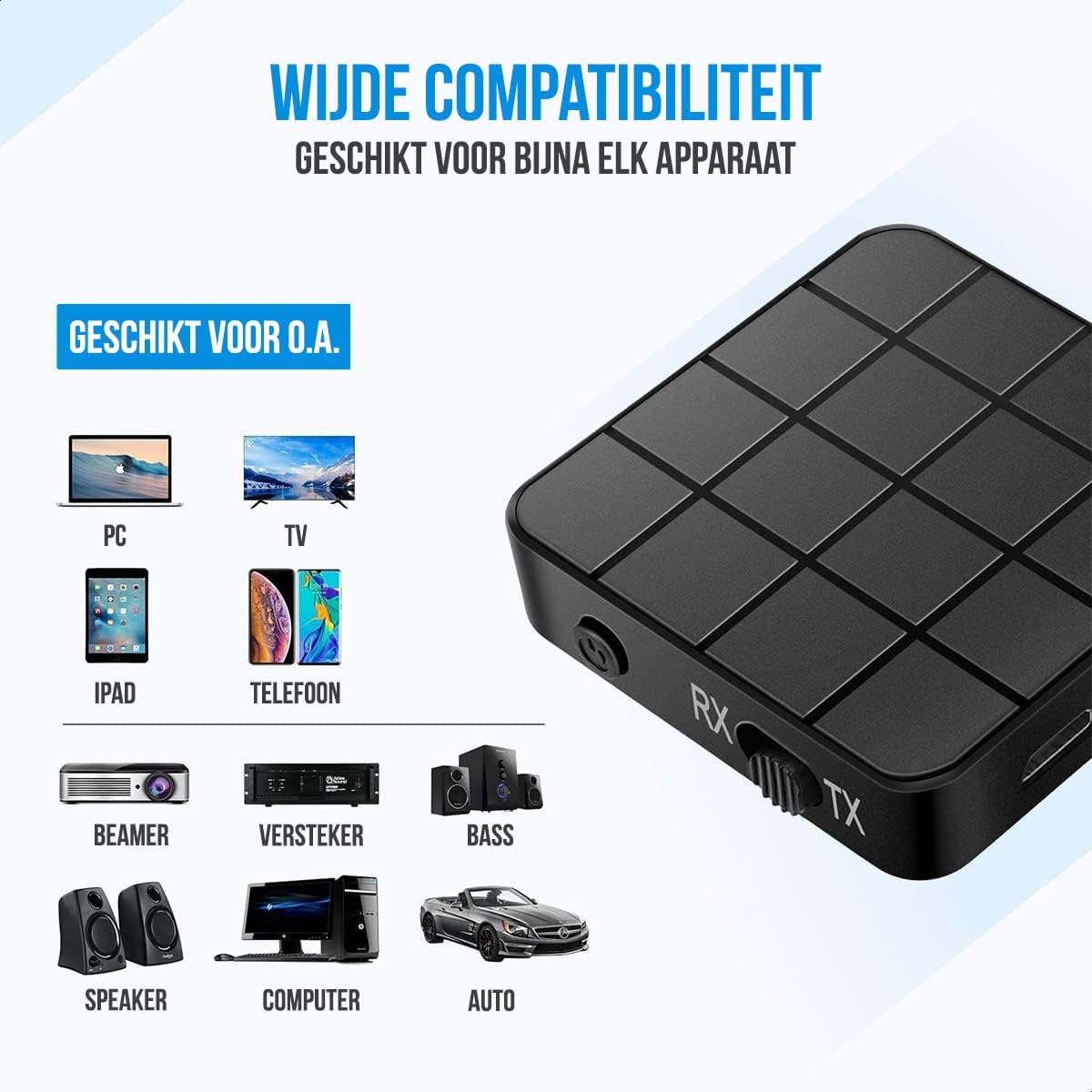
| อุปกรณ์ที่รองรับ | Smartphones, Tablets, PCs, TVs, Audio Systems, Headphones, Speakers |

ข้อมูลด้านความปลอดภัย
- ห้ามทิ้งแบตเตอรี่ลงในกองไฟ แบตเตอรี่อาจระเบิดได้
- ควรเก็บอุปกรณ์ให้ห่างจากน้ำและความชื้นสูง
- ห้ามชาร์จอุปกรณ์ใกล้กับวัสดุไวไฟ
- The device has an operating range of 10 meters and may interfere with other wireless devices within this range.
- Always adhere to local regulations for the disposal of electronic waste.
การรับประกันและการสนับสนุน
Specific warranty details are not provided in this manual. For warranty information or technical support, please refer to the product packaging or contact Strex customer service through their official webไซต์หรือผู้ค้าปลีกที่ซื้อผลิตภัณฑ์