1. บทนำ
This manual provides detailed instructions for the installation, operation, and maintenance of your Tbest 9-inch Android Car GPS Navigation Multimedia Player. Please read this manual thoroughly before using the product to ensure proper function and safety.
2. ข้อมูลด้านความปลอดภัย
- ควรใช้งานอุปกรณ์อย่างมีความรับผิดชอบและสอดคล้องกับกฎจราจรในท้องถิ่นเสมอ
- Do not attempt to install or service the device if you are not qualified. Improper installation can lead to damage or injury.
- หลีกเลี่ยงการให้เครื่องสัมผัสกับอุณหภูมิที่สูงหรือต่ำเกินไป แสงแดดโดยตรงเป็นเวลานาน หรือความชื้นที่มากเกินไป
- ตรวจสอบให้แน่ใจว่าสายไฟทั้งหมดเชื่อมต่ออย่างถูกต้องเพื่อป้องกันไฟฟ้าลัดวงจรหรืออันตรายจากไฟฟ้า
3. เนื้อหาบรรจุภัณฑ์
ตรวจสอบว่ารายการทั้งหมดที่ระบุไว้ด้านล่างนี้รวมอยู่ในแพ็คเกจของคุณ:
- 1 x Navigator Unit (9-inch Android Multimedia Player)
- 10 x Various Connection Cables
- 4 x Camera Units
- เสาอากาศ GPS 1 เส้น
- 1 x คู่มือผู้ใช้
- 2 x ขายึด
- 1 x ที่เจาะรู
- 2 x Buffer Rings
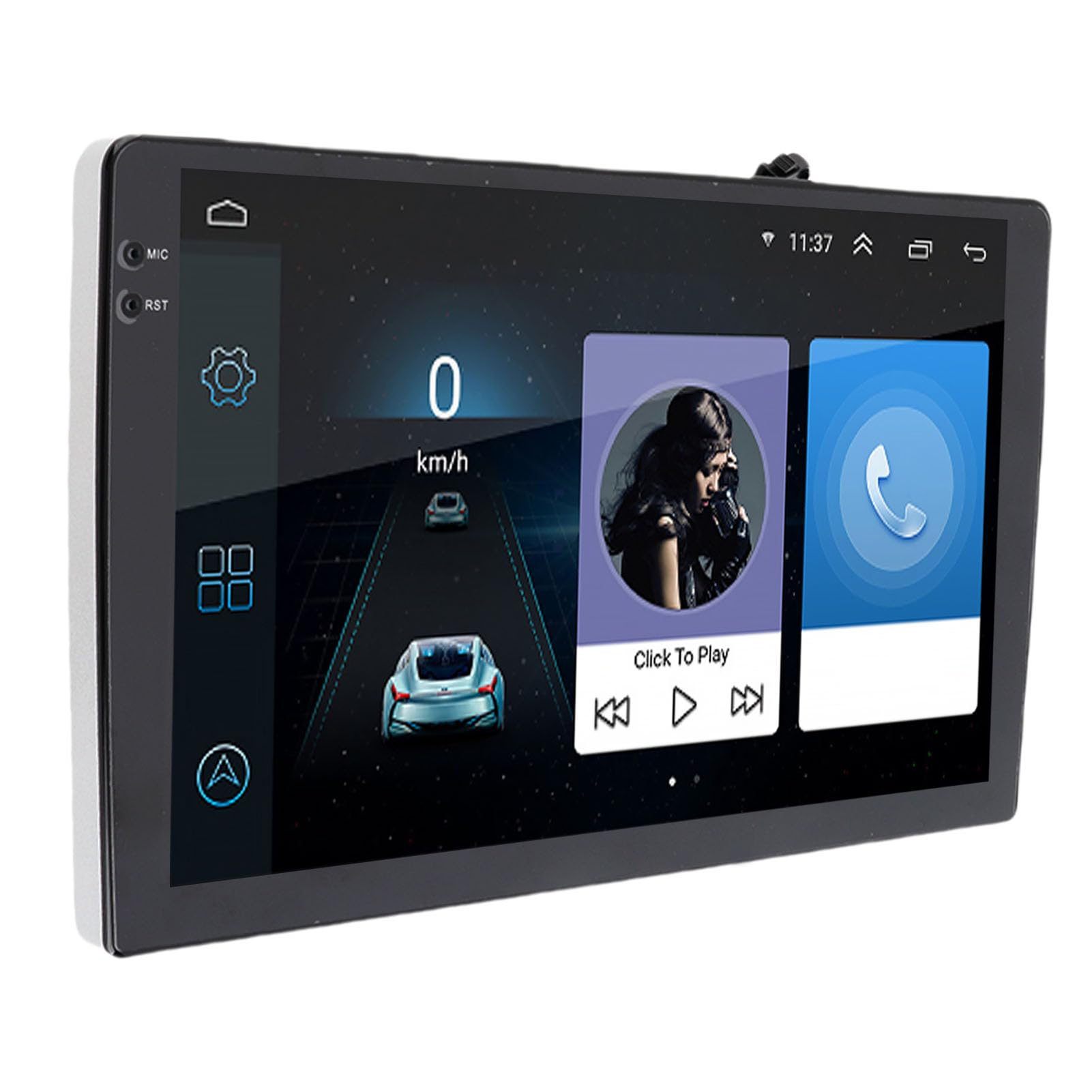
Image: The Tbest 9-inch Android Car GPS Navigation Multimedia Player unit shown with all accompanying cables, cameras, GPS antenna, mounting brackets, and other accessories.
4. การตั้งค่าและการติดตั้ง
4.1 แนวทางการติดตั้งทั่วไป
The Tbest multimedia player is designed for universal fit in various car models. Due to variations in vehicle dashboards, professional installation is recommended. Ensure the mounting location allows for clear visibility and safe operation.
4.2 การเชื่อมต่อสายไฟ
Carefully connect all necessary cables. Refer to your vehicle's wiring diagram and the provided cable labels for correct connections. Key connections include:
- สายไฟ: เชื่อมต่อกับแหล่งจ่ายไฟของรถยนต์ (ACC, B+, Ground)
- สายลำโพง: Connect to your car's speaker system.
- RCA Terminals: For reverse input, video input, and audio output.
- พอร์ต USB: For external devices or media.
- เสาอากาศ GPS: เชื่อมต่อเสาอากาศ GPS และวางไว้ในตำแหน่งที่ชัดเจน view ของท้องฟ้าเพื่อการรับสัญญาณที่ดีที่สุด
- การเชื่อมต่อกล้อง: Connect the four camera units to the designated camera inputs for panoramic view ฟังก์ชันการทำงาน

ภาพ: รายละเอียด view of the Tbest multimedia player's rear connections and the array of cables provided for power, audio, video, and peripheral devices.
5. คู่มือการใช้งาน
5.1 เปิด/ปิดเครื่อง
The unit will typically power on automatically when the vehicle's ignition is turned on. To manually power off, press and hold the power button (if available) or turn off the vehicle's ignition.
5.2 การใช้งานหน้าจอสัมผัส
The device features a 9-inch capacitive touch screen. Navigate through menus, select applications, and control functions by tapping, swiping, and pinching gestures similar to a smartphone or tablet.
5.3 ระบบนำทาง GPS
The unit has built-in GPS reception. You can download navigation applications and maps directly from the Application Store for offline use. Ensure the GPS antenna is properly installed for accurate positioning.
5.4 ฟังก์ชั่นบลูทูธ
The device includes Bluetooth 4.0 for hands-free calling and music streaming (A2DP).
- การจับคู่: Go to the Bluetooth settings on the device, enable Bluetooth, and search for available devices. Select your phone from the list and confirm the pairing code.
- การโทรแบบแฮนด์ฟรี: Once paired, you can make and receive calls directly through the multimedia player. The phone book can be automatically loaded.
- เพลงบลูทูธ: Stream audio from your paired phone to the car's speakers.
5.5 การเล่นมัลติมีเดีย
The player supports various audio formats including MP3, FLAC, APE, WMA, WAV, AAC, AMR. Video playback is also supported. You can play media from USB drives or via Bluetooth streaming.
5.6 Panoramic Camera and Recorder
The integrated 360-degree panoramic camera system provides a comprehensive view around your vehicle, aiding in safe parking. The system also supports recording, allowing you to retain video evidence if needed. Playback functionality is available directly on the unit.
5.7 ระบบควบคุมพวงมาลัย
The unit supports steering wheel control functions, allowing you to manage audio and other features without taking your hands off the wheel. Configuration may be required in the settings menu.
5.8 Mobile Internet (Mirror Link)
The device supports screen mirroring for both iOS (one-way projection) and Android phones (two-way connection). This allows you to display your phone's screen on the multimedia player.
5.9 วิทยุ
Access FM, AM, and RDS radio bands. Use the touch screen interface to scan for stations and save presets.

Image: The Tbest multimedia player's 9-inch screen showing a typical user interface with navigation on the left and media playback controls on the right.
6. การบำรุงรักษา
6.1 การทำความสะอาดหน้าจอ
ใช้ผ้านุ่มไม่เป็นขุยเช็ดหน้าจอเบาๆ สำหรับรอยเปื้อนฝังแน่น ให้เช็ดเบาๆampen the cloth with water or a screen-cleaning solution designed for electronics. Avoid harsh chemicals or abrasive materials.
6.2 การอัปเดตซอฟต์แวร์
Periodically check for software updates to ensure optimal performance and access to new features. Updates can usually be performed via a Wi-Fi connection or USB. Follow the on-screen prompts for any available updates.
7 การแก้ไขปัญหา
If you encounter issues with your Tbest multimedia player, refer to the following common problems and solutions:
| ปัญหา | สาเหตุที่เป็นไปได้ | สารละลาย |
|---|---|---|
| ไม่มีไฟฟ้า | การเดินสายไฟผิดพลาด ฟิวส์ขาด ปัญหาเกี่ยวกับระบบไฟฟ้าของรถยนต์ | Check power cable connections, inspect vehicle fuses, ensure ignition is on. |
| ไม่มีสัญญาณ GPS | เสาอากาศ GPS ไม่ได้เชื่อมต่อ เสาอากาศถูกกีดขวาง การรับสัญญาณดาวเทียมไม่ดี | ตรวจสอบให้แน่ใจว่าเสาอากาศ GPS เชื่อมต่ออย่างแน่นหนาและอยู่ในตำแหน่งที่มองเห็นได้ชัดเจน view ของท้องฟ้า เคลื่อนตัวไปยังพื้นที่เปิดโล่ง |
| ไม่ได้เชื่อมต่อบลูทูธ | Bluetooth off on device/phone, incorrect pairing, interference. | ตรวจสอบให้แน่ใจว่าได้เปิดใช้งานบลูทูธบนอุปกรณ์ทั้งสองเครื่องแล้ว ลบการจับคู่ก่อนหน้าและจับคู่ใหม่ รีสตาร์ทอุปกรณ์ทั้งสองเครื่อง |
| หน้าจอสัมผัสไม่ตอบสนอง | ความผิดพลาดของซอฟต์แวร์, หน้าจอเสียหาย | รีสตาร์ทเครื่อง หากปัญหายังคงอยู่ โปรดติดต่อฝ่ายสนับสนุน |
| กล้อง View ไม่แสดง | Camera cables loose, camera malfunction. | Check all camera connections. Ensure the vehicle is in reverse (if applicable for rear camera). |
หากปัญหายังคงมีอยู่หลังจากพยายามแก้ไขปัญหาเหล่านี้แล้ว โปรดติดต่อฝ่ายสนับสนุนลูกค้า
8. ข้อมูลจำเพาะ
| คุณสมบัติ | ข้อมูลจำเพาะ |
|---|---|
| ขนาดหน้าจอ | 9 นิ้ว |
| ระบบปฏิบัติการ | แอนดรอยด์ |
| ความละเอียดหน้าจอ | 1024 x 600 |
| ระบบนำทาง GPS | Support (Offline maps via app store) |
| เวอร์ชันบลูทูธ | 4.0 (A2DP, Hands-free, Phone Book) |
| แบนด์วิทยุ | FM, AM, RDS |
| พลัง Ampชิปลิฟายเออร์ | TDA7388 |
| Camera Host Chip | For HiSilicon 3520DV300 |
| มุมกล้อง | 181 องศา |
| พิกเซลกล้อง | 1MP (Resolution: 1280 x 720P) |
| ฉบับทำงานtage | DC9V-24V |
| กระแสไฟฟ้าทำงาน | 500mA (กระแสตรง12V) |
| อุณหภูมิในการทำงาน | 35°C - 75°C (Host), -25°C - 90°C (Camera) |
| การเชื่อมต่อ | ยูเอสบี, ไวไฟ |
| รูปแบบเสียงที่รองรับ | MP3, FLAC, APE, WMA, WAV, AAC, AMR, etc. |
| เอาท์พุตวิดีโอ | CVBS, VGA |
| Waterproof Grade (Camera) | IP67 |
| ขนาดสินค้า | 9 x 9 x 9 นิ้ว |
| น้ำหนักสินค้า | 3.38 ปอนด์ |
9. การรับประกันและการสนับสนุน
Your Tbest multimedia player comes with a standard manufacturer's warranty. Please refer to the warranty card included in your package for specific terms and conditions. For technical support, troubleshooting assistance, or warranty claims, please contact your retailer or the Tbest customer service department.
ข้อมูลติดต่อ: (Please refer to your purchase documentation or the official Tbest web(ดูรายละเอียดการติดต่อล่าสุดได้ที่เว็บไซต์)


