1. บทนำ
The Belkin BoostCharge Magnetic Wireless Power Bank (Model BPD004) provides portable power for your compatible devices. Featuring MagSafe technology, a 5000 mAh battery capacity, and a built-in kickstand, it offers convenient wireless charging on the go. This manual provides essential information for safe and effective use of your power bank.
2. เนื้อหาบรรจุภัณฑ์
ตรวจสอบให้แน่ใจว่ามีสินค้าทั้งหมดอยู่ในแพ็คเกจของคุณ:
- Belkin BoostCharge Magnetic Wireless Power Bank 5000 mAh
- 3.3ft USB-C to USB-C Charging Cable
- คู่มือการใช้งาน (เอกสารนี้)
3. การตั้งค่า
การชาร์จพาวเวอร์แบงค์ครั้งแรก
Before first use, fully charge your Belkin BoostCharge Magnetic Wireless Power Bank.
- เชื่อมต่อสาย USB-C ที่ให้มากับพอร์ต USB-C บนพาวเวอร์แบงค์
- เชื่อมต่อปลายสายอีกด้านหนึ่งเข้ากับอะแดปเตอร์แปลงไฟ USB-C ที่ใช้งานร่วมกันได้ (ไม่รวมอยู่ด้วย)
- The LED indicator lights on the side of the power bank will illuminate to show charging progress. All four LEDs will be solid when fully charged.
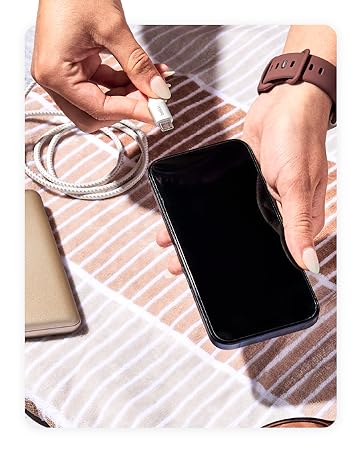
Figure 1: Connecting the USB-C cable to the power bank for charging.
4. คู่มือการใช้งาน
Attaching to Your Device (MagSafe)
The power bank uses MagSafe technology for secure attachment and wireless charging.
- Ensure your device is MagSafe compatible (iPhone 12 series or newer) or has a MagSafe compatible case.
- Align the power bank with the back of your device. The magnets will automatically snap it into place.
- Wireless charging will begin automatically. The LED indicator lights on the power bank will show its remaining charge.

Figure 2: Magnetic attachment of the power bank to a compatible iPhone.
Using the Built-in Kickstand
The integrated pop-up kickstand allows for hands-free viewขณะชาร์จ
- With the power bank attached to your device, gently pull out the kickstand from the back of the power bank.
- Position your device vertically or horizontally for optimal viewการไอเอ็นจี

Figure 3: Device standing vertically using the power bank's kickstand.

Figure 4: Device standing horizontally using the power bank's kickstand.
การชาร์จแบบผ่าน
The power bank supports pass-through charging, allowing you to charge both the power bank and your device simultaneously.
- Attach the power bank to your MagSafe-compatible device.
- Connect the USB-C to USB-C cable to the power bank's USB-C port and a power source.
- ทั้งพาวเวอร์แบงค์และอุปกรณ์ของคุณจะชาร์จไฟ
Video 1: Official product video demonstrating features including pass-through charging and kickstand functionality.
ไฟ LED แสดงสถานะ
The LED lights on the side of the power bank indicate its charge level:
- 4 Solid LEDs: 75-100% เรียกเก็บ
- 3 Solid LEDs: 50-75% เรียกเก็บ
- 2 Solid LEDs: 25-50% เรียกเก็บ
- ไฟ LED 1 ดวงแบบทึบ: 0-25% เรียกเก็บ
5. ความเข้ากันได้
The Belkin BoostCharge Magnetic Wireless Power Bank is compatible with a wide range of devices:
- ไอโฟน : iPhone 17, iPhone Air, iPhone 17 Pro, iPhone 17 Pro Max, iPhone 16 Pro Max, iPhone 16 Pro, iPhone 16 Plus, iPhone 16, iPhone 15 Pro Max, iPhone 15 Pro, iPhone 15 Plus, iPhone 15, iPhone 14 Pro Max, iPhone 14 Pro, iPhone 14 Plus, iPhone 14.
- Apple Accessories: AirPods Pro, AirPods.
- กูเกิล พิกเซล: Google Pixel 10 Pro XL, Google Pixel 10 Pro Fold, Google Pixel 10 Pro, Google Pixel 10.
- กรณี: Compatible with official MagSafe cases.
6. ข้อมูลด้านความปลอดภัย
Your Belkin BoostCharge Magnetic Wireless Power Bank is designed with multiple safety features:
- Advanced Safety Testing: Undergoes rigorous 16-point testing for hardware design, including temperature protection, overcharge protection, drop test, and plug and unplug test.
- Dual-Chip Protection: Equipped with two intelligent safety chips to prevent damage from overvoltage, overcurrent, and other faults.
- Carry-On Safe: The power bank features 18.5 Wh (watt-hours) to be fully compliant with 100 Wh-limit TSA carry-on requirements for air travel.
Figure 5: Carry-On Safe features of the power bank.
7. การบำรุงรักษา
เพื่อให้มั่นใจถึงอายุการใช้งานที่ยาวนานและประสิทธิภาพสูงสุดของพาวเวอร์แบงค์ของคุณ:
- เก็บอุปกรณ์ให้แห้งและห่างจากความชื้น
- หลีกเลี่ยงอุณหภูมิที่สูงหรือต่ำเกินไป
- ทำความสะอาดอุปกรณ์ด้วยผ้านุ่มและแห้ง ห้ามใช้สารเคมีรุนแรงหรือวัสดุที่มีฤทธิ์กัดกร่อน
- เก็บไว้ในที่แห้งและเย็นเมื่อไม่ได้ใช้งาน
8 การแก้ไขปัญหา
หากคุณพบปัญหาเกี่ยวกับพาวเวอร์แบงค์ โปรดดูวิธีแก้ไขปัญหาทั่วไปต่อไปนี้:
- อุปกรณ์ไม่ชาร์จแบบไร้สาย: Ensure your device is MagSafe compatible and properly aligned with the power bank. Remove any non-MagSafe cases that may interfere with the magnetic connection.
- พาวเวอร์แบงค์ไม่ชาร์จ: Verify that the USB-C cable is securely connected to both the power bank and a functioning power adapter. Try a different cable or power adapter.
- การชาร์จช้า: Ensure you are using a compatible power adapter for optimal charging speed. Wireless charging (7.5W) is generally slower than wired charging (12W via USB-C).
- ไฟ LED ไม่ทำงาน: Press the power button on the side of the power bank to activate the LED indicators. If they still do not light up, the power bank may be fully depleted or require service.
9. ข้อมูลจำเพาะ
| คุณสมบัติ | รายละเอียด |
|---|---|
| หมายเลขรุ่น | บีพีดี004 |
| ความจุของแบตเตอรี่ | 5000 มิลลิแอมป์ |
| เอาท์พุทชาร์จไร้สาย | 7.5W (MagSafe compatible) |
| เอาต์พุต/อินพุตการชาร์จแบบมีสาย | USB-C (สูงสุด 12W) |
| ขนาด (กว้าง x ยาว x สูง) | 3.69 x 2.5 x 0.65 นิ้ว |
| น้ำหนักสินค้า | 5.3 ออนซ์ |
| คุณสมบัติพิเศษ | LED Indicator Lights, Pass-Through Charging, Wireless Charging, Built-in Kickstand |
| สี | สีขาว |
10. การรับประกันและการสนับสนุน
Belkin stands by the quality of its products. Your Belkin BoostCharge Magnetic Wireless Power Bank comes with:
- การรับประกันจำกัด 2 ปี: ครอบคลุมถึงข้อบกพร่องในด้านวัสดุและฝีมือการผลิตภายใต้การใช้งานปกติ
- การรับประกันอุปกรณ์เชื่อมต่อ (CEW) มูลค่า 2,500 ดอลลาร์สหรัฐ: Provides coverage for connected electronic devices damaged by an electrical surge while properly connected to the power bank.
For detailed terms and conditions, please visit the official Belkin website or contact Belkin customer support.
Figure 6: Belkin offers a range of charging solutions and accessories.