1. สินค้าหมดview
The Sinotimer TM618N-2 is a versatile 7-day weekly digital programmable timer designed for automated control of electrical equipment. It allows users to set specific daily or weekly schedules for turning devices on and off, ensuring efficient energy management and convenience. This timer is suitable for a wide range of applications, including controlling lighting, heating, ventilation, and other electrical appliances.

รูปที่ 1 : ด้านหน้า view of the Sinotimer TM618N-2 Digital Timer, showing the display and control buttons.
2. คุณสมบัติหลัก
- โปรแกรมรายสัปดาห์: Allows up to 16 ON/OFF programs per day or week.
- มัลติฟังก์ชัน: Includes Clock display, Timer, Countdown, Automatic weekly time deviation correction, and Sleep mode.
- ความจุสูง: รองรับ 16 Amp / 220 Volt AC loads.
- ฉบับกว้างtagความเข้ากันได้: Operates with 220V, 230V, 240V AC.
- แบตเตอรี่ในตัว: คงการตั้งค่าไว้ระหว่างเปิดเครื่องtages (Lithium battery type).
- การใช้งานที่หลากหลาย: Ideal for controlling dryers, defrosting equipment, swimming pool pumps, gates, lighting, and more.
3. ข้อมูลจำเพาะ
| คุณสมบัติ | รายละเอียด |
|---|---|
| แบบอย่าง | TM618N-2 |
| ยี่ห้อ | ซิโนติเมอร์ |
| เล่มที่tage | กระแสไฟสลับ 220V / 230V / 240V |
| คะแนนปัจจุบัน | 16 Amp |
| จำนวนโปรแกรม | โปรแกรมเปิด/ปิด 16 โปรแกรม |
| วัสดุ | พลาสติก |
| ประเภทแบตเตอรี่ | Lithium (internal, non-replaceable by user) |
| สี | Multi-color (typically white/grey) |
4. การติดตั้ง
ประกาศความปลอดภัยที่สำคัญ: Installation should only be performed by a qualified electrician. Ensure power is disconnected before attempting any wiring.
- การติดตั้ง: The TM618N-2 is designed for DIN rail mounting or screw mounting. Secure the timer in a suitable electrical enclosure.
- การเดินสายไฟ: Refer to the wiring diagram on the back of the unit.
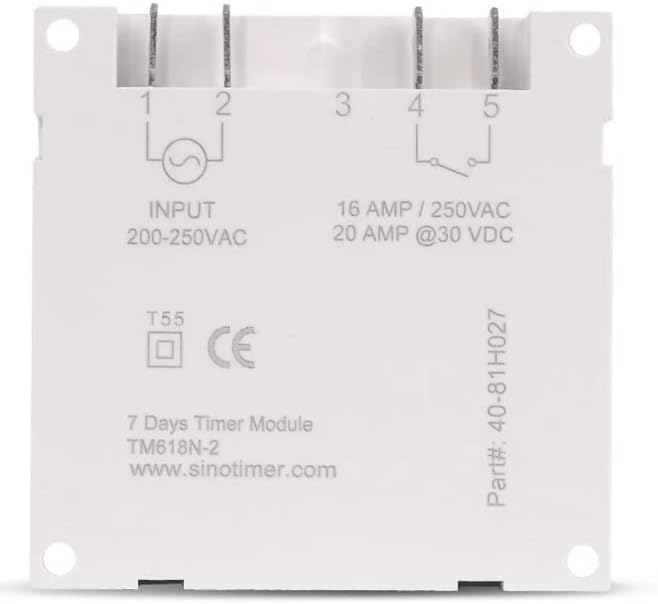
รูปที่ 2: ย้อนกลับ view of the Sinotimer TM618N-2, showing input/output terminals and wiring diagram.
- Input (Terminals 1 & 2): เชื่อมต่อแหล่งจ่ายไฟ 200-250VAC ของคุณเข้ากับขั้วต่อเหล่านี้
- Output (Terminals 3, 4, & 5):
- Terminal 3: Common (COM)
- Terminal 4: Normally Open (NO) - Connect your load here for switched power.
- Terminal 5: Normally Closed (NC) - (Less commonly used for timer applications, but available).
- เปิดเครื่อง: Once wiring is complete and secure, restore power to the circuit. The timer display should illuminate.

Figure 3: Technical drawing showing the dimensions of the Sinotimer TM618N-2 timer.
5. คู่มือการใช้งาน
5.1. ปุ่มฟังก์ชัน
- นาฬิกา: ใช้สำหรับตั้งเวลาและวันปัจจุบัน
- โปรแกรม: Enters/exits programming mode for ON/OFF schedules.
- สัปดาห์: Selects the day(s) of the week during time or program setting.
- ชั่วโมง: Adjusts the hour during time or program setting.
- นาที: Adjusts the minute during time or program setting.
- จำไว้: Recalls or cancels a program setting.
- คู่มือ: Manually overrides the timer's current state (ON/AUTO/OFF).
- R (รีเซ็ต): Small button (requires a pointed object) to reset the timer to factory defaults.
5.2 การตั้งเวลาและวันปัจจุบัน
- กดปุ่มค้างไว้ นาฬิกา ปุ่ม.
- ขณะถืออยู่ นาฬิกา, กด สัปดาห์ เพื่อตั้งค่าวันปัจจุบัน (จันทร์ อังคาร พุธ พฤหัสบดี ศุกร์ เสาร์ อาทิตย์)
- ขณะถืออยู่ นาฬิกา, กด ชั่วโมง เพื่อตั้งชั่วโมงปัจจุบัน
- ขณะถืออยู่ นาฬิกา, กด นาที เพื่อตั้งนาทีปัจจุบัน
- ปล่อยตัว นาฬิกา เพื่อบันทึกการตั้งค่า
5.3. การตั้งโปรแกรมตารางเวลาเปิด/ปิด
The timer supports up to 16 ON and 16 OFF programs. Each program can be set for a specific day or group of days.
- กดปุ่ม โปรเจกต์ กดปุ่มหนึ่งครั้ง หน้าจอจะแสดง "1 ON"
- กด สัปดาห์ repeatedly to select the desired day(s) for this program (e.g., MO, TU, WE, TH, FR, SA, SU; MO-FR; SA-SU; MO-SA; etc.).
- กด ชั่วโมง เพื่อตั้งเวลาเปิดใช้งานที่ต้องการ
- กด นาที เพื่อตั้งค่านาทีที่ต้องการเปิดใช้งาน
- กด โปรเจกต์ อีกครั้ง หน้าจอจะแสดง "1 OFF"
- ทำซ้ำขั้นตอนที่ 2-4 เพื่อตั้งเวลาปิดที่ต้องการสำหรับโปรแกรมแรก
- กด โปรเจกต์ to move to the next program ("2 ON", "2 OFF", etc.) and repeat the process for up to 16 programs.
- To exit programming mode and save settings, press the นาฬิกา ปุ่ม.
5.4. คู่มือการแทนที่
กดปุ่ม คู่มือ ปุ่มสำหรับสลับโหมดการแสดงผล:
- บน: เอาต์พุตเปิดใช้งานอยู่ตลอดเวลา โดยไม่สนใจโปรแกรมใดๆ
- อัตโนมัติ: Output follows the programmed schedules.
- ปิด: เอาต์พุตจะปิดอยู่ตลอดเวลา โดยไม่สนใจโปรแกรมใดๆ
ตรวจสอบให้แน่ใจว่าตัวจับเวลาเปิดใช้งานอยู่ ออโต้ mode for programmed operation.
5.5 การรีเซ็ตตัวจับเวลา
To clear all settings and return the timer to its factory default state, insert a pointed object (like a paperclip) into the small R (Reset) hole and press gently.
6. การบำรุงรักษา
The Sinotimer TM618N-2 requires minimal maintenance.
- รักษาอุปกรณ์ให้สะอาดและปราศจากฝุ่น ใช้ผ้านุ่มและแห้งทำความสะอาด
- ห้ามใช้น้ำยาทำความสะอาดที่มีฤทธิ์กัดกร่อนหรือตัวทำละลาย
- Ensure the timer is installed in a dry environment, away from direct moisture or extreme temperatures.
- The internal battery is designed for long life and is not user-replaceable. If the display goes blank or settings are not retained after a power outage, the battery may need professional service.
7 การแก้ไขปัญหา
| ปัญหา | สาเหตุที่เป็นไปได้ | สารละลาย |
|---|---|---|
| จอแสดงผลว่างเปล่า | ไม่มีแหล่งจ่ายไฟ แบตเตอรี่ภายในหมดแล้ว | Check power connections. If power is present, the internal battery may need charging (leave connected to power for several hours) or replacement (professional service required). |
| ตัวตั้งเวลาไม่เปิด/ปิดตามที่ตั้งโปรแกรมไว้ | Timer is not in AUTO mode; incorrect program settings; wiring issue. | กด คู่มือ จนกว่าจะแสดงคำว่า "AUTO"view and correct program settings. Verify wiring connections. |
| การตั้งค่าจะหายไปหลังจากไฟดับtage. | Internal battery is depleted or faulty. | Leave the timer connected to power for at least 4 hours to charge the internal battery. If the problem persists, the battery may need replacement (professional service recommended). |
| ปุ่มต่างๆ ไม่ตอบสนอง | Temporary software glitch; unit needs reset. | Perform a full reset using the R button. If the issue continues, contact support. |
8. การรับประกันและการสนับสนุน
สำหรับข้อมูลการรับประกันและการสนับสนุนทางเทคนิค โปรดดูเอกสารที่แนบมากับสินค้าที่ซื้อ หรือติดต่อผู้ค้าปลีกของคุณ โปรดเก็บหลักฐานการซื้อไว้เพื่อใช้ในการเรียกร้องการรับประกัน
Manufacturer: Sinotimer


