1. บทนำ
This user manual provides comprehensive instructions for the safe and efficient operation, maintenance, and troubleshooting of your Pecron E3000 Portable Power Station. Please read this manual thoroughly before using the product and retain it for future reference.
ข้อมูลด้านความปลอดภัยที่สำคัญ
- ห้ามถอดประกอบ ซ่อมแซม หรือดัดแปลงตัวเครื่อง การประกอบใหม่ที่ไม่ถูกต้องอาจทำให้เกิดไฟไหม้หรือไฟฟ้าช็อตได้
- อย่าวางเครื่องไว้ใกล้ไฟหรือให้โดนความร้อน เก็บให้พ้นแสงแดดโดยตรง
- ห้ามชาร์จ ใช้งาน หรือเก็บอุปกรณ์ในห้องน้ำ หรือบริเวณที่โดนฝนหรือความชื้น
- Use only the original or certified accessories.
- ควรจัดให้มีการระบายอากาศที่เหมาะสมขณะใช้งานและชาร์จเพื่อป้องกันความร้อนสูงเกินไป
- เก็บให้พ้นจากมือเด็กและสัตว์เลี้ยง
- ในกรณีเกิดเพลิงไหม้ ให้ใช้เครื่องดับเพลิงชนิดผงแห้ง น้ำอาจทำให้เกิดไฟฟ้าช็อตได้
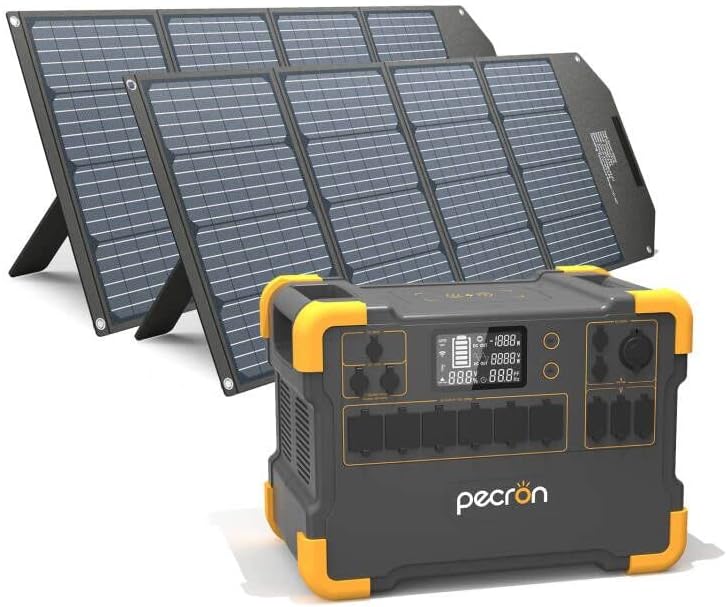
Figure 1.1: Pecron E3000 Portable Power Station with included 200W solar panels.
2. สินค้าหมดview & ส่วนประกอบ
The Pecron E3000 is a high-capacity portable power station designed for various applications, from outdoor camping to emergency home backup. It features a robust design and multiple output ports to power a wide range of devices.
คุณสมบัติหลัก:
- ความจุขนาดใหญ่: 3108Wh battery capacity, suitable for extended use.
- กำลังขับสูง: 2000W rated power (4000W surge) with 110V Pure-sine wave inverter.
- เอาต์พุตอเนกประสงค์: 16 output ports including 6x AC outlets, 6x USB ports (up to PD 100W), 1x Cigar port, 2x DC ports, and 1x 15W wireless charger.
- Multiple Recharging Options: Supports wall outlet, dual wall outlet, solar panel, generator, car socket, and combined wall + solar charging.
- การชาร์จพลังงานแสงอาทิตย์อย่างมีประสิทธิภาพ: Dual independent 600W (PV 32V~95V) MPPT charge controllers and one step-up 100W (PV 18V) MPPT charge controller.
- Safety & Reliability: Built-in Battery Management System (BMS) for protection against short circuit, overload, and overheat. UL-Certified Automotive-Grade Batteries.
การระบุส่วนประกอบ:

รูปที่ 2.1: ด้านหน้าและด้านข้าง view of the Pecron E3000 with labeled ports and dimensions.
- AC 110V Output Port: เต้ารับไฟฟ้ามาตรฐานสำหรับเครื่องใช้ไฟฟ้ากระแสสลับ
- Adapter & PV Charging Port: Input for AC adapter and solar panel charging.
- 12V PV & Car Charging Port: Input for 12V solar panels and car charging.
- ที่ชาร์จแบบไร้สาย: For compatible wireless charging devices.
- จอแสดงผล LCD: แสดงระดับแบตเตอรี่ กำลังไฟฟ้าขาเข้า/ขาออก และตัวบ่งชี้สถานะ
- DC12V/USB & Wireless Charging Switch: Button to activate DC, USB, and wireless charging outputs.
- สวิตช์เอาต์พุต AC: Button to activate AC outputs.
- DC 12V10A Cigar Port: Standard car cigarette lighter port.
- DC 12V(5525) Output Port: DC output for specific devices.
- พอร์ตเอาต์พุต USB / Type-C: USB-A and USB-C ports for charging mobile devices.

รูปที่ 2.2: เกินview of Pecron E3000's massive capacity and key functionalities.
3. การตั้งค่า
3.1 การแกะกล่องและการตรวจสอบเบื้องต้น
Upon receiving your Pecron E3000, carefully open the packaging and remove all components. Verify that all items listed in the "What You Get" section of the product description are present:
- Pecron E3000 Portable Power Station
- 2 Pcs 200W Solar Panels
- แพ็คอุปกรณ์เสริม
- อะแดปเตอร์ AC
- 5-Pin Aviation Plug To MC4 Solar Charging Cable (2x)
- สายชาร์จรถยนต์
- คู่มือการใช้งาน (เอกสารนี้)
Inspect the unit and accessories for any signs of damage. If any components are missing or damaged, contact Pecron customer service immediately.
3.2 การชาร์จเริ่มต้น
Before first use, it is recommended to fully charge the Pecron E3000. This ensures optimal battery performance and calibration.
- Connect the AC Power Adapter to the "Adapter & PV Charging Port" on the power station.
- Plug the AC Power Adapter into a standard wall outlet (110V AC).
- The LCD display will indicate charging status. A full charge via wall outlet typically takes 5-6 hours.
Alternatively, you can use solar panels for initial charging, though this may take longer depending on sunlight conditions.
4. การดำเนินการ
4.1 การเปิด/ปิด
- To turn on the unit: Press and hold the main power button (usually located near the LCD display) for a few seconds until the display illuminates.
- To turn off the unit: Press and hold the main power button again until the display turns off.
4.2 Activating Output Ports
Individual output sections (AC, DC/USB) have their own activation buttons to conserve power when not in use.
- เอาต์พุต AC: Press the "AC Output Switch" button to enable the AC outlets. The AC indicator on the display will light up. Press again to turn off.
- DC/USB/Wireless Outputs: Press the "DC12V/USB & Wireless Charging Switch" button to enable the DC, USB, and wireless charging ports. The corresponding indicators will light up. Press again to turn off.
4.3 การเชื่อมต่ออุปกรณ์
Once the desired output ports are activated, plug your devices into the appropriate ports. The LCD display will show the real-time output wattage.

รูปที่ 4.1: อดีตamples of devices and their estimated runtimes when powered by the Pecron E3000.
บันทึก: The total power consumption of connected devices should not exceed the E3000's rated output of 2000W. If the load exceeds 2000W, the power station will automatically shut down to prevent damage.
4.4 การชาร์จไฟสถานีไฟฟ้า
The Pecron E3000 offers multiple ways to recharge:

Figure 4.2: Six different methods for recharging your Pecron E3000.
- Wall Outlet (AC Adapter): Connect the included AC adapter to the "Adapter & PV Charging Port" and plug into a standard wall outlet. (Approx. 5-6 hours)
- Dual Wall Outlet: Using two AC adapters (second adapter sold separately), connect both to the appropriate input ports for faster charging. (Approx. 2-3 hours)
- แผงโซล่าเซลล์: Connect compatible solar panels (like the included 200W panels) to the "Adapter & PV Charging Port" or "12V PV & Car Charging Port" using the provided MC4 cables. Ensure the solar panel's open circuit voltage (Voc) does not exceed 95V for the main MPPT inputs. (Approx. 5-6 hours with 4x 200W solar panels)
- เครื่องกำเนิดไฟฟ้า: Connect the AC adapter to a generator's AC output. (Approx. 5-6 hours with 1 adapter, 2-3 hours with 2 adapters)
- ซ็อกเก็ตรถ: Use the included car charger cable to connect to your vehicle's 12V cigarette lighter socket. (Approx. 31 hours)
- Wall + Solar: Combine AC wall charging with solar panel charging for the fastest recharge time. (Approx. 3-4 hours with wall + 200W solar panel*3)
The E3000 features dual built-in MPPT charge controllers, supporting up to 1200W max solar input. For optimal solar charging, position panels directly towards the sun.
5. การบำรุงรักษา
5.1 พื้นที่จัดเก็บ
- Store the Pecron E3000 in a cool, dry place, away from direct sunlight, heat sources, and moisture.
- หากต้องการเก็บรักษาในระยะยาว ควรชาร์จแบตเตอรี่ให้อยู่ในระดับประมาณ 50-80% ทุกๆ 3-6 เดือน เพื่อรักษาสุขภาพแบตเตอรี่
- Avoid storing in extreme temperatures (below 0°C or above 40°C).
5.2 การทำความสะอาด
- Ensure the unit is turned off and disconnected from all power sources before cleaning.
- Use a soft, dry, lint-free cloth to wipe the exterior of the power station.
- ห้ามใช้สารทำความสะอาดที่มีฤทธิ์กัดกร่อน สารละลาย หรือแช่เครื่องในน้ำ
- รักษาช่องระบายอากาศให้สะอาดปราศจากฝุ่นและเศษขยะ
5.3 การดูแลแบตเตอรี่
- The Pecron E3000 uses UL-Certified Automotive-Grade Batteries for durability and safety.
- หลีกเลี่ยงการระบายแบตเตอรี่จนหมดบ่อยครั้ง เพราะอาจทำให้แบตเตอรี่มีอายุการใช้งานสั้นลง
- ควรชาร์จแบตเตอรี่ให้เต็มก่อนใช้งานหนัก
- If the unit will not be used for an extended period, charge it to 50-80% and recharge every 3-6 months.
6 การแก้ไขปัญหา
| ปัญหา | สาเหตุที่เป็นไปได้ | สารละลาย |
|---|---|---|
| เครื่องไม่เปิด | แบตเตอรี่หมดเกลี้ยงแล้ว | เสียบปลั๊กไฟและชาร์จอย่างน้อย 30 นาทีก่อนที่จะพยายามเปิดเครื่อง |
| เอาท์พุต AC ไม่ทำงาน | AC output not activated; Overload protection triggered; Device power exceeds 2000W. | Press the "AC Output Switch" button. Reduce the total wattage of connected devices. Restart the unit. |
| DC/USB/Wireless output not working. | DC/USB/Wireless output not activated; Overload protection triggered. | Press the "DC12V/USB & Wireless Charging Switch" button. Reduce the load. Restart the unit. |
| การชาร์จด้วยพลังงานแสงอาทิตย์ช้าหรือไม่ทำงานเลย | Insufficient sunlight; Panels not properly connected; Panel voltage too high/low; Dirty panels. | Ensure panels are in direct sunlight and angled correctly. Check all cable connections. Verify panel voltage is within acceptable range (32V-95V for main MPPT). Clean solar panels. |
| หน่วยมีความร้อนสูงเกินไป | การระบายอากาศไม่ดี; โหลดมากเกินไป | Ensure ventilation vents are clear. Reduce the load on the power station. Move to a cooler environment. |
If the problem persists after attempting these solutions, please contact Pecron customer service for further assistance.
7. ข้อมูลจำเพาะ
| คุณสมบัติ | ข้อมูลจำเพาะ |
|---|---|
| ชื่อรุ่น | E2000LFP with 2pcs 200W solar panels (E3000 Series) |
| ความจุของแบตเตอรี่ | 3108 วัตต์ชั่วโมง |
| กำลังไฟที่กำหนด | 2000 วัตต์ (กำลังไฟสูงสุด 4000 วัตต์) |
| กระแสไฟขาออกVoltage | กระแสสลับ 110 โวลต์ |
| AC Output Type | เพียวไซน์เวฟ |
| พอร์ต USB | 6x (including PD 100W) |
| พอร์ต DC | 2x DC ports, 1x Cigar port |
| การชาร์จแบบไร้สาย | 15วัตต์ |
| อินพุตพลังงานแสงอาทิตย์ (MPPT) | Dual 600W (PV 32V~95V), One 100W (PV 18V) |
| อินพุตพลังงานแสงอาทิตย์สูงสุด | 1200วัตต์ |
| ขนาด (กว้าง x ยาว x สูง) | ยาว 16 นิ้ว x กว้าง 10 นิ้ว x สูง 11 นิ้ว |
| น้ำหนักสินค้า | 56 ปอนด์ |
| Included Solar Panels | 2 Pcs 200W Monocrystalline Solar Panels |
| Solar Panel Fold Dimension | 705x470x60มม. |
| Solar Panel Unfold Dimension | 2086x705x25มม. |
| น้ำหนักแผงโซล่าเซลล์ | 17.6 ปอนด์ (อัน) |
| ขั้วต่อแผงโซล่าเซลล์ | MC4 |
| ระดับการกันน้ำของแผงโซลาร์เซลล์ | IPX4 (Resistant to water splashes) |
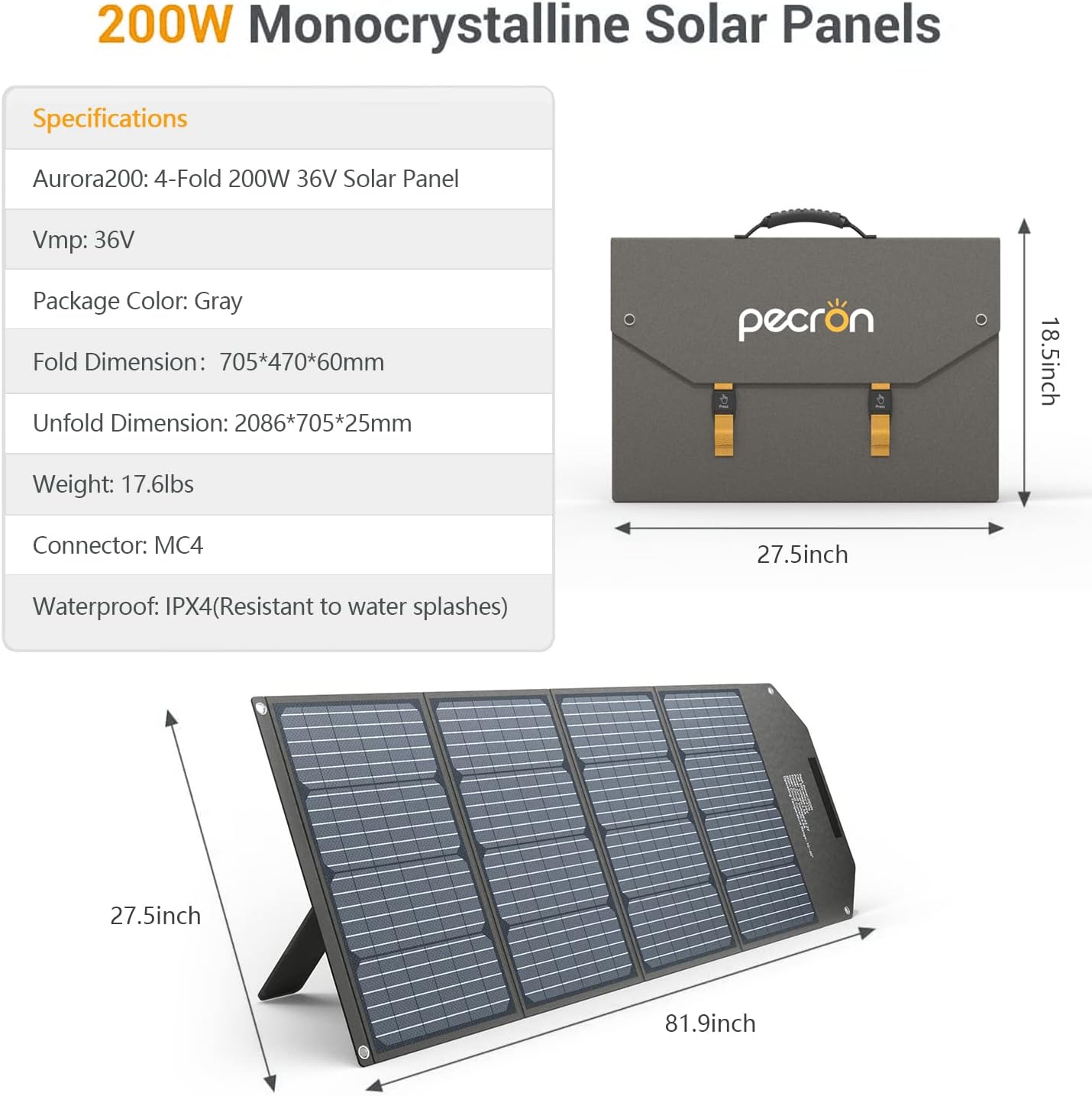
Figure 7.1: Detailed specifications for the included 200W Monocrystalline Solar Panels.
8. การรับประกันและการสนับสนุน
8.1 ข้อมูลการรับประกัน
The Pecron E3000 Portable Power Station comes with a รับประกัน 12 เดือนโดยไม่ต้องกังวล นับจากวันที่ซื้อสินค้า การรับประกันนี้ครอบคลุมถึงข้อบกพร่องจากการผลิตและฝีมือการประกอบภายใต้การใช้งานปกติ ไม่ครอบคลุมถึงความเสียหายที่เกิดจากการใช้งานผิดวิธี อุบัติเหตุ การดัดแปลงโดยไม่ได้รับอนุญาต หรือภัยพิบัติทางธรรมชาติ
โปรดเก็บหลักฐานการซื้อของคุณไว้เพื่อเรียกร้องการรับประกัน
8.2 การสนับสนุนลูกค้า
For any questions, technical assistance, or warranty claims, please contact Pecron customer service. Our team is available ตลอด 24 ชม. 7 วันต่อสัปดาห์ to provide friendly and prompt support.
You can find contact information on the official Pecron webเว็บไซต์หรือผ่านแพลตฟอร์มการซื้อของคุณ
For more information, visit the official Pecron store: Pecron Amazon Store


