1. คำแนะนำด้านความปลอดภัย
Please read these safety instructions carefully before using the product. Keep this manual for future reference.
- ผลิตภัณฑ์นี้ออกแบบมาสำหรับใช้ภายในอาคารเท่านั้น ห้ามวางในที่ที่มีความชื้นหรืออุณหภูมิสูงเกินไป
- Do not attempt to open or modify the device. This may void the warranty and pose a safety risk.
- เก็บอุปกรณ์ให้ห่างจากเด็ก
- Use only the provided micro-USB cable for charging.
- อย่ามองเข้าไปในแหล่งกำเนิดแสง LED โดยตรง
2. เนื้อหาบรรจุภัณฑ์
ตรวจสอบให้แน่ใจว่ามีรายการทั้งหมดอยู่ในบรรจุภัณฑ์:
- ANSMANN Under-Cabinet Light M
- สายชาร์จไมโคร USB
- คู่มือการใช้งาน
3. สินค้าหมดview
The ANSMANN Under-Cabinet Light M is a versatile, rechargeable LED lamp designed for various indoor applications. It features a motion sensor, adjustable color temperatures, and a slim design for discreet placement.

Image 1: The ANSMANN Under-Cabinet Light M, showcasing its sleek, white design and integrated motion sensor.
คุณสมบัติหลัก:
- เซ็นเซอร์ตรวจจับความเคลื่อนไหว PIR: Automatically activates the light when motion is detected in low-light conditions.
- เซ็นเซอร์แสงสนธยา: Ensures the light only activates in dark environments, conserving battery life.
- อุณหภูมิสีปรับได้: Choose between 3 color temperatures (cool white, neutral white, warm white) or activate all LEDs for maximum brightness.
- การหรี่แสงแบบไม่ต่อเนื่อง: Adjust brightness by holding down the control button.
- แบตเตอรี่แบบชาร์จไฟได้: Integrated battery for cordless operation, charged via micro-USB.
- การติดตั้งแม่เหล็ก: Easy installation and removal with a magnetic strip.

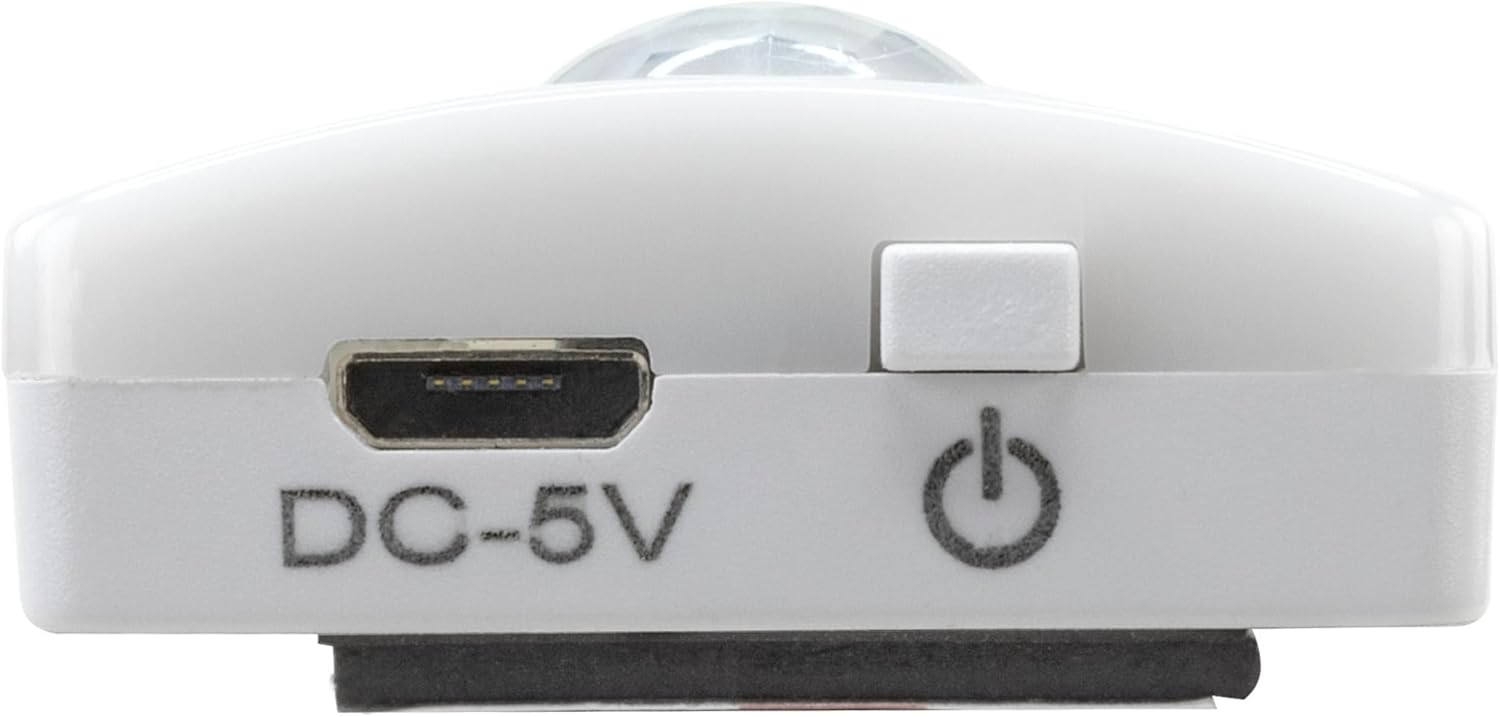
Image 2: Diagram illustrating the Micro-USB Port, On/Off button, and PIR motion sensor on the device.
4. การตั้งค่าและการติดตั้ง
The Under-Cabinet Light M offers flexible installation options using its integrated magnetic strip.
การติดตั้งแม่เหล็ก:
- Identify a suitable, clean, and dry surface for installation (e.g., inside a cabinet, under a shelf).
- The light comes with a fixed magnetic strip on its back. For non-metallic surfaces, use the included adhesive strip.
- Peel off the protective film from the adhesive strip and firmly press it onto the desired surface.
- Attach the Under-Cabinet Light M to the adhesive strip. The magnetic connection will hold it in place.
ภาพที่ 3: ภาพระยะใกล้ view of the magnetic strip and the removable adhesive strip, demonstrating the mounting mechanism.

ภาพที่ 4: อดีตample of the under-cabinet light installed in a modern kitchen setting, providing illumination over a countertop.
5. การดำเนินการ
The Under-Cabinet Light M offers intuitive control for its lighting functions.
เปิด/ปิดเครื่อง:
- Locate the On/Off button (refer to Image 2).
- Press the button once to turn the light on or off.
การปรับอุณหภูมิสี:
- With the light on, short press the control button repeatedly to cycle through the 3 available color temperatures: cool white, neutral white, and warm white.
- A fourth press will activate all LEDs for maximum brightness.
ฟังก์ชันลดแสง:
- To adjust the brightness, press and hold the control button. The light will gradually dim or brighten. Release the button when the desired brightness level is reached.
Motion and Twilight Sensor:
- When the light is in motion sensor mode, it will automatically turn on when movement is detected within its range.
- The integrated twilight sensor ensures that the motion sensor only activates the light in dark environments, preventing unnecessary illumination during daylight hours.
6. การชาร์จไฟ
The Under-Cabinet Light M is equipped with a rechargeable battery for convenient cordless use.
- When the battery is low, the light output may decrease or the light may not turn on.
- Gently detach the light from its magnetic mounting surface.
- Connect the provided micro-USB cable to the micro-USB port on the light (refer to Image 2).
- Connect the other end of the micro-USB cable to a suitable USB power source (e.g., USB wall adapter, computer USB port).
- ไฟแสดงสถานะจะแสดงสถานะการชาร์จ (เช่น สีแดงเมื่อกำลังชาร์จ สีเขียวเมื่อชาร์จเต็มแล้ว)
- Once fully charged, disconnect the cable and reattach the light to its mounting surface.

ภาพที่ 5: รายละเอียด view of the Micro-USB charging port and the On/Off button, essential for charging and operation.
7. การบำรุงรักษา
To ensure the longevity and optimal performance of your Under-Cabinet Light M, follow these simple maintenance guidelines:
- Clean the light regularly with a soft, dry cloth. Do not use abrasive cleaners or solvents.
- Ensure the motion sensor lens is kept clean and free from obstructions for proper function.
- Store the light in a cool, dry place if not in use for extended periods.
8 การแก้ไขปัญหา
If you encounter issues with your Under-Cabinet Light M, refer to the following common problems and solutions:
| ปัญหา | สาเหตุที่เป็นไปได้ | สารละลาย |
|---|---|---|
| ไฟไม่เปิด | แบตเตอรี่หมด | Charge the light using the micro-USB cable. |
| เซ็นเซอร์ตรวจจับความเคลื่อนไหวไม่ตรวจพบการเคลื่อนไหว | Ensure the sensor is clean and unobstructed. Check if the environment is dark enough for the twilight sensor to activate. | |
| ไฟไม่ชาร์จ | สายไฟหรือแหล่งจ่ายไฟชำรุด | Try a different micro-USB cable or USB power adapter. |
| ช่องเสียบชาร์จสกปรก | Gently clean the micro-USB port with a dry, soft brush. | |
| ไฟกระพริบหรือสลัว | แบตเตอรี่อ่อน | ชาร์จอุปกรณ์ใหม่ |
หากปัญหายังคงมีอยู่หลังจากลองวิธีแก้ไขเหล่านี้แล้ว โปรดติดต่อฝ่ายสนับสนุนลูกค้า
9. ข้อมูลจำเพาะ
| คุณสมบัติ | รายละเอียด |
|---|---|
| หมายเลขรุ่น | 1600-0438 |
| ขนาดสินค้า | 25L x 3.5W x 1.3H cm (9.84L x 1.38W x 0.51H inches) |
| น้ำหนักสินค้า | 112 กรัม (0.25 ปอนด์) |
| แหล่งพลังงาน | ใช้พลังงานจากแบตเตอรี่ |
| พอร์ตชาร์จ | Micro-USB (DC-5V) |
| วัสดุ | พลาสติก |
| สี | สีขาว |
| ประเภทการติดตั้ง | ติดตั้งบนผนัง (แม่เหล็ก) |
| ประเภทห้อง | Dining Room, Kitchen, Wardrobe, Hallway, etc. |
10. การรับประกันและการสนับสนุน
ANSMANN products are manufactured with high-quality standards. For information regarding warranty terms and conditions, please refer to the documentation provided with your purchase or visit the official ANSMANN webเว็บไซต์.
For technical support or inquiries, please contact ANSMANN customer service through their official channels.


