1. บทนำ
The Hama MW-650 is a versatile 6-button optical wireless mouse designed for multi-device use. It offers flexible connectivity options via a 2.4 GHz USB-A receiver and Bluetooth, allowing seamless switching between up to three devices. The optical sensor provides precise cursor control, and adjustable DPI settings cater to various user preferences. This manual provides detailed instructions for setup, operation, maintenance, and troubleshooting to ensure optimal performance of your device.
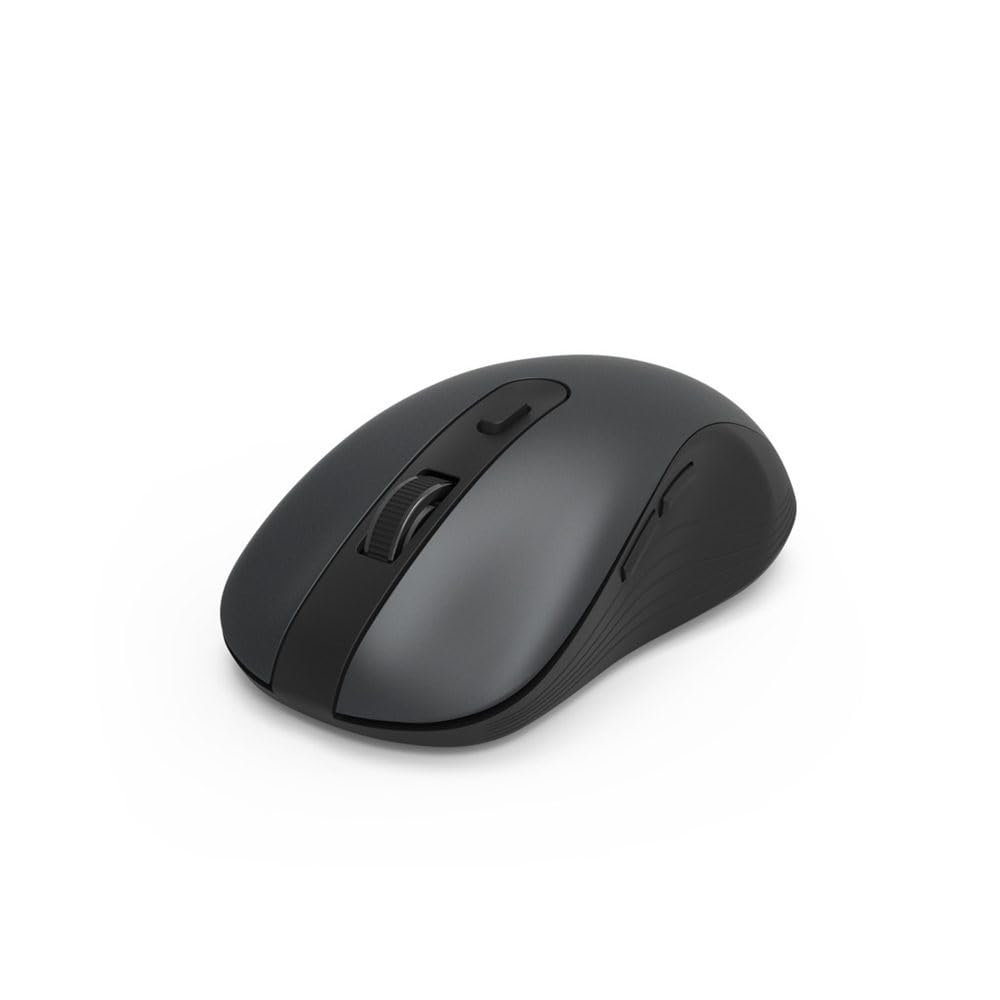
Image 1.1: Hama MW-650 Wireless Mouse (Top View)
2. เนื้อหาบรรจุภัณฑ์
กรุณาตรวจสอบแพ็คเกจสำหรับรายการต่อไปนี้:
- 1 x Hama MW-650 6-Button Optical Wireless Mouse
- ตัวรับ USB-A 1 ตัว
- แบตเตอรี่ AA Mignon 2 ก้อน
- 1 x คู่มือการใช้งาน (เอกสารนี้)

Image 2.1: Hama MW-650 Product Packaging
3. การตั้งค่า
3.1. การติดตั้งแบตเตอรี่
- ค้นหาช่องใส่แบตเตอรี่ที่ด้านล่างของเมาส์
- เปิดฝาช่องใส่แบตเตอรี่
- Insert the two AA Mignon batteries, ensuring correct polarity (+/-).
- ปิดฝาช่องใส่แบตเตอรี่ให้แน่น
3.2. เปิด/ปิดเครื่อง
On the underside of the mouse, slide the ON/OFF switch to the 'ON' position to power on the mouse. Slide it to 'OFF' when not in use to conserve battery life.

Image 3.1: Underside of Hama MW-650 Mouse with ON/OFF Switch and Receiver
3.3. ตัวเลือกการเชื่อมต่อ
The Hama MW-650 mouse supports two wireless connection methods: 2.4 GHz via USB-A receiver and Bluetooth.
3.3.1. 2.4 GHz USB-A Receiver Connection
- Remove the USB-A receiver from its storage slot on the underside of the mouse.
- Plug the USB-A receiver into an available USB-A port on your computer or laptop.
- ระบบปฏิบัติการควรตรวจจับและติดตั้งไดรเวอร์ที่จำเป็นโดยอัตโนมัติ
- The mouse will connect automatically. The LED indicator for BT1/BT2 will not be lit when using the USB receiver.
3.3.2. การเชื่อมต่อบลูทู ธ
The mouse can connect to two separate Bluetooth devices (BT1 and BT2).
- ตรวจสอบให้แน่ใจว่าเมาส์เปิดอยู่
- Press the 'BT1' or 'BT2' button on the underside of the mouse to select the desired Bluetooth channel. The corresponding LED will flash slowly.
- To enter pairing mode, press and hold the selected 'BT1' or 'BT2' button for approximately 3 seconds until the LED flashes rapidly.
- บนอุปกรณ์ของคุณ (พีซี แล็ปท็อป แท็บเล็ต สมาร์ทโฟน) เปิดใช้งาน Bluetooth และค้นหาอุปกรณ์ใหม่
- Select "Hama MW-650" from the list of available devices to pair.
- Once successfully paired, the LED will stop flashing and remain steadily lit for a few seconds before turning off.
4. คู่มือการใช้งาน
4.1. ฟังก์ชันพื้นฐานของเมาส์
The Hama MW-650 features 6 buttons and a scroll wheel:
- ปุ่มคลิกซ้าย: Primary function, typically for selecting items or opening links.
- ปุ่มคลิกขวา: Secondary function, typically for context menus.
- ล้อเลื่อน: For scrolling up and down documents or web pages. Can also be pressed for a middle-click function.
- ปุ่ม DPI: Located behind the scroll wheel, used to adjust cursor sensitivity.
- ปุ่มเดินหน้า/ถอยหลัง: Located on the side of the mouse, typically used for navigating web หน้าหรือโฟลเดอร์
4.2 การสลับระหว่างอุปกรณ์
The MW-650 mouse allows you to switch between three connected devices (one via USB receiver, two via Bluetooth).
- To switch to a Bluetooth-connected device, press the 'BT1' or 'BT2' button on the underside of the mouse. The corresponding LED will light up briefly.
- To switch to the device connected via the USB receiver, press the 'USB' button (or the button without a BT label) on the underside of the mouse.

Image 4.1: Multi-Device Connectivity Example

Image 4.2: Multi-Device Setup with Monitor
4.3 การปรับความไวของ DPI
The mouse offers adjustable DPI (Dots Per Inch) settings to control cursor speed and sensitivity. Press the DPI button located behind the scroll wheel to cycle through the available sensitivities:
- 800 จุดต่อนิ้ว
- 1200 DPI (ค่าเริ่มต้น)
- 1600 จุดต่อนิ้ว
- 2000 จุดต่อนิ้ว
- 2400 จุดต่อนิ้ว
Each press of the DPI button will change the sensitivity, allowing you to find the setting that best suits your task or preference.
5. การจัดการพลังงาน
The Hama MW-650 mouse is designed with intelligent power management features to conserve battery life:
- โหมดสแตนด์บายอัตโนมัติ: The mouse will automatically enter a standby mode after a period of inactivity. To wake it up, simply move the mouse or click any button.
- สวิตช์เปิด/ปิด: For extended periods of non-use, slide the ON/OFF switch on the underside of the mouse to the 'OFF' position to completely power down the device and maximize battery life.
6. การดูแลรักษา
6.1. การทำความสะอาด
เพื่อรักษาประสิทธิภาพและรูปลักษณ์ของเมาส์ของคุณ:
- โปรดตรวจสอบให้แน่ใจว่าได้ปิดเมาส์แล้วก่อนทำการทำความสะอาด
- ใช้ผ้าแห้งนุ่มและไม่เป็นขุยเช็ดพื้นผิวของเมาส์
- สำหรับสิ่งสกปรกฝังแน่น ให้เช็ดออกเล็กน้อยampชุบผ้าด้วยน้ำหรือน้ำยาทำความสะอาดอ่อนๆ หลีกเลี่ยงสารเคมีรุนแรงหรือสารกัดกร่อน
- ควรทำความสะอาดบริเวณเซ็นเซอร์แสงที่อยู่ด้านล่างของเมาส์เป็นระยะด้วยสำลี เพื่อให้มั่นใจได้ว่าการติดตามการเคลื่อนไหวมีความแม่นยำ
6.2. การเปลี่ยนแบตเตอรี่
เมื่อประสิทธิภาพการทำงานของเมาส์ลดลงหรือหยุดตอบสนอง อาจถึงเวลาต้องเปลี่ยนแบตเตอรี่แล้ว
- Power off the mouse using the ON/OFF switch.
- เปิดช่องใส่แบตเตอรี่ด้านล่าง
- Remove the old AA batteries and dispose of them according to local regulations.
- Insert new AA Mignon batteries, observing correct polarity.
- ปิดช่องใส่แบตเตอรี่
7 การแก้ไขปัญหา
If you encounter issues with your Hama MW-650 mouse, please refer to the following common solutions:
| ปัญหา | วิธีแก้ปัญหาที่เป็นไปได้ |
|---|---|
| เมาส์ไม่ตอบสนอง |
|
| การเคลื่อนไหวของเคอร์เซอร์ไม่แน่นอนหรือช้า |
|
| ไม่สามารถสลับระหว่างอุปกรณ์ได้ |
|
| การจับคู่บลูทูธล้มเหลว |
|
8. ข้อมูลจำเพาะทางเทคนิค
| หมายเลขรุ่น | 00182617 (MW-650) |
| เทคโนโลยีการเชื่อมต่อ | 2.4GHz RF (USB-A Receiver), Bluetooth 5.0 |
| เทคโนโลยีตรวจจับการเคลื่อนไหว | ออฟติคอล |
| ความไวของ DPI | 800 / 1200 / 1600 / 2000 / 2400 DPI (adjustable) |
| จำนวนปุ่ม | 6 (รวมถึงล้อเลื่อน) |
| ฟอร์มแฟกเตอร์ | มือขวา |
| แหล่งพลังงาน | 2 x AA Mignon Batteries (included) |
| อายุการใช้งานแบตเตอรี่ | สูงสุด 288 วัน (ขึ้นอยู่กับการใช้งาน) |
| ระบบปฏิบัติการที่รองรับ | Windows 11/10/8/7, Android 4.3 or higher, macOS 10.10 or higher, iOS 13 or higher |
| ขนาดสินค้า (กว้าง x ยาว x สูง) | 11.3 x 6.3 x 4 ซม. (4.41 x 2.48 x 1.57 นิ้ว) |
| น้ำหนักสินค้า | 3.62 ออนซ์ |
| สี | สีดำ |
9. การรับประกันและการสนับสนุน
For warranty information and technical support, please refer to the official Hama webหรือติดต่อฝ่ายบริการลูกค้าโดยตรง โปรดเก็บหลักฐานการซื้อไว้เพื่อใช้ในกรณีที่ต้องการเคลมประกัน
- ผู้ผลิต: บริษัท ฮามา จีเอ็มบีเอช แอนด์ โค เคจี
- Webเว็บไซต์: www.hama.com