การแนะนำ
This manual provides essential instructions for setting up, operating, maintaining, and troubleshooting your Blackview Tab 10 Android Tablet. The Blackview Tab 10 features a 10.1-inch FHD+ display, an MTK8768 Octa-Core processor, 4GB RAM, 64GB internal storage, and runs on Android 11 (Doke OS_P 1.0). It supports dual SIM cards for 4G phone calls and data, Wi-Fi, and Bluetooth 5.0 connectivity.
Please read this manual thoroughly to ensure proper use and to maximize your tablet's performance and longevity.

ภาพ: เดอะแบล็กview Tab 10 tablet shown from the rear in three color options: gray, golden, and silvery, highlighting its sleek design.
การตั้งค่า
เนื้อหาแพ็คเกจ
ตรวจสอบให้แน่ใจว่ามีรายการทั้งหมดอยู่ในบรรจุภัณฑ์:
- สีดำview Tab 10 Tablet PC
- สาย USB (ประเภท-C)
- อะแดปเตอร์ไฟฟ้า (9V 2A)
- คู่มือการใช้งาน
การชาร์จแบตเตอรี่
Before first use, fully charge the tablet. Connect the USB Type-C cable to the tablet's Type-C port and the other end to the provided power adapter. Plug the adapter into a power outlet. The charging indicator will show the charging status. The tablet supports 18W fast charging.
การใส่ซิมการ์ดและการ์ด TF
สีดำview Tab 10 supports dual Nano SIM cards or one Nano SIM card and one TF (microSD) card for expandable storage up to 128GB.
- หาช่องใส่ซิมการ์ด/การ์ด TF ที่ด้านข้างของแท็บเล็ต
- ใช้เครื่องมือถอดซิมที่ให้มาเพื่อเปิดถาด
- Carefully place the Nano SIM card(s) and/or TF card into the designated slots on the tray. Ensure the cards are correctly oriented.
- ค่อยๆ ดันถาดกลับเข้าไปในแท็บเล็ตจนกระทั่งล็อคเข้าที่
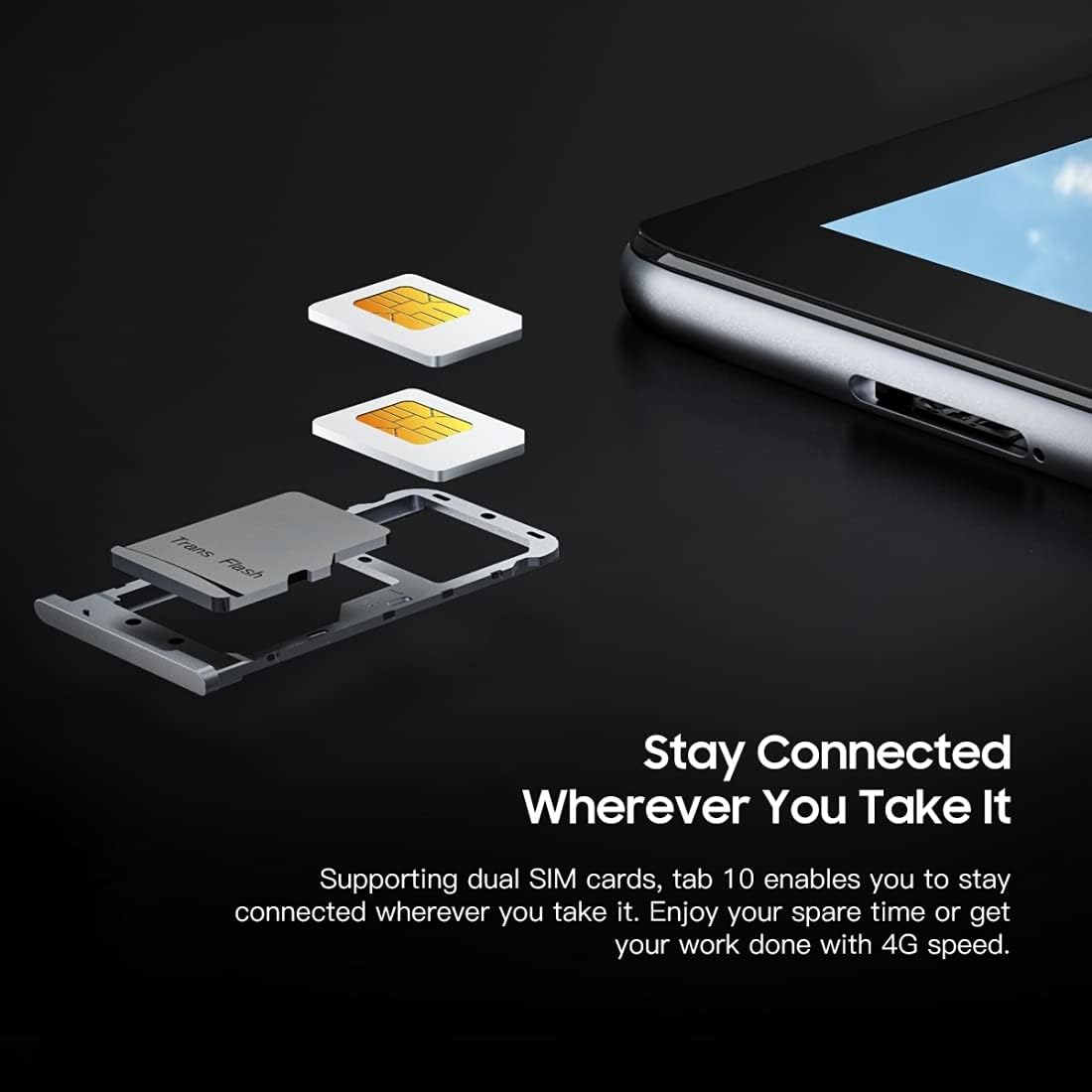
ภาพ: รายละเอียด view ของสีดำview Tab 10's SIM card tray, showing how two Nano SIM cards are inserted, illustrating the dual SIM support.
การเปิด/ปิดเครื่อง
- การเปิดเครื่อง: กดปุ่มเปิด/ปิดค้างไว้จนกระทั่งไฟสีดำติดview โลโก้ปรากฏขึ้น
- วิธีปิดเครื่อง: กดปุ่มเปิด/ปิดค้างไว้จนกว่าเมนูตัวเลือกพลังงานจะปรากฏขึ้น จากนั้นเลือก "ปิดเครื่อง"
- ในการรีสตาร์ท: กดปุ่มเปิด/ปิดค้างไว้จนกว่าเมนูตัวเลือกพลังงานจะปรากฏขึ้น จากนั้นเลือก "รีสตาร์ท"
การตั้งค่าเริ่มต้น
เมื่อเปิดเครื่องครั้งแรก ให้ทำตามคำแนะนำบนหน้าจอเพื่อดำเนินการตั้งค่าเริ่มต้นให้เสร็จสมบูรณ์:
- เลือกภาษาของคุณ
- เชื่อมต่อกับเครือข่าย Wi-Fi
- ลงชื่อเข้าใช้ด้วยบัญชี Google ของคุณหรือสร้างบัญชีใหม่
- ตั้งค่าล็อคหน้าจอ (PIN, รูปแบบ, รหัสผ่าน)
- Review และยอมรับข้อกำหนดและเงื่อนไข
คำแนะนำการใช้งาน
การนำทางพื้นฐาน
- แตะ: สัมผัสหน้าจอหนึ่งครั้งเพื่อเปิดแอป เลือกรายการ หรือ กดปุ่ม
- แตะค้างไว้: กดและค้างรายการเพื่อเข้าถึงตัวเลือกเพิ่มเติมหรือย้ายรายการ
- ปัด: ลากนิ้วของคุณไปตามหน้าจอเพื่อเลื่อนดูหน้าหรือเนื้อหา
- หยิก: ใช้สองนิ้วเพื่อซูมเข้าหรือออกจากรูปภาพและ web หน้า
การเชื่อมต่อกับเครือข่าย
- ไวไฟ : ไปที่ การตั้งค่า > เครือข่ายและอินเตอร์เน็ต > ไวไฟเปิดใช้งาน Wi-Fi เลือกเครือข่ายที่ต้องการ และป้อนรหัสผ่านหากจำเป็น
- บลูทูธ: ไปที่ การตั้งค่า > อุปกรณ์ที่เชื่อมต่อ > บลูทูธ. Turn Bluetooth on, then select a device from the list to pair.
- ข้อมูลมือถือ (4G): หากใส่ซิมการ์ดแล้วให้ไปที่ การตั้งค่า > เครือข่ายและอินเตอร์เน็ต > เครือข่ายมือถือ เพื่อเปิดใช้งานข้อมูลมือถือและกำหนดค่าการตั้งค่า
การใช้กล้อง
สีดำview Tab 10 features a 13.0MP rear camera and a 5.0MP front camera.
- เปิด กล้อง แอป.
- แตะไอคอนกล้องเพื่อสลับระหว่างกล้องหน้าและกล้องหลัง
- แตะปุ่มชัตเตอร์เพื่อถ่ายภาพหรือเริ่ม/หยุดการบันทึกวิดีโอ
- Explore various camera modes and settings within the app.

ภาพ: เดอะแบล็กview Tab 10 displaying its camera features, including an 8MP front camera and a 13MP rear camera, emphasizing its photographic capabilities.
Android 11 and Doke OS_P 1.0
Your tablet runs on Android 11 with Blackview's Doke OS_P 1.0 interface, offering enhanced privacy controls, improved notification management, and a more intuitive user experience. Explore the การตั้งค่า menu to customize your device, manage apps, and optimize performance.

ภาพ: เดอะแบล็กview Tab 10 screen showing the Doke OS_P 1.0 interface based on Android 11, with various settings and app screens visible.
การซ่อมบำรุง
การทำความสะอาดอุปกรณ์
- ใช้ผ้านุ่มที่ไม่เป็นขุยในการทำความสะอาดหน้าจอและตัวเครื่องแท็บเล็ต
- สำหรับรอยเปื้อนฝังแน่น ให้เช็ดออกเล็กน้อยampเทน้ำหรือน้ำยาทำความสะอาดหน้าจอที่ออกแบบมาสำหรับอุปกรณ์อิเล็กทรอนิกส์ลงบนผ้า
- หลีกเลี่ยงการใช้สารเคมีรุนแรง วัสดุที่มีฤทธิ์กัดกร่อน หรือสเปรย์กระป๋องโดยตรงกับยาเม็ด
การดูแลแบตเตอรี่
- Avoid exposing the tablet to extreme temperatures (hot or cold), as this can affect battery life.
- อย่าทิ้งแท็บเล็ตไว้ชาร์จเป็นเวลานานหลังจากชาร์จเต็มแล้ว
- โปรดใช้เฉพาะที่ชาร์จและสายเคเบิลที่ให้มากับแท็บเล็ตเท่านั้น
การอัพเดตซอฟต์แวร์
ตรวจสอบและติดตั้งการอัปเดตซอฟต์แวร์เป็นประจำเพื่อให้แน่ใจว่าแท็บเล็ตของคุณมีฟีเจอร์ แพตช์ความปลอดภัย และการปรับปรุงประสิทธิภาพล่าสุด ไปที่ การตั้งค่า > ระบบ > การอัพเดทระบบ.
การแก้ไขปัญหา
อุปกรณ์ไม่เปิด
- ตรวจสอบให้แน่ใจว่าแบตเตอรี่ชาร์จเต็มแล้ว เสียบแท็บเล็ตเข้ากับเครื่องชาร์จอย่างน้อย 30 นาที
- กดปุ่มเปิด/ปิดค้างไว้ 10-15 วินาทีเพื่อบังคับให้รีสตาร์ท
ปัญหาการเชื่อมต่อ Wi-Fi
- รีสตาร์ทเราเตอร์ Wi-Fi และแท็บเล็ตของคุณ
- ลืมเครือข่ายในการตั้งค่า Wi-Fi และเชื่อมต่อใหม่อีกครั้ง
- ตรวจสอบให้แน่ใจว่าคุณอยู่ในระยะสัญญาณ Wi-Fi
ประสิทธิภาพการทำงานช้า
- ปิดแอปพลิเคชันที่ไม่ได้ใช้งานซึ่งทำงานอยู่เบื้องหลัง
- Clear cache data for apps that are frequently used.
- Ensure sufficient storage space is available. Delete unnecessary files หรือแอพ
- ควรพิจารณาการรีเซ็ตเป็นค่าเริ่มต้นจากโรงงานเป็นวิธีสุดท้าย (อย่าลืมสำรองข้อมูลก่อน)
แอปขัดข้องหรือหยุดทำงาน
- บังคับปิดแอป: ไปที่ การตั้งค่า > แอปและการแจ้งเตือน, select the app, then tap บังคับหยุด.
- Clear the app's cache and data (this will reset the app).
- ถอนการติดตั้งและติดตั้งแอปใหม่อีกครั้ง
ข้อมูลจำเพาะ
| แบบอย่าง | แท็บ 10 |
| ขนาดหน้าจอ | 10.1 นิ้ว |
| ความละเอียดการแสดงผล | 1920 x 1200 (FHD+) |
| โปรเซสเซอร์ | MTK8768 Octa Core Cortex-A53 2.0GHz |
| แรม | 4GB |
| การจัดเก็บข้อมูลภายใน | 64GB |
| พื้นที่เก็บข้อมูลแบบขยายได้ | การ์ด TF ขนาดสูงสุด 128GB (ไม่รวมอยู่ในชุด) |
| ระบบปฏิบัติการ | Android 11 (Doke OS_P 1.0) |
| กล้องหลัง | 13.0MP with AF, LED flash |
| กล้องหน้า | 5.0MP |
| ความจุของแบตเตอรี่ | 7480mAh |
| การชาร์จไฟ | 9V 2A, 18W Fast Charging |
| เครือข่ายการสื่อสาร | 4G LTE, Wi-Fi (802.11a/b/g/n/ac), Bluetooth V5.0 |
| ประเภทซิม | ซิมนาโนคู่ |
| อินเทอร์เฟซ | 1 x 3.5mm Earphone Port, 1 x Type-C, 1 x Magnetic Port |
| ขนาด (กว้าง x ยาว x สูง) | 243XXXXXXXXXXXXXX (162XXXXXXXXXXXXX นิ้ว) |
| น้ำหนัก | 523g (1.15 ปอนด์) |

ภาพ: อินโฟกราฟิกแสดง...asinจี เดอะ แบล็คview Tab 10's main features, including its 13MP rear camera, Octa-core processor, 7480mAh battery, 10.1-inch FHD display, 8.8mm slim body, and support for dual SIM cards.
การรับประกันและการสนับสนุน
สีดำview Tab 10 comes with a standard manufacturer's warranty. Please refer to the warranty card included in your package for specific terms and conditions, including warranty period and coverage details.
For technical support, service inquiries, or additional product information, please visit the official Blackview webหรือติดต่อฝ่ายบริการลูกค้า โปรดเก็บใบเสร็จรับเงินและหมายเลขซีเรียลของผลิตภัณฑ์ไว้ใกล้มือเมื่อต้องการขอความช่วยเหลือ
สีดำอย่างเป็นทางการview เก็บ: สีดำview ร้านค้าบน Amazon


