การแนะนำ
ขอบคุณสำหรับการซื้อasing the Marvo Scorpion HG9055 USB Gaming Headset. This manual provides detailed instructions for setup, operation, maintenance, and troubleshooting to ensure optimal performance and longevity of your device. Please read this manual thoroughly before using the headset.
ข้อมูลด้านความปลอดภัย
- Avoid exposing the headset to extreme temperatures, humidity, or dust.
- Do not disassemble or attempt to repair the headset yourself. This may void the warranty and cause damage.
- เช็ดทำความสะอาดหูฟังด้วยผ้าแห้งนุ่มๆ ห้ามใช้น้ำยาทำความสะอาด
- การฟังเพลงในระดับเสียงสูงเป็นเวลานานอาจทำให้การได้ยินเสียหายได้ โปรดปรับระดับเสียงให้อยู่ในระดับที่สบายหู
- เก็บหูฟังให้ห่างจากเด็กและสัตว์เลี้ยง
เนื้อหาแพ็คเกจ
กรุณาตรวจสอบสิ่งของภายในกล่องเมื่อแกะกล่อง หากมีสินค้าใดสูญหายหรือเสียหาย โปรดติดต่อตัวแทนจำหน่ายของคุณ
- Marvo Scorpion HG9055 USB Gaming Headset
- คู่มือการใช้งาน (เอกสารนี้)
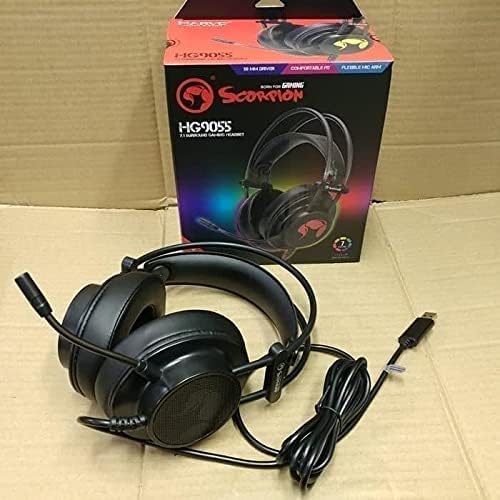
Image: The Marvo Scorpion HG9055 headset displayed next to its retail packaging, showing the product and its box.
สินค้าเกินview
The Marvo Scorpion HG9055 is a USB gaming headset designed for PC and laptop use, featuring 7.1 virtual surround sound, 50mm drivers, and a noise-cancelling microphone.

Image: A promotional view of the Marvo Scorpion HG9055 headset, detailing its 7.1 surround sound, USB connection, and customizable 7-color lighting features.
ส่วนประกอบหลัก:
- แถบคาดศีรษะปรับได้: เพื่อให้สวมใส่สบาย
- ที่ครอบหูแบบครอบหู: บุด้วยวัสดุที่นุ่มสบายขณะใช้งานเป็นเวลานาน
- ไมโครโฟนแบบยืดหยุ่น: Noise-cancelling for clear communication.
- ขั้วต่อ USB: For digital audio and power.
คำแนะนำการตั้งค่า
- เชื่อมต่อชุดหูฟัง: Plug the USB connector of the HG9055 headset into an available USB port on your PC or laptop.
- การติดตั้งไดร์เวอร์: The operating system (Windows/macOS) should automatically detect and install the necessary drivers. Allow a few moments for this process to complete.
- Verify Audio Output:
- หน้าต่าง: Right-click the speaker icon in the system tray, select "Sound Settings" or "Playback devices." Ensure "Marvo Scorpion HG9055" or a similar device name is selected as the default playback device.
- MacOS: Go to "System Preferences" > "Sound" > "Output." Select "Marvo Scorpion HG9055" as the output device.
- Verify Microphone Input:
- หน้าต่าง: In "Sound Settings" or "Recording devices," ensure "Marvo Scorpion HG9055" is selected as the default recording device.
- MacOS: In "System Preferences" > "Sound" > "Input," select "Marvo Scorpion HG9055" as the input device.
- ปรับความพอดี: Adjust the headband and earcups for a comfortable and secure fit. Position the microphone approximately 2-3 cm from your mouth for optimal voice clarity.

Image: The Marvo Scorpion HG9055 headset resting on a stand, demonstrating its over-ear design and flexible microphone, ready for use.
คำแนะนำการใช้งาน
การเล่นเสียง:
Once connected and configured, the headset will function as your primary audio output device.
- การควบคุมระดับเสียง: Adjust the volume using the in-line control wheel on the headset cable or through your operating system's sound settings.
- 7.1 ระบบเสียงรอบทิศทางเสมือนจริง: The headset supports 7.1 virtual surround sound. This feature may require specific software or settings within your game or audio application for full utilization. Refer to your game's audio settings for configuration.
การใช้งานไมโครโฟน:
- การเปิดใช้งานไมโครโฟน: The microphone is active by default when connected. Use the in-line microphone mute switch (if present) to toggle the microphone on/off.
- ตัดเสียงรบกวน: The integrated noise-cancelling microphone reduces background noise for clearer voice communication. Ensure the microphone is positioned correctly near your mouth.
- ปริมาณไมโครโฟน: Adjust microphone sensitivity through your operating system's sound settings (Input/Recording devices).
การซ่อมบำรุง
- การทำความสะอาด: Use a soft, dry, lint-free cloth to wipe the earcups and headband. Do not use abrasive cleaners, alcohol, or solvents.
- พื้นที่จัดเก็บ: When not in use, store the headset in a clean, dry place, away from direct sunlight and extreme temperatures. Avoid tangling the cable.
- การดูแลสายเคเบิล: Do not pull on the cable to disconnect the headset. Always grasp the USB plug.
การแก้ไขปัญหา
| ปัญหา | สารละลาย |
|---|---|
| ไม่มีเสียงจากหูฟัง |
|
| ไมโครโฟนไม่ทำงาน |
|
| คุณภาพเสียงไม่ดีหรือผิดเพี้ยน |
|
ข้อมูลจำเพาะ
| ชื่อรุ่น | HG9055 |
| การเชื่อมต่อ | USB (แบบมีสาย) |
| ปัจจัยรูปแบบหูฟัง | ครอบหู |
| ไดรเวอร์ | 50มม. |
| ระบบเสียงรอบทิศทาง | 7.1 Virtual Surround Sound |
| ไมโครโฟน | Noise Cancellation, Included |
| การควบคุมเสียงรบกวน | ระบบตัดเสียงรบกวนแบบแอคทีฟ (ไมโครโฟน) |
| เข้ากันได้กับ | พีซี, แล็ปท็อป |
| สี | สีดำ |
| วัสดุ | พลาสติก |
| ผู้ผลิต | มาร์โว |
การรับประกันและการสนับสนุน
For warranty information and technical support, please refer to the warranty card included with your product or visit the official MARVO webไซต์ เก็บหลักฐานการซื้อของคุณไว้เพื่อใช้ในกรณีเรียกร้องการรับประกัน
ผู้ผลิต: มาร์โว
แบบอย่าง: HG9055


