1. บทนำ
ขอบคุณสำหรับการซื้อasing the SHARP XL-B512 Stereo Sound System. This micro sound system offers a rich 45-watt sound experience with versatile connectivity options including Bluetooth, CD player, USB, and FM radio. Its elegant design with a wooden speaker housing and LED display complements any living space. This manual provides essential information for setting up, operating, and maintaining your device to ensure optimal performance and longevity.
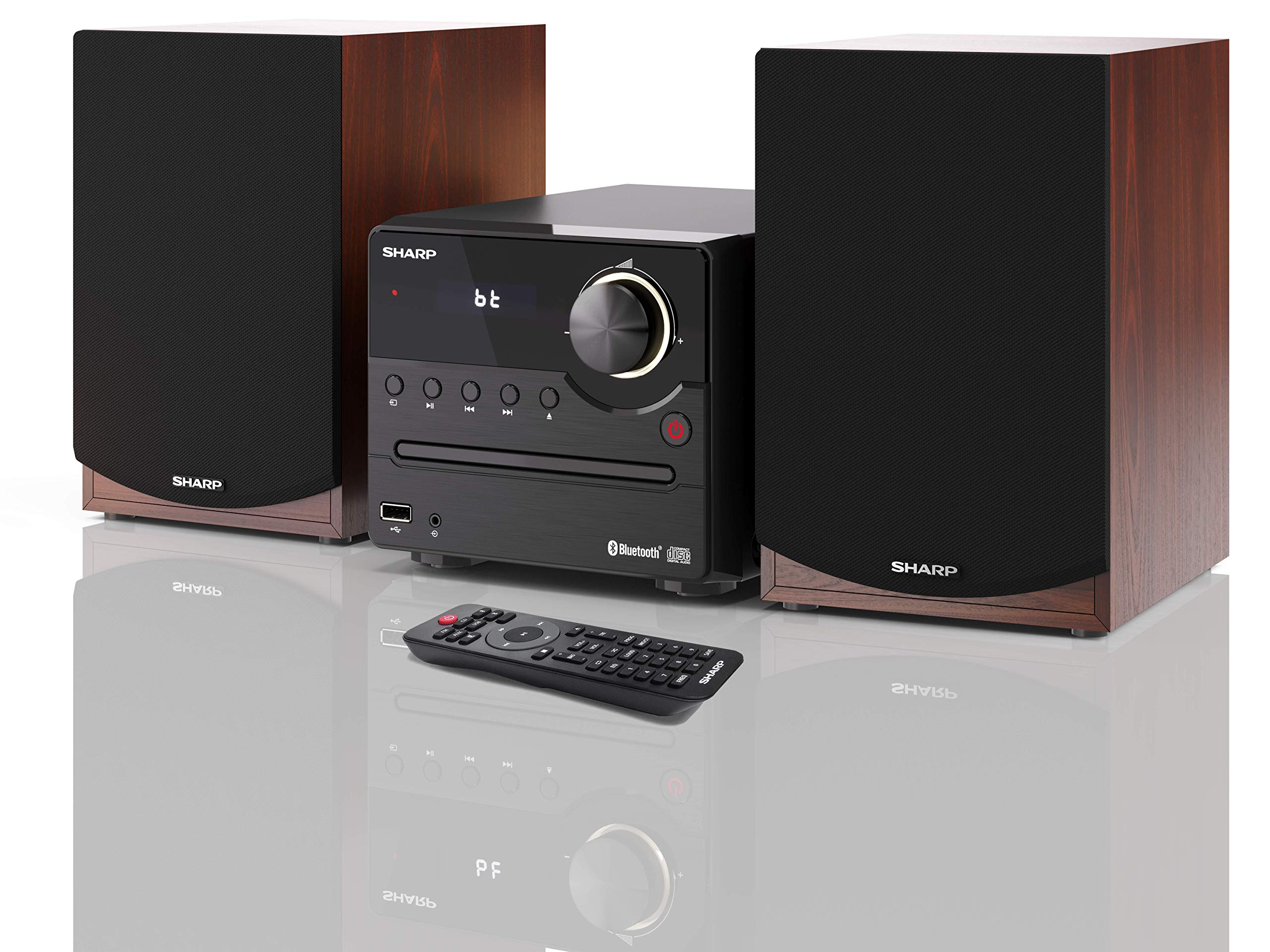
รูปที่ 1: SHARP XL-B512 Stereo Sound System. This image shows the central unit flanked by two wooden-cased speakers, reflecting on a polished surface.
2. ข้อมูลด้านความปลอดภัย
โปรดอ่านคำแนะนำด้านความปลอดภัยทั้งหมดอย่างละเอียดก่อนใช้ผลิตภัณฑ์ เก็บคู่มือนี้ไว้เพื่อใช้อ้างอิงในอนาคต
- แหล่งพลังงาน: ใช้เฉพาะแหล่งจ่ายไฟที่ระบุไว้เท่านั้น ตรวจสอบให้แน่ใจว่าแรงดันไฟฟ้าถูกต้องtage ตรงกับแหล่งจ่ายไฟในพื้นที่ของคุณ
- การระบายอากาศ : อย่าปิดกั้นช่องระบายอากาศใดๆ ควรเว้นพื้นที่รอบตัวเครื่องให้เพียงพอเพื่อให้อากาศถ่ายเทได้สะดวก
- น้ำและความชื้น: อย่าวางเครื่องไว้ในที่ที่มีฝน ความชื้น หรือของเหลวหยด/กระเด็น อย่าวางสิ่งของที่บรรจุของเหลว เช่น แจกัน ไว้บนเครื่อง
- ความร้อน: เก็บเครื่องให้ห่างจากแหล่งความร้อน เช่น หม้อน้ำ เครื่องทำความร้อน เตา หรืออุปกรณ์อื่นๆ (รวมถึง ampเครื่องให้ความร้อน) ที่ผลิตความร้อน
- การทำความสะอาด: ถอดปลั๊กเครื่องออกจากเต้ารับที่ผนังก่อนทำความสะอาด ใช้ผ้าแห้งเท่านั้น
- การบริการ: อย่าพยายามให้บริการผลิตภัณฑ์นี้ด้วยตนเอง ส่งต่อการบริการทั้งหมดไปยังช่างบริการที่ผ่านการรับรอง
3. เนื้อหาบรรจุภัณฑ์
ตรวจสอบว่ารายการทั้งหมดที่ระบุไว้ด้านล่างนี้รวมอยู่ในแพ็คเกจของคุณ:
- SHARP XL-B512 Micro Sound System (Main Unit)
- Two Speakers (with wooden housing)
- สายไฟ
- รีโมทคอนโทรล (พร้อมแบตเตอรี่)
- คู่มือการใช้งาน (เอกสารนี้)
- คู่มือเริ่มต้นอย่างรวดเร็ว
4. การตั้งค่า
4.1 การเชื่อมต่อลำโพง
Connect the two speakers to the main unit using the provided speaker cables. Ensure correct polarity (positive to positive, negative to negative) for optimal sound quality.
4.2 การเชื่อมต่อสายไฟ
Connect the power cable to the AC IN port on the rear of the main unit, then plug it into a wall outlet.

รูปที่ 2: Rear panel connections. This image displays the back of the central unit with ports for speaker wires and the AC power input, alongside the rear of the two speakers.
4.3 การเปิดเครื่องครั้งแรก
Press the Power button on the main unit or the remote control to turn on the system. The LCD display will illuminate.
5. คู่มือการใช้งาน
5.1 แผงควบคุมด้านหน้า

รูปที่ 3: Front panel controls. This close-up shows the central unit's display, volume knob, and various control buttons for playback and source selection.
- ปุ่มเปิด/ปิด: เปิดหรือปิดเครื่อง
- ปุ่มต้นทาง: Cycles through available input sources (CD, FM, Bluetooth, USB, AUX).
- ปุ่มปรับระดับเสียง: ปรับระดับเสียงหลัก
- การควบคุมการเล่น: Play/Pause, Stop, Skip Forward/Backward for CD and USB modes.
- พอร์ต USB: สำหรับเชื่อมต่ออุปกรณ์จัดเก็บข้อมูล USB เพื่อเล่นเพลง
- อินพุต AUX: แจ็คขนาด 3.5 มม. สำหรับเชื่อมต่ออุปกรณ์เสียงภายนอก
5.2 การเล่นแผ่นซีดี
- กดปุ่ม แหล่งที่มา ปุ่มสำหรับเลือกโหมด 'CD'
- Open the CD tray by pressing the Eject button.
- Place a CD (CD/CD-R/CD-RW/MP3 format) with the label side up into the tray.
- Close the CD tray. The system will read the disc and begin playback automatically or display track information.
- ใช้ปุ่มควบคุมการเล่น (เล่น/หยุดชั่วคราว, หยุด, ข้าม) เพื่อจัดการเพลงของคุณ
5.3 วิทยุ FM
- กดปุ่ม แหล่งที่มา กดปุ่มเพื่อเลือกโหมด 'FM'
- The system will automatically search for available stations or you can manually tune.
- To save a station as a preset, tune to the desired station, then press and hold the พรีเซ็ต button (if available on remote) or follow on-screen instructions. The system supports 40 preset memories.
- ใช้ ตั้งค่าล่วงหน้าขึ้น/ลง ปุ่มเพื่อนำทางผ่านสถานีที่บันทึกไว้
5.4 การจับคู่บลูทูธ
- กดปุ่ม แหล่งที่มา button to select 'Bluetooth' mode. The display will show 'bt' and flash, indicating it's in pairing mode.
- บนอุปกรณ์มือถือของคุณ เปิดใช้งาน Bluetooth และค้นหาอุปกรณ์ที่มีอยู่
- Select 'SHARP XL-B512' from the list of devices.
- Once paired, the 'bt' indicator on the system's display will stop flashing. You can now stream audio from your device.
5.5 การเล่น USB
- เสียบอุปกรณ์จัดเก็บข้อมูล USB เข้ากับพอร์ต USB ที่แผงด้านหน้า
- กดปุ่ม แหล่งที่มา กดปุ่มเพื่อเลือกโหมด 'USB'
- ระบบจะตรวจจับและเล่นไฟล์เสียงที่เข้ากันได้โดยอัตโนมัติ fileเอส (MP3)
- ใช้ปุ่มควบคุมการเล่นเพื่อเลื่อนดูแทร็กต่างๆ
อินพุต AUX 5.6 ช่อง
- Connect an external audio device (e.g., smartphone, MP3 player) to the AUX IN jack on the front panel using a 3.5mm audio cable (not supplied).
- กดปุ่ม แหล่งที่มา ปุ่มสำหรับเลือกโหมด 'AUX'
- Play audio from your connected device. The sound will be output through the SHARP XL-B512 system.
5.7 การตั้งค่าอีควอไลเซอร์
The system features 6 preset equalizers with independent treble and depth control. Use the EQ button on the remote control or main unit to cycle through the presets and adjust sound to your preference.
6. การบำรุงรักษา
6.1 การทำความสะอาดหน่วย
Wipe the unit with a soft, dry cloth. Do not use abrasive cleaners, waxes, or solvents as they may damage the finish. Ensure the unit is unplugged before cleaning.
6.2 การดูแลซีดี
Handle CDs by their edges. Keep them clean and free of scratches. Store CDs in their cases when not in use.
6.3 การดูแลลำโพง
The wooden speaker housing can be cleaned with a soft, dry cloth. Avoid placing heavy objects on the speakers or exposing them to direct sunlight or extreme temperatures.
7 การแก้ไขปัญหา
If you encounter any issues with your SHARP XL-B512 system, refer to the following table for common problems and solutions.
| ปัญหา | สาเหตุที่เป็นไปได้ | สารละลาย |
|---|---|---|
| ไม่มีไฟฟ้า | Power cable not connected securely; Power outlet not active. | ตรวจสอบการเชื่อมต่อสายไฟ ลองใช้ปลั๊กไฟอื่นดู |
| ไม่มีเสียง | Volume too low; Incorrect source selected; Speaker cables disconnected. | เพิ่มระดับเสียง; เลือกแหล่งสัญญาณเข้าที่ถูกต้อง; ตรวจสอบการเชื่อมต่อสายลำโพง |
| บลูทูธไม่จับคู่ | System not in pairing mode; Device too far; Bluetooth disabled on device. | Ensure system is in Bluetooth pairing mode; Move device closer; Enable Bluetooth on your device. |
| ซีดีไม่เล่น | CD inserted incorrectly; CD is dirty or scratched; Incorrect format. | Reinsert CD correctly; Clean CD; Ensure CD is a supported format (CD/CD-R/CD-RW/MP3). |
| รีโมตคอนโทรลไม่ทำงาน | แบตเตอรี่หมดหรือใส่ไม่ถูกต้อง; มีสิ่งกีดขวางระหว่างรีโมทและตัวเครื่อง | เปลี่ยนแบตเตอรี่ ตรวจสอบให้แน่ใจว่าขั้วแบตเตอรี่ถูกต้อง และนำสิ่งกีดขวางออกให้หมด |
หากปัญหายังคงมีอยู่หลังจากลองวิธีแก้ไขเหล่านี้แล้ว โปรดติดต่อฝ่ายสนับสนุนลูกค้า
8. ข้อมูลจำเพาะ
Below are the technical specifications for the SHARP XL-B512 Stereo Sound System:
- แบบอย่าง: เอ็กแอล-B512
- กำลังขับรวม: 45 วัตต์
- โหมดเอาต์พุตเสียง: สเตอริโอ
- Speaker Output Channel Quantity: 2
- รูปแบบเสียงที่รองรับ: MP3, CD, CD-R, CD-RW
- เทคโนโลยีจูนเนอร์: FM PLL Tuner
- ช่วงความถี่ FM: 87.5 ถึง 108 เมกะเฮิรตซ์
- FM Preset Memory: 40 สถานี
- การเชื่อมต่อ: บลูทูธ, USB, ช่องเสียบ AUX (3.5 มม.)
- คุณสมบัติพิเศษ: 6 Preset Equalizers, LCD Display with white backlight
- Sound System Dimensions (W x H x D): 17 x 22 x 15 ซม.
- ขนาดลำโพง (กว้าง x สูง x ลึก): 14.5 x 17.7 x 22.3 cm (each)
- น้ำหนักสินค้า: 4 กก.
- แหล่งพลังงาน: สายไฟ
- รีโมทคอนโทรล: ใช่ (รวมแบตเตอรี่)
9. การรับประกันและการสนับสนุน
Your SHARP XL-B512 Stereo Sound System comes with a standard manufacturer's warranty. Please refer to the warranty card included in your package for specific terms and conditions, including the warranty period and coverage details.
For technical support, service inquiries, or further assistance, please contact your local SHARP customer service center. Contact information can typically be found on the manufacturer's webไซต์หรือในเอกสารการรับประกัน


