การแนะนำ
The Eve Energy smart plug is designed to provide intelligent control over your electrical appliances and monitor their energy consumption. This manual provides essential information for the safe and efficient use of your device, including setup, operation, maintenance, and troubleshooting.

Image: The Eve Energy smart plug shown alongside its mobile application interface, demonstrating energy monitoring and control features.
ข้อมูลด้านความปลอดภัย
- ห้ามถอดประกอบหรือดัดแปลงอุปกรณ์
- อย่าให้อุปกรณ์โดนน้ำหรืออุณหภูมิที่สูงเกินไป
- Ensure the device is properly plugged into a suitable wall outlet.
- Do not exceed the maximum load rating of the smart plug. Refer to the specifications section for details.
- เก็บให้พ้นจากมือเด็ก
เนื้อหาแพ็คเกจ
- 1 x Eve Energy Smart Plug
- คู่มือเริ่มต้นอย่างรวดเร็ว 1 ชุด
การตั้งค่า
1. การติดตั้งแอพ
Download the Eve app from the Apple App Store on your iPhone, iPad, or Mac. The Eve Energy smart plug is designed for quick and easy setup without requiring a separate gateway.

Image: The Eve Energy smart plug displayed with the 'Works with Apple Home' logo, indicating compatibility and ease of integration.
2. การจับคู่เบื้องต้น
- Plug the Eve Energy smart plug into a wall outlet.
- Open the Eve app on your device.
- Follow the on-screen instructions to add a new accessory. You may need to scan the HomeKit setup code located on the device or its packaging.
- Once paired, you can assign the plug to a room and give it a custom name.
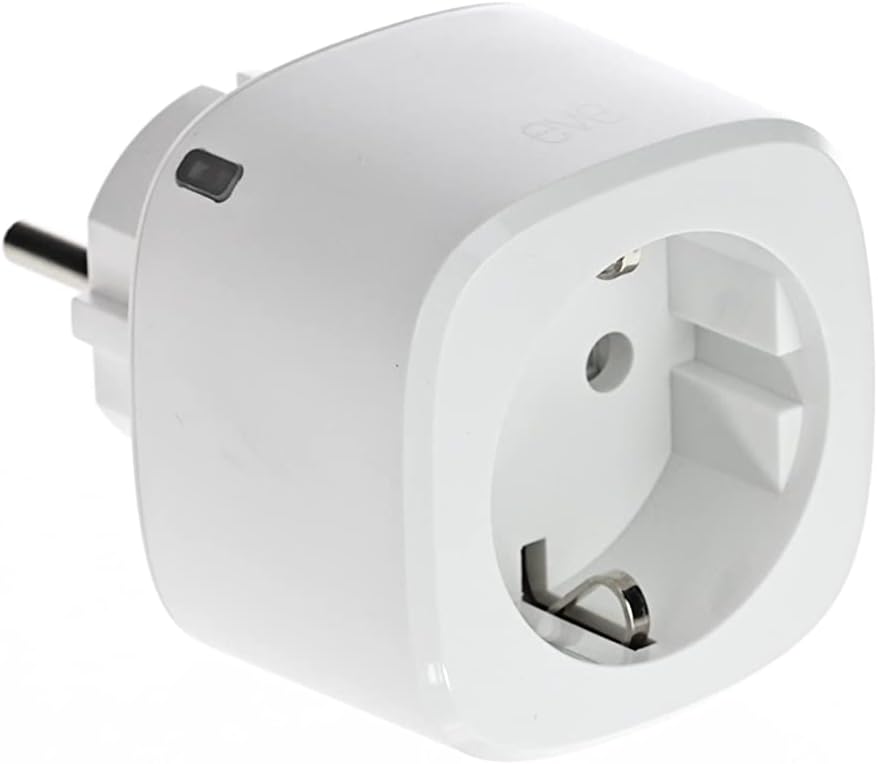
Image: A detailed close-up of the Eve Energy smart plug, highlighting its compact design and plug type.
คำแนะนำการใช้งาน
1. การควบคุมการเปิด/ปิดพื้นฐาน
- ผ่านแอป: Open the Eve app, select your Eve Energy plug, and tap the power icon to toggle the connected appliance on or off.
- Via Siri: Use voice commands like "Hey Siri, turn on [device name]" or "Hey Siri, turn off [device name]".
- Via Built-in Button: Press the physical button on the Eve Energy plug to manually switch the connected appliance on or off.

Image: The Eve Energy smart plug plugged into a wall outlet, illustrating control via Siri with the text "Hey Siri, Light on."
2. การกำหนดตารางเวลา
Configure schedules within the Eve app to automatically turn devices on or off at specific times. These schedules operate independently of your iPhone and home network once set.

Image: A screenshot of the Eve app displaying the scheduling interface, allowing users to set autonomous timers for connected devices.
3. การติดตามตรวจสอบพลังงาน
The Eve app allows you to monitor the electricity consumption of connected devices in real-time. You can also view historical data and estimate cost forecasts based on your electricity tariff settings.

Image: A mobile phone screen displaying the Eve app's energy monitoring feature, showing current consumption, estimated costs, and total consumption over time.
4. Remote Access and Automation
Control your devices remotely or based on presence via a home hub such as an Apple HomePod, HomePod mini, or Apple TV. The Eve Energy supports Bluetooth and Thread for reliable connectivity.

Image: A person using a smartphone to control a smart plug remotely, demonstrating the remote access capability.

Image: A diagram illustrating a smart home network with various Eve devices connected via Thread technology, emphasizing speed, reliability, and range.
การซ่อมบำรุง
- Clean the device with a dry, soft cloth. Do not use liquid cleaners.
- Ensure the plug and outlet are free from dust and debris.
- Regularly check for firmware updates through the Eve app to ensure optimal performance and security.
การแก้ไขปัญหา
อุปกรณ์ไม่ตอบสนอง
- Ensure the Eve Energy plug is securely plugged into a working outlet.
- Check if the connected appliance is powered on and functioning correctly.
- Verify that your iPhone/iPad is within Bluetooth range or that your home hub (HomePod, Apple TV) is online and functioning.
- Restart the Eve Energy plug by unplugging it from the wall outlet for 10 seconds and then plugging it back in.
- If using a home hub, ensure it is updated to the latest software version.
ปัญหาการเชื่อมต่อ
- If you experience frequent disconnections, ensure there are no major obstructions between the Eve Energy plug and your iPhone/iPad or home hub.
- For Thread network users, ensure your Thread border router (e.g., HomePod mini, Apple TV 4K) is properly set up and within range.
- Try resetting the Eve Energy plug to factory settings (refer to the Eve app for specific instructions) and re-pairing it.
ข้อมูลจำเพาะ
| ผู้ผลิต | อีฟ |
| หมายเลขชิ้นส่วน | 20EBO8301 |
| ขนาดสินค้า | 7.9 x 5.6 x 5.6 ซม. |
| น้ำหนัก | 97 กรัม |
| หมายเลขรุ่น | 20EBO8301 |
| สี | สีขาว |
| วัสดุ | พลาสติก |
| ประเภทแหล่งพลังงาน | AC |
| เล่มที่tage | 230V (ไฟฟ้ากระแสสลับ) |
| กระแสไฟฟ้าที่ได้รับการจัดอันดับ | 1 Ampเอเรส |
| ประเภทสวิตซ์ | Button, 1-position |
| ปลั๊กโปรfile | แบบติดผนัง |
| คุณสมบัติพิเศษ | แอปเปิลโฮมคิท |
| การเชื่อมต่อ | บลูทูธ, เธรด |
| แบตเตอรี่ที่จำเป็น | เลขที่ |
การรับประกันและการสนับสนุน
For warranty information and technical support, please refer to the documentation included with your product or visit the official Eve Systems webไซต์ ข้อมูลการติดต่อฝ่ายบริการลูกค้าโดยทั่วไปสามารถพบได้ในเว็บไซต์ของผู้ผลิต webเว็บไซต์.


