1. บทนำ
Thank you for choosing the HANMATEK S1 DM20 Digital Multimeter. This intelligent multimeter is designed for safe and accurate measurements of various electrical parameters. Please read this manual thoroughly before use to ensure proper operation and to prevent potential hazards.
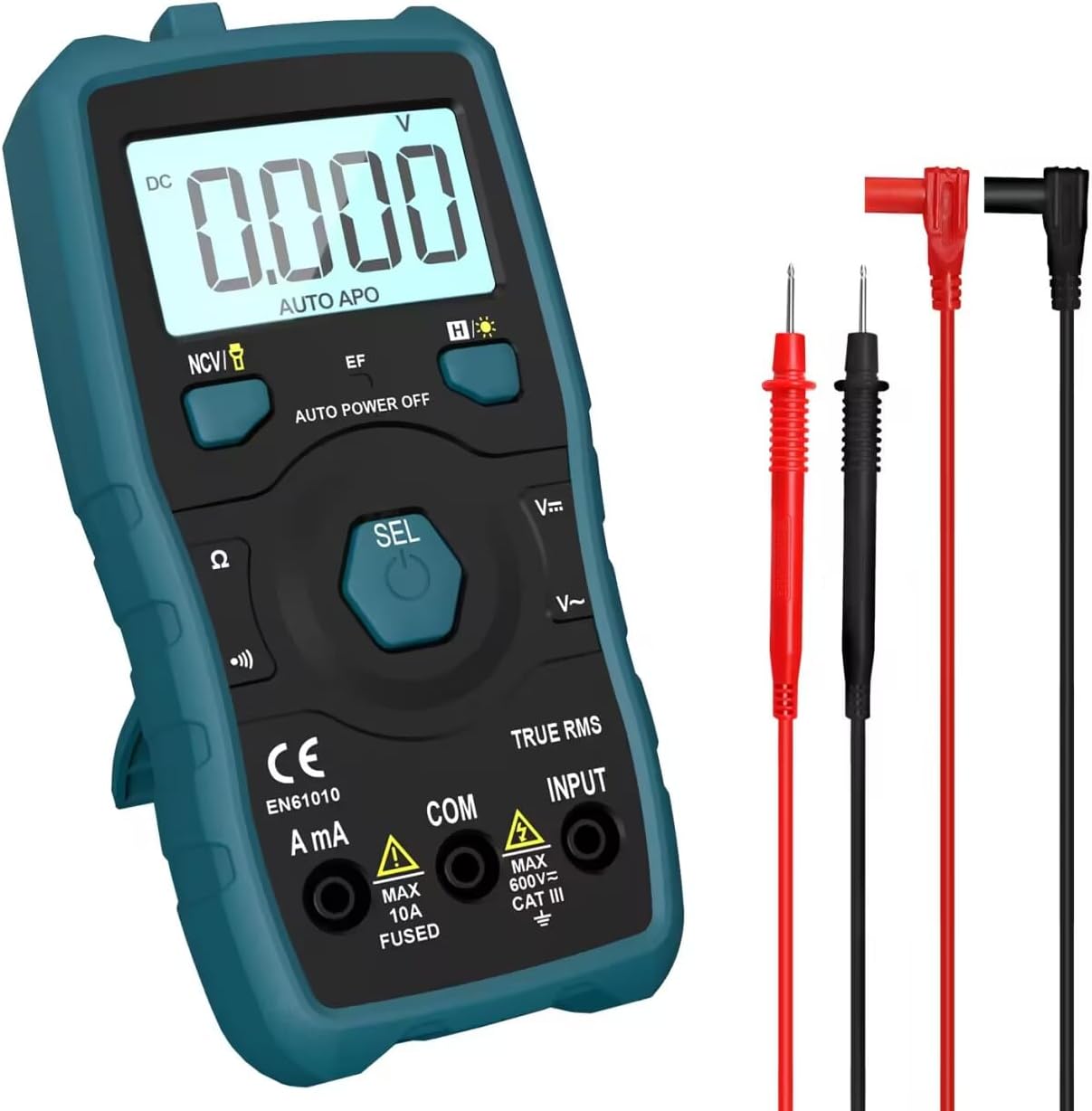
Image 1.1: HANMATEK S1 DM20 Digital Multimeter with included test leads.
2. ข้อมูลด้านความปลอดภัย
คำเตือน: การไม่ปฏิบัติตามคำแนะนำด้านความปลอดภัยเหล่านี้ อาจส่งผลให้เกิดไฟฟ้าช็อต ไฟไหม้ หรือการบาดเจ็บได้
- To prevent erroneous readings and avoid electric shock or personal injury, replace the battery as soon as the low battery voltage symbol appears.
- To prevent electric shock or personal injury, turn off the device and ensure test leads are disconnected from the circuit under test before opening the battery cover to replace the battery.
- Do not measure any AC or DC voltage exceeding 600V to prevent electric shock or damage to the instrument.
- ควรตรวจสอบมัลติมิเตอร์และสายวัดทดสอบว่ามีรอยชำรุดเสียหายหรือไม่ก่อนใช้งานทุกครั้ง ห้ามใช้หากพบว่าชำรุดเสียหาย
- Ensure your hands are dry when operating the multimeter.
- ห้ามใช้งานมัลติมิเตอร์ในบริเวณที่มีก๊าซไวไฟ ไอระเหย หรือฝุ่นละออง
3. คุณสมบัติและส่วนประกอบของผลิตภัณฑ์
The HANMATEK S1 DM20 Digital Multimeter is equipped with several features for versatile measurements. Familiarize yourself with the components shown below.
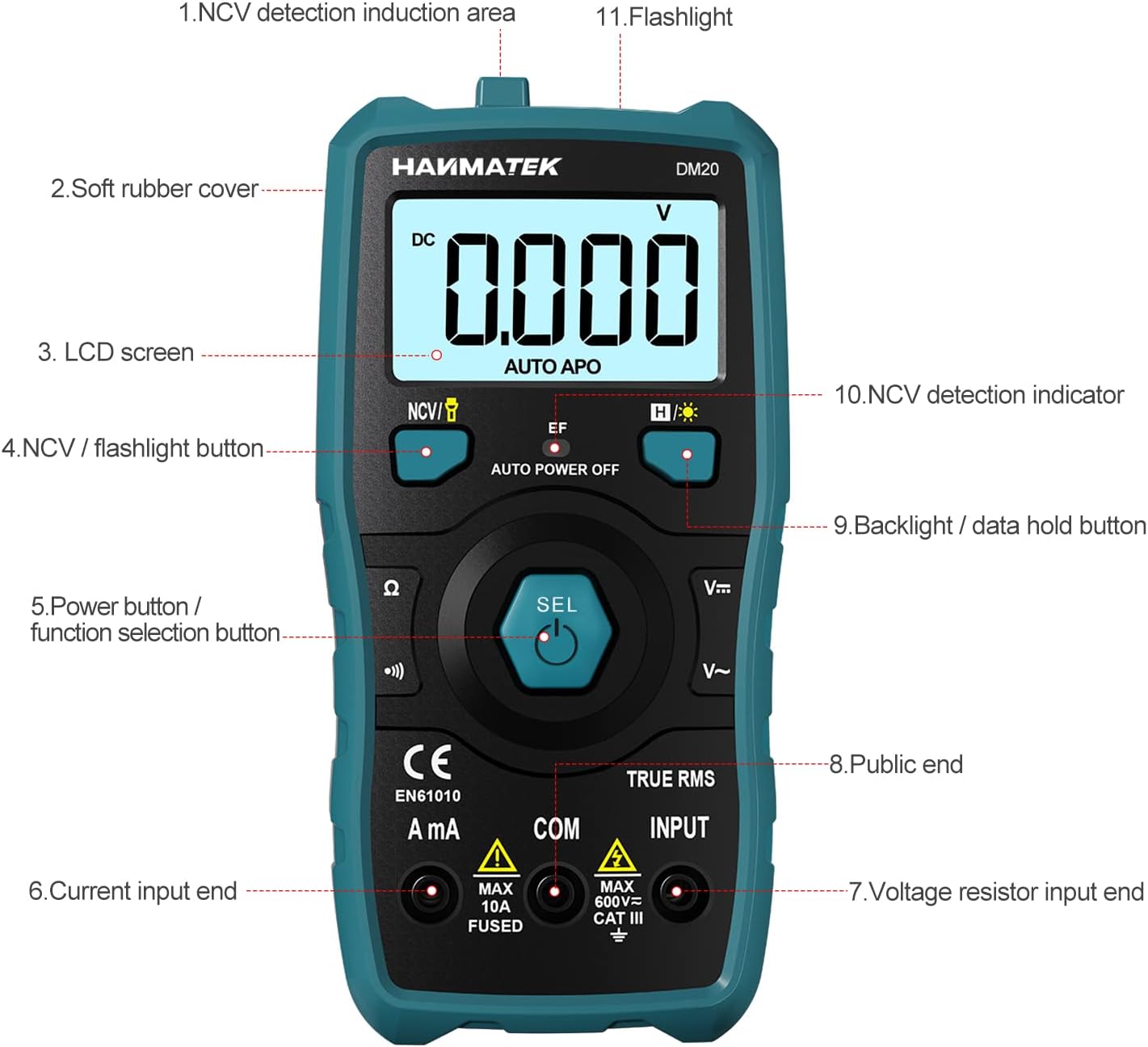
ภาพที่ 3.1: ด้านหน้า view of the multimeter with labeled components.
- NCV Detection Induction Area
- Soft Rubber Cover
- หน้าจอ LCD
- NCV / Flashlight Button
- Power Button / Function Selection Button (SEL)
- Current Input End (A mA)
- เล่มที่tage Resistor Input End (INPUT)
- Public End (COM)
- Backlight / Data Hold Button
- NCV Detection Indicator
- ไฟฉาย

ภาพที่ 3.2: จบแล้วview of multimeter functions including AC/DC Voltage, AC/DC Current, Resistance, Continuity, Backlight, Data Hold, NCV, Flashlight, and 6000 Count display.
4. การตั้งค่า
4.1 เนื้อหาบรรจุภัณฑ์
ก่อนเริ่มต้น โปรดตรวจสอบให้แน่ใจว่ามีรายการทั้งหมดอยู่ในบรรจุภัณฑ์:
- HANMATEK S1 DM20 Digital Multimeter
- แบตเตอรี่ AAA 3 ก้อน 1.5V
- สายทดสอบ (สีแดงและสีดำ)
- คู่มือการใช้งาน

Image 4.1: Package contents including the multimeter, batteries, test leads, and manual.
4.2 การติดตั้งแบตเตอรี่
The multimeter requires 3 x 1.5V AAA batteries. Follow these steps to install them:
- ตรวจสอบให้แน่ใจว่ามัลติมิเตอร์ปิดอยู่และถอดสายวัดออกแล้ว
- ค้นหาช่องใส่แบตเตอรี่ที่ด้านหลังของมัลติมิเตอร์
- ใช้ไขควงเปิดฝาครอบแบตเตอรี่
- Insert the 3 AAA batteries, observing the correct polarity (+/-).
- ใส่ฝาครอบแบตเตอรี่และขันให้แน่นด้วยสกรู

ภาพที่ 4.2: รายละเอียด view of the multimeter's rear, showing the battery bay and stable holder.
5. คู่มือการใช้งาน
The HANMATEK S1 DM20 features auto-ranging for most measurements, simplifying operation.
5.1 เปิด/ปิดเครื่อง
- กดปุ่ม เอสอีแอล button to power on the multimeter.
- มัลติมิเตอร์จะปิดเครื่องโดยอัตโนมัติหลังจากไม่มีการใช้งานเป็นระยะเวลาหนึ่ง เพื่อประหยัดพลังงานแบตเตอรี่
- หากต้องการปิดเครื่องด้วยตนเอง ให้กดปุ่มค้างไว้ เอสอีแอล ปุ่ม.
5.2 การเลือกฟังก์ชัน
The multimeter automatically detects the measurement type (voltage, resistance, continuity) when test leads are connected. For specific functions or to switch between AC/DC, press the เอสอีแอล ปุ่มสั้นๆ
5.3 การวัดพื้นฐาน
เชื่อมต่อสายทดสอบสีแดงเข้ากับ ป้อนข้อมูล ขั้วและการทดสอบสีดำนำไปสู่ คอม terminal for most measurements.
- เล่มที่tagอี (เอซี/ดีซี): Connect test leads in parallel to the circuit or component. The multimeter will automatically detect AC or DC voltage.
- กระแสไฟฟ้า (AC/DC): Connect test leads in series with the circuit. Use the มิลลิแอมป์ terminal for current measurements. Ensure the circuit is de-energized before connecting.
- ความต้านทาน: Connect test leads across the component. Ensure the component is isolated from power.
- ความต่อเนื่อง: Connect test leads across the circuit. A buzzer will sound if continuity is detected.
- ไดโอด: Connect test leads across the diode.
- ความถี่: Connect test leads to the signal source.

Image 5.1: Demonstrations of NCV testing, resistance test, current measuring, voltage measuring, and on-off test.
5.4 ไม่สัมผัส Voltagการตรวจจับ e (NCV)
ฟังก์ชัน NCV ช่วยให้สามารถตรวจจับแรงดันไฟฟ้ากระแสสลับได้tagอีโดยไม่ต้องมีการสัมผัสโดยตรง
- กดปุ่ม NCV / Flashlight ปุ่มสำหรับเปิดใช้งานโหมด NCV
- Place the NCV detection area (top of the multimeter) near the conductor.
- ถ้า AC voltage is detected, the NCV LED will flash, and the buzzer will sound. The LCD screen will display segments ('-' to '----') indicating signal strength.

Image 5.2: NCV function detecting voltage in a live line versus a null line.
5.5 ไฟแบ็คไลท์และฟังก์ชั่นบันทึกข้อมูล
- แสงไฟแบ็คไลท์: กดปุ่ม Backlight / Data Hold button briefly to turn the LCD backlight on/off.
- การเก็บข้อมูล: กดปุ่มค้างไว้ Backlight / Data Hold กดปุ่มเพื่อหยุดค่าที่แสดงบนหน้าจอ กดอีกครั้งเพื่อปล่อย
5.6 ไฟฉาย
- กดปุ่มค้างไว้ NCV / Flashlight button to turn the built-in flashlight on/off.
6. การบำรุงรักษา
- การทำความสะอาด: Wipe the multimeter with a damp ผ้าและผงซักฟอกอ่อน ห้ามใช้สารกัดกร่อนหรือตัวทำละลาย
- พื้นที่จัดเก็บ: Store the multimeter in a dry, cool place away from direct sunlight. If storing for extended periods, remove the batteries to prevent leakage.
- การเปลี่ยนแบตเตอรี่: Replace batteries promptly when the low battery indicator appears to ensure accurate readings. Refer to Section 4.2 for instructions.
7 การแก้ไขปัญหา
- No Display/Power On: ตรวจสอบการติดตั้งแบตเตอรี่และให้แน่ใจว่าแบตเตอรี่ไม่หมด เปลี่ยนแบตเตอรี่หากจำเป็น
- การอ่านค่าที่ไม่ถูกต้อง: Ensure test leads are properly connected and not damaged. Verify the correct measurement function is selected (though auto-ranging handles most). Check battery level.
- No NCV Detection: Ensure NCV mode is activated. The detection area must be close to the AC voltagแหล่งที่มา
- Auto Power Off Too Soon: This is a power-saving feature. The device will power off after a period of inactivity.
8. ข้อมูลจำเพาะ
| คุณสมบัติ | ข้อมูลจำเพาะ |
|---|---|
| หมายเลขรุ่น | ดีเอ็ม20 |
| จำนวนการแสดงผล | 4000 |
| ระดับความปลอดภัย | 600V CAT II, Pollution Degree 2, IEC61010 |
| แหล่งพลังงาน | แบตเตอรี่ AAA 3 ก้อน 1.5V |
| ขนาด | 147 มม. x 71 มม. x 45 มม. (7.1 x 4.5 x 14.7 ซม.) |
| น้ำหนัก | 220 กรัม |
| คุณสมบัติพิเศษ | NCV, Auto-Ranging, Data Hold, Auto Power-Off, Backlight, Flashlight |
9. การรับประกันและการสนับสนุน
The HANMATEK S1 DM20 Digital Multimeter comes with a รับประกัน 24 เดือน นับจากวันที่ซื้อ การรับประกันนี้ครอบคลุมถึงข้อบกพร่องจากการผลิตภายใต้การใช้งานปกติ
For technical support, warranty claims, or any inquiries, please contact HANMATEK customer service through their official channels or the retailer where the product was purchased. You can find more information on the HANMATEK Brand Store.


