1. บทนำ
The Geeni Dot Smart Plug provides remote control over your electronic devices. This compact, fire-resistant smart outlet connects directly to your 2.4GHz Wi-Fi network, allowing you to manage lights, appliances, and electronics from anywhere using the Geeni app. It supports voice commands via Amazon Alexa and Google Assistant, offers custom scheduling, and includes energy monitoring features.

Image: Geeni Dot Smart Plug packaging and two individual smart plugs.
2. อะไรอยู่ในกล่อง
- Geeni Dot Smart Wi-Fi Plug (2 units)
- คู่มือการใช้งาน
- คู่มือการควบคุมด้วยเสียง
3. คำแนะนำในการตั้งค่า
Follow these steps to set up your Geeni Dot Smart Plug:
- ดาวน์โหลดแอป Geeni: ค้นหา "Geeni" in the Apple App Store (for iOS devices) or Google Play Store (for Android devices) and download the application.
- ลงทะเบียนบัญชี: Open the Geeni app and follow the on-screen instructions to register a new account using your mobile phone number or email address.
- เสียบปลั๊ก: Insert the Geeni Dot Smart Plug into a standard electrical outlet. Ensure the indicator light on the device is flashing, indicating it is ready to connect.
- เชื่อมต่อกับ Wi-Fi:
- ตรวจสอบให้แน่ใจว่าโทรศัพท์ของคุณเปิดใช้งานบลูทูธแล้ว
- In the Geeni app, tap "Add Device" or the "+" icon. The app should discover the plug via Bluetooth.
- Follow the in-app instructions to connect the plug to your 2.4GHz Wi-Fi network. Note: The Geeni Dot Smart Plug does not support 5GHz Wi-Fi networks.

Image: Visual guide for simple setup: Download the Geeni App, Plug in the Smart Plug, and Connect via the app.
4. คู่มือการใช้งาน
4.1. รีโมทคอนโทรล
Once connected, you can control any device plugged into the Geeni Smart Plug from anywhere using the Geeni app on your smartphone.

Image: A smartphone displaying the Geeni app interface, showing various smart devices in a home that can be remotely controlled.
4.2. การควบคุมด้วยเสียง
The Geeni Dot Smart Plug is compatible with Amazon Alexa and Google Assistant. Link your Geeni account to your voice assistant app to enable voice commands.
- สำหรับอเล็กซ่า: Say "Alexa, turn on [device name]."
- สำหรับผู้ช่วยของ Google: Say "Hey Google, turn off [device name]."
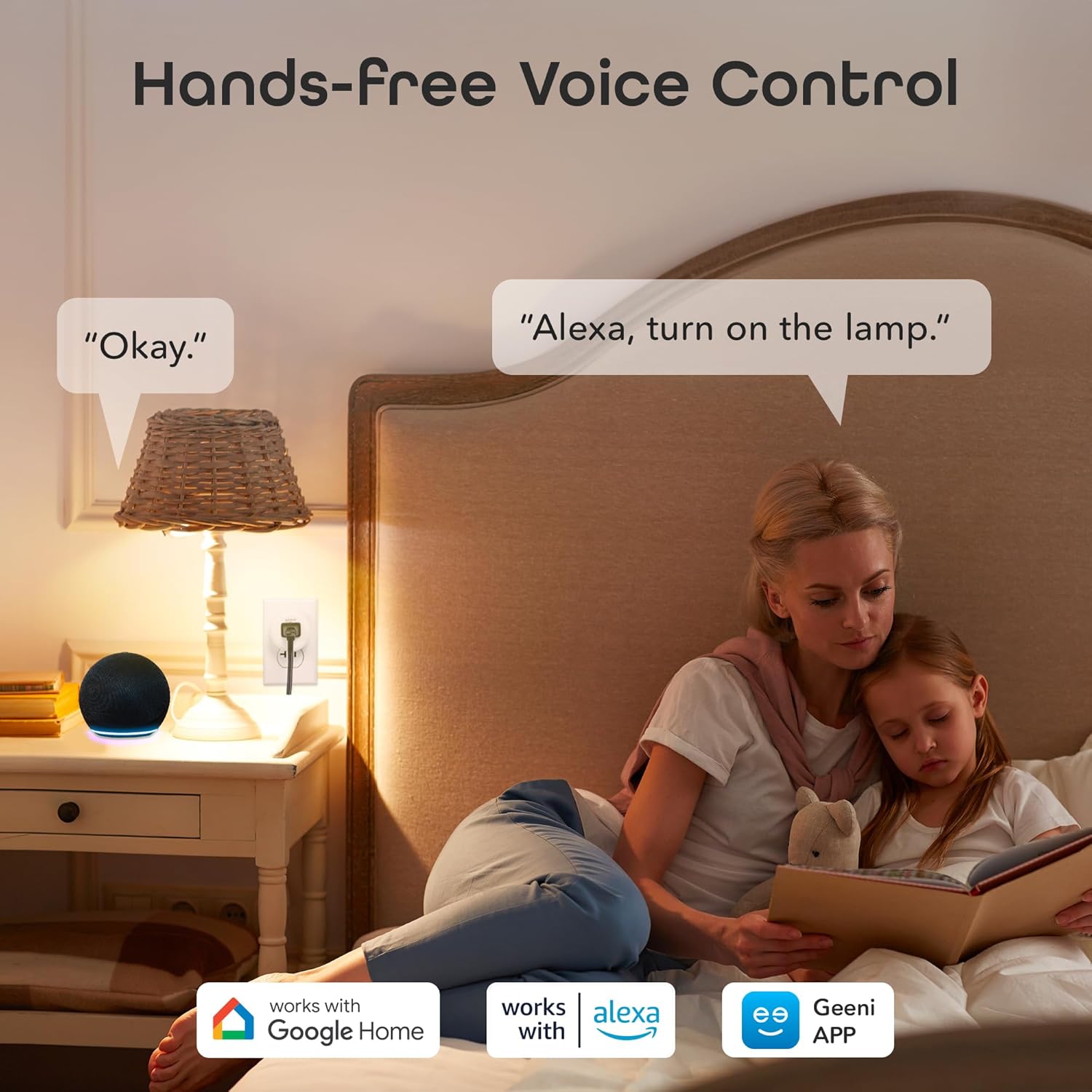
Image: A person in a bedroom using voice commands to turn on a lamp connected to a Geeni Smart Plug.
4.3. Custom Scheduling & Timers
Use the Geeni app to set schedules and timers for your connected devices. This allows for automatic operation, such as turning lights on at dusk or a coffee maker on in the morning.

Image: An illustration showing different home devices and how schedules and timers can be set for them using the Geeni app.
4.4. การควบคุมกลุ่ม
Organize multiple Geeni Smart Plugs into groups within the app to control several devices simultaneously with a single command.

ภาพ: ภาพตัดขวาง view of a house illustrating how multiple smart devices can be managed together using the group control feature in the Geeni app.
5. คุณสมบัติ
- การออกแบบที่กะทัดรัด: Designed to save space and keep other outlets accessible.
- คุณสมบัติด้านความปลอดภัย: Includes secure PCBA, overcurrent protection fuse, and fire-resistant material.
- การตรวจสอบพลังงาน: Track real-time energy usage via the Geeni app to optimize consumption.
- ไม่ต้องใช้ฮับ: เชื่อมต่อโดยตรงกับเครือข่าย Wi-Fi 2.4GHz ของคุณ

ภาพ: ระเบิด view diagram highlighting the safety components of the Geeni Smart Plug.
6. ข้อมูลจำเพาะ
| ข้อมูลจำเพาะ | รายละเอียด |
|---|---|
| ผู้ผลิต | เกนี |
| หมายเลขรุ่น | GN-WW217-199 |
| น้ำหนักสินค้า | 5.6 ออนซ์ |
| ขนาดสินค้า | 2 x 1.9 x 1.1 นิ้ว |
| วัสดุ | เอบีเอส |
| แหล่งพลังงาน | AC |
| เล่มที่tage | 125 โวลต์ |
| วัดtage | 1250 วัตต์ |
| ประเภทสวิตซ์ | 1 ทาง |
| การรับรอง | UL |
7 การแก้ไขปัญหา
If you encounter issues with your Geeni Dot Smart Plug, consider the following:
- ปัญหาการเชื่อมต่อ: Ensure your Wi-Fi network is 2.4GHz. The plug does not support 5GHz networks. Verify your Wi-Fi password and signal strength. Try moving the plug closer to your router.
- อุปกรณ์ไม่ตอบสนอง: Check if the plug is securely inserted into the outlet. Press the manual power button on the side of the plug to see if it responds. If not, try unplugging and re-plugging the device.
- ปัญหาการควบคุมแอป: Ensure your Geeni app is updated to the latest version. Restart the app or your smartphone.
- Resetting the Plug: If issues persist, you may need to reset the smart plug. Consult the Geeni app or the included quick start guide for specific reset instructions.
วิดีโอ: จบแล้วview of Geeni Smart Home Products, demonstrating various devices including smart plugs. This video provides context on the ecosystem but does not specifically address troubleshooting.
8. การบำรุงรักษา
To ensure optimal performance and longevity of your Geeni Dot Smart Plug:
- รักษาอุปกรณ์ให้สะอาดและปราศจากฝุ่น ใช้ผ้าแห้งนุ่มๆ เช็ดทำความสะอาด
- Avoid exposing the plug to excessive moisture or extreme temperatures.
- อย่าพยายามถอดประกอบหรือซ่อมแซมอุปกรณ์ด้วยตนเอง ติดต่อฝ่ายสนับสนุนลูกค้าเพื่อขอความช่วยเหลือ
9. การรับประกันและการสนับสนุน
The Geeni Dot Smart Plug comes with a รับประกันจำกัด 1 ปี. For any questions, technical support, or warranty claims, please contact Geeni customer support:
- Webเว็บไซต์: support.mygeeni.com
- โทรศัพท์: 1 (888) 232-3143


