1. บทนำและเรื่องอื่นๆview
The Samson CB288 Beltpack Transmitter is a key component of the Samson Concert 288 Wireless System, designed to provide reliable and high-quality audio transmission for various applications. This compact and durable transmitter offers exceptional performance and ease of use, making it ideal for musicians, presenters, and performers.
This manual provides detailed instructions on the setup, operation, maintenance, and troubleshooting of your CB288 Beltpack Transmitter to ensure optimal performance and longevity.
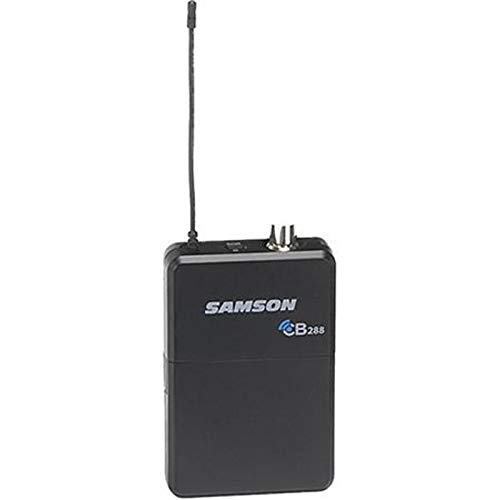
รูปที่ 1 : ด้านหน้า view of the Samson CB288 Beltpack Transmitter. The device is black with the "SAMSON CB288" logo visible on the front. An antenna extends from the top left, and two small connectors are visible on the top right.
2. คุณสมบัติหลัก
- อายุการใช้งานแบตเตอรี่ที่ยาวนานขึ้น: Operates for up to eight hours on two standard AA batteries.
- ช่วงการทำงานกว้าง: Provides a reliable operating range of up to 300 feet (line of sight).
- Specific Frequency Band: Operates within Band I, Channel A: 518-542MHz, ensuring clear and interference-free transmission.
- Versatile Input: Features a Mini-XLR (P3) input connector for various microphone and instrument connections.
- Optimized Input Impedance: Designed with a 1MOhm input impedance for broad compatibility.
- Adjustable Input Gain: Offers a 38dB input gain range, allowing precise level matching for different audio sources.
- โครงสร้างทนทาน: Built to withstand the rigors of live performance and regular use.
3. คู่มือการติดตั้ง
3.1. การติดตั้งแบตเตอรี่
- Locate the battery compartment on the rear of the CB288 Beltpack Transmitter.
- เลื่อนเปิดฝาครอบช่องใส่แบตเตอรี่
- ใส่แบตเตอรี่ AA ใหม่ 2 ก้อน โดยตรวจสอบให้แน่ใจว่าขั้ว (+/-) ถูกต้องตามที่ระบุภายในช่อง
- ปิดฝาช่องใส่แบตเตอรี่ให้แน่น
บันทึก: Always use fresh alkaline or rechargeable AA batteries for optimal performance and battery life. Remove batteries if the unit will not be used for an extended period.
3.2. Connecting a Microphone or Instrument
- Identify the Mini-XLR (P3) input connector on the top of the transmitter.
- Connect your compatible Samson microphone (e.g., LM10, HS5) or instrument cable to this input. Ensure the connector clicks firmly into place.
3.3. การเปิด/ปิดเครื่อง
- To power on, press and hold the power button located on the top of the transmitter until the indicator light illuminates.
- หากต้องการปิดเครื่อง ให้กดปุ่มเปิด/ปิดค้างไว้อีกครั้งจนกว่าไฟแสดงสถานะจะดับ
3.4. Frequency Selection and Pairing
The CB288 transmitter is pre-set to Band I, Channel A (518-542MHz). For proper operation, ensure your Concert 288 receiver is also set to the corresponding frequency band and channel.
- Refer to your Concert 288 receiver's manual for specific instructions on channel selection and pairing procedures.
- Typically, the receiver will have a scan function to find an available channel, and then a sync function (often via infrared) to pair with the transmitter.
- Once paired, the receiver will indicate a stable RF connection.
4. คู่มือการใช้งาน
4.1. Adjusting Input Gain
The CB288 features an adjustable input gain to optimize the audio level from your microphone or instrument before transmission. This helps prevent distortion and ensures a strong, clear signal.
- With the transmitter powered on and connected to your audio source, speak into the microphone or play your instrument at your typical performance level.
- Locate the gain adjustment control (usually a small trim pot) on the transmitter. You may need a small screwdriver or a similar tool to adjust it.
- Monitor the audio level on your Concert 288 receiver. Adjust the gain control on the transmitter until the receiver's audio level indicator shows a strong signal without clipping (peaking into the red).
- A good starting point is to set the gain so that the peak audio levels on the receiver are consistently in the green or amber range, only occasionally touching the red.
4.2. การจัดวางที่เหมาะสมที่สุด
For best wireless performance, ensure the transmitter's antenna is not obstructed. Wear the beltpack on your hip or in a position where the antenna has a clear line of sight to the receiver whenever possible. Avoid placing the transmitter directly against metal objects or large body masses that could block the signal.
4.3. ไฟแสดงสถานะแบตเตอรี่
The CB288 Beltpack Transmitter includes an LED indicator that displays battery status. A solid green light typically indicates sufficient battery power. A flashing or red light indicates low battery, and batteries should be replaced soon.
5. การบำรุงรักษา
- การทำความสะอาด: Use a soft, dry cloth to clean the exterior of the transmitter. Do not use abrasive cleaners, solvents, or harsh chemicals.
- การดูแลแบตเตอรี่ Always remove batteries from the transmitter if it will not be used for an extended period (e.g., more than a few weeks) to prevent leakage and damage.
- พื้นที่จัดเก็บ: เก็บเครื่องส่งสัญญาณไว้ในที่แห้งและเย็น หลีกเลี่ยงแสงแดดโดยตรง อุณหภูมิที่สูงหรือต่ำเกินไป และความชื้นสูง
- การดูแลเสาอากาศ: Handle the antenna with care. Avoid bending or stressing it excessively, as this can affect performance.
6 การแก้ไขปัญหา
| ปัญหา | สาเหตุที่เป็นไปได้ | สารละลาย |
|---|---|---|
| ไม่มีเสียงหรือสัญญาณอ่อน |
|
|
| เสียงบิดเบี้ยว |
|
|
| อายุการใช้งานแบตเตอรี่สั้น |
|
|
7. ข้อมูลจำเพาะ
| แบบอย่าง | CB288 Transmitter |
| ช่วงความถี่ | Band I, Channel A: 518-542MHz |
| ช่องต่อเชื่อม | มินิ-XLR (P3) |
| อิมพีแดนซ์อินพุต | 1MOhm |
| อินพุตเกนเรนจ์ | 38เดซิเบล |
| อายุการใช้งานแบตเตอรี่ | Up to 8 hours (with 2x AA batteries) |
| ระยะการทำงาน | 300 feet (line of sight) |
| ขนาดสินค้า | 4.6 x 3.2 x 1.6 นิ้ว |
| น้ำหนักสินค้า | 4 ออนซ์ |
| ผู้ผลิต | แซมสัน |
| วันที่พร้อมใช้งานครั้งแรก | วันที่ 28 สิงหาคม 2019 |
8. การรับประกันและการสนับสนุน
The Samson CB288 Beltpack Transmitter is covered by a Samson 2 Year Limited Warrantyการรับประกันนี้ครอบคลุมถึงข้อบกพร่องในวัสดุและฝีมือการผลิตภายใต้การใช้งานปกติ
For detailed warranty information, technical support, or service inquiries, please visit the official Samson website or contact their customer support. You can often find FAQs, driver downloads, and service center locations on their support pages.
Samson Official Webเว็บไซต์: www.samsontech.com
สำหรับข้อมูลเพิ่มเติมและรายละเอียดผลิตภัณฑ์ คุณสามารถเยี่ยมชมได้ที่ [ลิงก์เว็บไซต์] Samson Store on Amazon.


