1. สินค้าหมดview
The Panasonic KX-HN4101W is a long-range video baby monitor designed to provide secure and reliable monitoring of your child. It features a 3.5-inch color LCD display, remote pan, tilt, and zoom capabilities, two-way talk, night vision, and smart alerts for motion, sound, and temperature changes. The system utilizes DECT technology for an interference-free and private connection, eliminating the need for Wi-Fi.

Image: The Panasonic KX-HN4101W baby monitor unit and camera.
คุณสมบัติที่สำคัญ ได้แก่:
- ระยะยาว: Monitor children from up to 1500 feet away (line-of-sight). Actual distance may vary based on environmental factors.
- การเชื่อมต่อที่ปลอดภัย: Utilizes DECT technology for a private, interference-free connection, not reliant on Wi-Fi.
- Remote Pan, Tilt, Zoom: ปรับกล้อง view remotely from the monitor unit.
- การมองเห็นในเวลากลางคืนที่คมชัด: Provides a clear monochrome view in low-light or dark conditions.
- การพูดคุยแบบสองทาง: Communicate with your baby through the monitor and camera.
- เสียงที่ผ่อนคลาย: Play lullabies, white noise, ocean sounds, rain, vacuum, or heartbeat sounds to comfort your baby.
- การแจ้งเตือนอัจฉริยะ: Receive notifications for sound, motion, and room temperature changes.
- อายุการใช้งานแบตเตอรี่ยาวนาน: The monitor's built-in rechargeable battery offers up to 13 hours of standby time or 5 hours of continuous use.
- ขยายได้: The system can be expanded with up to four cameras (sold separately).
วิดีโอ: จบแล้วview of Panasonic Baby Monitor features including extended battery life, customizable alerts, extra long range, and smart sensors.
2. อะไรอยู่ในกล่อง
The Panasonic KX-HN4101W baby monitor system includes the following components:
- Baby Monitor Unit (Parent Unit)
- Baby Camera Unit (Baby Unit)
- AC Adapter for Camera
- AC Adapter for Monitor
- อะแดปเตอร์ติดผนัง
- Rechargeable Battery (pre-installed in monitor)

Image: All components included in the Panasonic KX-HN4101W baby monitor package.
3. คู่มือการติดตั้ง
3.1 Charging the Monitor Unit
- Connect the monitor AC adapter to the monitor unit and a power outlet.
- Charge the monitor unit for at least 6 hours before initial use. The battery indicator will show full when charging is complete.
3.2 Positioning the Camera Unit
- Place the camera unit on a flat surface or mount it to a wall using the provided wall mounting adaptor.
- Ensure the camera is positioned to provide a clear view of your baby, away from direct sunlight or strong light sources.
- Connect the camera AC adapter to the camera unit and a power outlet. The camera unit must remain plugged in for continuous operation.

Image: The baby camera unit mounted on a wall, providing a view of the crib.
3.3 การจับคู่ (ถ้าจำเป็น)
The monitor and camera units are pre-paired at the factory. If they lose connection or you are adding an additional camera, follow these steps:
- On the monitor unit, press the เมนู ปุ่ม.
- Navigate to the 'Camera Settings' or 'Add Camera' option.
- Follow the on-screen prompts to initiate pairing.
- On the camera unit, press and hold the pairing button (usually located on the back or bottom) until the indicator light flashes.
- The units will connect automatically.
4. คู่มือการใช้งาน
4.1 Monitor Unit Controls
The monitor unit features a 3.5-inch LCD screen and several control buttons:
- ปุ่มเมนู: เข้าสู่เมนูหลักเพื่อเข้าถึงการตั้งค่าและคุณสมบัติต่างๆ
- ปุ่มตกลง: ยืนยันการเลือก
- แผ่นทิศทาง: Navigates through menus and controls camera pan/tilt/zoom.
- ปุ่มไมโครโฟน: Activates two-way talk.
- ปุ่มลำโพง: Adjusts monitor volume.
- ปุ่มเปิด/ปิด: เปิด/ปิดมอนิเตอร์
4.2 Remote Pan, Tilt, and Zoom
เพื่อปรับกล้อง view:
- ในขณะที่ viewing the live feed, use the directional pad on the monitor unit to pan (left/right) and tilt (up/down) the camera.
- To zoom in or out, press the appropriate zoom button (often integrated into the directional pad or a separate button).

Image: Visual representation of the remote pan, tilt, and zoom functions controlled from the monitor unit.
4.3 การสนทนาสองทาง
วิธีพูดคุยกับลูกน้อยของคุณ:
- Press and hold the microphone button on the monitor unit.
- Speak clearly into the monitor's microphone. Your voice will be transmitted through the camera's speaker.
- Release the button to stop talking and resume listening.
4.4 Soothing Sounds and Lullabies
To play sounds to your baby:
- กดปุ่ม เมนู button on the monitor unit.
- Navigate to the 'Lullaby' or 'Soothing Sounds' option.
- Select from the available sounds (e.g., lullabies, white noise, ocean/wave, rain, vacuum, heartbeat).
- ปรับระดับเสียงได้ตามต้องการ

Image: The baby camera unit emitting musical notes, indicating the soothing sounds feature.
5. คุณสมบัติหลัก
5.1 การมองเห็นตอนกลางคืน
The camera unit automatically switches to monochrome night vision in low-light conditions, allowing you to see your baby clearly even in a dark room. The night vision feature ensures continuous monitoring without disturbing your baby with bright lights.

Image: The monitor screen showing a clear, monochrome night vision view ภาพของทารกนอนหลับอยู่ในเปล
5.2 Smart Alerts (Motion, Sound, Temperature)
The monitor system provides customizable alerts to keep you informed:
- เซ็นเซอร์ตรวจจับการเคลื่อนไหว: Notifies you when movement is detected in the camera's view. You can define specific detection areas to avoid false alarms.
- เซนเซอร์เสียง: Alerts you when sounds above a set threshold are detected, such as your baby crying.
- เซ็นเซอร์อุณหภูมิ: Monitors the room temperature and alerts you if it goes above or below a pre-set range.

Image: Icons illustrating the monitor's features: long battery life, temperature alerts, sound alerts, and motion alerts.
5.3 Extra Long Range
The Panasonic KX-HN4101W offers an extra-long range of up to 1500 feet in a straight line-of-sight, thanks to its DECT technology. This allows you to move freely around your home or even outdoors while maintaining a secure connection to your baby's room. Actual range may vary depending on obstacles and interference.

Image: An illustration depicting the monitor's extra-long range capability, extending up to 1500 feet.
6. การบำรุงรักษา
6.1 การทำความสะอาด
วิธีการทำความสะอาดจอภาพและชุดกล้อง:
- ถอดปลั๊กไฟของอุปกรณ์ทั้งสองก่อนทำความสะอาด
- เช็ดพื้นผิวด้วยผ้าแห้งนุ่ม
- สำหรับคราบที่ลบออกยาก ให้ใช้ผ้าชุบน้ำยาที่เจือจางเล็กน้อยamp ใช้ผ้าชุบสบู่เหลวอ่อนๆ เช็ด แล้วเช็ดให้แห้งทันที
- ห้ามใช้น้ำยาทำความสะอาดที่มีฤทธิ์กัดกร่อน ตัวทำละลาย หรือสารเคมีรุนแรง
6.2 การดูแลแบตเตอรี่
- To maximize battery life, avoid fully discharging the monitor unit frequently.
- If the monitor will not be used for an extended period, fully charge it and then store it in a cool, dry place.
7 การแก้ไขปัญหา
7.1 No Video/Audio on Monitor
- Ensure both the monitor and camera units are powered on and connected to their respective AC adapters.
- Check if the monitor unit's battery is charged.
- Verify that the units are within range of each other. Move them closer if necessary.
- Re-pair the camera and monitor units if the connection is lost (refer to Section 3.3).
7.2 Poor Signal Quality
- Reduce the distance between the camera and monitor units.
- Avoid placing units near large metal objects, thick walls, or other electronic devices that may cause interference.
- Ensure the camera's antenna is fully extended.
7.3 การแจ้งเตือนไม่ทำงาน
- Check the settings in the monitor's menu to ensure motion, sound, and temperature alerts are enabled and configured correctly.
- Adjust the sensitivity levels for motion and sound detection as needed.
8. ข้อมูลจำเพาะทางเทคนิค
| คุณสมบัติ | ข้อมูลจำเพาะ |
|---|---|
| หมายเลขรุ่น | KX-HN4101W |
| ขนาดหน้าจอ | 3.5 นิ้ว |
| เทคโนโลยีการเชื่อมต่อ | DECT ไร้สาย |
| ช่วงสูงสุด | ระยะสูงสุด 1500 ฟุต (ในระยะสายตา) |
| การมองเห็นตอนกลางคืน | เอกรงค์ |
| คุยสองทาง | ใช่ |
| ระบบแจ้งเตือนอัจฉริยะ | Motion, Sound, Temperature |
| Lullabies/Sounds | Yes (Lullabies, White Noise, Ocean/Wave, Rain, Vacuum, Heartbeat) |
| ตรวจสอบอายุการใช้งานแบตเตอรี่ | Up to 13 hours standby / 5 hours continuous use |
| ความสามารถในการขยาย | มากถึง 4 กล้อง |
| แหล่งพลังงาน | Battery Powered (Monitor), AC Powered (Camera) |
| ขนาดรายการ (ยาว x กว้าง x สูง) | 15.5 x 6.5 x 7.5 นิ้ว |
| น้ำหนักสินค้า | 8 ออนซ์ |
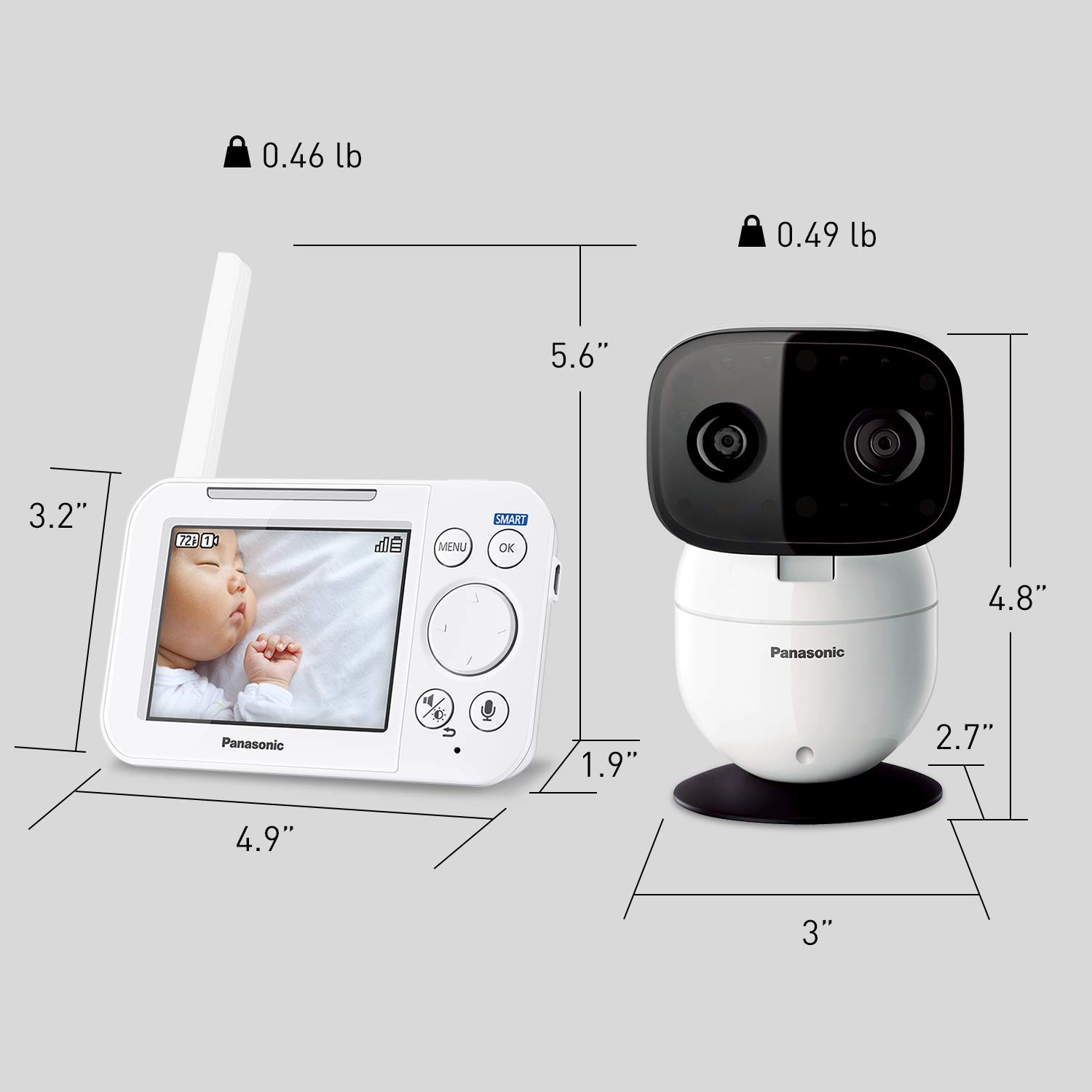
Image: Detailed dimensions of both the monitor and camera units.
9. การรับประกันและการสนับสนุน
9.1 ข้อมูลการรับประกัน
This product comes with a manufacturer's warranty. Please refer to the warranty card included in your product packaging or visit the official Panasonic webเว็บไซต์สำหรับข้อกำหนดและเงื่อนไขการรับประกันโดยละเอียด
9.2 การสนับสนุนลูกค้า
For technical assistance, troubleshooting, or service inquiries, please contact Panasonic customer support. Contact information can typically be found in your product manual, on the product packaging, or on the official Panasonic support webเว็บไซต์.


