1. บทนำ
This manual provides essential information for setting up, operating, and maintaining your Acer Aspire Z24-890-UA91 All-in-One Desktop. Please read this guide thoroughly to ensure proper use and to maximize the performance and longevity of your device.

ภาพที่ 1.1: ด้านหน้า view of the Acer Aspire Z24-890-UA91 All-in-One Desktop, showcasing the display, wireless keyboard, and mouse.
2. เนื้อหาบรรจุภัณฑ์
ตรวจสอบว่ารายการทั้งหมดที่ระบุไว้ด้านล่างนี้รวมอยู่ในบรรจุภัณฑ์ผลิตภัณฑ์ของคุณแล้ว:
- Acer Aspire Z24-890-UA91 All-in-One Desktop
- คีย์บอร์ดไร้สาย
- เมาส์ไร้สาย
- สายไฟ
3. การตั้งค่า
Follow these steps to set up your Acer Aspire Z24-890-UA91 All-in-One Desktop:
- เชื่อมต่อพลังงาน: Plug the power cord into the power port on the rear of the desktop, then into a wall outlet.
- Connect Wireless Peripherals: The wireless keyboard and mouse connect via a USB RF dongle. This dongle is pre-installed in a USB 2.0 port located at the bottom of the display. Ensure the keyboard and mouse have batteries installed.
- เปิดเครื่อง: Press the power button, typically located on the side or bottom edge of the display. The system will boot up.
- การตั้งค่า Windows เริ่มต้น: ทำตามคำแนะนำบนหน้าจอเพื่อทำการตั้งค่า Windows 10 Home ให้เสร็จสมบูรณ์ ซึ่งรวมถึงการตั้งค่าบัญชีผู้ใช้ การเชื่อมต่อเครือข่าย และการตั้งค่าอื่นๆ

Image 3.1: Easy access ports located at the bottom of the display, including the USB port for the wireless dongle, headphone jack, and SD card reader.
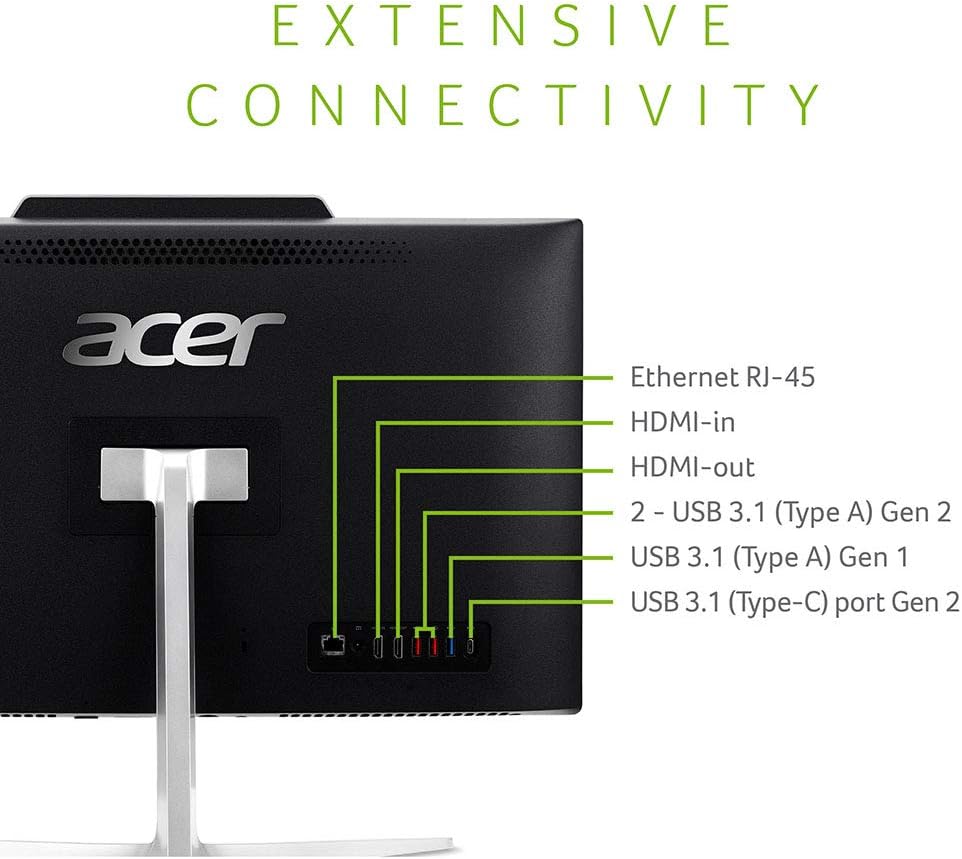
Image 3.2: Rear connectivity ports for external devices and network connections.
4. สินค้าหมดview
The Acer Aspire Z24-890-UA91 is an All-in-One desktop designed for efficient computing. It features a 23.8-inch Full HD display and is powered by a 9th Gen Intel Core i5-9400T processor.
4.1 คุณสมบัติหลัก
- แสดง: 23.8" Full HD (1920 x 1080) widescreen edge-to-edge LED Back-lit display.
- โปรเซสเซอร์: 9th Generation Intel Core i5-9400T Processor (up to 3.4GHz).
- หน่วยความจำ: แรม DDR4 12GB.
- พื้นที่จัดเก็บ: 512GB SSD.
- ออปติคัลไดรฟ์ 8x DVD-Writer Double-Layer Drive (DVD-RW).
- การเชื่อมต่อ: 802.11AC Wi-Fi, Gigabit Ethernet LAN, Bluetooth 4.2 LE.
- เสียง: Two built-in 2W stereo speakers with optimized Dolby Audio Premium and Acer TrueHarmony technology.
- Webลูกเบี้ยว: Built-in 2.0MP Full HD (1080P) Webcam and dual built-in digital microphones.
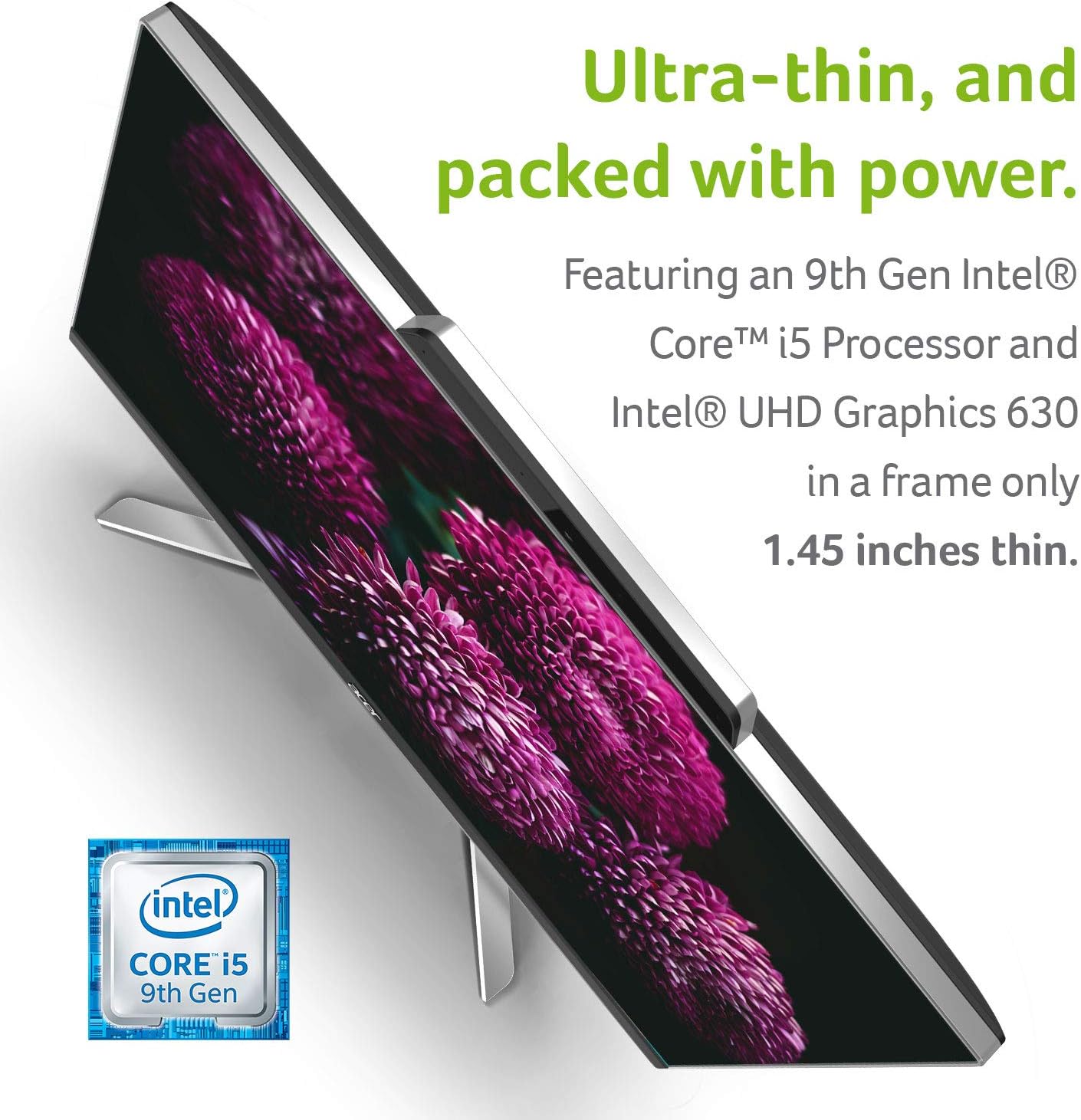
ภาพที่ 4.1: สลิมโปรfile of the desktop, illustrating its compact design.
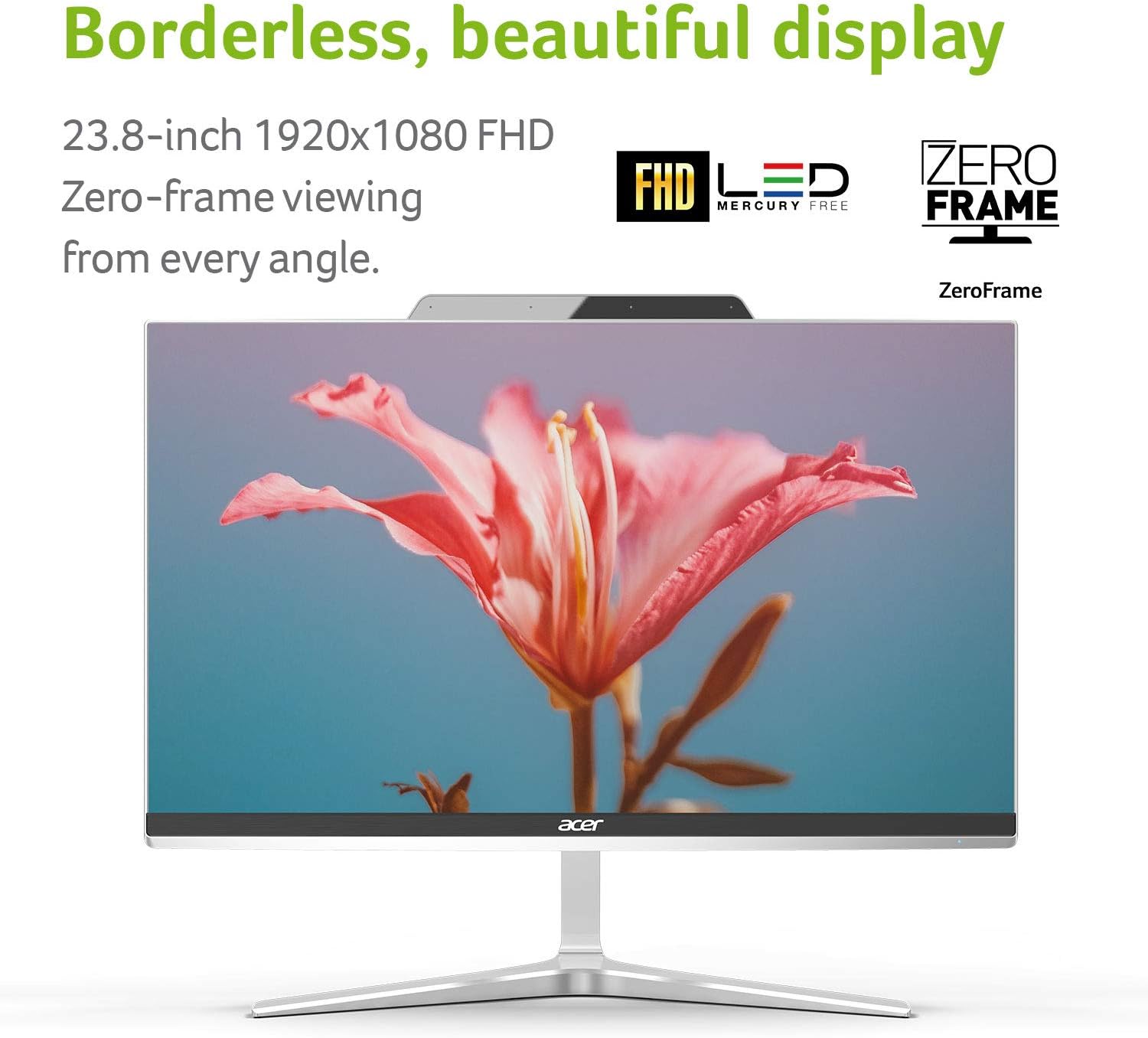
Image 4.2: The borderless display design for an immersive viewการสร้างประสบการณ์
5. คู่มือการใช้งาน
5.1 เปิด/ปิดเครื่อง
- หากต้องการเปิดเครื่อง ให้กดปุ่มเปิด/ปิด
- To power off, click the Start button in Windows, then select Power > Shut down. Alternatively, press and hold the power button for a few seconds to force a shutdown (use only if the system is unresponsive).
5.2 การใช้งานไดรฟ์ออปติคัล
The integrated DVD-Writer Double-Layer Drive (DVD-RW) is located on the side of the display. Press the eject button on the drive to open the tray, insert a disc, and close the tray. Windows will typically prompt you with options for playing or viewกำลังอ่านเนื้อหาในดิสก์

ภาพที่ 5.1: ด้านข้าง view illustrating the location of the optical drive.
5.3 การเชื่อมต่อเครือข่าย
- ไวไฟ : To connect to a wireless network, click the Wi-Fi icon in the Windows taskbar, select your desired network, and enter the password if required. The system supports 802.11AC Wi-Fi.
- อีเธอร์เน็ต: For a wired connection, plug an Ethernet cable into the RJ-45 port on the rear of the desktop.
5.4 การใช้ Webcam and Microphones
The built-in 2.0MP Full HD webcam and dual digital microphones are ready for video conferencing and recording. Access them through compatible applications such as Camera, Skype, or other communication software.

Image 5.2: Visual representation of the integrated webcam and wireless capabilities.
6. การบำรุงรักษา
Regular maintenance helps ensure the optimal performance and longevity of your desktop.
- การทำความสะอาด: ใช้ผ้าเนื้อนุ่มที่ไม่เป็นขุยเช็ดทำความสะอาดหน้าจอและพื้นผิวด้านนอก สำหรับคราบฝังแน่น ให้ใช้ผ้าชนิดอื่นเช็ดampชุบผ้าเล็กน้อยด้วยน้ำหรือน้ำยาทำความสะอาดหน้าจอ หลีกเลี่ยงสารเคมีรุนแรง
- การอัปเดตซอฟต์แวร์: ตรวจสอบและติดตั้งการอัปเดต Windows และการอัปเดตไดรเวอร์เป็นประจำเพื่อให้แน่ใจว่าระบบมีเสถียรภาพและปลอดภัย
- การสำรองข้อมูล: สำรองข้อมูลสำคัญเป็นระยะๆ fileไปยังไดรฟ์ภายนอกหรือที่เก็บข้อมูลบนคลาวด์เพื่อป้องกันการสูญหายของข้อมูล
- การระบายอากาศ : Ensure the ventilation openings on the desktop are not blocked to prevent overheating.
7 การแก้ไขปัญหา
This section addresses common issues you might encounter with your Acer Aspire Z24-890-UA91 desktop.
7.1 ไม่มีไฟฟ้า
- Ensure the power cord is securely connected to both the desktop and a working electrical outlet.
- ตรวจสอบว่าเต้ารับไฟฟ้าใช้งานได้โดยเสียบอุปกรณ์อื่น
- Check if the power button on the desktop is fully pressed.
7.2 ปัญหาการแสดงผล
- หากหน้าจอว่างเปล่า โปรดตรวจสอบให้แน่ใจว่าคอมพิวเตอร์เปิดอยู่
- Adjust the display brightness settings in Windows.
- If an external monitor is connected, ensure the correct display output is selected (e.g., by pressing Windows key + P).
7.3 ปัญหาการเชื่อมต่อไร้สาย
- ตรวจสอบให้แน่ใจว่าได้เปิดใช้งาน Wi-Fi ในการตั้งค่า Windows
- รีสตาร์ทเราเตอร์ไร้สายและโมเด็มของคุณ
- Check if the wireless network adapter drivers are up to date.
7.4 แป้นพิมพ์หรือเมาส์ไม่ตอบสนอง
- Check the batteries in the wireless keyboard and mouse.
- Ensure the USB RF dongle is securely plugged into the designated USB 2.0 port at the bottom of the display.
- Try plugging the dongle into a different USB port to rule out a port issue.
8. ข้อมูลจำเพาะ
Detailed technical specifications for the Acer Aspire Z24-890-UA91 All-in-One Desktop:
| คุณสมบัติ | ข้อมูลจำเพาะ |
|---|---|
| ขนาดการแสดงผลหน้าจอยืน | 23.8 นิ้ว |
| ความละเอียดหน้าจอ | 1920 x 1080 พิกเซล |
| ความละเอียดหน้าจอสูงสุด | 1920 x 1080 พิกเซล |
| โปรเซสเซอร์ | 3.4 GHz core_i5 (9th Gen Intel Core i5-9400T) |
| แรม | แรม 12GB DDR4 |
| ฮาร์ดไดรฟ์ | SSD ความจุ 512GB |
| โคโปรเซสเซอร์กราฟิก | กราฟิก Intel UHD 630 |
| ประเภทไร้สาย | 802.11ac |
| จำนวนพอร์ต USB 2.0 | 1 (for wireless dongle) |
| จำนวนพอร์ต USB 3.0 | 4 (2x USB 3.1 Gen 2, 1x USB 3.1 Gen 1, 1x USB 3.1 Type-C Gen 2) |
| ระบบปฏิบัติการ | วินโดวส์ 10 โฮม |
| น้ำหนักสินค้า | 17.5 pounds (6.99 kg system unit only) |
| ขนาดสินค้า | 21.29 x 1.45 x 17.3 นิ้ว |
| ประเภทไดรฟ์ออปติคัล | ดีวีดี-อาร์ดับบลิว |
9. การรับประกันและการสนับสนุน
Your Acer Aspire Z24-890-UA91 All-in-One Desktop comes with a การรับประกันชิ้นส่วนและค่าแรงแบบจำกัด 1 ปี, which includes Toll-Free Tech Support.
For further assistance, technical support, or warranty claims, please visit the official Acer support website or contact Acer customer service. You can find more information and resources on the Acer Brand Store.


