1. บทนำ
Thank you for choosing the Hama EWS-3200 Wireless Weather Station. This device provides accurate indoor and outdoor temperature and humidity readings, weather forecasts, moon phase display, and a radio-controlled clock with alarm functions. Please read this manual carefully to ensure correct setup and operation.
2. คำแนะนำด้านความปลอดภัย
- ปกป้องผลิตภัณฑ์จากสิ่งสกปรก ความชื้น และความร้อนสูงเกินไป
- ห้ามใช้ผลิตภัณฑ์ในบริเวณใกล้เครื่องทำความร้อนหรือแหล่งความร้อนอื่นๆ
- ห้ามทำผลิตภัณฑ์ตกหรือวางไว้ในที่ที่มีแรงกระแทกรุนแรง
- Do not open the product and do not operate it if it is damaged.
- เก็บผลิตภัณฑ์นี้ให้พ้นมือเด็ก เช่นเดียวกับผลิตภัณฑ์ไฟฟ้าทั้งหมด
- กำจัดวัสดุบรรจุภัณฑ์ทันทีตามข้อบังคับที่ใช้บังคับในพื้นที่
- ต้องใส่แบตเตอรี่ให้ขั้วถูกต้อง
- ถอดแบตเตอรี่ออกจากผลิตภัณฑ์หากไม่ได้ใช้งานเป็นเวลานาน
3. เนื้อหาบรรจุภัณฑ์
- 1 Hama EWS-3200 Weather Station (Base Unit)
- 1 เซ็นเซอร์กลางแจ้งไร้สาย
- 3 AA Mignon Batteries (for Base Unit)
- 2 AAA Micro Batteries (for Outdoor Sensor)
- คู่มือการใช้งาน 1 เล่ม
4. คุณสมบัติของผลิตภัณฑ์
- Indoor and Outdoor Temperature/Humidity Display: Shows current conditions for both locations.
- DCF Radio Clock: Automatic time setting for the most accurate time display.
- พยากรณ์อากาศ: Icons for sunny, partly cloudy, cloudy, rainy, and stormy conditions.
- Air Pressure Trend: Displays rising, stable, or falling air pressure.
- การแสดงข้างขึ้นข้างแรม: แสดงข้างขึ้นข้างแรมของดวงจันทร์ในปัจจุบัน
- ฟังก์ชั่นปลุก: Two adjustable alarms, including a weekday alarm.
- สัญญาณเตือนอุณหภูมิ: Individually adjustable alarm for outdoor temperature.
- ฟังก์ชั่นเลื่อน: For temporary alarm interruption.
- แสงพื้นหลังสีฟ้า: For improved readability in low light.
- Max/Min Data Memory: Records highest and lowest temperature/humidity values.
- จอแสดงผลความจุแบตเตอรี่: For both base station and outdoor sensor.
- ตัวเลือกการติดตั้ง: Can be wall-mounted or freestanding.
5. การตั้งค่า
5.1 การติดตั้งแบตเตอรี่
The base station and outdoor sensor require batteries for operation. Ensure correct polarity when inserting batteries.


- เซ็นเซอร์กลางแจ้ง: Open the battery compartment on the back of the outdoor sensor. Insert 2 AAA Micro batteries, observing the polarity markings (+/-). Close the compartment securely.
- หน่วยฐาน: Open the battery compartment on the back of the base unit. Insert 3 AA Mignon batteries, observing the polarity markings (+/-). Close the compartment securely.
5.2 การวางตำแหน่งเซ็นเซอร์
Place the outdoor sensor in a location protected from direct sunlight and rain to ensure accurate temperature and humidity readings. The maximum wireless range is 50 meters. Avoid placing the sensor near large metal objects or other electronic devices that may cause interference.
5.3 การซิงโครไนซ์เบื้องต้น
After inserting batteries into both units, the base station will automatically search for the outdoor sensor and the DCF radio signal. This process may take a few minutes. Once synchronized, the outdoor temperature and humidity will appear on the base station display, and the time will be set automatically.

6. คู่มือการใช้งาน
6.1 แสดงผลเกินview
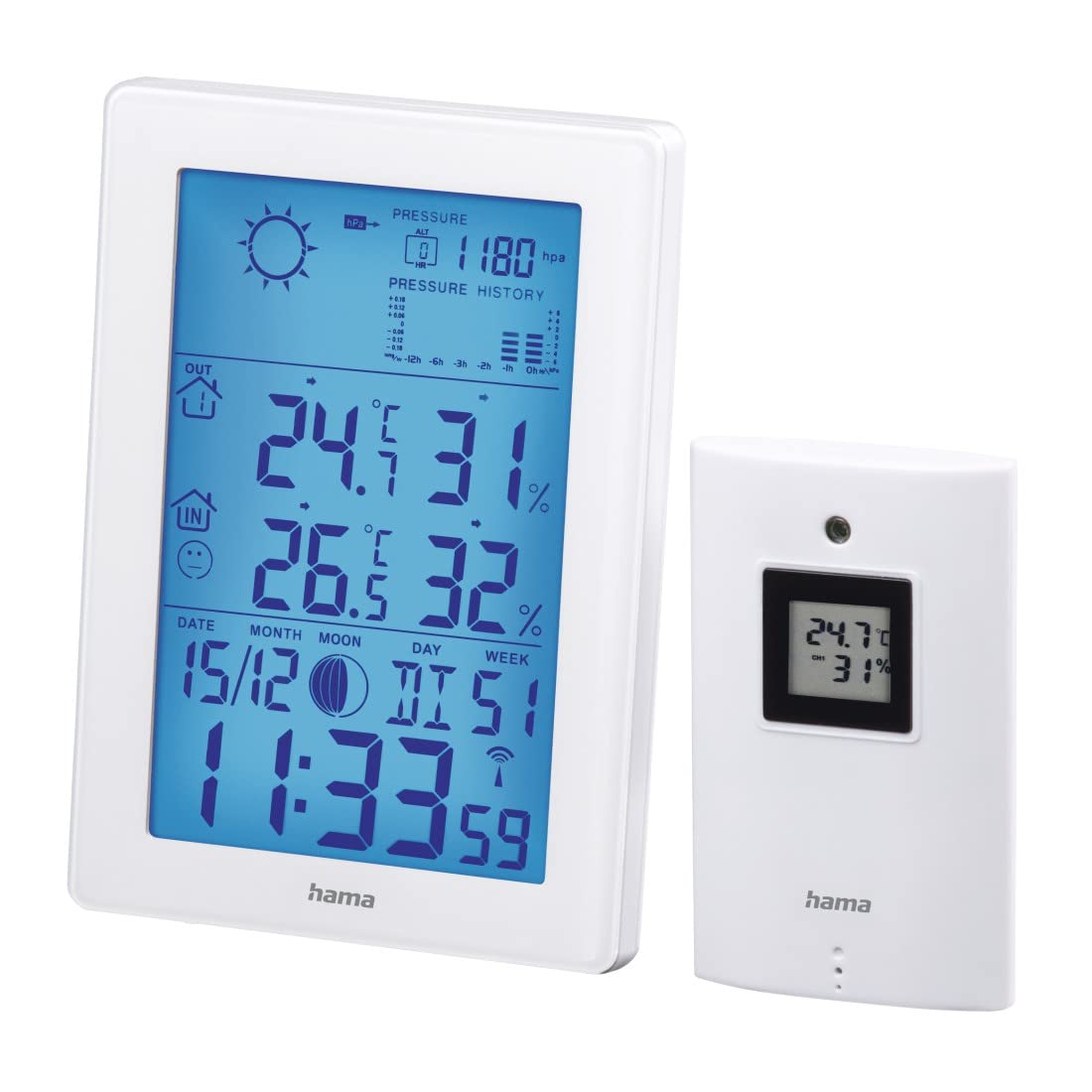
The main display of the base unit shows various information at a glance.

- เวลาและวันที่: Displays current time (12/24h format) and date.
- อุณหภูมิและความชื้นภายในอาคาร: Current readings inside.
- อุณหภูมิและความชื้นภายนอกอาคาร: ค่าที่อ่านได้ในปัจจุบันจากเซ็นเซอร์ไร้สาย
- ไอคอนพยากรณ์อากาศ: Indicates predicted weather conditions.
- Air Pressure History: Bar graph showing pressure trends over the last 12 hours.
- ข้างขึ้นข้างแรม: Graphic representation of the current moon phase.
- ตัวบ่งชี้แบตเตอรี่: Shows battery status for both units.
6.2 การตั้งค่าเวลาและวันที่
The weather station automatically sets the time via the DCF radio signal. If manual adjustment is needed (e.g., for different time zones):
- กดปุ่มค้างไว้ โหมด ปุ่มเพื่อเข้าสู่โหมดตั้งเวลา
- ใช้ + และ - ปุ่มเพื่อปรับค่า
- กด โหมด again to confirm and move to the next setting (e.g., 12/24h format, time zone, year, month, day, weekday language).
6.3 การแสดงอุณหภูมิและความชื้น
- การเลือกหน่วย: กดปุ่ม - ปุ่มสำหรับสลับระหว่างหน่วยวัดอุณหภูมิเซลเซียส (°C) และฟาเรนไฮต์ (°F)
- ค่าสูงสุด/ต่ำสุด: กดปุ่ม โหมด button repeatedly to cycle through current, maximum (MAX), and minimum (MIN) temperature and humidity readings. To clear MAX/MIN records, press and hold the ประวัติศาสตร์ button while MAX/MIN values are displayed.
6.4 พยากรณ์อากาศ
The weather station predicts weather conditions based on air pressure changes. The forecast icons (sunny, partly cloudy, cloudy, rainy, stormy) indicate the expected weather for the next 12-24 hours. The bar graph shows the air pressure trend over the last 12 hours.
6.5 ฟังก์ชั่นปลุก
- การตั้งค่าการเตือน: กดปุ่ม โหมด button until the alarm time is displayed. Press and hold โหมด เพื่อเข้าสู่โหมดตั้งค่านาฬิกาปลุก ให้ใช้ + และ - to adjust the hour and minute, and โหมด to confirm. You can set two separate alarms, including a weekday alarm (Monday-Friday).
- ฟังก์ชั่นเลื่อน: เมื่อสัญญาณเตือนดังขึ้น ให้กดปุ่ม สนูซ / ไลท์ button to activate the snooze function. The alarm will sound again after a few minutes.
- สัญญาณเตือนอุณหภูมิ: An individually adjustable temperature alarm can be set to alert you when the outdoor temperature reaches a certain threshold (e.g., for frost warning). Refer to the manual for specific steps to set the temperature alarm.
6.6 แสงพื้นหลัง
กดปุ่ม สนูซ / ไลท์ button to activate the blue backlight for a few seconds, improving display visibility in dark conditions.
7. การบำรุงรักษา
- ทำความสะอาดผลิตภัณฑ์นี้ด้วยผ้าชุบน้ำหมาดๆ เท่านั้นampผ้าที่ไม่เป็นขุยและห้ามใช้สารทำความสะอาดที่มีฤทธิ์กัดกร่อน
- ตรวจสอบให้แน่ใจว่าไม่มีน้ำเข้าไปในผลิตภัณฑ์
- เปลี่ยนแบตเตอรี่เมื่อไฟแสดงสถานะแบตเตอรี่อ่อนปรากฏบนจอแสดงผล
8 การแก้ไขปัญหา
| ปัญหา | สาเหตุที่เป็นไปได้ | สารละลาย |
|---|---|---|
| No display on base unit | แบตเตอรี่หมดหรือใส่ไม่ถูกต้อง | ตรวจสอบขั้วแบตเตอรี่และเปลี่ยนใหม่หากจำเป็น |
| Outdoor readings not displayed | Sensor out of range, interference, or dead batteries. | Move sensor closer to base unit, check for interference, replace sensor batteries. Initiate manual synchronization if needed. |
| การแสดงเวลาไม่ถูกต้อง | DCF signal interference or manual time zone setting needed. | Relocate the base unit away from electronic devices. Manually set the time zone if the DCF signal is received but the time is incorrect. |
| พยากรณ์อากาศที่ไม่ถูกต้อง | Weather forecast is based on air pressure trends and is an estimation. | This is normal. The forecast is a prediction and may not always match actual conditions perfectly. |
9. ข้อมูลจำเพาะ
- หมายเลขรุ่น: 00186307
- ประเภทจอภาพ: LCD, Digital
- สี: สีขาว
- วัสดุ: โลหะหรือพลาสติก
- แหล่งพลังงาน: ใช้พลังงานจากแบตเตอรี่
- Base Unit Batteries: 3 x เนื้อสันในเกรด AA (รวมอยู่ในชุด)
- Outdoor Sensor Batteries: 2 x AAA Micro (included)
- ช่วงอุณหภูมิในร่ม: 0 °C ถึง +50 °C (32 °F ถึง 122 °F)
- ช่วงอุณหภูมิกลางแจ้ง: -20°C ถึง +60°C
- Wireless Range (Outdoor Sensor): สูงสุด 50 เมตร
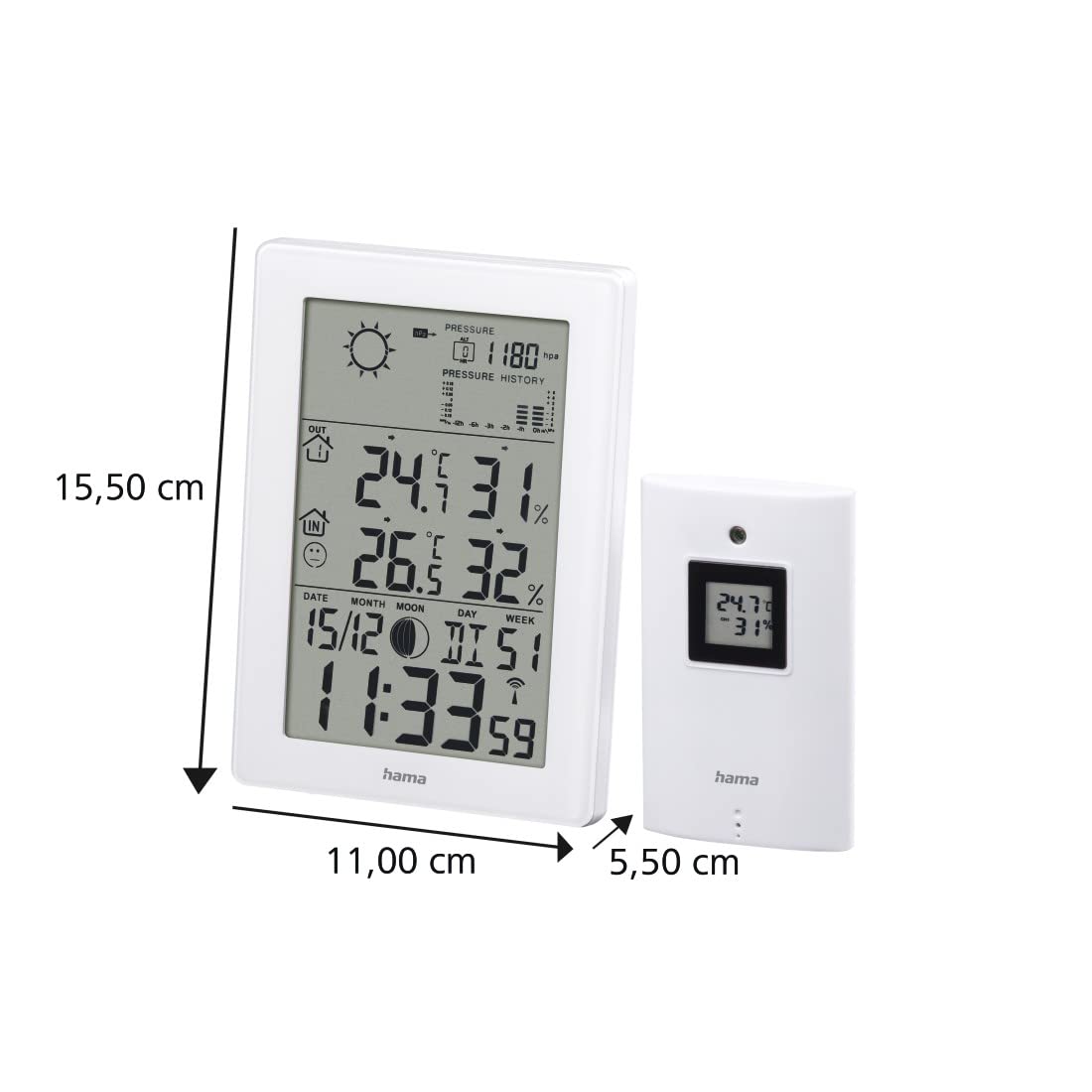
- ขนาดของฐาน (ยาว x กว้าง x สูง): 15.5 x 11 x 5.5 ซม.
- น้ำหนัก: 530 กรัม
- เทคโนโลยีการเชื่อมต่อ: ความถี่วิทยุ
- คุณสมบัติพิเศษ: Temperature Alarm, Snooze Function, Moon Phase Display, Backlight
10. การรับประกัน
Hama GmbH & Co KG ไม่มีส่วนรับผิดและไม่ให้การรับประกันความเสียหายที่เกิดจากการติดตั้ง/การติดตั้งที่ไม่เหมาะสม การใช้ผลิตภัณฑ์อย่างไม่เหมาะสม หรือจากการไม่ปฏิบัติตามคำแนะนำในการใช้งานและ/หรือหมายเหตุด้านความปลอดภัย
11. การสนับสนุน
For technical support or warranty claims, please contact your local Hama customer service or visit the official Hama webเว็บไซต์สำหรับข้อมูลเพิ่มเติม
Webเว็บไซต์: www.hama.com


