การแนะนำ
The Bose Home Speaker 300 delivers rich, 360-degree sound and powerful bass in a compact design. It features built-in voice assistants like Amazon Alexa and Google Assistant, allowing for hands-free control of music, radio stations, playlists, and more. The speaker also offers superior voice pickup through a custom-designed six-microphone array and visual indicators for voice assistant activity. Control is available via integrated touch presets on the speaker's top panel or through the Bose Music app, providing a personalized audio experience. This manual provides essential information for setting up, operating, and maintaining your Bose Home Speaker 300.

Image: The Bose Home Speaker 300 in Silver, showcasinด้วยดีไซน์ที่กะทัดรัดและสวยงาม
มีอะไรอยู่ในกล่อง
- Bose Home Speaker 300
- อะแดปเตอร์แปลงไฟ
- Quickstart sheets
- เอกสารความปลอดภัย
การตั้งค่า
การตั้งค่าเริ่มต้น
- แกะกล่องลำโพง: Carefully remove the Bose Home Speaker 300 and all accessories from its packaging.
- เชื่อมต่อพลังงาน: Plug the power adapter into the speaker and then into a wall outlet. The speaker will power on automatically.
- Download the Bose Music App: For full functionality and setup, download the Bose Music app on your mobile device (smartphone or tablet).
- เชื่อมต่อกับ Wi-Fi: Follow the in-app instructions to connect your speaker to your home Wi-Fi network. A stable Wi-Fi connection is essential for smart features and voice assistants.
- Set Up Voice Assistant: Within the Bose Music app, navigate to the settings for your speaker, select "Voice Assistant," and choose either Amazon Alexa or Google Assistant. Follow the on-screen prompts to link your Amazon or Google account.
Video: This video demonstrates the process of setting up Alexa on your Bose Home Speaker 300 using the Bose Music app and linking your Amazon account.
การเชื่อมต่อบลูทูธ
วิธีเชื่อมต่ออุปกรณ์ผ่านบลูทูธ:
- กดปุ่มค้างไว้ ปุ่มบลูทูธ on the top of the speaker until the light bar pulses blue.
- On your mobile device, go to Bluetooth settings and select "Bose Home Speaker 300" from the list of available devices.
- Once connected, the light bar will glow solid blue.
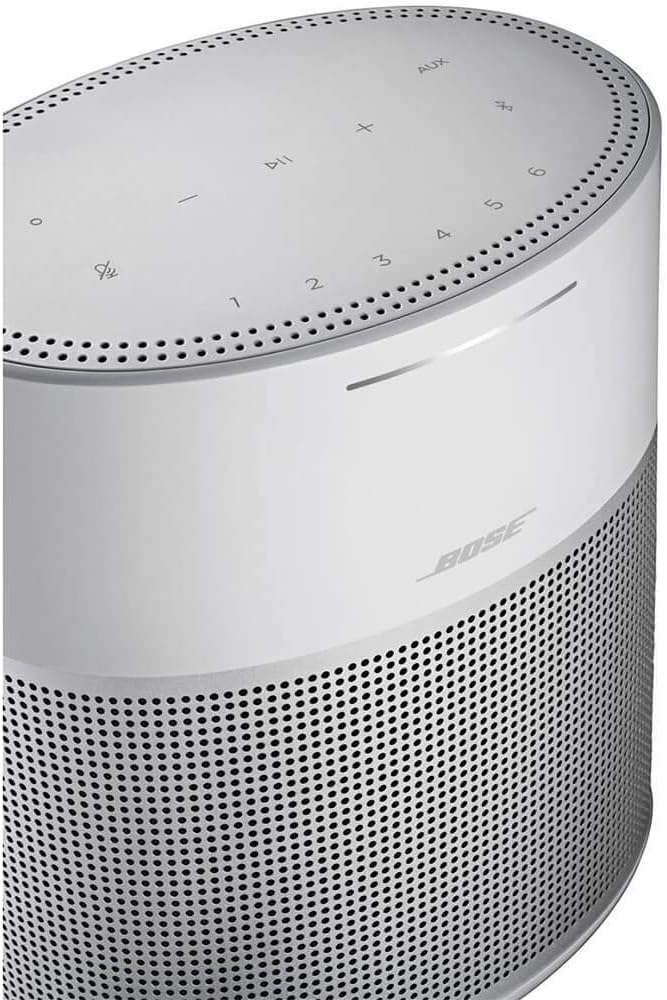
ภาพ: ภาพระยะใกล้ view of the top panel of the Bose Home Speaker 300, showing the touch-sensitive control buttons including volume, play/pause, microphone mute, Bluetooth, AUX, and preset numbers.
การใช้งานลำโพง
Controls on the Speaker
- ปิดเสียงไมโครโฟน: Tap the microphone icon to mute or unmute the voice assistant.
- ปริมาณ: ใช้ปุ่ม '+' และ '-' เพื่อปรับระดับเสียง
- เล่น/หยุดชั่วคราว: Tap the play/pause button to control media playback.
- Presets (1-6): Customize these buttons in the Bose Music app to quickly access your favorite playlists, radio stations, or albums.
- ช่องเสริม: Select to switch to an auxiliary input source.
- บลูทูธ: Tap to switch to Bluetooth mode or initiate pairing.
การควบคุมด้วยเสียง
With Amazon Alexa or Google Assistant built-in, you can control your speaker and smart home devices using voice commands. Simply say the wake word ("Alexa" or "Hey Google") followed by your command. Exampรวมถึง:
- "Alexa, play jazz music."
- "Hey Google, what's the weather today?"
- "Alexa ตั้งเวลา 10 นาที"
แอป Bose Music
The Bose Music app provides comprehensive control over your speaker, including:
- Adjusting volume and playback.
- Managing music services (Spotify, Pandora, iHeartRadio, SiriusXM, Deezer, TuneIn).
- Customizing presets.
- Grouping multiple Bose smart speakers for multi-room audio.
- Accessing product settings and updates.
วิดีโอ: จบแล้วview of the Bose Home Speaker 300's features, including its compact size, 360-degree audio, built-in voice assistants, and control options via touch or the Bose Music app.
การซ่อมบำรุง
To ensure optimal performance and longevity of your Bose Home Speaker 300, follow these maintenance guidelines:
- การทำความสะอาด: Gently wipe the speaker's surfaces with a soft, dry cloth. Avoid using abrasive cleaners, solvents, or sprays.
- การจัดวาง: Place the speaker on a stable, flat surface away from direct sunlight, heat sources, and moisture. Ensure adequate ventilation around the speaker.
- การอัปเดตซอฟต์แวร์: Regularly check for and install software updates via the Bose Music app to ensure your speaker has the latest features and performance enhancements.
การแก้ไขปัญหา
If you encounter issues with your Bose Home Speaker 300, try the following steps:
- ไม่มีไฟฟ้า: ตรวจสอบให้แน่ใจว่าอะแดปเตอร์ไฟฟ้าเชื่อมต่อกับลำโพงและเต้ารับไฟฟ้าที่ผนังอย่างแน่นหนา
- ไม่มีเสียง:
- ตรวจสอบระดับเสียงทั้งบนลำโพงและอุปกรณ์ที่เชื่อมต่อของคุณ
- Verify the correct input source (Wi-Fi, Bluetooth, AUX) is selected.
- หากใช้บลูทูธ โปรดตรวจสอบให้แน่ใจว่าอุปกรณ์ได้จับคู่แล้วและอยู่ในระยะทำการ
- ผู้ช่วยเสียงไม่ตอบสนอง:
- Ensure the microphone is not muted (check the microphone mute button on top).
- Verify the speaker is connected to Wi-Fi.
- ตรวจสอบการเชื่อมต่ออินเตอร์เน็ตของคุณ
- Confirm your Amazon or Google account is properly linked in the Bose Music app.
- ปัญหาการเชื่อมต่อ (Wi-Fi/Bluetooth):
- Restart your speaker by unplugging it for 30 seconds and then plugging it back in.
- รีสตาร์ทเราเตอร์และโมเด็มของคุณ
- Ensure your mobile device and speaker are within range of your Wi-Fi router or Bluetooth device.
- If issues persist, try re-establishing the connection through the Bose Music app or your device's Bluetooth settings.
ข้อมูลจำเพาะ
| คุณสมบัติ | รายละเอียด |
|---|---|
| ยี่ห้อ | โบส |
| ชื่อรุ่น | ลำโพงที่บ้าน 300 |
| หมายเลขรุ่น | 808429-1300 |
| เทคโนโลยีการเชื่อมต่อ | บลูทู ธ Wi-Fi |
| คุณสมบัติพิเศษ | Built-in Amazon Alexa, Built-in Google Assistant, 360-degree sound |
| ประเภทลำโพง | มัลติรูม |
| วิธีการควบคุม | Voice, Touch, Bose Music App |
| ขนาดสินค้า | ลึก 4.02 นิ้ว x กว้าง 5.59 นิ้ว x สูง 6.34 นิ้ว |
| น้ำหนักสินค้า | 2.09 ปอนด์ |
| แหล่งพลังงาน | สายไฟ |
| สี | Silver (as per current product variant) |

Image: A diagram illustrating the dimensions of the Bose Home Speaker 300: 4.02 inches deep, 5.59 inches wide, and 6.34 inches high.
การรับประกันและการสนับสนุน
The Bose Home Speaker 300 comes with a การรับประกันแบบจำกัด. For specific details regarding warranty coverage, duration, and terms, please refer to the warranty information included in your product packaging or visit the official Bose support webเว็บไซต์.
For further assistance, technical support, or service inquiries, please contact Bose customer support through their official channels. You can typically find contact information on the Bose website or within the Bose Music app.


