การแนะนำ
This manual provides essential information for the safe and effective use of your Canon PowerShot SX420 IS digital camera. Please read this manual thoroughly before using the camera and retain it for future reference. The Canon PowerShot SX420 IS is a compact digital camera featuring a powerful 42x optical zoom, 20.0 Megapixel sensor, and built-in Wi-Fi and NFC connectivity.

ภาพ: ด้านหน้า view of the Canon PowerShot SX420 IS digital camera.
การตั้งค่า
1. การแกะกล่องและตรวจสอบเนื้อหา
ตรวจสอบให้แน่ใจว่ามีส่วนประกอบทั้งหมดอยู่:
- Canon PowerShot SX420 IS Camera Body
- แบตเตอรี่แพ็ค
- เครื่องชาร์จแบตเตอรี่
- สายรัดข้อมือ
- ฝาปิดเลนส์

Image: Canon PowerShot SX420 IS camera with included battery, charger, wrist strap, and lens cap.
2. การชาร์จแบตเตอรี่
- ใส่ก้อนแบตเตอรี่ลงในเครื่องชาร์จแบตเตอรี่
- เสียบที่ชาร์จเข้ากับเต้ารับไฟฟ้า ไฟแสดงสถานะการชาร์จจะสว่างขึ้น
- Once charging is complete, the indicator light will change or turn off (refer to charger specific instructions).
3. การใส่แบตเตอรี่และการ์ดหน่วยความจำ
- เปิดฝาช่องใส่แบตเตอรี่/การ์ดที่ด้านล่างของกล้อง
- Insert the charged battery pack, ensuring correct orientation.
- Insert an SDHC or SDXC memory card into the card slot until it clicks into place.
- ปิดฝาปิดช่องใส่ให้แน่น
4. การเปิดเครื่องครั้งแรกและการตั้งค่าพื้นฐาน
- กดปุ่ม เปิด/ปิด ปุ่มเพื่อเปิดกล้อง
- ทำตามคำแนะนำบนหน้าจอเพื่อตั้งค่าวันที่ เวลา และภาษา
การใช้งานกล้อง
1. การควบคุมพื้นฐาน
- ปุ่มเปิด/ปิด: ฟังก์ชันนี้ใช้สำหรับเปิดหรือปิดกล้อง
- ปุ่มชัตเตอร์: กดลงครึ่งหนึ่งเพื่อปรับโฟกัส กดลงจนสุดเพื่อถ่ายภาพ
- คันโยกซูม: Controls the 42x optical zoom for telephoto and wide-angle shots.
- หน้าปัดโหมด: Selects shooting modes such as Auto, Program, Portrait, Landscape, and Movie.
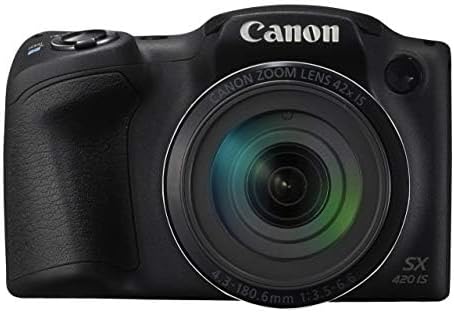
ภาพ: ด้านหน้า view of the Canon PowerShot SX420 IS, highlighting the lens and zoom capabilities.
2.การถ่ายภาพ
- Turn on the camera and select your desired shooting mode using the mode dial. For general use, select ออโต้ โหมด.
- จัดกรอบภาพถ่ายของคุณโดยใช้หน้าจอ LCD ขนาด 3.0 นิ้ว
- ใช้คันโยกซูมเพื่อปรับระยะโฟกัส
- Press the shutter button halfway down to allow the camera to focus. The focus frame will turn green when focus is achieved.
- Press the shutter button fully to capture the image. The camera's optical image stabilizer helps reduce blur from camera shake.
3. บันทึกวิดีโอ
- ตั้งค่าปุ่มหมุนโหมดเป็น ภาพยนตร์ โหมด.
- Press the dedicated movie button to start recording. The camera records in HD 720p resolution in MP4 format.
- กดปุ่มบันทึกวิดีโออีกครั้งเพื่อหยุดการบันทึก
4. เรื่องviewการลงภาพและวิดีโอ
- กดปุ่ม การเล่นซ้ำ button (usually indicated by a play icon).
- ใช้ปุ่มทิศทางเพื่อเลื่อนดูภาพและวิดีโอที่คุณบันทึกไว้
- กดปุ่ม เมนู button to access playback options.
5. การเชื่อมต่อ Wi-Fi และ NFC
The camera features built-in Wi-Fi and NFC for easy sharing and transferring of images and videos.
- Enable Wi-Fi or NFC from the camera's menu.
- Follow the on-screen instructions to connect to a compatible smartphone, tablet, or computer.
- Use the Canon Camera Connect app (available for iOS and Android) for remote shooting and image transfer.
การซ่อมบำรุง
1. การทำความสะอาดกล้อง
- ตัวกล้อง: เช็ดด้วยผ้านุ่มและแห้ง สำหรับคราบฝังแน่น ให้ใช้ผ้านุ่มๆ เช็ดเบาๆamp ผ้าแล้วเช็ดให้แห้งสนิท
- เลนส์: ใช้แปรงปัดฝุ่นเลนส์ออก จากนั้นเช็ดเบาๆ ด้วยผ้าทำความสะอาดเลนส์และน้ำยาทำความสะอาดเลนส์ หลีกเลี่ยงการสัมผัสพื้นผิวเลนส์ด้วยนิ้วมือ
- หน้าจอ LCD: Use a soft, dry cloth. For smudges, use a screen cleaner specifically designed for electronics.
2. การดูแลแบตเตอรี่
- Always use genuine Canon battery packs and chargers.
- หลีกเลี่ยงการให้แบตเตอรี่สัมผัสกับอุณหภูมิที่สูงเกินไป
- If not using the camera for an extended period, remove the battery and store it in a cool, dry place.
3. การจัดเก็บ
Store the camera in a dry, well-ventilated area, away from direct sunlight, high temperatures, and humidity. Use a camera bag or case to protect it from dust and physical damage.
การแก้ไขปัญหา
หากคุณพบปัญหาเกี่ยวกับกล้องของคุณ โปรดดูวิธีแก้ไขทั่วไปต่อไปนี้:
| ปัญหา | สารละลาย |
|---|---|
| กล้องไม่สามารถเปิดได้ | ตรวจสอบให้แน่ใจว่าแบตเตอรี่ชาร์จเต็มและใส่แบตเตอรี่อย่างถูกต้อง ลองใช้แบตเตอรี่ที่ชาร์จแล้วก้อนอื่น (ถ้ามี) |
| ภาพมีความเบลอ | Check that the lens is clean. Ensure the camera is focusing correctly (press shutter halfway). Use the optical image stabilizer and hold the camera steady. Consider using a tripod in low light. |
| Cannot connect via Wi-Fi/NFC. | Ensure Wi-Fi/NFC is enabled on both the camera and the connecting device. Check network settings and password. Restart both devices. |
| ข้อผิดพลาดการ์ดหน่วยความจำ | Ensure the memory card is inserted correctly. Try formatting the card (this will erase all data). Use a different compatible memory card. |
| แฟลชไม่ทำงาน | Check flash mode settings. Ensure the flash is not set to 'Off'. The flash may not fire if the battery is low or in certain shooting modes. |
ข้อมูลจำเพาะ
| คุณสมบัติ | รายละเอียด |
|---|---|
| ชื่อรุ่น | PSSX420IS |
| ความละเอียดของภาพนิ่งที่มีประสิทธิภาพ | 20 MP |
| ซูมออปติคอล | 42 เท่า |
| ระบบป้องกันภาพสั่นไหว | ออฟติคอล |
| เทคโนโลยีโฟโต้เซนเซอร์ | ซีมอส |
| ขนาดหน้าจอ | 3 นิ้ว |
| ประเภทจอภาพ | จอแอลซีดี |
| เทคโนโลยีการเชื่อมต่อ | เอ็นเอฟซี, WiFi |
| รองรับ File รูปแบบ | เจเพ็ก, ดิบ |
| ความละเอียดวิดีโอ | เอชดี 720p |
| รูปแบบการจับภาพวิดีโอ | เอ็มพี 4 |
| ประเภทหน่วยความจำแฟลช | SDHC หรือ SDXC |
| รูรับแสงสูงสุด | 3.5 ฟ. |
| ช่วง ISO ที่ขยายเพิ่มเติม | 100 - 1600 |
| น้ำหนักสินค้า | 1.5 ปอนด์ |
| สี | สีดำ |
ข้อมูลการรับประกัน
This Canon PowerShot SX420 IS camera comes with a รับประกันจำกัด 90 วัน. Please retain your proof of purchase for warranty claims. For detailed terms and conditions, refer to the warranty documentation provided with your product or visit the official Canon webเว็บไซต์.
การสนับสนุนลูกค้า
For further assistance, technical support, or service inquiries, please visit the official Canon support website or contact their customer service. You can typically find contact information and FAQs on the manufacturer's webเว็บไซต์.
แคนนอนอย่างเป็นทางการ Webเว็บไซต์: www.usa.canon.com


