การแนะนำ
This manual provides detailed instructions for the installation, operation, and maintenance of your FOSCAM R4S 4MP WiFi IP Camera. Designed for home security and monitoring, this camera offers advanced features such as 4MP resolution, dual-band WiFi connectivity, AI human detection, two-way audio, and night vision. Please read this manual thoroughly before using the product to ensure proper setup and functionality.

Figure 1: FOSCAM R4S 4MP WiFi IP Camera
เนื้อหาแพ็คเกจ
Verify that all items listed below are included in your package. If any items are missing or damaged, please contact FOSCAM support.
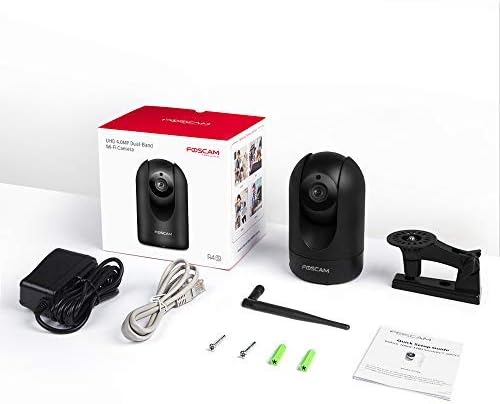
- FOSCAM R4S 4MP WiFi IP Camera
- อะแดปเตอร์แปลงไฟ
- สายเคเบิลอีเทอร์เน็ต
- ตัวยึด
- สกรูยึดและปลั๊กผนัง
- คู่มือการติดตั้งด่วน
- เสาอากาศ WiFi

Figure 2: FOSCAM R4S Package Contents
สินค้าเกินview และคุณสมบัติ
The FOSCAM R4S camera is equipped with advanced technology to provide reliable surveillance and monitoring. Key features include:
- 4MP/2K Resolution: นำเสนอภาพวิดีโอที่ชัดเจนและละเอียดtage.
- Wi-Fi สองย่านความถี่ (2.4/5GHz): Ensures stable and flexible wireless connectivity.
- AI การตรวจจับมนุษย์: Reduces false alarms by distinguishing human shapes from other movements.
- การตรวจจับเสียง: แจ้งเตือนคุณเมื่อได้ยินเสียงผิดปกติ
- กล้องมองกลางคืนระยะ 33 ฟุต: ให้ทัศนวิสัยที่ชัดเจนแม้ในสภาพแสงน้อย
- เสียงสองทาง: ช่วยให้สามารถสื่อสารแบบเรียลไทม์ผ่านกล้องได้
- ฟังก์ชันการหมุน/เอียง: Offers a 360° horizontal and 100° vertical viewช่วงไอเอ็นจี
- ซูมดิจิตอล 20 เท่า: ช่วยให้สามารถตรวจสอบรายละเอียดได้อย่างใกล้ชิดยิ่งขึ้น
- โหมดความเป็นส่วนตัว: Temporarily disables recording and transmission for privacy.
- ความเข้ากันได้: ทำงานร่วมกับ Amazon Alexa และ Google Assistant
- ตัวเลือกการจัดเก็บ: Supports Micro SD card (up to 256GB, not included) and cloud storage services.
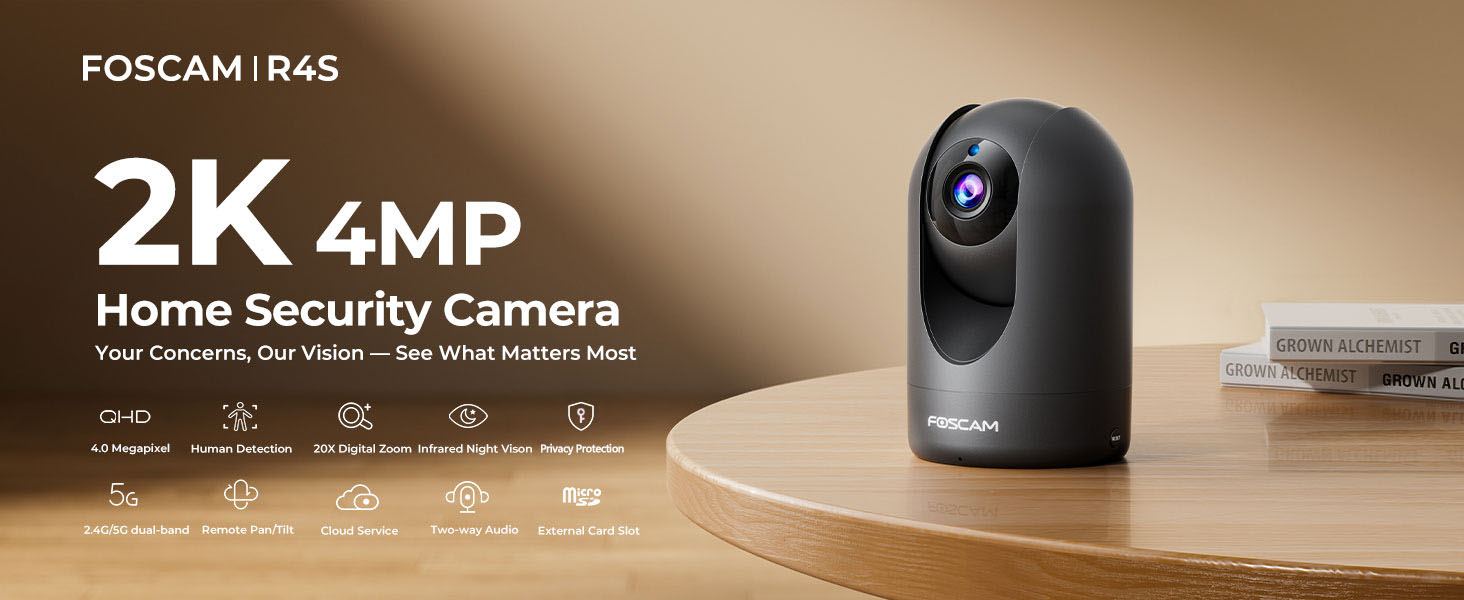
Figure 3: FOSCAM R4S Key Features
คู่มือการติดตั้ง
1. การจัดวางทางกายภาพ
The FOSCAM R4S camera can be placed on a flat surface or mounted to a wall or ceiling. Ensure the camera is positioned to cover the desired monitoring area.

Figure 4: Camera Placement Options
2. การเชื่อมต่อไฟฟ้า
Connect the power adapter to the camera's power input and plug it into a standard electrical outlet. The camera will power on automatically.
3 การติดตั้งแอปและการตั้งค่าเริ่มต้น
- Download the Foscam App from your mobile device's app store (iOS or Android).
- Open the Foscam App and create an account or log in.
- Tap the "+" icon to add a new camera.
- Follow the on-screen instructions to connect your camera to your Wi-Fi network using either the sound wave or QR code setup method. Ensure your mobile device is connected to the same Wi-Fi network (2.4GHz or 5GHz) you intend to use for the camera.
- Once connected, you can name your camera and set a password.

Figure 5: Dual-Band WiFi Connection
คำแนะนำการใช้งาน
1. สด View และการควบคุมแพน/เอียง
From the Foscam App, select your camera to view the live feed. Use the on-screen controls to pan (horizontal movement) and tilt (vertical movement) the camera lens to adjust your viewมุมอิง

Figure 6: Pan/Tilt Camera Control
2. เสียงสองทาง
Tap the microphone icon in the app to enable two-way audio. You can speak through your phone, and your voice will be broadcast through the camera's speaker. Similarly, you can hear audio from the camera's environment.
รูปที่ 7: การสื่อสารด้วยเสียงสองทาง
3. การตรวจจับการเคลื่อนไหวและเสียง
Configure detection settings in the app to receive alerts for human movement or unusual sounds. You can customize sensitivity and detection zones to minimize false alarms.

Figure 8: Intelligent Human and Pet Detection
4. การมองเห็นในเวลากลางคืน
The camera automatically switches to night vision mode in low-light conditions, providing clear black and white images up to 33 feet.

รูปที่ 9: ความสามารถในการมองเห็นในเวลากลางคืน
5. โหมดความเป็นส่วนตัว
Activate Privacy Mode via the app to temporarily disable video recording and transmission, ensuring your privacy when needed. The camera lens will physically retract or turn away.

Figure 10: Activating Privacy Mode
6. การจัดเก็บและการเล่น
Recordings can be stored on a Micro SD card (up to 256GB, not included) or via FOSCAM's cloud service. Access and playback recorded footage through the Foscam App.

รูปที่ 11: ตัวเลือกการจัดเก็บข้อมูล
การซ่อมบำรุง
To ensure optimal performance and longevity of your FOSCAM R4S camera, follow these maintenance guidelines:
- การทำความสะอาด: เช็ดเลนส์และตัวกล้องเบาๆ ด้วยผ้านุ่มและแห้ง หลีกเลี่ยงการใช้สารเคมีรุนแรงหรือวัสดุที่มีฤทธิ์กัดกร่อน
- อัพเดตเฟิร์มแวร์: Regularly check for and install firmware updates through the Foscam App to ensure your camera has the latest features and security enhancements.
- การจัดวาง: Ensure the camera is placed in a stable environment, away from direct sunlight, extreme temperatures, and excessive moisture.
- แหล่งจ่ายไฟ: ใช้เฉพาะอะแดปเตอร์แปลงไฟที่ให้มากับกล้องเท่านั้น
การแก้ไขปัญหา
If you encounter issues with your FOSCAM R4S camera, refer to the following common troubleshooting steps:
| ปัญหา | สาเหตุที่เป็นไปได้ | สารละลาย |
|---|---|---|
| กล้องออฟไลน์ | ไม่มีไฟเลี้ยง, Wi-Fi หลุด, เราเตอร์มีปัญหา | ตรวจสอบการเชื่อมต่อสายไฟ รีสตาร์ทกล้องและเราเตอร์ ตรวจสอบความแรงของสัญญาณ Wi-Fi |
| คุณภาพวิดีโอไม่ดี | แบนด์วิดท์ต่ำ เลนส์สกปรก แสงสว่างไม่เพียงพอ | Ensure stable Wi-Fi. Clean the lens. Adjust camera position or add lighting. |
| การตรวจจับการเคลื่อนไหวไม่ทำงาน | Incorrect settings, detection zone not configured. | Check motion detection settings in the app. Ensure detection zones are active. |
| ปัญหาเสียงสองทาง | ปิดเสียงไมโครโฟน/ลำโพง และอนุญาตการใช้งานแอปแล้ว | Check volume settings in the app. Ensure app has microphone permissions. |
For further assistance, please refer to the FOSCAM support webเว็บไซต์หรือติดต่อฝ่ายบริการลูกค้า
ข้อมูลจำเพาะ
| คุณสมบัติ | รายละเอียด |
|---|---|
| ปณิธาน | 4MP (2K) |
| การเชื่อมต่อ | 2.4GHz & 5GHz Dual-Band Wi-Fi |
| ช่วงการมองเห็นตอนกลางคืน | สูงถึง 33 ฟุต (10 เมตร) |
| Viewอิงแองเกิล | 105° (แนวทแยง) |
| ช่วงแพน/เอียง | แนวนอน: 360°, แนวตั้ง: 100° |
| ซูมดิจิตอล | 20X |
| เสียง | Two-Way Audio with built-in mic and speaker |
| การตรวจจับ | AI Human Detection, Sound Detection |
| พื้นที่จัดเก็บ | การ์ด Micro SD (สูงสุด 256GB), พื้นที่จัดเก็บข้อมูลบนคลาวด์ |
| ความเข้ากันได้ | Amazon Alexa, Google Assistant |
| กำลังไฟเข้า | DC 5V/2A (via power adapter) |
| ขนาด (กว้าง x ยาว x สูง) | 2.91 x 3.03 x 4.69 นิ้ว |
| น้ำหนัก | 1.15 ปอนด์ |
การรับประกันและการสนับสนุน
FOSCAM is committed to providing high-quality products and excellent customer service.
- การรับประกันคุณภาพ: รับประกันคุณภาพ 180 วัน
- การส่งคืน: คืนสินค้าได้ฟรีภายใน 30 วัน
- การสนับสนุนด้านเทคนิค: 24/7 Fast Reply & Lifetime Tech Support.
- ติดต่อ: For support, please visit the official FOSCAM webเว็บไซต์หรือติดต่อทีมบริการลูกค้าของพวกเขา


