คู่มือการใช้งานโทรศัพท์มือถือ SERVO 225
Model: SERVO 225
1. บทนำ
This user manual provides comprehensive instructions for the operation and maintenance of your new SERVO 225 mobile phone. Please read this manual carefully before using the device to ensure proper functionality and to maximize its lifespan. The SERVO 225 is a compact and reliable mobile phone featuring dual SIM capability, a 2.4-inch display, and essential functions for daily communication.

รูปที่ 1.1: ด้านหน้าและด้านหลัง view of the SERVO 225 mobile phone, showcasinด้วยดีไซน์ที่กะทัดรัดและแป้นพิมพ์
2. ข้อมูลด้านความปลอดภัย
- ห้ามถอดประกอบหรือดัดแปลงอุปกรณ์
- เก็บอุปกรณ์ให้ห่างจากน้ำและความชื้น
- ใช้เฉพาะอุปกรณ์เสริมที่เป็นของแท้หรือที่ได้รับการรับรองเท่านั้น
- หลีกเลี่ยงอุณหภูมิที่สูงหรือต่ำเกินไป
- ห้ามใช้โทรศัพท์ขณะขับรถ
- กำจัดแบตเตอรี่และอุปกรณ์อย่างมีความรับผิดชอบตามกฎระเบียบท้องถิ่น
- Before first use, ensure to remove any insulating tape from the battery terminals.
3. เนื้อหาบรรจุภัณฑ์
โปรดตรวจสอบสิ่งของภายในบรรจุภัณฑ์ของคุณ หากมีสินค้าใดสูญหายหรือเสียหาย โปรดติดต่อผู้ค้าปลีกของคุณ
- 1 x SERVO 225 Mobile Phone
- 1 x Battery (1400 mAh Li-ion)
- 1 x เครื่องชาร์จ
- 1 x เคสป้องกัน
- 1 x คู่มือผู้ใช้ (เอกสารนี้)

Figure 3.1: The SERVO 225 package contents, including the phone, battery, charger, and protective case.
4. สินค้าหมดview
The SERVO 225 features a classic candy bar design with a physical keypad and a 2.4-inch display. It supports dual SIM cards for flexible network usage.
4.1. ลักษณะทางกายภาพ
- แสดง: 2.4-inch VGA screen.
- ปุ่มกด: Standard alphanumeric keypad with navigation keys.
- กล้อง: 0.3 Megapixel CMOS camera with flash on the rear.
- ฝาหลัง: Features a mechanical back cover, available in various colors like Black, Brown, and Gold.
- ขนาด : Approximately 122 x 52 x 11 mm (4.80 x 2.05 x 0.43 inches).
- น้ำหนัก: น้ำหนักประมาณ 80 กรัม.

Figure 4.1: Close-up of the SERVO 225's rear, highlighting the camera and dual LED flash for improved low-light photography.

Figure 4.2: Various color options for the SERVO 225, demonstrating the 2.4-inch screen size.
5. การตั้งค่า
5.1. การติดตั้งและการชาร์จแบตเตอรี่
- ถอดฝาหลังโทรศัพท์ออกโดยงัดเบาๆ ให้เปิดออกจากรอยบาก
- If present, remove the insulating tape from the battery terminals.
- Insert the 1400 mAh Li-ion battery into the battery compartment, ensuring the gold contacts align with the phone's terminals.
- ใส่ฝาหลังกลับเข้าไปโดยกดให้แน่นจนกระทั่งล็อคเข้าที่
- Connect the charger to the phone's charging port and plug it into a power outlet. Charge the battery fully before first use.

Figure 5.1: The 1400 mAh battery and the phone's zinc alloy paint shell design.
5.2. การใส่ซิมการ์ดและเมมโมรี่การ์ด
The SERVO 225 supports dual SIM cards (Dual GSM) and a T-Flash memory card (up to 32GB, not included).
- With the back cover and battery removed, locate the SIM card slots. The phone supports two SIM cards.
- ใส่ซิมการ์ดลงในช่องที่กำหนดอย่างระมัดระวัง โดยให้ด้านที่เป็นขั้วสีทองหันลงด้านล่าง
- Locate the T-Flash (microSD) card slot. Insert the memory card until it clicks into place.
- ใส่แบตเตอรี่และฝาหลังกลับเข้าไปใหม่
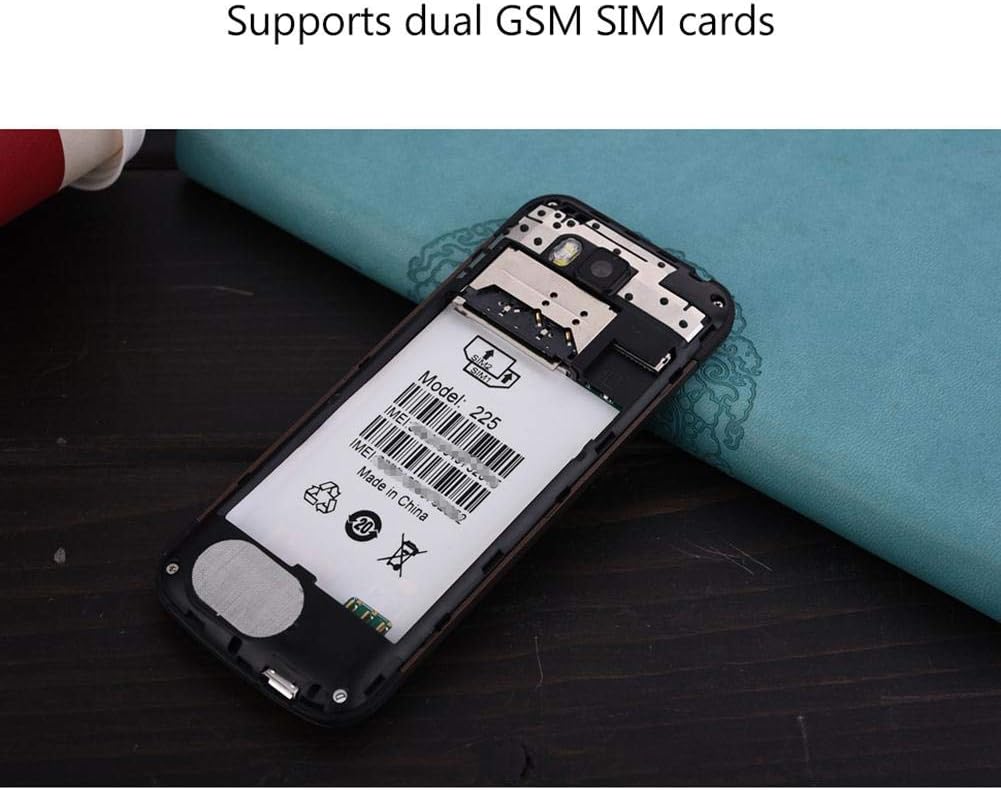
รูปที่ 5.2: ภายใน view of the SERVO 225, illustrating the dual SIM card slots and the memory card slot.
6. คู่มือการใช้งาน
6.1. เปิด/ปิดเครื่อง
- การเปิดเครื่อง: กดปุ่มเปิด/ปิดเครื่อง/วางสายค้างไว้จนกว่าหน้าจอจะสว่างขึ้น
- วิธีปิดเครื่อง: กดปุ่มเปิด/ปิด/วางสายค้างไว้จนกว่าตัวเลือกการปิดเครื่องจะปรากฏขึ้น จากนั้นเลือก "ปิดเครื่อง"
6.2. ฟังก์ชั่นพื้นฐาน
- โทรออก: ป้อนหมายเลขโทรศัพท์โดยใช้แป้นพิมพ์และกดปุ่มโทรออก
- การรับสายโทรศัพท์: กดปุ่มโทรออกเมื่อโทรศัพท์ดังขึ้น
- การส่งข้อความ: Navigate to the "Messages" menu, select "Write message", enter your text, and send to the desired recipient.
- การนำทางเมนู: Use the navigation keys (up, down, left, right) to browse through menus and the center key to select.
6.3. คุณสมบัติหลัก
- บลูทูธ: Connect to other Bluetooth-enabled devices for file การโอนสายหรือการสื่อสารแบบแฮนด์ฟรี
- วิทยุ FM: Listen to your favorite radio stations. Requires headphones to be plugged in as an antenna.
- MP3/MP4 Player: เล่นเสียงและวิดีโอ fileที่เก็บไว้ในการ์ดหน่วยความจำของคุณ
- GPRS/WAP: Access basic internet services and WAP sites.
- กล้อง: Capture photos with the 0.3MP rear camera.
- เครื่องมือเพิ่มเติม: Calendar, Sound Recorder, Calculator, World Clock, Alarm.
7. การบำรุงรักษา
- การทำความสะอาด: ใช้ผ้าแห้งนุ่มๆ เช็ดทำความสะอาดพื้นผิวโทรศัพท์ ห้ามใช้น้ำยาทำความสะอาดหรือสเปรย์กระป๋อง
- พื้นที่จัดเก็บ: ควรเก็บโทรศัพท์ไว้ในที่แห้งและเย็นเมื่อไม่ได้ใช้งานเป็นเวลานาน
- การดูแลแบตเตอรี่ Avoid overcharging or completely draining the battery frequently to prolong its life.
8 การแก้ไขปัญหา
| ปัญหา | สาเหตุที่เป็นไปได้ | สารละลาย |
|---|---|---|
| โทรศัพท์ไม่สามารถเปิดเครื่องได้ | แบตเตอรี่เหลือน้อยหรือติดตั้งไม่ถูกต้อง | Charge the battery. Ensure battery is properly inserted and insulating tape is removed. |
| ไม่มีสัญญาณเครือข่าย | SIM card not inserted correctly or out of network coverage. | Reinsert SIM card. Move to an area with better network coverage. |
| ไม่สามารถโทรออกหรือรับสายได้ | No network, SIM card issue, or call barring enabled. | Check network signal. Verify SIM card. Disable call barring if active. |
| ไม่พบการ์ดหน่วยความจำ | Memory card not inserted correctly or corrupted. | Reinsert memory card. Try a different memory card. |
9. ข้อมูลจำเพาะ
| คุณสมบัติ | ข้อมูลจำเพาะ |
|---|---|
| ยี่ห้อ | SERVO |
| แบบอย่าง | 225 |
| แสดง | 2.4-inch VGA |
| แพลตฟอร์ม | Spreadtrum6531CA |
| ประเภทซิม | Dual SIM, Dual Standby (Dual GSM) |
| ความถี่เครือข่าย | GSM850/900/1800/1900 MHz (2G) |
| หน่วยความจำภายใน | แรม 32MB, รอม 32MB |
| หน่วยความจำที่ขยายได้ | Up to 32GB (T-Flash / microSD card, not included) |
| กล้อง | 0.3 Megapixel CMOS (Rear) with Flash |
| แบตเตอรี่ | แบตเตอรี่ลิเธียมไออน 1400 mAh |
| เวลาสนทนา | ประมาณ 6 ชั่วโมง |
| ขนาด | 122 x 52 x 11 มม. (4.80 x 2.05 x 0.43 นิ้ว) |
| น้ำหนัก | ประมาณ 80 กรัม |
| การเชื่อมต่อ | บลูทูธ |
| คุณสมบัติอื่น ๆ | FM Radio, MP3/MP4 Player, GPRS, WAP, Calendar, Recorder, Calculator, World Clock, Alarm |
10. การรับประกันและการสนับสนุน
Your SERVO 225 mobile phone comes with a standard manufacturer's warranty. Please refer to the warranty card included in your package for specific terms and conditions. For technical support, troubleshooting assistance, or warranty claims, please contact your point of purchase or the official SERVO customer service channels.
เก็บใบเสร็จรับเงินของคุณไว้เป็นหลักฐานการซื้อเพื่อวัตถุประสงค์การรับประกัน


