การแนะนำ
Welcome to the user manual for the TC Electronic Ditto JAM X2 Looper Pedal. This intuitive looper pedal is designed for musicians seeking intelligent loop synchronization that responds to their band's rhythm. It features innovative BeatSense technology, allowing for automatic adjustment of loop tracks to your beat, and offers both Record-then-Play and Record-then-Overdub functionalities with unlimited overdubs and undo/redo capabilities. This manual provides essential information for setting up, operating, maintaining, and troubleshooting your Ditto JAM X2 Looper.
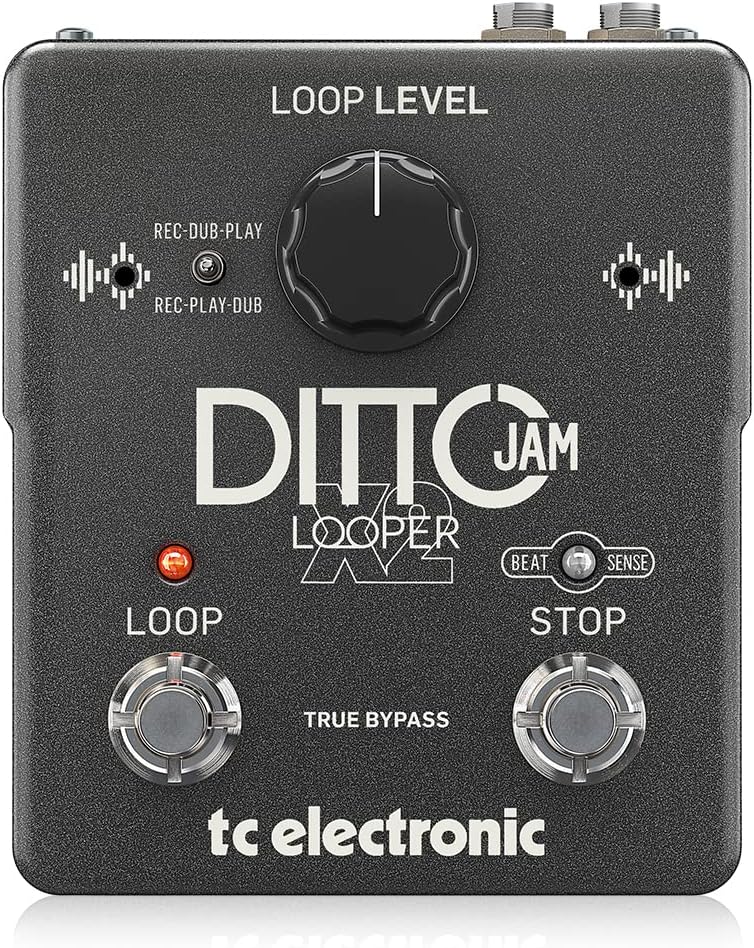
ภาพ: ด้านหน้า view of the TC Electronic Ditto JAM X2 Looper Pedal, showcasing the 'LOOP LEVEL' knob, 'REC-DUB-PLAY' and 'REC-PLAY-DUB' switches, 'LOOP' and 'STOP' footswitches, and 'BEAT SENSE' indicator.
คุณสมบัติหลัก
- Intuitive looper pedal with intelligent loop synchronization that responds to your band.
- Innovative responsive BeatSense technology automatically adjusts loop tracks to your beat.
- Choose between Record-then-Play or Record-then-Overdub functionalities.
- Unlimited overdubs and undo/redo for total creative freedom.
- Dual built-in mics accurately track band tempo by focusing only on rhythmic elements.

ภาพ: ภาพระยะใกล้ view of the "BEAT SENSE" indicator on the pedal, highlighting its function.

Image: An external microphone, likely used for the BeatSense technology, clipped onto a drum kit component.
การตั้งค่า
แหล่งจ่ายไฟ
The Ditto JAM X2 Looper requires a 9V power supply. Ensure you use a compatible power adapter (not included) to power the unit.
การเชื่อมต่อ
- เชื่อมต่อเครื่องดนตรีของคุณ (เช่น กีตาร์) เข้ากับ... ป้อนข้อมูล เสียบแจ็คโดยใช้สายเคเบิลเครื่องดนตรีขนาดมาตรฐาน 1/4 นิ้ว
- เชื่อมต่อ เอาท์พุต แจ็คของคุณ amplifier or next pedal in the signal chain using a standard 1/4-inch instrument cable.
- An ต่อไมค์ input is available for connecting an external microphone to enhance BeatSense accuracy, particularly in complex rhythmic environments.

ภาพ: ด้านหลัง view of the Ditto JAM X2 pedal, clearly showing the INPUT, OUTPUT, EXT MIC jacks, and the power input.
คำแนะนำการใช้งาน
การวนซ้ำขั้นพื้นฐาน
- การบันทึก: กดปุ่ม ลูป footswitch once to start recording your loop. The LED will illuminate red.
- Playback/Overdub: กดปุ่ม ลูป footswitch again to stop recording and begin playback. If you press it again during playback, you will start overdubbing.
- หยุด: กดปุ่ม หยุด footswitch once to stop playback.
- ย้อนกลับ/ทำซ้ำ: กดปุ่มค้างไว้ หยุด footswitch to undo the last overdub. Press and hold again to redo it.
- เคลียร์ลูป: กดปุ่มค้างไว้ ลูป ใช้สวิตช์เท้าเพื่อตัดกระแสไฟวนซ้ำ
Loop Level Control
การ ระดับลูป knob adjusts the overall volume of your recorded loop. Turn clockwise to increase volume, counter-clockwise to decrease.
Record Modes (REC-DUB-PLAY / REC-PLAY-DUB)
The Ditto JAM X2 offers two recording modes, selectable via the small toggle switch:
- REC-DUB-PLAY: In this mode, the first press of the LOOP footswitch records, the second press starts overdubbing, and a third press initiates playback without further overdubbing.
- REC-PLAY-DUB: In this mode, the first press records, the second press starts playback, and a third press initiates overdubbing.

ภาพ: รายละเอียด view of the toggle switch for selecting between REC-DUB-PLAY and REC-PLAY-DUB modes.
BeatSense Technology
The innovative BeatSense technology uses dual built-in microphones to listen to your band's rhythmic elements (like drums) and automatically synchronize your loops to the detected tempo. This ensures your loops stay perfectly in time with the rest of the band.

Image: A musician's feet operating the Ditto JAM X2 pedal on a stage floor, demonstrating its use in a live setting.
การซ่อมบำรุง
- รักษาแป้นเหยียบให้สะอาด ปราศจากฝุ่นและสิ่งสกปรก ใช้ผ้าแห้งนุ่มๆ ในการทำความสะอาด
- ควรหลีกเลี่ยงการวางแป้นเหยียบในที่ที่มีอุณหภูมิสูง ความชื้นสูง หรือแสงแดดโดยตรง
- Do not attempt to open the unit or perform repairs yourself, as this will void the warranty. Refer to qualified service personnel for any issues.
- Ensure proper ventilation around the pedal during use.

Image: The bottom label of the Ditto JAM X2 pedal, displaying compliance information, manufacturer details, and power requirements.
การแก้ไขปัญหา
ไม่มีเสียงออก
- ตรวจสอบการเชื่อมต่อสายเคเบิลทั้งหมด (สายเข้า สายออก สายไฟ)
- ตรวจสอบให้แน่ใจว่าแป้นเหยียบได้รับพลังงานแล้ว
- Verify the LOOP LEVEL knob is not set to minimum.
- Test with different cables and amplifier/instrument to isolate the issue.
Loop Not Synchronizing
- Ensure the BeatSense microphones are not obstructed.
- Verify the external microphone (if used) is properly connected and functioning.
- The BeatSense technology works best with clear, consistent rhythmic input (e.g., drums). Complex or irregular rhythms may affect synchronization accuracy.
- Ensure the pedal is placed in an optimal position to pick up rhythmic sounds from the band.
Footswitches Not Responding
- ตรวจสอบแหล่งจ่ายไฟ
- หากปัญหายังคงอยู่ โปรดติดต่อฝ่ายสนับสนุนลูกค้า
ข้อมูลจำเพาะ
| คุณสมบัติ | ข้อมูลจำเพาะ |
|---|---|
| แบบอย่าง | DITTO JAM X2 ลูเปอร์ |
| ยี่ห้อ | TC อิเล็กทรอนิกส์ |
| น้ำหนักสินค้า | 1.26 ปอนด์ (570 กรัม) |
| ขนาดสินค้า | 4.45 x 5.31 x 2.13 นิ้ว (ยาว 5.31 นิ้ว x กว้าง 4.45 นิ้ว x สูง 2.13 นิ้ว) |
| สี | สีดำ |
| แหล่งพลังงาน | ใช้แบตเตอรี่ (9 โวลต์) |
| ฮาร์ดแวร์อินเตอร์เฟซ | เสียงขนาด 1/4 นิ้ว |
| รูปแบบสัญญาณ | อนาล็อก |
การรับประกันและการสนับสนุน
For warranty information and technical support, please refer to the official TC Electronic webหรือติดต่อฝ่ายบริการลูกค้าโดยตรง โปรดเก็บหลักฐานการซื้อไว้เพื่อใช้ในการเคลมประกัน
แหล่งข้อมูลออนไลน์: เยี่ยมชม TC Electronic Store on Amazon สำหรับข้อมูลผลิตภัณฑ์และทรัพยากรเพิ่มเติม


