1. บทนำ
The NETGEAR GS116PP Unmanaged Power over Ethernet (PoE) Switch is designed for desktop or rackmount installations. It features 16 Gigabit Ethernet ports, including 16 PoE+ ports with a total power budget of 183 watts. This switch offers simple plug-and-play functionality without requiring software installation or complex configuration, making it suitable for various networking environments.
2. เนื้อหาบรรจุภัณฑ์
ตรวจสอบว่าแพ็คเกจของคุณมีรายการต่อไปนี้:
- 16-port Gigabit Ethernet PoE+ Unmanaged Switch (GS116PP)
- Power adapter (External 200W)
- คู่มือการติดตั้งฉบับย่อ
- ชุดติดตั้งแร็ค
- ชุดติดผนัง
3. ทางกายภาพมากกว่าview
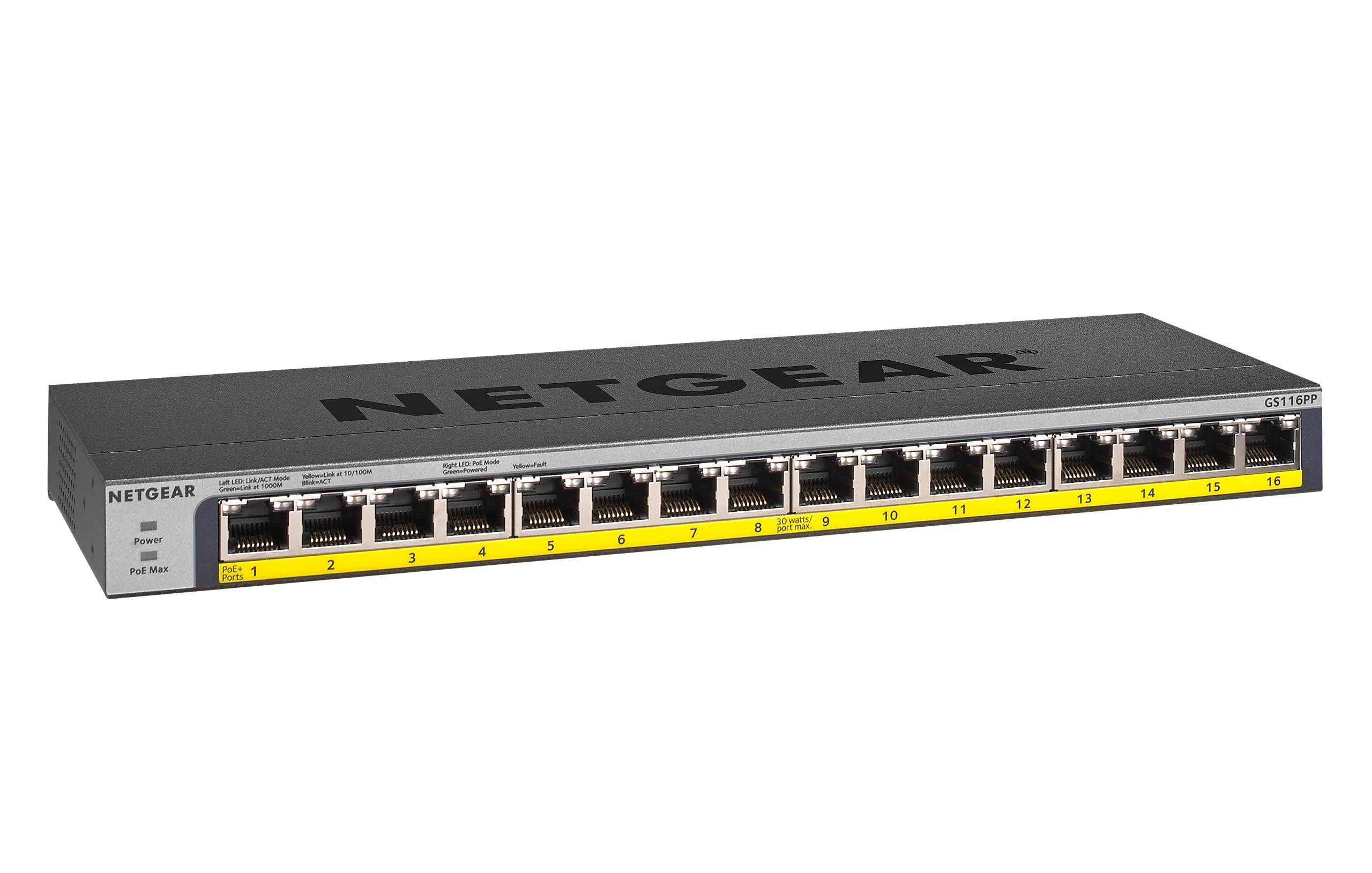
รูปที่ 1: ด้านหน้า view of the NETGEAR GS116PP Switch.

รูปที่ 2: Close-up of the front panel with 16 Gigabit Ethernet PoE+ ports.

รูปที่ 3: หลัง view of the NETGEAR GS116PP Switch, showing the power input and ventilation.

รูปที่ 4: Dimensions of the NETGEAR GS116PP Switch (11.3"L x 4"W x 1.1"H).
4. การตั้งค่า
4.1 การแกะและการจัดวาง
Carefully remove the switch and all accessories from the packaging. The GS116PP supports desktop, wall-mount, or rack-mount placement. Ensure adequate ventilation around the device and avoid placing it near heat sources or in enclosed spaces.
4.2 การเชื่อมต่อสายไฟ
- Connect the provided external 200W power adapter to the power input port on the rear of the switch.
- Plug the power adapter into a standard electrical outlet. The power LED on the front panel will illuminate, indicating the switch is powered on.
4.3 การเชื่อมต่อเครือข่าย
The GS116PP is an unmanaged switch, offering simple plug-and-play connectivity. No software installation or configuration is required.
- Connect your network router or main network device to any of the 16 Gigabit Ethernet ports on the switch using a standard Ethernet cable.
- Connect your network devices (computers, IP cameras, VoIP phones, wireless access points, etc.) to the remaining ports.
- For PoE-powered devices, simply connect them to any of the 16 PoE+ ports. The switch will automatically detect and provide power to compatible devices.
1 วิดีโอ: โอเวอร์view of Power over Ethernet (PoE) switching concepts and applications.
5. การใช้งานสวิตช์
5.1 การทำงานพื้นฐาน
The NETGEAR GS116PP operates as a standard unmanaged network switch. It automatically detects the speed and duplex mode of connected devices and adjusts accordingly. Data is forwarded efficiently between connected devices at Gigabit speeds.
5.2 ฟังก์ชันการจ่ายไฟผ่านสายอีเธอร์เน็ต (PoE+)
All 16 ports on the GS116PP support PoE+ (802.3at) and standard PoE (802.3af). This allows you to power compatible devices directly through the Ethernet cable, eliminating the need for separate power adapters and simplifying cable management.
- Total Power Budget: The switch provides a total power budget of 183W across all 16 PoE+ ports.
- Per-Port Power: Each PoE+ port can deliver up to 30W of power to a connected device.
- การตรวจจับอัตโนมัติ: The switch automatically detects if a connected device is PoE-compatible and supplies the necessary power. Non-PoE devices can also be connected safely, as the switch will not supply power to them.
2 วิดีโอ: A brief demonstration of the NETGEAR 16-Port Gigabit Ethernet Unmanaged PoE Switch (GS116PP) and its PoE capabilities.
6. คุณสมบัติ
- พอร์ตอีเธอร์เน็ต 16 กิกะบิต: Provides high-speed wired connections for all your network devices.
- 16 PoE+ Ports with 183W Budget: Powers compatible devices like IP cameras, VoIP phones, and wireless access points directly through the Ethernet cable.
- การตั้งค่าแบบพลักแอนด์เพลย์: No software to install or configuration needed for immediate use.
- ตัวเลือกการติดตั้งที่ยืดหยุ่น: Supports desktop, wall-mount, or rack-mount placement with included hardware.
- การออกแบบประหยัดพลังงาน: Compliant with IEEE802.3az for reduced power consumption.
- การทำงานเงียบ: Fanless design makes it ideal for noise-sensitive environments.
- ความเข้ากันได้ในระดับภูมิภาค: Made for use in U.S. & CA only.
7. ข้อมูลจำเพาะ
| คุณสมบัติ | ข้อมูลจำเพาะ |
|---|---|
| หมายเลขรุ่น | GS116PP-100NAS |
| จำนวนพอร์ต | พอร์ตอีเทอร์เน็ตกิกะบิต 16 พอร์ต |
| พอร์ต PoE+ | 16 (IEEE 802.3at/af) |
| งบประมาณด้านพลังงาน PoE ทั้งหมด | 183วัตต์ |
| อัตราการถ่ายโอนข้อมูล | 1 กิกะบิตต่อวินาที |
| ขนาดสินค้า (กxยxส) | 11.3" x 4" x 1.1" (28.7 ซม. x 10.16 ซม. x 2.79 ซม.) |
| น้ำหนักสินค้า | 1.94 ปอนด์ (0.88 กก.) |
| วัสดุตัวเรือน | โลหะ |
| เล่มที่tage | 240 โวลต์ |
| อุณหภูมิในการทำงาน | Up to 130 Degrees Fahrenheit (54.4°C) |
8. การบำรุงรักษา
To ensure optimal performance and longevity of your NETGEAR GS116PP switch, follow these maintenance guidelines:
- รักษาความสะอาด: ควรทำความสะอาดภายนอกของสวิตช์เป็นประจำด้วยผ้าแห้งเนื้อนุ่ม หลีกเลี่ยงการใช้น้ำยาทำความสะอาดหรือสเปรย์กระป๋อง
- ตรวจสอบให้แน่ใจว่ามีการระบายอากาศ: Do not block the ventilation openings on the switch. Proper airflow prevents overheating.
- การจัดการสายเคเบิล: รักษาสายเคเบิลเครือข่ายให้เป็นระเบียบและไม่หักงอหรือโค้งงอมากเกินไปเพื่อป้องกันการเสื่อมของสัญญาณ
- การรีสตาร์ทเครื่อง (หากจำเป็น): If the switch or connected devices are experiencing issues, a simple power cycle (unplugging and replugging the power adapter) can often resolve minor problems.
9 การแก้ไขปัญหา
If you encounter issues with your GS116PP switch, consider the following troubleshooting steps:
- ไม่มีไฟฟ้า:
- ตรวจสอบให้แน่ใจว่าได้เสียบอะแดปเตอร์แปลงไฟเข้ากับสวิตช์และเต้ารับไฟฟ้าที่ใช้งานได้สนิทแล้ว
- Check the power LED on the front panel; it should be illuminated.
- ไม่มีการเชื่อมต่อเครือข่าย:
- Verify that Ethernet cables are securely plugged into both the switch and the connected devices.
- Check the link/activity LEDs on the switch ports; they should be lit or blinking for active connections.
- Ensure your router or upstream network device is functioning correctly.
- อุปกรณ์ PoE ไม่เปิดเครื่อง:
- Confirm that the connected device is PoE-compatible (IEEE 802.3af or 802.3at).
- Check the PoE status LED for the specific port; it should indicate power delivery.
- Ensure the total power consumption of all connected PoE devices does not exceed the 183W budget. If the budget is exceeded, the switch may prioritize power to certain ports or disable power to others.
- Try connecting the PoE device to a different port.
- ความเร็วเครือข่ายช้า:
- โปรดตรวจสอบให้แน่ใจว่าอุปกรณ์และสายเคเบิลที่เชื่อมต่อทั้งหมดรองรับ Gigabit Ethernet เพื่อประสิทธิภาพสูงสุด
- Check for faulty cables by testing with known good cables.
- Avoid network loops by ensuring cables are not connected in a way that creates a circular path.
10. การรับประกันและการสนับสนุน
The NETGEAR GS116PP Switch comes with a Lifetime Limited Hardware Warranty. This includes Next Business Day Replacement for eligible hardware failures.
For technical assistance and support, NETGEAR offers 24/7 chat support with a NETGEAR expert. Please refer to the official NETGEAR website or the quick install guide for detailed support contact information and warranty terms.